> ## Documentation Index
> Fetch the complete documentation index at: https://notes.kodekloud.com/llms.txt
> Use this file to discover all available pages before exploring further.
# Demo Manage Resource Behavior with lifecycle
> Demonstrates Terraform's lifecycle ignore_changes to allow out-of-band updates (like manual S3 tag edits) so Terraform won't revert specified attribute changes.
This lesson demonstrates Terraform’s `lifecycle` meta-argument — specifically `ignore_changes` — and how it lets you allow out-of-band updates (for example, manual tag edits in the AWS Console) without Terraform attempting to revert them. You’ll learn the minimal Terraform configuration used for the demo, how Terraform detects drift, and how adding `ignore_changes` changes Terraform’s behavior.
This demo uses AWS S3 resources. You should have the AWS provider configured and credentials available (for example via `AWS_ACCESS_KEY_ID` / `AWS_SECRET_ACCESS_KEY` or an AWS profile). See the Terraform docs for provider setup: [https://developer.hashicorp.com/terraform/providers/aws](https://developer.hashicorp.com/terraform/providers/aws)
## Resources in main.tf
The example `main.tf` below creates an S3 bucket plus ownership controls and an ACL. This is intentionally minimal so you can focus on `lifecycle` behavior.
```hcl theme={null}
resource "aws_s3_bucket" "bryan" {
bucket = "bryans-example-bucket-for-terraform"
tags = {
Environment = "production"
CreatedBy = "terraform"
}
}
resource "aws_s3_bucket_ownership_controls" "example" {
bucket = aws_s3_bucket.bryan.id
rule {
object_ownership = "BucketOwnerPreferred"
}
}
resource "aws_s3_bucket_acl" "example" {
bucket = aws_s3_bucket.bryan.id
acl = "private"
depends_on = [ aws_s3_bucket_ownership_controls.example ]
}
```
Apply the configuration to create the bucket and supporting resources:
```bash theme={null}
terraform apply
```
When prompted, respond `yes`. The apply will create the resources and produce output similar to:
```bash theme={null}
aws_s3_bucket.bryan: Creating...
aws_s3_bucket.bryan: Creation complete after 1s [id=bryans-example-bucket-for-terraform]
aws_s3_bucket_ownership_controls.example: Creating...
aws_s3_bucket_ownership_controls.example: Creation complete after 1s [id=bryans-example-bucket-for-terraform]
aws_s3_bucket_acl.example: Creating...
aws_s3_bucket_acl.example: Creation complete after 0s [id=bryans-example-bucket-for-terraform,private]
Apply complete! Resources: 3 added, 0 changed, 0 destroyed.
```
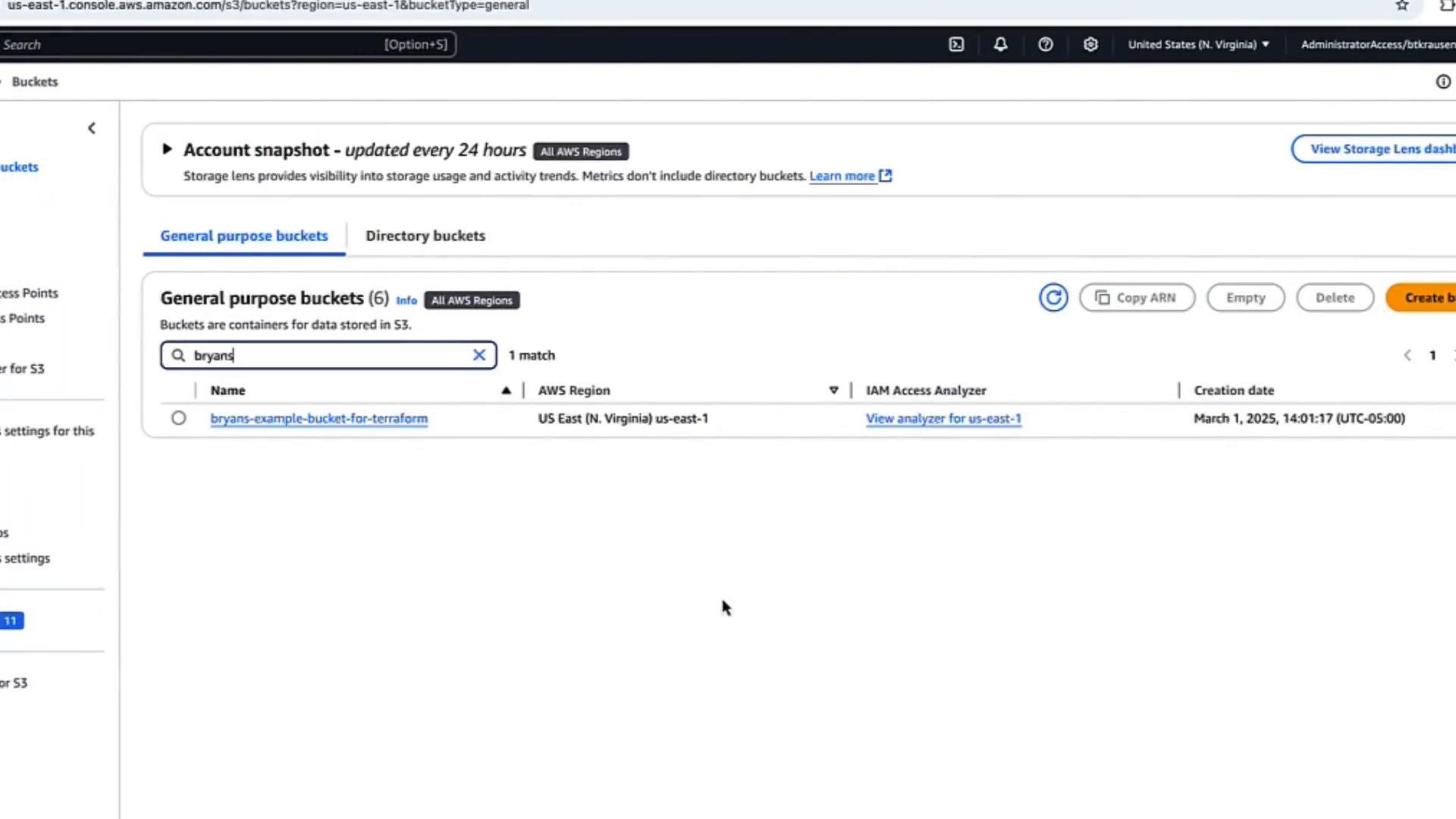
You can confirm the bucket exists in the AWS Console:
 ## Scenario: Out-of-band tag change
If you open the bucket in the AWS Console under Properties, you’ll see the tags created by Terraform:
* `Environment = production`
* `CreatedBy = terraform`
Now imagine a user manually edits the bucket tags in the AWS Console and changes `Environment` from `production` to `testing`. This is an out-of-band change (i.e., not made through Terraform).
To see how Terraform reacts, run a refresh/plan:
```bash theme={null}
terraform plan
```
Terraform refreshes state and detects differences. Example plan output showing a tag difference:
```bash theme={null}
aws_s3_bucket.bryan: Refreshing state... [id=bryans-example-bucket-for-terraform]
------------------------------------------------------------------------
An execution plan has been generated and is shown below.
Resource actions are indicated with the following symbols:
~ update in-place
Terraform will perform the following actions:
# aws_s3_bucket.bryan will be updated in-place
~ resource "aws_s3_bucket" "bryan" {
...
~ tags = {
"CreatedBy" = "terraform"
~ "Environment" = "testing" -> "production"
}
...
}
Plan: 0 to add, 1 to change, 0 to destroy.
```
Because the configuration still sets `Environment = production`, Terraform plans to revert the manual change back to `production`.
## Allowing out-of-band edits with lifecycle.ignore\_changes
If you want to permit manual updates to specific attributes (for example, user-modified tags in the console) and prevent Terraform from reverting them, add a `lifecycle` block with `ignore_changes` to the resource. Update the `aws_s3_bucket` resource like this:
```hcl theme={null}
resource "aws_s3_bucket" "bryan" {
bucket = "bryans-example-bucket-for-terraform"
tags = {
Environment = "production"
CreatedBy = "terraform"
}
lifecycle {
ignore_changes = [tags]
}
}
```
This instructs Terraform to ignore differences to the `tags` attribute when refreshing state and planning changes.
Run `terraform plan` again:
```bash theme={null}
terraform plan
```
After the refresh, Terraform reports no changes required:
```bash theme={null}
aws_s3_bucket.bryan: Refreshing state... [id=bryans-example-bucket-for-terraform]
aws_s3_bucket_ownership_controls.example: Refreshing state... [id=bryans-example-bucket-for-terraform]
aws_s3_bucket_acl.example: Refreshing state... [id=bryans-example-bucket-for-terraform,private]
No changes. Your infrastructure matches the configuration.
Terraform has compared your real infrastructure against your configuration and found no differences, so no changes are needed.
```
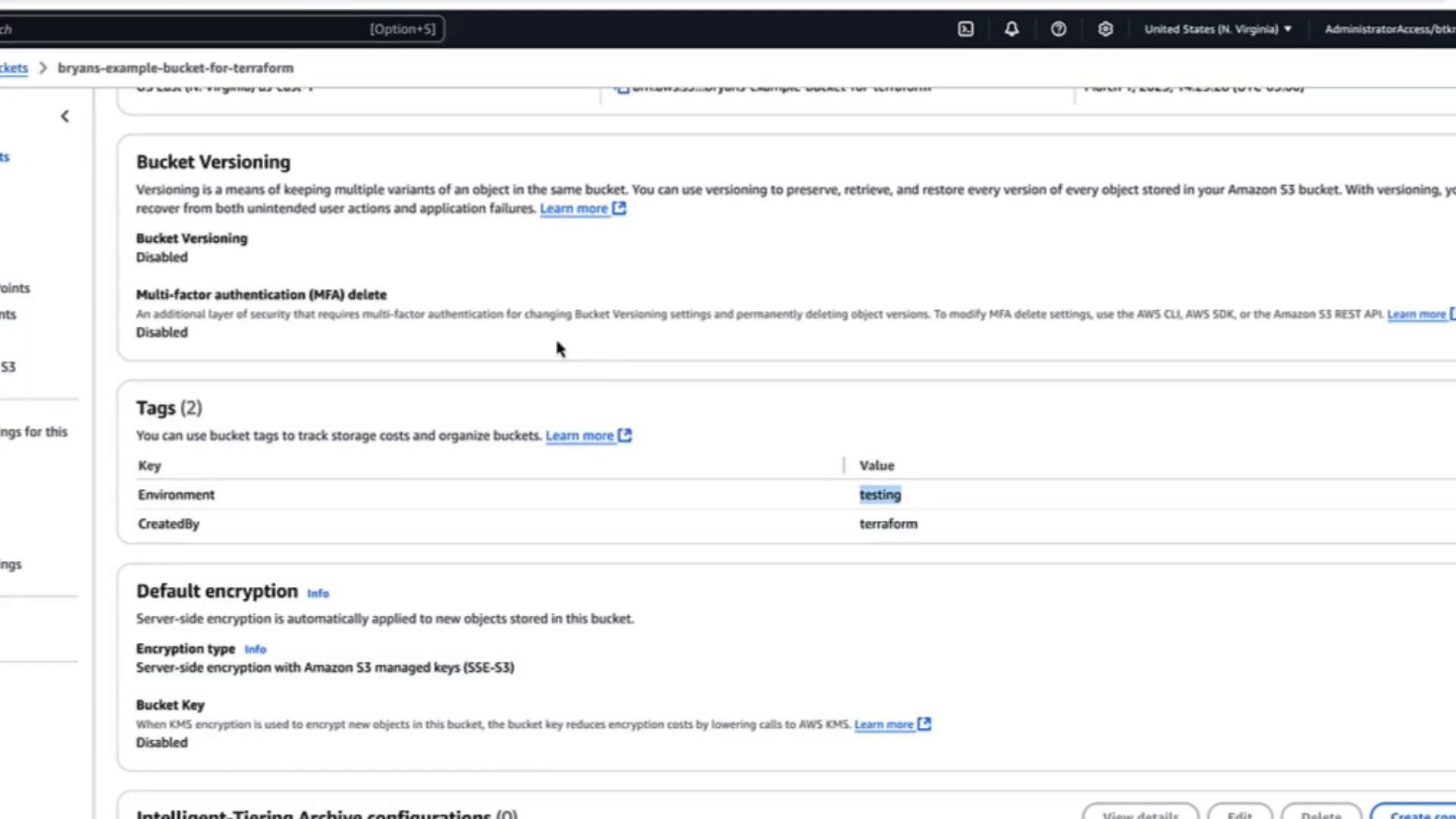
Even though the AWS Console may still display `Environment: testing`, Terraform will not attempt to revert it because `ignore_changes` tells Terraform to stop reconciling the `tags` attribute:
## Scenario: Out-of-band tag change
If you open the bucket in the AWS Console under Properties, you’ll see the tags created by Terraform:
* `Environment = production`
* `CreatedBy = terraform`
Now imagine a user manually edits the bucket tags in the AWS Console and changes `Environment` from `production` to `testing`. This is an out-of-band change (i.e., not made through Terraform).
To see how Terraform reacts, run a refresh/plan:
```bash theme={null}
terraform plan
```
Terraform refreshes state and detects differences. Example plan output showing a tag difference:
```bash theme={null}
aws_s3_bucket.bryan: Refreshing state... [id=bryans-example-bucket-for-terraform]
------------------------------------------------------------------------
An execution plan has been generated and is shown below.
Resource actions are indicated with the following symbols:
~ update in-place
Terraform will perform the following actions:
# aws_s3_bucket.bryan will be updated in-place
~ resource "aws_s3_bucket" "bryan" {
...
~ tags = {
"CreatedBy" = "terraform"
~ "Environment" = "testing" -> "production"
}
...
}
Plan: 0 to add, 1 to change, 0 to destroy.
```
Because the configuration still sets `Environment = production`, Terraform plans to revert the manual change back to `production`.
## Allowing out-of-band edits with lifecycle.ignore\_changes
If you want to permit manual updates to specific attributes (for example, user-modified tags in the console) and prevent Terraform from reverting them, add a `lifecycle` block with `ignore_changes` to the resource. Update the `aws_s3_bucket` resource like this:
```hcl theme={null}
resource "aws_s3_bucket" "bryan" {
bucket = "bryans-example-bucket-for-terraform"
tags = {
Environment = "production"
CreatedBy = "terraform"
}
lifecycle {
ignore_changes = [tags]
}
}
```
This instructs Terraform to ignore differences to the `tags` attribute when refreshing state and planning changes.
Run `terraform plan` again:
```bash theme={null}
terraform plan
```
After the refresh, Terraform reports no changes required:
```bash theme={null}
aws_s3_bucket.bryan: Refreshing state... [id=bryans-example-bucket-for-terraform]
aws_s3_bucket_ownership_controls.example: Refreshing state... [id=bryans-example-bucket-for-terraform]
aws_s3_bucket_acl.example: Refreshing state... [id=bryans-example-bucket-for-terraform,private]
No changes. Your infrastructure matches the configuration.
Terraform has compared your real infrastructure against your configuration and found no differences, so no changes are needed.
```
Even though the AWS Console may still display `Environment: testing`, Terraform will not attempt to revert it because `ignore_changes` tells Terraform to stop reconciling the `tags` attribute:
 Use `ignore_changes` sparingly. Ignoring changes causes Terraform to stop reconciling that attribute, which can lead to drift between your configuration and real infrastructure. Prefer allowing Terraform to manage attributes unless you have a clear operational need for out-of-band edits.
## When to use `ignore_changes`
| Use case | Recommendation |
| - | - |
| Letting users edit UI-managed metadata (e.g., tags) without Terraform reverting it | Consider `ignore_changes = [tags]`, but document the reason and scope. |
| Temporarily avoiding updates while debugging or migrating | Use `ignore_changes` as a short-term measure, remove it when resolved. |
| Permanently delegating lifecycle of an attribute to another tool | Use with caution and ensure lifecycle is well-documented. |
## Summary
* By default, Terraform detects drift between configuration and real infrastructure and will plan to reconcile differences.
* The `lifecycle` meta-argument with `ignore_changes` allows you to instruct Terraform to ignore specific attribute changes (for example, `tags`) so out-of-band updates are not reverted.
* Use `ignore_changes` intentionally, document why certain attributes are ignored, and minimize its scope to avoid unexpected drift.
Further reading and references:
* Terraform lifecycle meta-arguments: [https://developer.hashicorp.com/terraform/language/meta-arguments/lifecycle](https://developer.hashicorp.com/terraform/language/meta-arguments/lifecycle)
* Terraform CLI `plan`: [https://developer.hashicorp.com/terraform/cli/commands/plan](https://developer.hashicorp.com/terraform/cli/commands/plan)
* AWS S3 documentation: [https://docs.aws.amazon.com/s3/](https://docs.aws.amazon.com/s3/)
That concludes this lesson on using the `lifecycle` meta-argument to manage resource behavior.
This documentation is built and hosted on [Mintlify](https://mintlify.com), a developer documentation platform.
Use `ignore_changes` sparingly. Ignoring changes causes Terraform to stop reconciling that attribute, which can lead to drift between your configuration and real infrastructure. Prefer allowing Terraform to manage attributes unless you have a clear operational need for out-of-band edits.
## When to use `ignore_changes`
| Use case | Recommendation |
| - | - |
| Letting users edit UI-managed metadata (e.g., tags) without Terraform reverting it | Consider `ignore_changes = [tags]`, but document the reason and scope. |
| Temporarily avoiding updates while debugging or migrating | Use `ignore_changes` as a short-term measure, remove it when resolved. |
| Permanently delegating lifecycle of an attribute to another tool | Use with caution and ensure lifecycle is well-documented. |
## Summary
* By default, Terraform detects drift between configuration and real infrastructure and will plan to reconcile differences.
* The `lifecycle` meta-argument with `ignore_changes` allows you to instruct Terraform to ignore specific attribute changes (for example, `tags`) so out-of-band updates are not reverted.
* Use `ignore_changes` intentionally, document why certain attributes are ignored, and minimize its scope to avoid unexpected drift.
Further reading and references:
* Terraform lifecycle meta-arguments: [https://developer.hashicorp.com/terraform/language/meta-arguments/lifecycle](https://developer.hashicorp.com/terraform/language/meta-arguments/lifecycle)
* Terraform CLI `plan`: [https://developer.hashicorp.com/terraform/cli/commands/plan](https://developer.hashicorp.com/terraform/cli/commands/plan)
* AWS S3 documentation: [https://docs.aws.amazon.com/s3/](https://docs.aws.amazon.com/s3/)
That concludes this lesson on using the `lifecycle` meta-argument to manage resource behavior.
This documentation is built and hosted on [Mintlify](https://mintlify.com), a developer documentation platform.