> ## Documentation Index
> Fetch the complete documentation index at: https://notes.kodekloud.com/llms.txt
> Use this file to discover all available pages before exploring further.
# Removing Resources with the removed Block
> Explains Terraform removed block to safely remove resources from state without destroying infrastructure, providing workflow steps, examples, use cases, and differences from the moved block.
In this lesson we explain Terraform's `removed` block: what it does, when to use it, and the correct workflow to remove resources from Terraform state without destroying the underlying infrastructure.
Real-world scenario: production databases
You've been managing two production PostgreSQL instances with Terraform for months. The database team now needs full manual control of schema changes on one instance (for example, `production-db-02`) and asks that Terraform stop managing that instance so they can make manual changes safely.
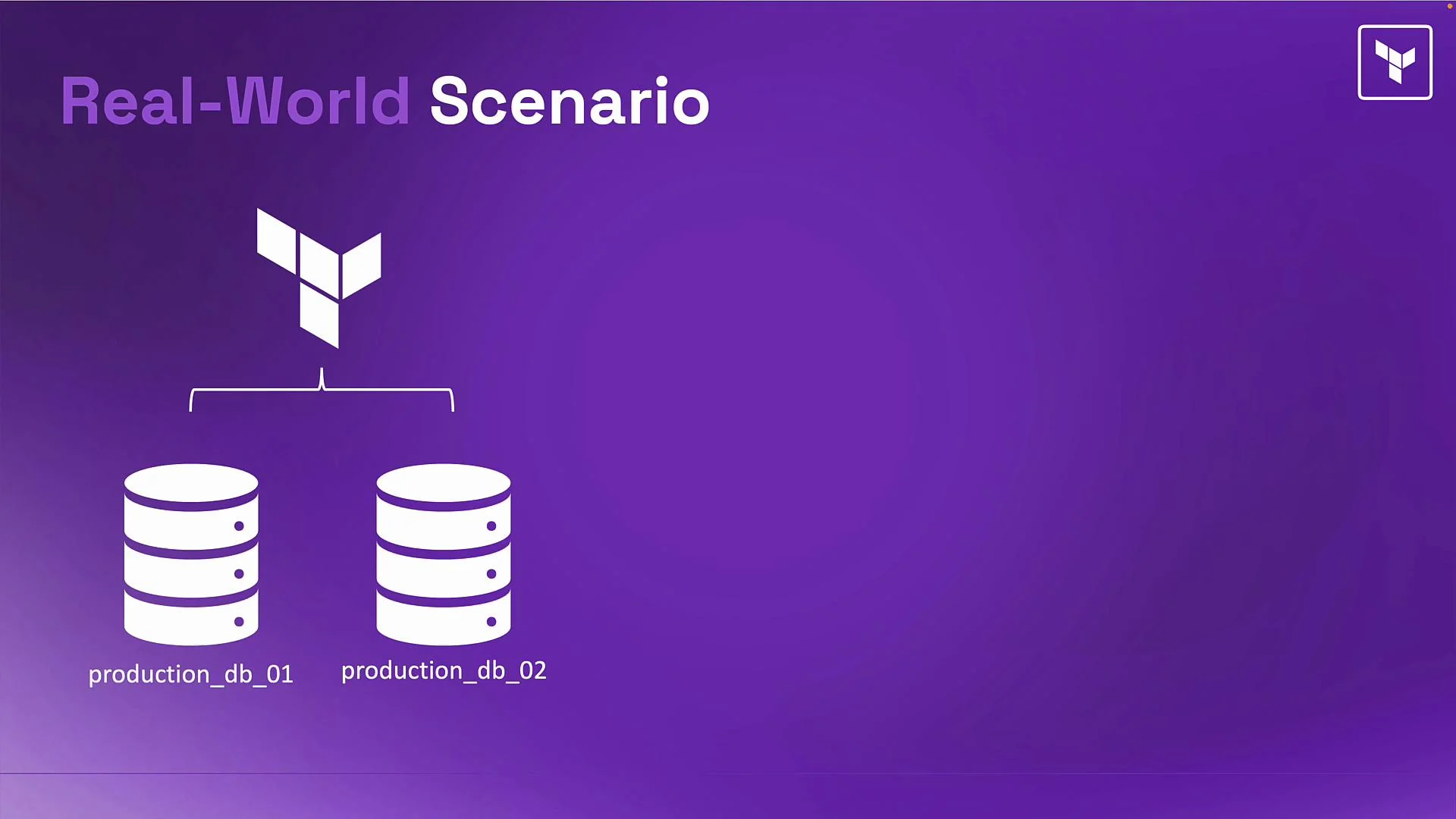 Original Terraform resource definitions
These were the original resource blocks in your configuration:
```hcl theme={null}
resource "google_sql_database_instance" "prd_db_1" {
name = "production-db-01"
database_version = "POSTGRES_15"
region = "us-central1"
settings {
tier = "db-f1-micro"
}
}
resource "google_sql_database_instance" "prd_db_2" {
name = "production-db-02"
database_version = "POSTGRES_15"
region = "us-central1"
settings {
tier = "db-f1-micro"
}
}
```
Why you can't just delete the resource block
Removing the `prd_db_2` resource block from code and running `terraform plan` will make Terraform interpret the resource as removed from configuration and propose to destroy the real infrastructure:
```plaintext theme={null}
# Example terraform plan output
-/+ google_sql_database_instance.prd_db_2
- resource will be destroyed
```
That would delete production data — which you must avoid. The goal is to make Terraform "forget" the resource (remove it from state) while leaving the actual database intact. The `removed` block provides a safer, declarative way to do this.
What the `removed` block does
* Removes the specified resource address from Terraform state so Terraform stops managing it.
* Leaves the actual infrastructure running and untouched.
* Is useful for handing resources off to other teams, transitioning to manual management, or splitting a monolithic configuration.
Core pieces to know
* `from` — specifies the resource address to remove from state. Use the resource address exactly as it appears in configuration (for example, `google_sql_database_instance.prd_db_2`).
* `removed` blocks only need the `from` argument. They instruct Terraform to remove the matching resource from state without destroying the underlying infrastructure.
* Always validate behavior in your Terraform version and provider. See HashiCorp's refactoring docs for details: [https://developer.hashicorp.com/terraform/language/state/refactoring](https://developer.hashicorp.com/terraform/language/state/refactoring)
Example `removed` blocks for the two databases:
```hcl theme={null}
removed {
from = google_sql_database_instance.prd_db_1
}
removed {
from = google_sql_database_instance.prd_db_2
}
```
When using a `removed` block, the resource definition must be absent (or commented out) from your configuration first. Terraform will refuse to remove a resource from state if that resource still exists in code.
Important ordering and workflow
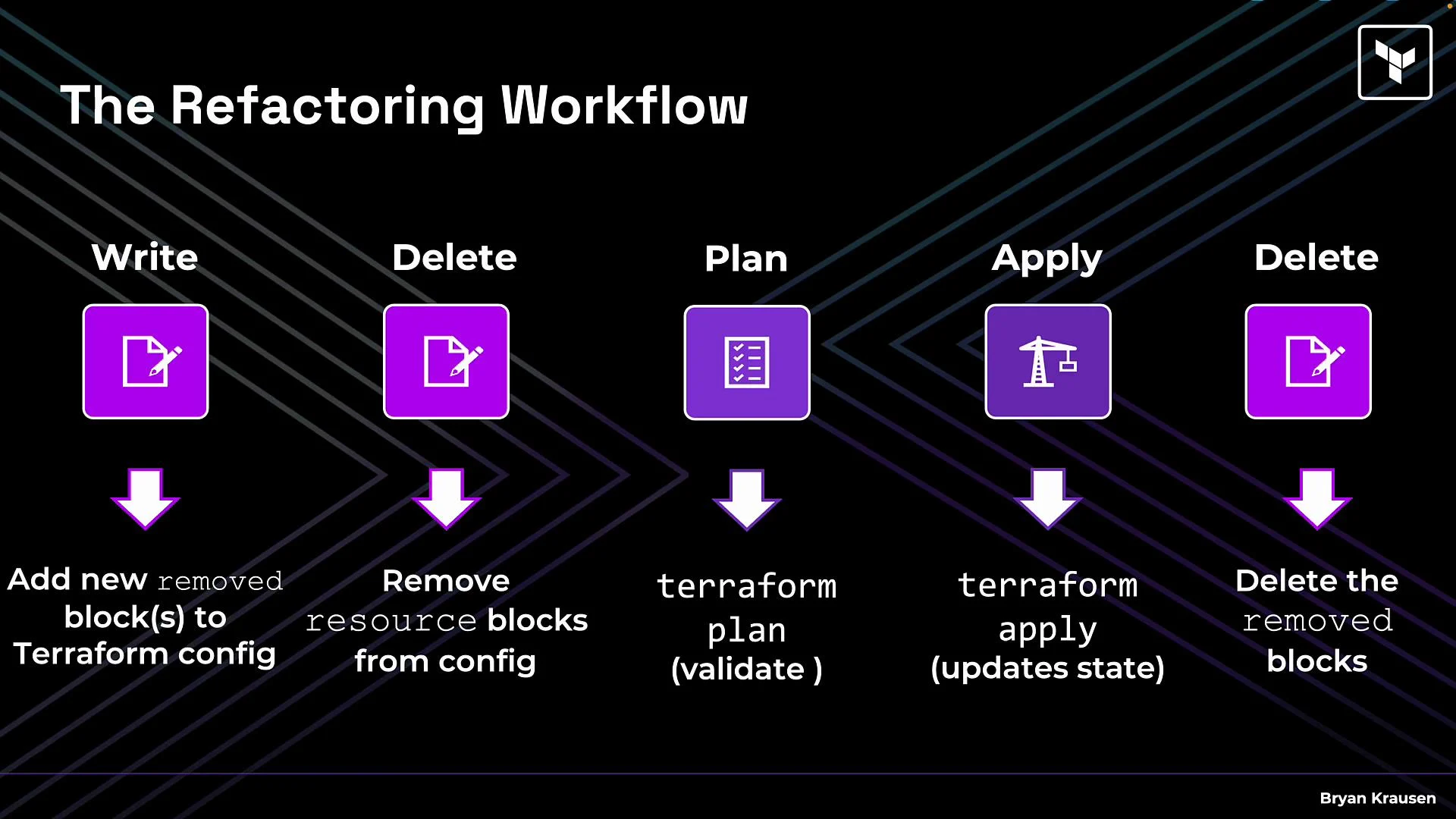
The sequence of steps matters. If you keep the resource block in code while also declaring a `removed` block for it, Terraform will be unable to reconcile them. Follow this workflow:
1. Delete or comment out the resource blocks you want Terraform to stop managing.
2. Add a `removed` block for each resource to be forgotten.
3. Run `terraform plan` to inspect the proposed state change.
4. Run `terraform apply` to update the state file and remove the resource from Terraform state.
5. After the state is updated, delete the temporary `removed` blocks from your configuration (they are not required after apply but can be kept for documentation).
Example commands:
```bash theme={null}
# Inspect changes (safe)
terraform plan
# Apply the state-only changes
terraform apply
```
The typical refactoring lifecycle is:
Delete (resource block) → Write (`removed`/`moved` block) → Plan → Apply → Delete (temporary scaffolding).
Original Terraform resource definitions
These were the original resource blocks in your configuration:
```hcl theme={null}
resource "google_sql_database_instance" "prd_db_1" {
name = "production-db-01"
database_version = "POSTGRES_15"
region = "us-central1"
settings {
tier = "db-f1-micro"
}
}
resource "google_sql_database_instance" "prd_db_2" {
name = "production-db-02"
database_version = "POSTGRES_15"
region = "us-central1"
settings {
tier = "db-f1-micro"
}
}
```
Why you can't just delete the resource block
Removing the `prd_db_2` resource block from code and running `terraform plan` will make Terraform interpret the resource as removed from configuration and propose to destroy the real infrastructure:
```plaintext theme={null}
# Example terraform plan output
-/+ google_sql_database_instance.prd_db_2
- resource will be destroyed
```
That would delete production data — which you must avoid. The goal is to make Terraform "forget" the resource (remove it from state) while leaving the actual database intact. The `removed` block provides a safer, declarative way to do this.
What the `removed` block does
* Removes the specified resource address from Terraform state so Terraform stops managing it.
* Leaves the actual infrastructure running and untouched.
* Is useful for handing resources off to other teams, transitioning to manual management, or splitting a monolithic configuration.
Core pieces to know
* `from` — specifies the resource address to remove from state. Use the resource address exactly as it appears in configuration (for example, `google_sql_database_instance.prd_db_2`).
* `removed` blocks only need the `from` argument. They instruct Terraform to remove the matching resource from state without destroying the underlying infrastructure.
* Always validate behavior in your Terraform version and provider. See HashiCorp's refactoring docs for details: [https://developer.hashicorp.com/terraform/language/state/refactoring](https://developer.hashicorp.com/terraform/language/state/refactoring)
Example `removed` blocks for the two databases:
```hcl theme={null}
removed {
from = google_sql_database_instance.prd_db_1
}
removed {
from = google_sql_database_instance.prd_db_2
}
```
When using a `removed` block, the resource definition must be absent (or commented out) from your configuration first. Terraform will refuse to remove a resource from state if that resource still exists in code.
Important ordering and workflow
The sequence of steps matters. If you keep the resource block in code while also declaring a `removed` block for it, Terraform will be unable to reconcile them. Follow this workflow:
1. Delete or comment out the resource blocks you want Terraform to stop managing.
2. Add a `removed` block for each resource to be forgotten.
3. Run `terraform plan` to inspect the proposed state change.
4. Run `terraform apply` to update the state file and remove the resource from Terraform state.
5. After the state is updated, delete the temporary `removed` blocks from your configuration (they are not required after apply but can be kept for documentation).
Example commands:
```bash theme={null}
# Inspect changes (safe)
terraform plan
# Apply the state-only changes
terraform apply
```
The typical refactoring lifecycle is:
Delete (resource block) → Write (`removed`/`moved` block) → Plan → Apply → Delete (temporary scaffolding).
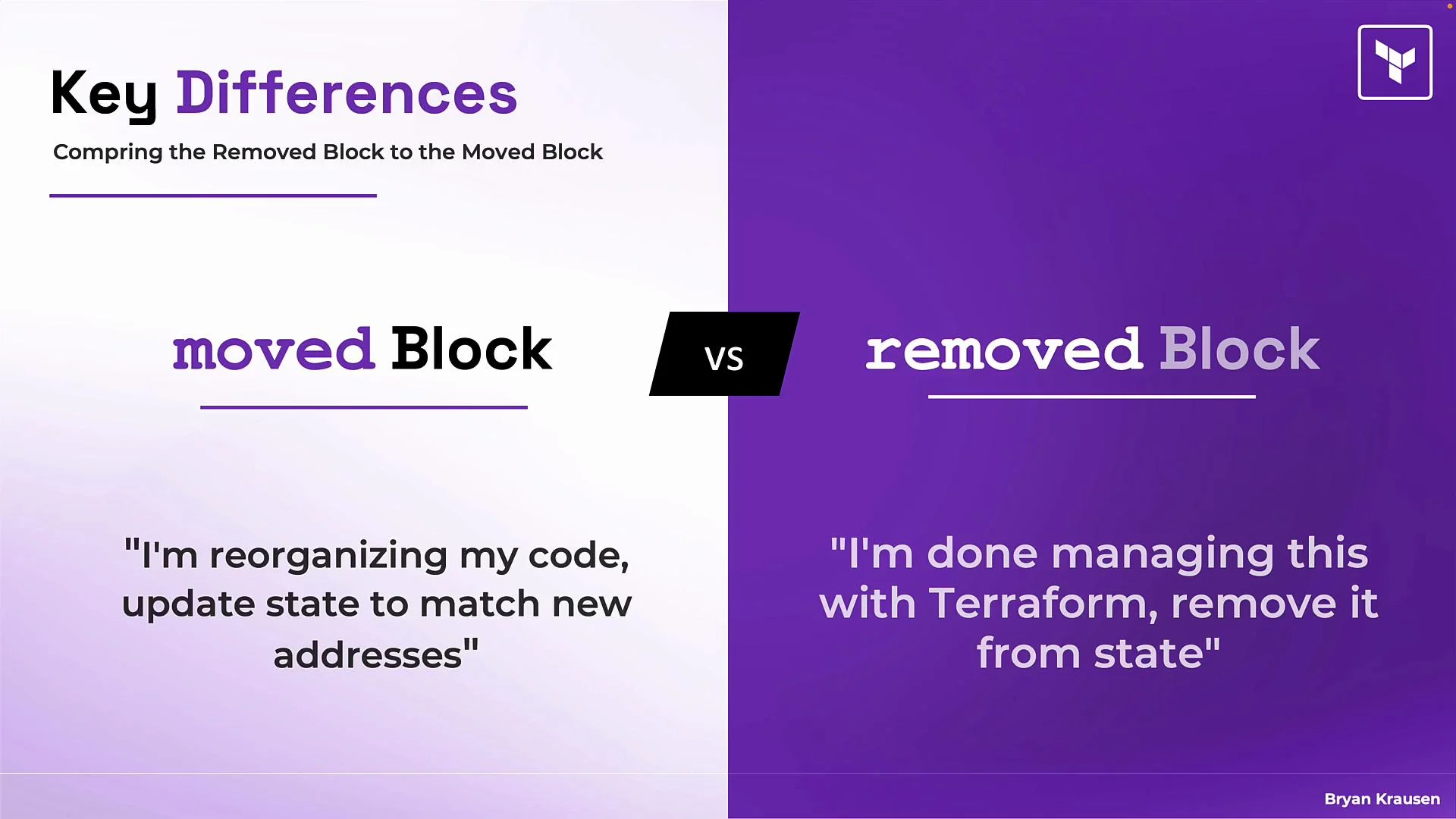
 `removed` vs `moved` — quick guidance
* Use `moved` when refactoring addresses within Terraform (renaming resources, moving to modules, etc.). `moved` updates state to reflect a change in resource address while leaving infrastructure intact.
* Use `removed` when you want Terraform to stop managing a resource entirely (hand-off to another team, manual management, or transferring to another state/workspace). `removed` deletes the resource from state without deleting the actual infrastructure.
Comparison table
| Action | Use case | Terraform block | Result |
| ------------------------------------------------------- | ------------------------------------------------- | --------------------------- | ------------------------------------------------------------------------------- |
| Rename or re-address resource | Refactoring code, moving resources into modules | `moved` | State updated to new addresses; infrastructure unchanged |
| Stop Terraform management / hand off resource | Transferring ownership; manual management | `removed` | Resource removed from state; infrastructure unchanged |
| Remove resource from configuration without state change | Temporary removal from config while still managed | None (use careful planning) | Terraform will propose to delete resource unless you remove it from state first |
`removed` vs `moved` — quick guidance
* Use `moved` when refactoring addresses within Terraform (renaming resources, moving to modules, etc.). `moved` updates state to reflect a change in resource address while leaving infrastructure intact.
* Use `removed` when you want Terraform to stop managing a resource entirely (hand-off to another team, manual management, or transferring to another state/workspace). `removed` deletes the resource from state without deleting the actual infrastructure.
Comparison table
| Action | Use case | Terraform block | Result |
| ------------------------------------------------------- | ------------------------------------------------- | --------------------------- | ------------------------------------------------------------------------------- |
| Rename or re-address resource | Refactoring code, moving resources into modules | `moved` | State updated to new addresses; infrastructure unchanged |
| Stop Terraform management / hand off resource | Transferring ownership; manual management | `removed` | Resource removed from state; infrastructure unchanged |
| Remove resource from configuration without state change | Temporary removal from config while still managed | None (use careful planning) | Terraform will propose to delete resource unless you remove it from state first |
 Real-world use cases
* Hand off resources to another team: remove them from your state so another team can import them into theirs.
* Migration from another IaC tool: import resources into Terraform and `removed` or `moved` as part of a staged migration.
* Split monolithic configurations or separate environments: remove resources from one state and import them into another workspace or project.
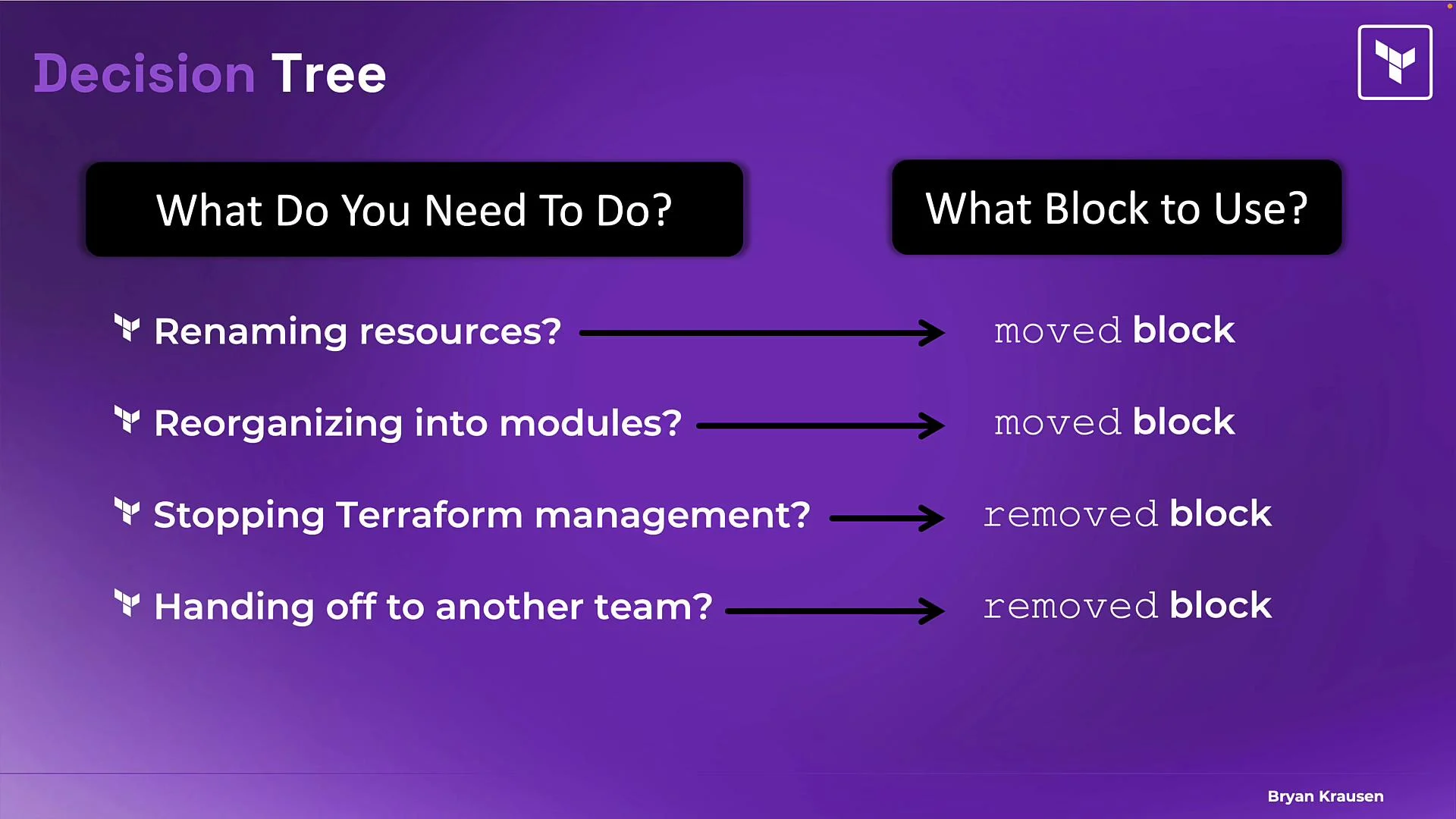
Decision guidance diagram
* If you are renaming or reorganizing within Terraform → use `moved`.
* If you are transferring ownership or stopping Terraform management → use `removed`.
* Migration scenarios often combine `import` with `removed`/`moved` actions depending on the direction of transfer.
Real-world use cases
* Hand off resources to another team: remove them from your state so another team can import them into theirs.
* Migration from another IaC tool: import resources into Terraform and `removed` or `moved` as part of a staged migration.
* Split monolithic configurations or separate environments: remove resources from one state and import them into another workspace or project.
Decision guidance diagram
* If you are renaming or reorganizing within Terraform → use `moved`.
* If you are transferring ownership or stopping Terraform management → use `removed`.
* Migration scenarios often combine `import` with `removed`/`moved` actions depending on the direction of transfer.
 Warnings and best practices
Do not leave a resource block in your configuration while also declaring a `removed` block for the same address. Terraform will not be able to reconcile them and the operation will fail. Always test `removed` workflows in non-production environments first.
Final notes and references
* The `removed` block is a powerful, but intentionally infrequent, tool. Use it when you need Terraform to forget a resource while keeping the physical resource intact.
* Practice this workflow in a safe environment and double-check behavior for your Terraform version and provider.
Useful links
* Terraform state refactoring: [https://developer.hashicorp.com/terraform/language/state/refactoring](https://developer.hashicorp.com/terraform/language/state/refactoring)
* Terraform state commands overview: [https://developer.hashicorp.com/terraform/cli/commands/state](https://developer.hashicorp.com/terraform/cli/commands/state)
That wraps up this lesson on the `removed` block. Use it when you need Terraform to stop tracking a resource without deleting the actual infrastructure.
Warnings and best practices
Do not leave a resource block in your configuration while also declaring a `removed` block for the same address. Terraform will not be able to reconcile them and the operation will fail. Always test `removed` workflows in non-production environments first.
Final notes and references
* The `removed` block is a powerful, but intentionally infrequent, tool. Use it when you need Terraform to forget a resource while keeping the physical resource intact.
* Practice this workflow in a safe environment and double-check behavior for your Terraform version and provider.
Useful links
* Terraform state refactoring: [https://developer.hashicorp.com/terraform/language/state/refactoring](https://developer.hashicorp.com/terraform/language/state/refactoring)
* Terraform state commands overview: [https://developer.hashicorp.com/terraform/cli/commands/state](https://developer.hashicorp.com/terraform/cli/commands/state)
That wraps up this lesson on the `removed` block. Use it when you need Terraform to stop tracking a resource without deleting the actual infrastructure.