> ## Documentation Index
> Fetch the complete documentation index at: https://notes.kodekloud.com/llms.txt
> Use this file to discover all available pages before exploring further.
# Reading Secrets from External Sources
> Best practices for retrieving and protecting secrets in Terraform by using external secret managers, marking variables sensitive, injecting via environment variables, and securing Terraform state
Instead of embedding secrets directly in your Terraform code, store them in a dedicated secrets manager such as AWS Secrets Manager, HashiCorp Vault, Azure Key Vault, or Google Secret Manager. These services are purpose-built for secret lifecycle management—rotation, access logging, and encryption at rest—so let them handle secrets and have Terraform retrieve values at runtime.
High-level workflow: Terraform fetches secrets from your secrets manager during plan/apply and then uses those secret values when creating or updating infrastructure.
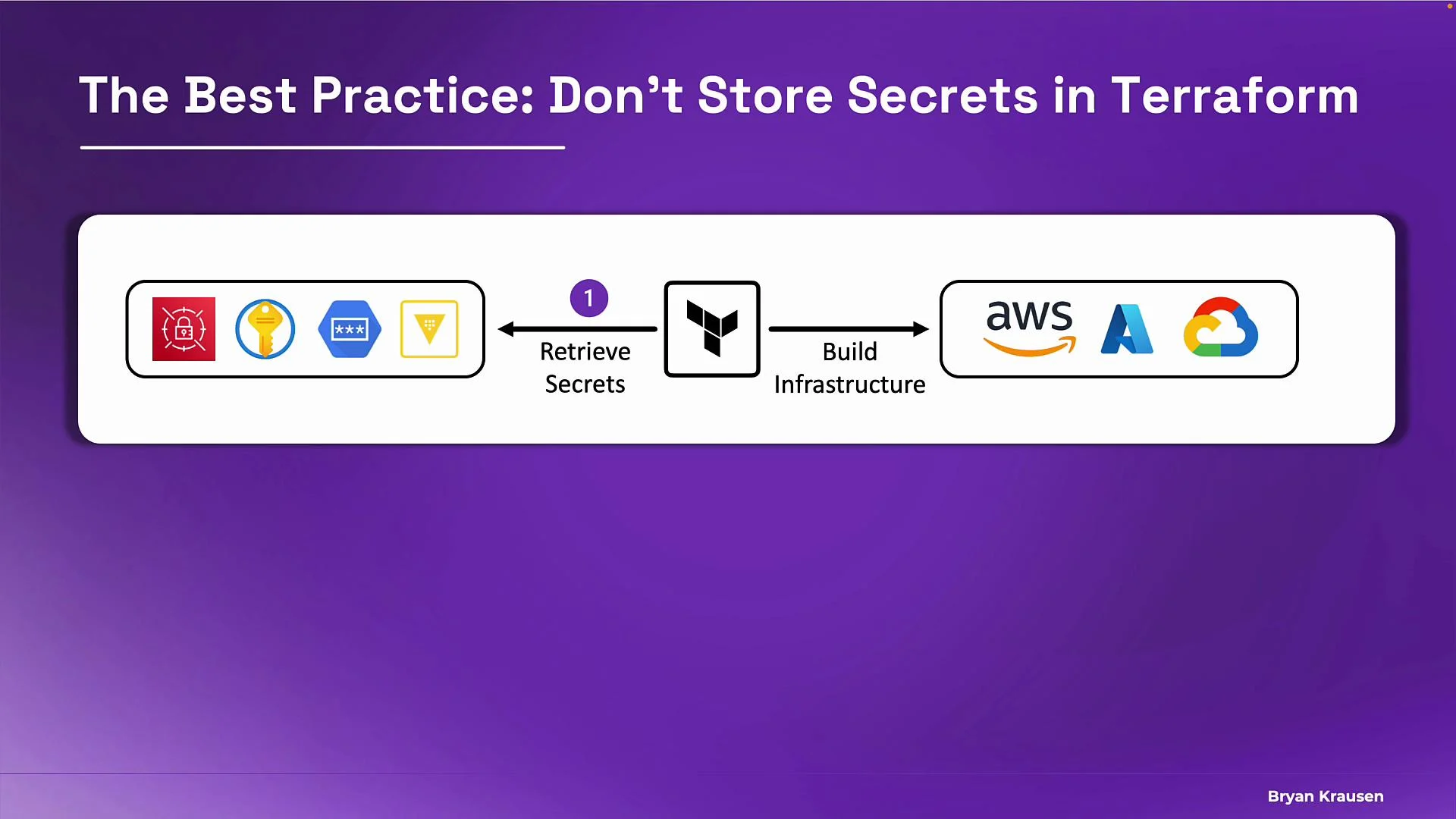 Benefits of using an external secrets manager
* Purpose-built controls: rotation, access logging, and encryption at rest are provided by the secrets manager.
* Centralized rotation and access control: rotate a secret once and all consumers read the updated value; manage access with IAM/RBAC.
* Reduced exposure in code: secrets are not hard-coded in `.tf` or `.tfvars` files (note: secrets may still end up in state).
* Single source of truth: Terraform, applications, and monitoring systems can all read the same centrally managed secret.
Benefits of using an external secrets manager
* Purpose-built controls: rotation, access logging, and encryption at rest are provided by the secrets manager.
* Centralized rotation and access control: rotate a secret once and all consumers read the updated value; manage access with IAM/RBAC.
* Reduced exposure in code: secrets are not hard-coded in `.tf` or `.tfvars` files (note: secrets may still end up in state).
* Single source of truth: Terraform, applications, and monitoring systems can all read the same centrally managed secret.
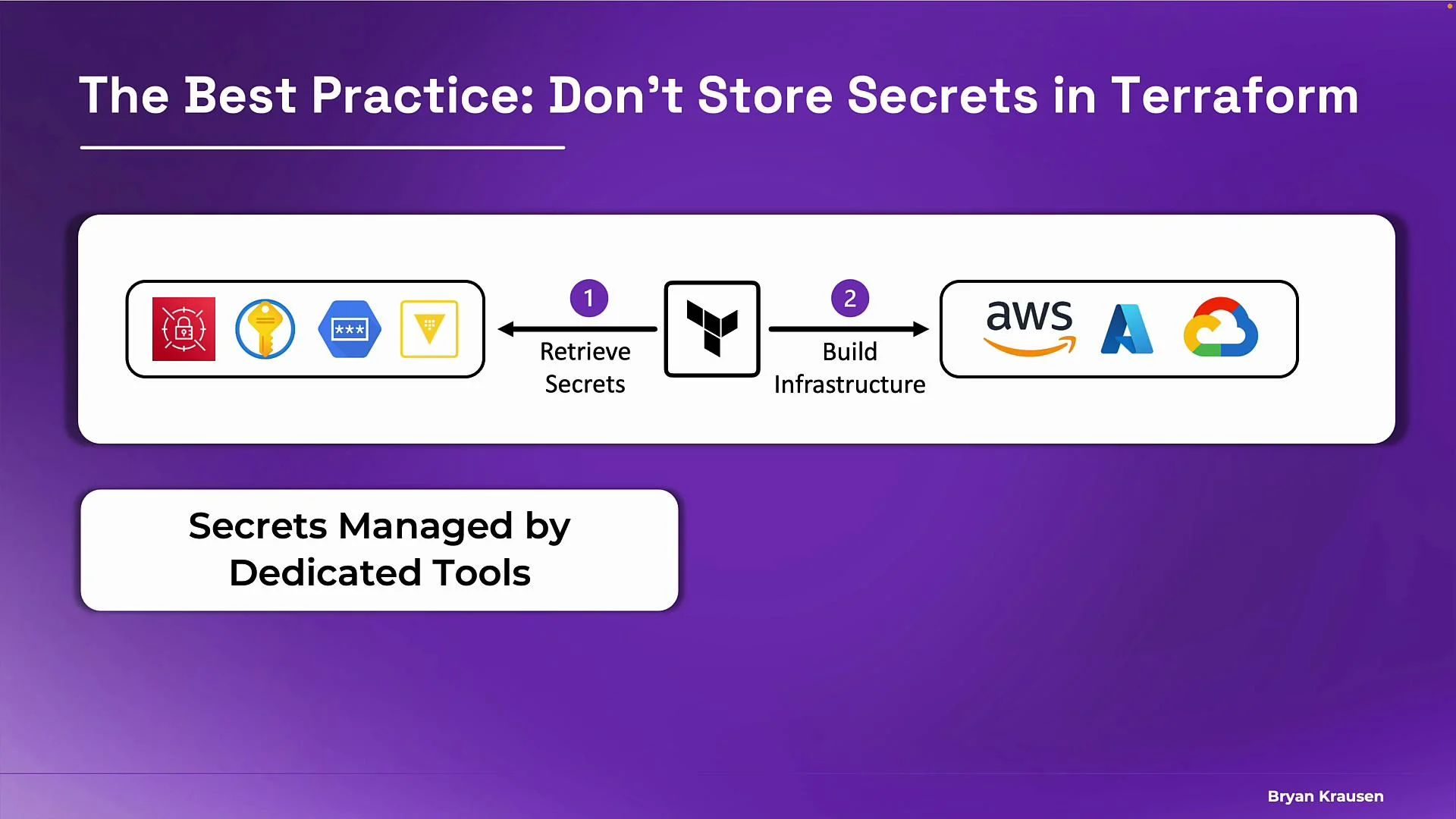 How it works in Terraform (AWS Secrets Manager example)
Use a provider-specific data source to read the secret value at plan/apply time and reference that data in your resources. This avoids hard-coding secret values in your repository while letting Terraform inject them when it creates or updates infrastructure.
```hcl theme={null}
# Read the secret from AWS Secrets Manager
data "aws_secretsmanager_secret_version" "db_pass" {
secret_id = "production/database/password"
}
# Use it in your resource
resource "aws_db_instance" "main" {
identifier = "mydb"
engine = "postgres"
instance_class = "db.t3.micro"
username = "admin"
# Secret is fetched at plan/apply time
password = data.aws_secretsmanager_secret_version.db_pass.secret_string
}
```
Operational notes for this pattern
* The secret value is not present in your `.tf` or `.tfvars` files—only the reference to Secrets Manager is.
* Terraform (or the CI runner executing Terraform) must have IAM permissions to read the secret.
* The secret value will typically be written to Terraform state after resource creation. Protect state using encrypted, access-controlled backends (for example, S3 + KMS with restricted IAM).
* The same concept applies to other platforms: use the Azure Key Vault, Google Secret Manager, or Vault data sources. Syntax differs, but the core idea—read at plan/apply and reference in resources—remains the same.
Advanced Vault patterns
* HashiCorp Vault supports dynamic credentials, leasing, and short-lived secrets—features that increase security for production workloads. Consider Vault when you need dynamic secrets or granular programmatic control.
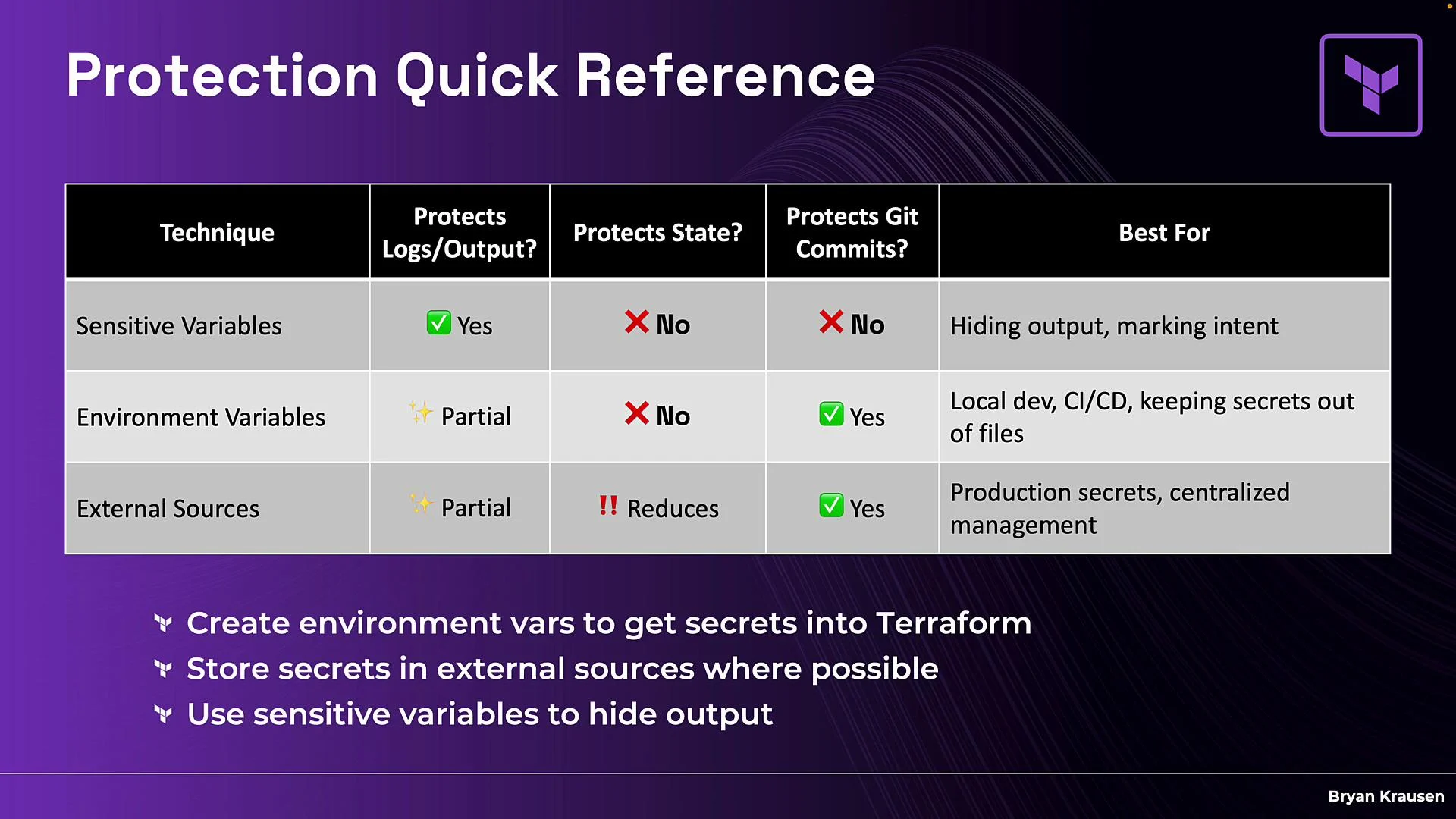
Protection Quick Reference
Below is a concise comparison of three techniques for protecting secrets during provisioning: sensitive variables, environment variables, and external secret sources.
| Technique | Protects console logs/output | Protects Terraform state | Protects Git commits | Recommended use |
| ------------------------ | ----------------------------------: | ------------------------------------------------------------: | --------------------------------: | ---------------------------------------------------------------------------------------- |
| Sensitive variables | Yes (hides output) | No (can still be in state) | Yes (reduces accidental exposure) | Use `sensitive = true` for variables/outputs to reduce accidental prints |
| Environment variables | Partially (depends on process logs) | No (values passed to Terraform can still be written to state) | Yes (keeps secrets out of files) | Use `TF_VAR_*` or `AWS_*` env vars for local dev and CI injection |
| External secret managers | Yes (prevents embedding in files) | No (state may still contain values) | Yes (secrets not in repo) | Use AWS Secrets Manager, Vault, Azure Key Vault, or Google Secret Manager for production |
Key recommendations (defense in depth)
* Store secrets in an external secrets manager for centralized lifecycle management and rotation.
* Inject secrets into the Terraform runtime via environment variables when appropriate (keeps secrets out of files).
* Mark variables and outputs as `sensitive = true` to avoid exposing values in logs and console output.
* Protect Terraform state with a remote backend, encryption (for example, KMS), and least-privilege IAM roles; assume secrets may appear in state.
Even when you read secrets from an external manager, the secret values may end up in Terraform state. Make sure your state backend is encrypted and access is restricted (for example, use a remote backend with KMS encryption and least-privilege IAM).
How it works in Terraform (AWS Secrets Manager example)
Use a provider-specific data source to read the secret value at plan/apply time and reference that data in your resources. This avoids hard-coding secret values in your repository while letting Terraform inject them when it creates or updates infrastructure.
```hcl theme={null}
# Read the secret from AWS Secrets Manager
data "aws_secretsmanager_secret_version" "db_pass" {
secret_id = "production/database/password"
}
# Use it in your resource
resource "aws_db_instance" "main" {
identifier = "mydb"
engine = "postgres"
instance_class = "db.t3.micro"
username = "admin"
# Secret is fetched at plan/apply time
password = data.aws_secretsmanager_secret_version.db_pass.secret_string
}
```
Operational notes for this pattern
* The secret value is not present in your `.tf` or `.tfvars` files—only the reference to Secrets Manager is.
* Terraform (or the CI runner executing Terraform) must have IAM permissions to read the secret.
* The secret value will typically be written to Terraform state after resource creation. Protect state using encrypted, access-controlled backends (for example, S3 + KMS with restricted IAM).
* The same concept applies to other platforms: use the Azure Key Vault, Google Secret Manager, or Vault data sources. Syntax differs, but the core idea—read at plan/apply and reference in resources—remains the same.
Advanced Vault patterns
* HashiCorp Vault supports dynamic credentials, leasing, and short-lived secrets—features that increase security for production workloads. Consider Vault when you need dynamic secrets or granular programmatic control.
Protection Quick Reference
Below is a concise comparison of three techniques for protecting secrets during provisioning: sensitive variables, environment variables, and external secret sources.
| Technique | Protects console logs/output | Protects Terraform state | Protects Git commits | Recommended use |
| ------------------------ | ----------------------------------: | ------------------------------------------------------------: | --------------------------------: | ---------------------------------------------------------------------------------------- |
| Sensitive variables | Yes (hides output) | No (can still be in state) | Yes (reduces accidental exposure) | Use `sensitive = true` for variables/outputs to reduce accidental prints |
| Environment variables | Partially (depends on process logs) | No (values passed to Terraform can still be written to state) | Yes (keeps secrets out of files) | Use `TF_VAR_*` or `AWS_*` env vars for local dev and CI injection |
| External secret managers | Yes (prevents embedding in files) | No (state may still contain values) | Yes (secrets not in repo) | Use AWS Secrets Manager, Vault, Azure Key Vault, or Google Secret Manager for production |
Key recommendations (defense in depth)
* Store secrets in an external secrets manager for centralized lifecycle management and rotation.
* Inject secrets into the Terraform runtime via environment variables when appropriate (keeps secrets out of files).
* Mark variables and outputs as `sensitive = true` to avoid exposing values in logs and console output.
* Protect Terraform state with a remote backend, encryption (for example, KMS), and least-privilege IAM roles; assume secrets may appear in state.
Even when you read secrets from an external manager, the secret values may end up in Terraform state. Make sure your state backend is encrypted and access is restricted (for example, use a remote backend with KMS encryption and least-privilege IAM).
 Wrapping up
This guide covered how to protect secrets when provisioning infrastructure with Terraform:
* Protect inputs with `sensitive` variables.
* Keep secrets out of version control by using environment variables for injection.
* Use an external secrets manager for production-grade security and centralized rotation.
* Secure your Terraform state—encrypt it, restrict access, and minimize sensitive data stored in it.
Further reading and references
* [Terraform documentation](https://www.terraform.io/docs)
* [AWS Secrets Manager](https://aws.amazon.com/secrets-manager/)
* [HashiCorp Vault](https://www.vaultproject.io/)
* [Azure Key Vault](https://learn.microsoft.com/azure/key-vault/)
* [Google Secret Manager](https://cloud.google.com/secret-manager)
Wrapping up
This guide covered how to protect secrets when provisioning infrastructure with Terraform:
* Protect inputs with `sensitive` variables.
* Keep secrets out of version control by using environment variables for injection.
* Use an external secrets manager for production-grade security and centralized rotation.
* Secure your Terraform state—encrypt it, restrict access, and minimize sensitive data stored in it.
Further reading and references
* [Terraform documentation](https://www.terraform.io/docs)
* [AWS Secrets Manager](https://aws.amazon.com/secrets-manager/)
* [HashiCorp Vault](https://www.vaultproject.io/)
* [Azure Key Vault](https://learn.microsoft.com/azure/key-vault/)
* [Google Secret Manager](https://cloud.google.com/secret-manager)