> ## Documentation Index
> Fetch the complete documentation index at: https://notes.kodekloud.com/llms.txt
> Use this file to discover all available pages before exploring further.
# Assigning Variable Values and Understanding Precedence
> Explains Terraform variable assignment methods and layered precedence among defaults, environment variables, tfvars files, and CLI flags with best practices for secure, predictable configurations.
After declaring variables in a Terraform configuration, you can assign values in multiple ways. Terraform resolves variable values using a layered precedence model—each method acts like a layer in an onion, where higher layers override lower ones. Understanding these methods and their order of precedence helps you keep configurations predictable, secure, and suitable for development, CI/CD, and production.
This guide covers four primary methods to set Terraform variables:
* Variable block defaults
* Environment variables (`TF_VAR_` prefix)
* Terraform variable files (`.tfvars`)
* Command-line flags (`-var` / `-var-file`)
Quick summary (for scanning or SEO):
| Method | Best for | Example |
| --------------------------------- | ----------------------------------------- | ----------------------------------------- |
| Variable `default` | Safe baseline values, documentation | See `variable` block example below |
| Environment variables (`TF_VAR_`) | Sensitive values from CI/CD/secret stores | `export TF_VAR_db_password="..."` |
| `.tfvars` files | Grouping environment-specific settings | `terraform plan -var-file="prod.tfvars"` |
| Command-line flags | Ad-hoc overrides, testing | `terraform apply -var="region=us-west-2"` |
For more detailed official guidance, see the Terraform docs: [Terraform CLI and provider docs](https://www.terraform.io/docs).
## 1) Variable defaults (variable block)
The simplest place to provide a value is inside the `variable` block using `default`. Defaults serve as a fallback when no other input method supplies a value.
Example:
```hcl theme={null}
variable "pub_subnet_ids" {
type = set(string)
default = ["subnet-12345", "subnet-67890"]
}
```
When to use defaults:
* Provide reasonable, non-sensitive baseline values for development or documentation.
* Use defaults to make modules easier to consume without requiring every caller to set every value.
Best practices:
* Never put secrets (API keys, passwords) in `default`.
* Keep defaults minimal and generic.
Do not store sensitive secrets (API keys, credentials, passwords) in variable `default` values. Defaults are part of your configuration and may be committed to version control.
## 2) Environment variables (TF\_VAR\_)
Terraform maps environment variables with the `TF_VAR_` prefix to variables by name. This keeps secrets and environment-specific values out of repository files and integrates seamlessly with CI/CD secret stores.
Examples (bash):
```bash theme={null}
export TF_VAR_vsphere_network="10.0.5.0/24"
export TF_VAR_vm_image="image-x3f83j2sv3"
export TF_VAR_enable_logging=true
```
Examples (PowerShell):
```powershell theme={null}
$env:TF_VAR_enable_logging = "true"
$env:TF_VAR_subscription_id = "abcd-1234-cc"
```
Advantages:
* Keeps sensitive values out of code and `.tfvars` files.
* Works well with CI/CD secrets and ephemeral runners.
* Simple to inject per session or per pipeline run.
Limitations:
* Environment variables are scoped to the session/runner and are not automatically versioned alongside your code.
Use environment variables for sensitive values that should not be checked into version control or for injecting secrets into CI/CD pipelines.
## 3) Terraform variable files (`.tfvars`)
`.tfvars` files are intentionally designed to hold variable assignments. Terraform automatically loads `terraform.tfvars` and any files ending in `.auto.tfvars` or `.auto.tfvars.json` in the working directory. Other `.tfvars` files—such as `dev.tfvars`, `staging.tfvars`, or `prod.tfvars`—must be passed explicitly with `-var-file`.
 Example `dev.tfvars`:
```hcl theme={null}
# VM-level configurations
vsphere_network = "10.0.5.0/24"
vm_image = "image-x3f83j2sv3"
# Application configurations
enable_logging = true
# Cloud account configurations
subscription_id = "abcd-1234-cc"
```
Tips for `.tfvars`:
* Group variables by intent (network, VM, app, cloud account) and add comments for clarity.
* Use environment-specific files (`dev.tfvars`, `staging.tfvars`, `prod.tfvars`) and pass the one you need at runtime.
* Exclude `.tfvars` files from version control if they contain secrets (use `.gitignore`), or store non-secret environment defaults in the repo.
* Use `terraform.tfvars` or `*.auto.tfvars` for values you want Terraform to pick up automatically in the current working directory.
Explicitly using a `.tfvars` file:
```bash theme={null}
terraform plan -var-file="prod.tfvars"
terraform apply -var-file="prod.tfvars"
```
## 4) Command-line flags (-var / -var-file)
Command-line flags provide the highest-priority overrides and are ideal for ephemeral changes, testing, or CI steps that must force a specific value.
Example `dev.tfvars`:
```hcl theme={null}
# VM-level configurations
vsphere_network = "10.0.5.0/24"
vm_image = "image-x3f83j2sv3"
# Application configurations
enable_logging = true
# Cloud account configurations
subscription_id = "abcd-1234-cc"
```
Tips for `.tfvars`:
* Group variables by intent (network, VM, app, cloud account) and add comments for clarity.
* Use environment-specific files (`dev.tfvars`, `staging.tfvars`, `prod.tfvars`) and pass the one you need at runtime.
* Exclude `.tfvars` files from version control if they contain secrets (use `.gitignore`), or store non-secret environment defaults in the repo.
* Use `terraform.tfvars` or `*.auto.tfvars` for values you want Terraform to pick up automatically in the current working directory.
Explicitly using a `.tfvars` file:
```bash theme={null}
terraform plan -var-file="prod.tfvars"
terraform apply -var-file="prod.tfvars"
```
## 4) Command-line flags (-var / -var-file)
Command-line flags provide the highest-priority overrides and are ideal for ephemeral changes, testing, or CI steps that must force a specific value.
 Examples:
```bash theme={null}
terraform plan -var="enable_logging=true"
terraform apply -var="region=us-west-2" -var="vm_image=image-x3f83j2sv3"
```
Notes:
* CLI `-var` overrides `.tfvars`, environment variables, and defaults.
* Use `-var-file` on the command line to provide a tfvars file that differs from the auto-loaded files.
* Avoid using `-var` for routine production config because command-line flags are not persisted in files and can be harder to audit.
## Precedence: which source wins?
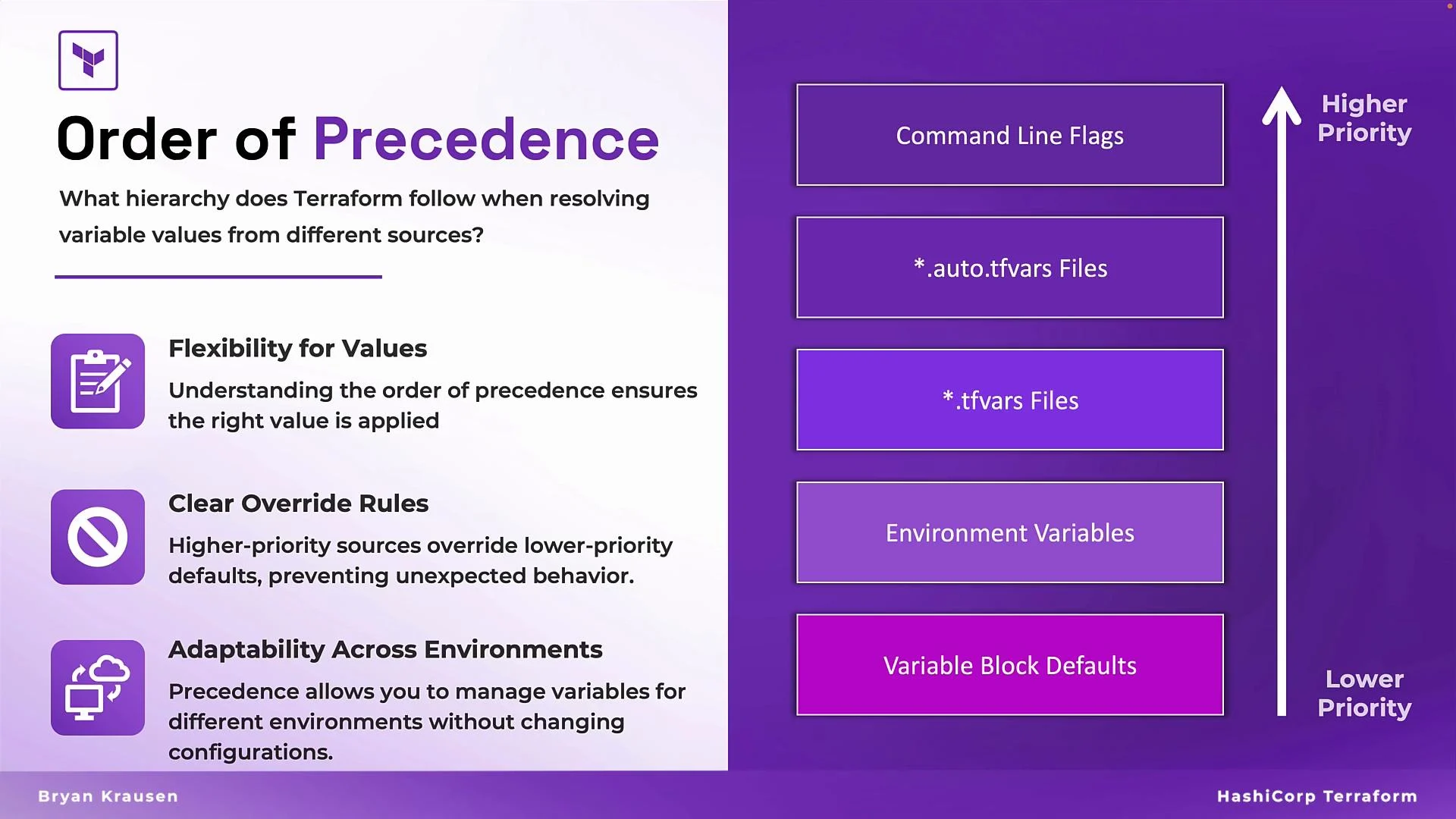
Terraform resolves variables using a strict order of precedence. When a variable is set in multiple places, the highest-priority source takes effect.
Precedence from highest to lowest:
1. Command-line flags (`-var` and `-var-file` specified on the CLI)
2. Environment variables (`TF_VAR_` prefixed)
3. Terraform variable files (auto-loaded `terraform.tfvars`, `*.auto.tfvars`, and other `*.tfvars` when passed)
4. Variable block `default` values
Examples:
```bash theme={null}
terraform plan -var="enable_logging=true"
terraform apply -var="region=us-west-2" -var="vm_image=image-x3f83j2sv3"
```
Notes:
* CLI `-var` overrides `.tfvars`, environment variables, and defaults.
* Use `-var-file` on the command line to provide a tfvars file that differs from the auto-loaded files.
* Avoid using `-var` for routine production config because command-line flags are not persisted in files and can be harder to audit.
## Precedence: which source wins?
Terraform resolves variables using a strict order of precedence. When a variable is set in multiple places, the highest-priority source takes effect.
Precedence from highest to lowest:
1. Command-line flags (`-var` and `-var-file` specified on the CLI)
2. Environment variables (`TF_VAR_` prefixed)
3. Terraform variable files (auto-loaded `terraform.tfvars`, `*.auto.tfvars`, and other `*.tfvars` when passed)
4. Variable block `default` values
 Practical examples:
* If a variable has a `default` and you set it in `dev.tfvars`, the `dev.tfvars` value wins over the `default`.
* If you then set the same variable using `TF_VAR_VARNAME`, the environment variable overrides `dev.tfvars`.
* Finally, providing `-var="VAR=value"` on the CLI will override the environment variable and all other sources.
### Quick reference table for precedence
| Priority | Source | How to apply |
| ----------- | --------------------- | ----------------------------------------------------------------- |
| 1 (highest) | Command-line flags | `terraform apply -var="key=value"` or `-var-file="file.tfvars"` |
| 2 | Environment variables | `export TF_VAR_key="value"` or pipeline secrets |
| 3 | `.tfvars` files | `terraform.tfvars`, `*.auto.tfvars`, or `-var-file="file.tfvars"` |
| 4 (lowest) | `variable` defaults | `variable "key" { default = "value" }` |
## Summary and best practices
* Defaults: Use for safe, non-sensitive baselines and documentation.
* Environment variables: Use for secrets and CI/CD-injected values.
* `.tfvars` files: Use to group environment-specific settings; avoid committing secrets unless stripped.
* Command-line flags: Use for ad-hoc overrides and testing; remember these are highest precedence.
* Always follow the precedence rules above to avoid unexpected overrides during runs.
References and further reading:
* Terraform CLI docs: [https://www.terraform.io/docs/cli](https://www.terraform.io/docs/cli)
* Variable configuration: [https://www.terraform.io/docs/language/values/variables.html](https://www.terraform.io/docs/language/values/variables.html)
Understanding these variable assignment methods and their precedence ensures predictable Terraform behavior and helps you design secure, maintainable infrastructure configurations.
Practical examples:
* If a variable has a `default` and you set it in `dev.tfvars`, the `dev.tfvars` value wins over the `default`.
* If you then set the same variable using `TF_VAR_VARNAME`, the environment variable overrides `dev.tfvars`.
* Finally, providing `-var="VAR=value"` on the CLI will override the environment variable and all other sources.
### Quick reference table for precedence
| Priority | Source | How to apply |
| ----------- | --------------------- | ----------------------------------------------------------------- |
| 1 (highest) | Command-line flags | `terraform apply -var="key=value"` or `-var-file="file.tfvars"` |
| 2 | Environment variables | `export TF_VAR_key="value"` or pipeline secrets |
| 3 | `.tfvars` files | `terraform.tfvars`, `*.auto.tfvars`, or `-var-file="file.tfvars"` |
| 4 (lowest) | `variable` defaults | `variable "key" { default = "value" }` |
## Summary and best practices
* Defaults: Use for safe, non-sensitive baselines and documentation.
* Environment variables: Use for secrets and CI/CD-injected values.
* `.tfvars` files: Use to group environment-specific settings; avoid committing secrets unless stripped.
* Command-line flags: Use for ad-hoc overrides and testing; remember these are highest precedence.
* Always follow the precedence rules above to avoid unexpected overrides during runs.
References and further reading:
* Terraform CLI docs: [https://www.terraform.io/docs/cli](https://www.terraform.io/docs/cli)
* Variable configuration: [https://www.terraform.io/docs/language/values/variables.html](https://www.terraform.io/docs/language/values/variables.html)
Understanding these variable assignment methods and their precedence ensures predictable Terraform behavior and helps you design secure, maintainable infrastructure configurations.