> ## Documentation Index
> Fetch the complete documentation index at: https://notes.kodekloud.com/llms.txt
> Use this file to discover all available pages before exploring further.
# Module Versioning and Version Constraints
> Discusses Terraform module versioning, semantic version constraints, pinning modules, upgrade procedures, and best practices to avoid breaking changes.
Below is a simple example showing how a root configuration can consume a module from the Terraform Registry.
```hcl theme={null}
variable "cidr_block" {
type = string
default = "192.168.0.0/16"
}
module "prod_vpc" {
source = "terraform-aws-modules/vpc/aws"
name = "my-vpc"
cidr = var.cidr_block
}
output "vpc_id" {
value = module.prod_vpc.vpc_id
}
```
A minimal implementation for the VPC module itself might look like this:
```hcl theme={null}
variable "cidr" {
type = string
default = "10.0.0.0/16"
}
variable "name" {
type = string
default = ""
}
resource "aws_vpc" "vpc" {
cidr_block = var.cidr
tags = {
Name = var.name
}
}
output "vpc_id" {
value = aws_vpc.vpc.id
}
```
Modules are versioned independently from the configurations that consume them. As contributors add features or fix bugs, registries (for example the [Terraform Registry](https://registry.terraform.io)) publish new module releases using semantic versioning. Because a module’s implementation can change between releases, controlling which module version your configuration uses is important to prevent unexpected breakage.
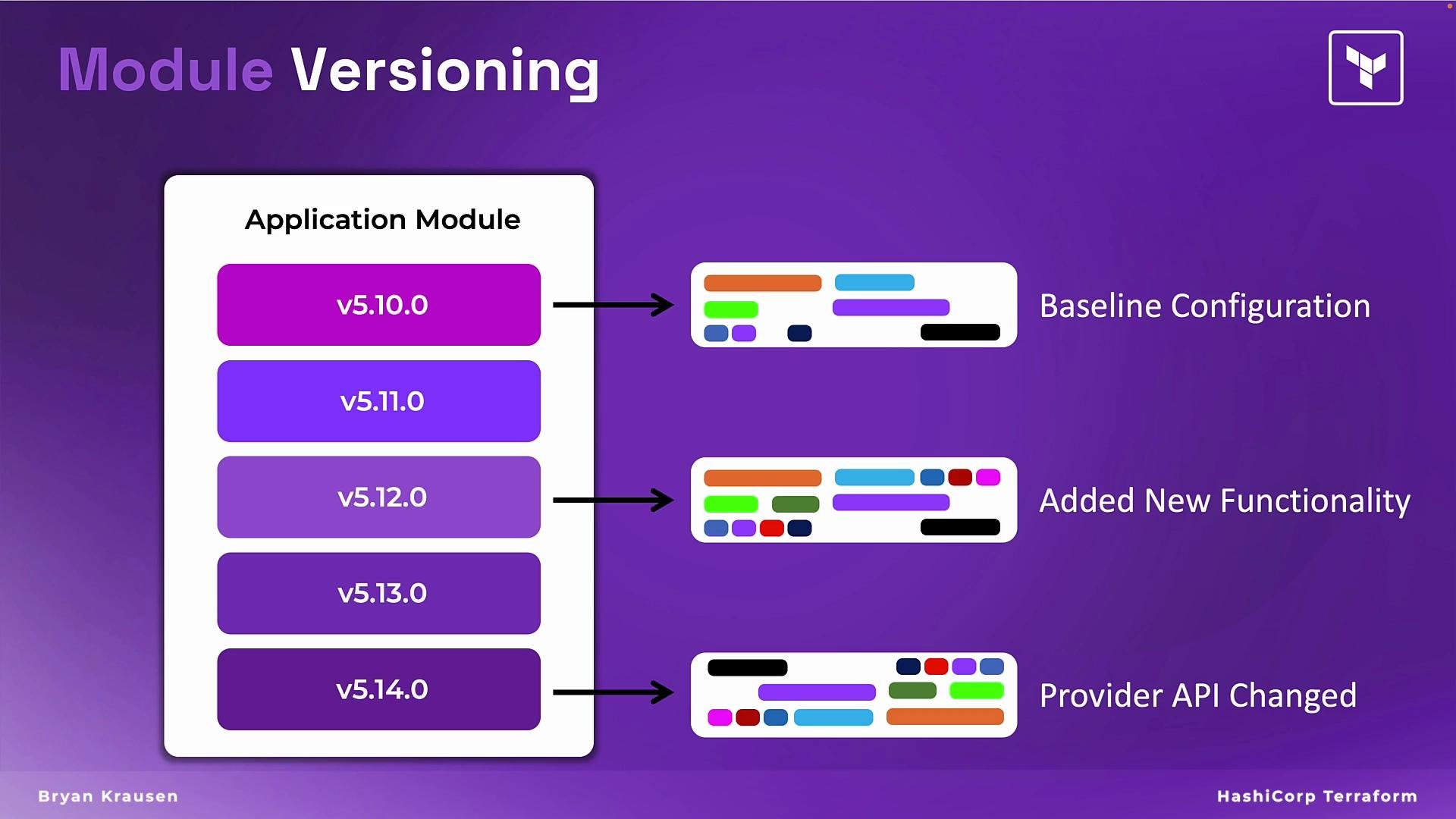 If you omit a version constraint, Terraform may download newer module releases that are incompatible with your code. To lock a module to a specific release, specify the `version` argument in the module block. For example, to pin the module to version 5.12.0:
```hcl theme={null}
variable "cidr_block" {
type = string
default = "192.168.0.0/16"
}
module "prod_vpc" {
source = "terraform-aws-modules/vpc/aws"
version = "5.12.0"
name = "my-vpc"
cidr = var.cidr_block
}
output "vpc_id" {
value = module.prod_vpc.vpc_id
}
```
When you run `terraform init`, Terraform will download the specified module version (5.12.0 in this example) and continue to use that version for plan and apply operations.
If you prefer to allow non-breaking updates but avoid major bumps, use version constraints. The table below summarizes common patterns and their behavior.
| Constraint pattern | Meaning | Example |
| ------------------------ | -------------------------------------------------------------------- | -------------------------------- |
| Exact version | Only this exact release will be used | `version = "5.12.0"` |
| Patch-compatible updates | Allows patch releases within the same minor version (safe bug fixes) | `version = "~> 5.12.0"` |
| Any 5.x release (no 6.x) | Accepts newer minor and patch updates but prevents major version 6 | `version = ">= 5.12.0, < 6.0.0"` |
When you decide to adopt a newer module release (for example, moving from 5.12.0 to 5.14.0), update the `version` in the module block and run `terraform init -upgrade` to re-download the module:
```hcl theme={null}
module "prod_vpc" {
source = "terraform-aws-modules/vpc/aws"
version = "5.14.0"
name = "my-vpc"
cidr = var.cidr_block
}
```
Best practices
* Pin module versions or use constrained ranges to reduce risk from breaking changes.
* Test module upgrades in non-production environments before promoting to production.
* Read the module's CHANGELOG and release notes to understand breaking changes and migration steps.
* Consider using CI pipelines to validate `terraform plan` after upgrading module versions.
Pin module versions (or use constrained version ranges) and test module upgrades in non-production environments before promoting them to production. This reduces the risk of unexpected breaking changes.
References and further reading
* [Terraform Registry](https://registry.terraform.io)
* [Semantic Versioning (semver)](https://semver.org/)
* Terraform CLI: `terraform init`, `terraform init -upgrade`
If you omit a version constraint, Terraform may download newer module releases that are incompatible with your code. To lock a module to a specific release, specify the `version` argument in the module block. For example, to pin the module to version 5.12.0:
```hcl theme={null}
variable "cidr_block" {
type = string
default = "192.168.0.0/16"
}
module "prod_vpc" {
source = "terraform-aws-modules/vpc/aws"
version = "5.12.0"
name = "my-vpc"
cidr = var.cidr_block
}
output "vpc_id" {
value = module.prod_vpc.vpc_id
}
```
When you run `terraform init`, Terraform will download the specified module version (5.12.0 in this example) and continue to use that version for plan and apply operations.
If you prefer to allow non-breaking updates but avoid major bumps, use version constraints. The table below summarizes common patterns and their behavior.
| Constraint pattern | Meaning | Example |
| ------------------------ | -------------------------------------------------------------------- | -------------------------------- |
| Exact version | Only this exact release will be used | `version = "5.12.0"` |
| Patch-compatible updates | Allows patch releases within the same minor version (safe bug fixes) | `version = "~> 5.12.0"` |
| Any 5.x release (no 6.x) | Accepts newer minor and patch updates but prevents major version 6 | `version = ">= 5.12.0, < 6.0.0"` |
When you decide to adopt a newer module release (for example, moving from 5.12.0 to 5.14.0), update the `version` in the module block and run `terraform init -upgrade` to re-download the module:
```hcl theme={null}
module "prod_vpc" {
source = "terraform-aws-modules/vpc/aws"
version = "5.14.0"
name = "my-vpc"
cidr = var.cidr_block
}
```
Best practices
* Pin module versions or use constrained ranges to reduce risk from breaking changes.
* Test module upgrades in non-production environments before promoting to production.
* Read the module's CHANGELOG and release notes to understand breaking changes and migration steps.
* Consider using CI pipelines to validate `terraform plan` after upgrading module versions.
Pin module versions (or use constrained version ranges) and test module upgrades in non-production environments before promoting them to production. This reduces the risk of unexpected breaking changes.
References and further reading
* [Terraform Registry](https://registry.terraform.io)
* [Semantic Versioning (semver)](https://semver.org/)
* Terraform CLI: `terraform init`, `terraform init -upgrade`