> ## Documentation Index
> Fetch the complete documentation index at: https://notes.kodekloud.com/llms.txt
> Use this file to discover all available pages before exploring further.
# Understanding Variable Scope in Modules
> Explains Terraform module variable scoping, how to pass inputs to child modules, expose outputs to callers, and manage defaults for reusable, isolated modules.
Variable scope in Terraform modules is a common stumbling block for beginners. Once you understand how variables are scoped and passed between modules, working with reusable modules becomes predictable and safe. This guide covers the essentials — how variables are declared, how to pass values into child modules, and how to expose values back to the caller. If you're preparing for the [HashiCorp Certified: Terraform Associate 004](https://learn.kodekloud.com/user/courses/hashicorp-certified-terraform-associate-004) exam, this topic frequently appears on practice questions.
Overview of the setup
* The root (parent) module is the top-level configuration that invokes other modules.
* A child module is a reusable unit of configuration — for example, a networking module or a compute module.
* Typical module files:
* `main.tf` — resources and module invocations
* `variables.tf` — input variable declarations
* `outputs.tf` — exported values for callers
What "module scope" means
* Each module has its own variable namespace (scope).
* Variables declared in one module are not visible to other modules unless explicitly passed or exported as outputs.
* This isolation makes modules more reusable and less prone to accidental coupling.
Variables are defined per-module
Below is an example where the root module defines its own variables and the child module defines different variables. These definitions are independent; naming collisions do not create implicit connections.
```hcl theme={null}
# root module variables (variables.tf)
variable "environment" {
type = string
default = "prod"
}
variable "region" {
type = string
default = "us-east-1"
}
variable "project" {
type = string
default = "myapp"
}
# child module variables (variables.tf)
variable "env" {
type = string
}
variable "cidr_block" {
type = string
default = "10.0.0.0/16"
}
variable "az_count" {
type = number
default = 2
}
```
Because each module has an isolated scope, the child module does not automatically see `environment` or `region` from the root, and the root does not automatically see `cidr_block` or `az_count` from the child. This behavior is intentional: modules act like black-box functions that only observe inputs you provide.
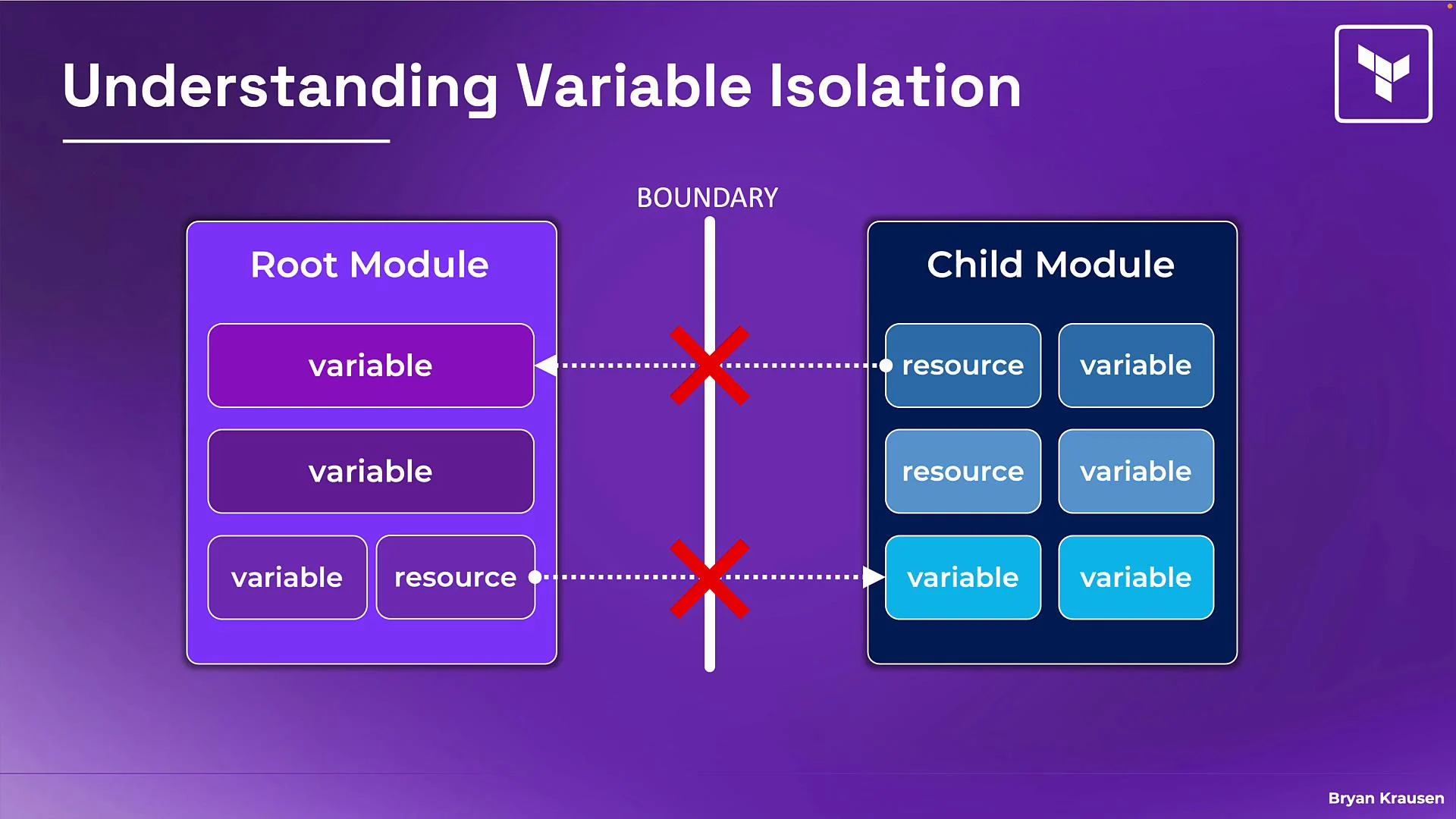 Note: Modules behave like functions — they only see the inputs you explicitly provide to them.
Modules have isolated scopes. You must explicitly pass values between modules; variables are not shared implicitly.
Passing values into a child module (module block)
To provide values to a child module, set arguments in the `module` block of the calling (root) module. Each argument corresponds to a declared input variable in the child module.
Example — passing a root variable into a child module:
```hcl theme={null}
# root module - main.tf
module "child" {
source = "./modules/child"
# pass root module variable value into the child module's `env` variable
env = var.environment
}
```
What you can pass into a module
* Root variables: `var.` (e.g., `var.environment`)
* Resource attributes: `aws_vpc.example.id`
* Another module's outputs: `module.network.subnet_ids[0]`
* Hard-coded literals: `"us-west-2"`, `42`, `true`
Quick reference table
| Value type | Example |
| ------------------ | ------------------------------ |
| Root variable | `var.environment` |
| Resource attribute | `aws_vpc.example.id` |
| Module output | `module.network.subnet_ids[0]` |
| Literal | `"us-west-2"` |
Example from the Registry (root calling an external VPC module):
```hcl theme={null}
module "vpc" {
source = "terraform-aws-modules/vpc/aws"
version = "4.0.1"
name = var.vpc_name
cidr = var.vpc_cidr_block
azs = ["us-west-2a", "us-west-2b"]
private_subnets = ["10.0.1.0/24"]
public_subnets = ["10.0.101.0/24"]
enable_nat_gateway = true
single_nat_gateway = true
}
```
Defaults and overrides
* Child-module variables can include defaults (for example, `az_count = 2`). If the caller doesn't pass a value, the child uses that default.
* Well-designed modules provide sensible defaults while permitting callers to override behavior via input variables.
Outputting data from a child module back to the root
A child module exposes internal values to its caller by defining `output` blocks. The root (or another calling module) can then read those outputs via `module..
Note: Modules behave like functions — they only see the inputs you explicitly provide to them.
Modules have isolated scopes. You must explicitly pass values between modules; variables are not shared implicitly.
Passing values into a child module (module block)
To provide values to a child module, set arguments in the `module` block of the calling (root) module. Each argument corresponds to a declared input variable in the child module.
Example — passing a root variable into a child module:
```hcl theme={null}
# root module - main.tf
module "child" {
source = "./modules/child"
# pass root module variable value into the child module's `env` variable
env = var.environment
}
```
What you can pass into a module
* Root variables: `var.` (e.g., `var.environment`)
* Resource attributes: `aws_vpc.example.id`
* Another module's outputs: `module.network.subnet_ids[0]`
* Hard-coded literals: `"us-west-2"`, `42`, `true`
Quick reference table
| Value type | Example |
| ------------------ | ------------------------------ |
| Root variable | `var.environment` |
| Resource attribute | `aws_vpc.example.id` |
| Module output | `module.network.subnet_ids[0]` |
| Literal | `"us-west-2"` |
Example from the Registry (root calling an external VPC module):
```hcl theme={null}
module "vpc" {
source = "terraform-aws-modules/vpc/aws"
version = "4.0.1"
name = var.vpc_name
cidr = var.vpc_cidr_block
azs = ["us-west-2a", "us-west-2b"]
private_subnets = ["10.0.1.0/24"]
public_subnets = ["10.0.101.0/24"]
enable_nat_gateway = true
single_nat_gateway = true
}
```
Defaults and overrides
* Child-module variables can include defaults (for example, `az_count = 2`). If the caller doesn't pass a value, the child uses that default.
* Well-designed modules provide sensible defaults while permitting callers to override behavior via input variables.
Outputting data from a child module back to the root
A child module exposes internal values to its caller by defining `output` blocks. The root (or another calling module) can then read those outputs via `module..