> ## Documentation Index
> Fetch the complete documentation index at: https://notes.kodekloud.com/llms.txt
> Use this file to discover all available pages before exploring further.
# Terraform Destroy
> Explains how to safely remove Terraform-managed infrastructure using terraform destroy, targeted destroys, and configuration-first workflows while highlighting best practices and warnings.
After applying your Terraform configurations and managing infrastructure with Terraform, you'll eventually need to remove that infrastructure. This article explains how to safely and predictably remove Terraform-managed resources using `terraform destroy` and alternative workflows.
Quick overview:
* `terraform destroy` removes resources managed in the current workspace.
* You can also remove resources by deleting resource blocks from your configuration and running `terraform apply`.
* Targeted destruction (`-target`) destroys specific resources but can cause drift if not accompanied by configuration changes.
## What `terraform destroy` does
`terraform destroy` builds a destruction plan (similar to `terraform plan`) and then, after you confirm, it destroys resources in dependency-aware order. This ensures that resources that depend on others are destroyed before their dependencies (for example, VMs are destroyed before the subnets they use).
Example:
```bash theme={null}
# Interactively destroy all resources managed in the current workspace (confirmation required)
terraform destroy
```
Useful flags:
* `-target=RESOURCE_ADDRESS` — destroy only a specific resource (advanced use).
* `-auto-approve` — skip the interactive confirmation (use with caution).
Example targeted destroy:
```bash theme={null}
terraform destroy -target=aws_instance.web1
```
Prefer removing resource blocks from your `.tf` files and running `terraform apply` when you want to remove specific resources. This keeps your configuration consistent with desired state and avoids accidental drift.
## Two common workflows to remove resources
| Workflow | When to use | Example |
| ----------------------------------------- | ----------------------------------------------------------------------- | ------------------------------------------------------------------ |
| `terraform destroy` | Tear down the entire Terraform-managed stack in the current workspace | `terraform destroy` or `terraform destroy -auto-approve` |
| Delete resource block + `terraform apply` | Remove selected resources and keep configuration as the source of truth | Remove block from `main.tf` → `terraform plan` → `terraform apply` |
| `terraform destroy -target` | Advanced: destroy a single resource immediately (use sparingly) | `terraform destroy -target=aws_instance.web1` |
## Best practice recommendations
* Use configuration-first removals (delete resource block + `terraform apply`) for selective removals.
* Use `terraform destroy` when you intentionally want to tear down the whole workspace.
* Avoid using `-target` for routine operations; it’s intended for troubleshooting and advanced scenarios.
* Remember: destroyed resources are removed from the Terraform state file.
## Practical workflow to remove a resource from your configuration
1. Delete the resource block from your `.tf` files (for example, from `main.tf`).
2. Run `terraform plan` and review the plan to verify the exact resources that will be removed.
```bash theme={null}
terraform plan
```
3. Run `terraform apply` and confirm to destroy the real-world resource and update the state.
```bash theme={null}
terraform apply
# type "yes" to confirm, or use -auto-approve if you understand the consequences
```
If you only want to remove a resource from the Terraform state (without destroying the real-world resource), consider `terraform state rm RESOURCE_ADDRESS`. This is advanced and will leave the real resource unmanaged by Terraform.
## Visualizing destruction order
Consider an example infrastructure: a virtual network, three subnets, and several VMs. Running `terraform destroy` without flags will destroy all resources Terraform manages in dependency-aware order — typically the reverse of creation. Terraform will delete the VMs first (because they depend on subnets), then the subnets, and finally the virtual network.
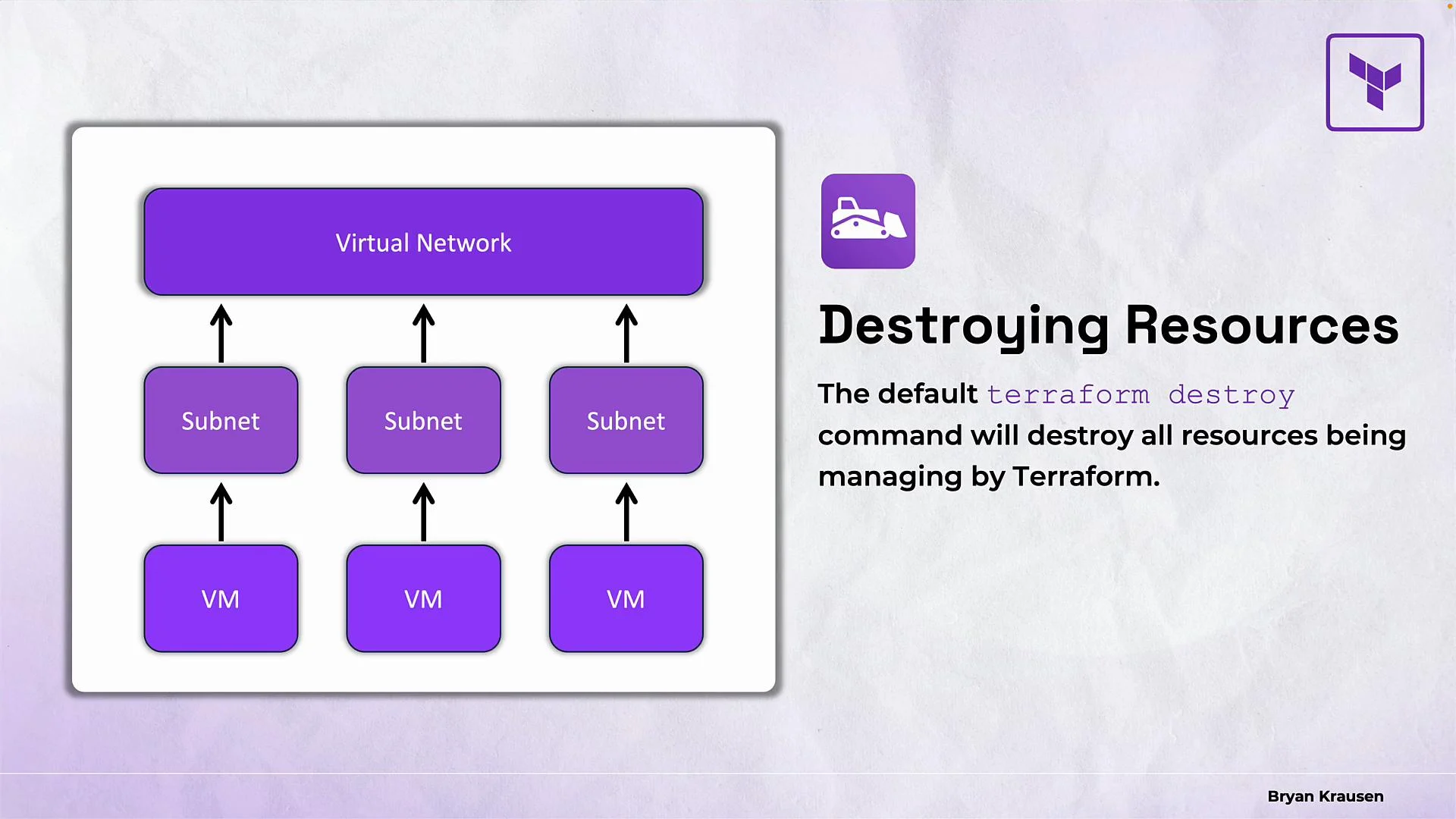 Because Terraform resolves and respects dependencies declared in the configuration, it avoids dependency errors (for example, you cannot delete a subnet that still has VMs attached — Terraform will delete the VMs first).
## Targeted destruction details
Using `-target` with `terraform destroy` lets you remove a single resource immediately:
```bash theme={null}
terraform destroy -target=aws_instance.web1
```
Important caveats:
* Targeted destroys bypass the usual full-plan review and can lead to configuration drift if the resource block remains in your `.tf` files.
* If you destroy a resource via `-target` but leave its resource block in your configuration, the next `terraform apply` will recreate it. To permanently remove it, delete the resource block from your configuration before applying.
## Important warning
Destroy operations are effectively irreversible from Terraform's perspective. Once Terraform deletes resources, it cannot restore them. Some cloud providers may offer backups or snapshots outside Terraform, but Terraform itself has no built-in "undo." Always review the destruction plan carefully and ensure you have backups or snapshots if needed, especially for production resources.
## Summary
* `terraform destroy` removes all resources managed in the current workspace after showing a destruction plan and requiring confirmation.
* For selective removals, prefer deleting resource blocks and running `terraform apply` so your configuration remains the source of truth.
* Destroyed resources are removed from the Terraform state file.
* Targeted destruction (`-target`) can remove a specific resource quickly but may cause drift and should be used sparingly.
* Always double-check destruction plans and consider backups before proceeding in production.
## Links and references
* [Terraform CLI Docs — destroy](https://www.terraform.io/cli/commands/destroy)
* [Terraform state subcommands](https://www.terraform.io/cli/commands/state)
* [HashiCorp Terraform Documentation](https://www.terraform.io/docs)
Because Terraform resolves and respects dependencies declared in the configuration, it avoids dependency errors (for example, you cannot delete a subnet that still has VMs attached — Terraform will delete the VMs first).
## Targeted destruction details
Using `-target` with `terraform destroy` lets you remove a single resource immediately:
```bash theme={null}
terraform destroy -target=aws_instance.web1
```
Important caveats:
* Targeted destroys bypass the usual full-plan review and can lead to configuration drift if the resource block remains in your `.tf` files.
* If you destroy a resource via `-target` but leave its resource block in your configuration, the next `terraform apply` will recreate it. To permanently remove it, delete the resource block from your configuration before applying.
## Important warning
Destroy operations are effectively irreversible from Terraform's perspective. Once Terraform deletes resources, it cannot restore them. Some cloud providers may offer backups or snapshots outside Terraform, but Terraform itself has no built-in "undo." Always review the destruction plan carefully and ensure you have backups or snapshots if needed, especially for production resources.
## Summary
* `terraform destroy` removes all resources managed in the current workspace after showing a destruction plan and requiring confirmation.
* For selective removals, prefer deleting resource blocks and running `terraform apply` so your configuration remains the source of truth.
* Destroyed resources are removed from the Terraform state file.
* Targeted destruction (`-target`) can remove a specific resource quickly but may cause drift and should be used sparingly.
* Always double-check destruction plans and consider backups before proceeding in production.
## Links and references
* [Terraform CLI Docs — destroy](https://www.terraform.io/cli/commands/destroy)
* [Terraform state subcommands](https://www.terraform.io/cli/commands/state)
* [HashiCorp Terraform Documentation](https://www.terraform.io/docs)