> ## Documentation Index
> Fetch the complete documentation index at: https://notes.kodekloud.com/llms.txt
> Use this file to discover all available pages before exploring further.
# Understanding State Drift Visual Walkthrough Lightboard
> Explains Terraform state drift, how plan detects mismatches, and practical ways to reconcile by reverting or adopting external changes while maintaining IaC best practices.
All right — Terraform state.
You either love it or you hate it, but it’s essential to reliable infrastructure as code. In this guide you’ll learn what happens when your Terraform state diverges from real-world infrastructure (known as Terraform state drift), how Terraform detects that divergence, and practical ways to reconcile or adopt changes.
Why this matters
* Drift breaks the guarantees provided by IaC: reproducibility, auditability, and safe automation.
* Detecting drift early prevents unexpected infrastructure changes and outages.
* Choosing the right remediation keeps your Terraform configuration, state, and real resources aligned.
Conceptual setup
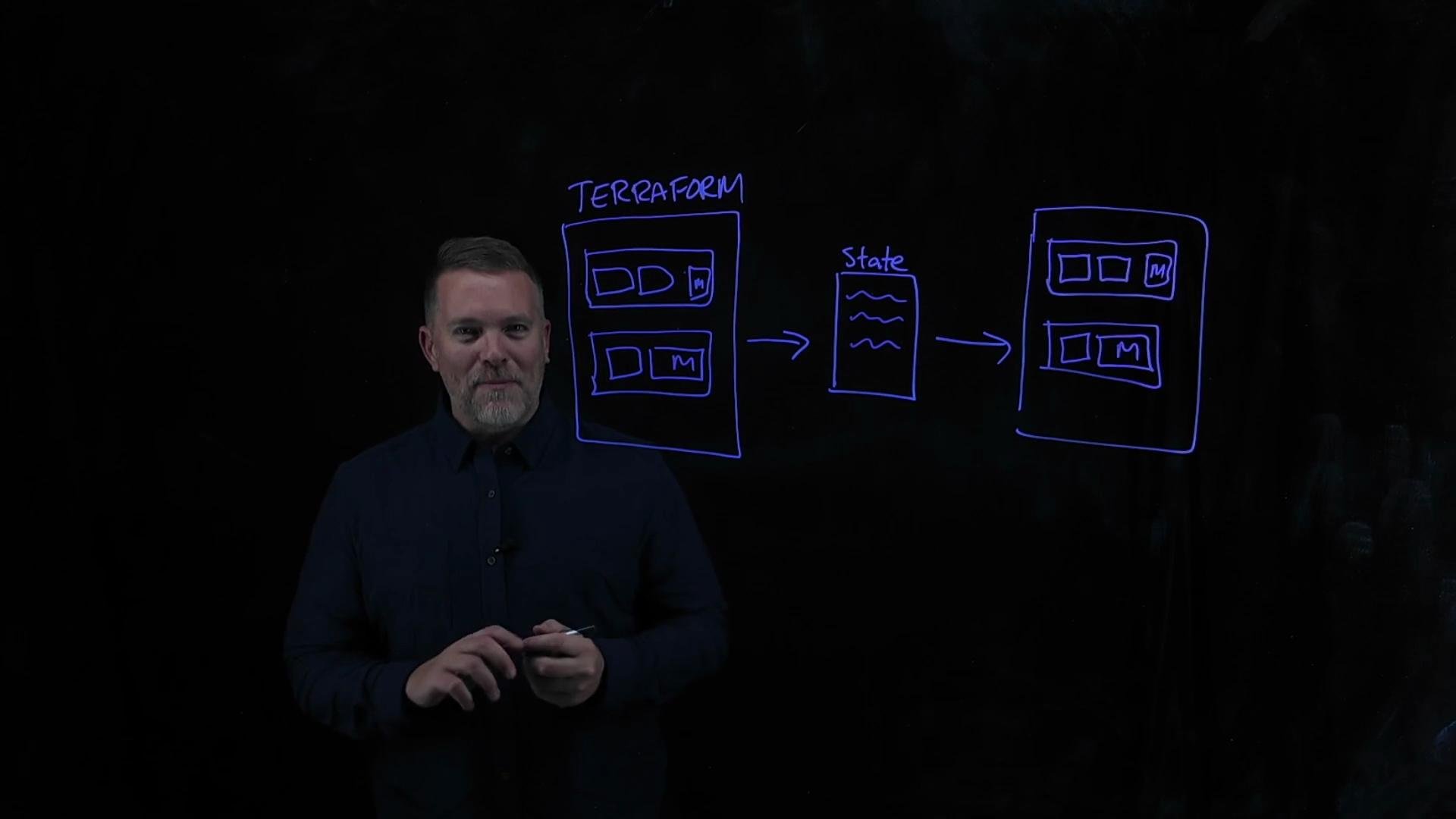
* You author Terraform configuration files that describe your desired infrastructure.
* Running Terraform records known resources and their attributes in the state file.
* Terraform then creates or updates real resources in the provider (for example, VMs).
After a successful apply, three things are expected to match:
* Desired configuration = Terraform configuration files
* State = Terraform state file
* Real world = Provider-managed resources
| Piece | What it represents | Example |
| --------------------- | -------------------------------------- | ------------------------------------------------ |
| Desired configuration | Source of truth written in HCL | `main.tf` resource blocks for two web servers |
| State | Terraform's recorded view of resources | `terraform.tfstate` (local or remote backend) |
| Real world | Actual cloud resources | Instances and attributes in the provider console |
Imagine a simple configuration that defines two web servers. One is intended to have two CPUs and moderate memory; the other, one CPU and a lot of memory. After you apply the configuration, the configuration, the state, and the real cloud resources all align.
Drift scenario
If someone or something modifies a resource outside Terraform (for example, a colleague in the cloud console, a maintenance script, or an automated pipeline), the real resource can change without Terraform updating either the state file or your configuration. That mismatch is state drift: state ≠ real world.
 Example: user changes a VM directly
Suppose someone edits a VM instance in the cloud console and swaps CPU and memory values on one of the web servers. After that manual change:
* Real-world VM attributes no longer match Terraform’s state file.
* The Terraform configuration files still express the original desired values.
* Terraform’s state remains stale until a refresh occurs.
This is drift — and it’s what `terraform plan` is designed to detect.
How Terraform detects drift
* When you run `terraform plan`, Terraform first refreshes the state by querying the provider for current attributes of managed resources.
* It compares the refreshed state against the configuration you’ve authored.
* Any differences that require action will be shown in the plan output as proposed changes.
Example commands
```bash theme={null}
# See what would change (this triggers a refresh)
terraform plan
# Apply configuration changes to make real resources match the config
terraform apply
```
Resolving drift — two approaches
You have two main options when you detect drift: revert the external change, or adopt it.
1. Revert the external change (make real resources match your configuration)
* Keep the configuration as the source of truth.
* Use Terraform to change the real resource back to your desired values.
Typical workflow:
```bash theme={null}
terraform plan
terraform apply
```
After `apply`, Terraform calls the provider APIs to modify the real resource and then updates the state file so configuration, state, and reality match again.
2. Accept the external change (make Terraform state and configuration reflect the new real-world state)
* If the external change was intentional and should become the desired state, update Terraform’s recorded state and then your configuration.
* Use `terraform apply -refresh-only` to refresh the state from the provider and write those values into the state file without changing infrastructure.
Workflow to adopt an external change:
```bash theme={null}
# Refresh and write the provider's current state into state file only
terraform plan
terraform apply -refresh-only
# Then update your HCL configuration to match the new reality, and apply
# (if configuration matches refreshed state, apply will perform no real changes)
terraform plan
terraform apply
```
`terraform plan` refreshes the state from the provider and compares it to your configuration. Use `terraform apply -refresh-only` to update state without making infrastructure changes when you want Terraform to adopt external updates.
Practical notes and recommendations
* Reverting external changes with `terraform apply` ensures the configuration remains the single source of truth.
* Accepting external changes with `-refresh-only` writes the provider state into Terraform’s state file; follow this with configuration updates so IaC stays authoritative.
* Enforce change control: restrict direct console edits via IAM, require PRs, or centralize changes through a CI/CD pipeline that runs Terraform.
* Consider state locking (backends like S3 + DynamoDB, or remote backends) to prevent concurrent modifications to state.
Quick reference — common commands
| Command | Purpose |
| ------------------------------- | ---------------------------------------------------------------------- |
| `terraform plan` | Refresh state from provider and show proposed changes |
| `terraform apply` | Reconcile configuration with real resources (update resources & state) |
| `terraform apply -refresh-only` | Refresh and update state only, do not change real resources |
| `terraform state` | Inspect or manipulate the state file (advanced use cases) |
Avoid relying on `-refresh-only` as a permanent workaround. Prefer workflows where all changes go through Terraform so configuration, state, and real resources remain consistent and auditable.
Summary
* Terraform state drift happens when real-world resources diverge from the state file and configuration.
* `terraform plan` detects drift by refreshing state and comparing it to configuration.
* To revert drift, run `terraform apply` to make real resources match the configuration.
* To accept drift, run `terraform apply -refresh-only`, then update your configuration and apply.
Links and references
* [Terraform CLI Docs — plan](https://www.terraform.io/cli/commands/plan)
* [Terraform CLI Docs — apply](https://www.terraform.io/cli/commands/apply)
* [Terraform State Documentation](https://www.terraform.io/language/state)
* [Best practices for Terraform state management](https://www.terraform.io/docs/cloud/run/state-management.html)
Example: user changes a VM directly
Suppose someone edits a VM instance in the cloud console and swaps CPU and memory values on one of the web servers. After that manual change:
* Real-world VM attributes no longer match Terraform’s state file.
* The Terraform configuration files still express the original desired values.
* Terraform’s state remains stale until a refresh occurs.
This is drift — and it’s what `terraform plan` is designed to detect.
How Terraform detects drift
* When you run `terraform plan`, Terraform first refreshes the state by querying the provider for current attributes of managed resources.
* It compares the refreshed state against the configuration you’ve authored.
* Any differences that require action will be shown in the plan output as proposed changes.
Example commands
```bash theme={null}
# See what would change (this triggers a refresh)
terraform plan
# Apply configuration changes to make real resources match the config
terraform apply
```
Resolving drift — two approaches
You have two main options when you detect drift: revert the external change, or adopt it.
1. Revert the external change (make real resources match your configuration)
* Keep the configuration as the source of truth.
* Use Terraform to change the real resource back to your desired values.
Typical workflow:
```bash theme={null}
terraform plan
terraform apply
```
After `apply`, Terraform calls the provider APIs to modify the real resource and then updates the state file so configuration, state, and reality match again.
2. Accept the external change (make Terraform state and configuration reflect the new real-world state)
* If the external change was intentional and should become the desired state, update Terraform’s recorded state and then your configuration.
* Use `terraform apply -refresh-only` to refresh the state from the provider and write those values into the state file without changing infrastructure.
Workflow to adopt an external change:
```bash theme={null}
# Refresh and write the provider's current state into state file only
terraform plan
terraform apply -refresh-only
# Then update your HCL configuration to match the new reality, and apply
# (if configuration matches refreshed state, apply will perform no real changes)
terraform plan
terraform apply
```
`terraform plan` refreshes the state from the provider and compares it to your configuration. Use `terraform apply -refresh-only` to update state without making infrastructure changes when you want Terraform to adopt external updates.
Practical notes and recommendations
* Reverting external changes with `terraform apply` ensures the configuration remains the single source of truth.
* Accepting external changes with `-refresh-only` writes the provider state into Terraform’s state file; follow this with configuration updates so IaC stays authoritative.
* Enforce change control: restrict direct console edits via IAM, require PRs, or centralize changes through a CI/CD pipeline that runs Terraform.
* Consider state locking (backends like S3 + DynamoDB, or remote backends) to prevent concurrent modifications to state.
Quick reference — common commands
| Command | Purpose |
| ------------------------------- | ---------------------------------------------------------------------- |
| `terraform plan` | Refresh state from provider and show proposed changes |
| `terraform apply` | Reconcile configuration with real resources (update resources & state) |
| `terraform apply -refresh-only` | Refresh and update state only, do not change real resources |
| `terraform state` | Inspect or manipulate the state file (advanced use cases) |
Avoid relying on `-refresh-only` as a permanent workaround. Prefer workflows where all changes go through Terraform so configuration, state, and real resources remain consistent and auditable.
Summary
* Terraform state drift happens when real-world resources diverge from the state file and configuration.
* `terraform plan` detects drift by refreshing state and comparing it to configuration.
* To revert drift, run `terraform apply` to make real resources match the configuration.
* To accept drift, run `terraform apply -refresh-only`, then update your configuration and apply.
Links and references
* [Terraform CLI Docs — plan](https://www.terraform.io/cli/commands/plan)
* [Terraform CLI Docs — apply](https://www.terraform.io/cli/commands/apply)
* [Terraform State Documentation](https://www.terraform.io/language/state)
* [Best practices for Terraform state management](https://www.terraform.io/docs/cloud/run/state-management.html)