> ## Documentation Index
> Fetch the complete documentation index at: https://notes.kodekloud.com/llms.txt
> Use this file to discover all available pages before exploring further.
# What Happens if You Lose State Visual Walkthrough Lightboard
> Explains consequences of losing Terraform state and recovery methods including restoring state, re-importing resources, and best practices to prevent state loss.
Terraform state is Terraform’s “memory” of the real-world resources it manages. This guide walks through a simple scenario—five virtual machines—showing what happens if Terraform loses access to its state file, and how to recover safely.
Imagine a Terraform configuration that defines five virtual machines. You run `terraform apply`, and the state file is stored remotely (for example, in an S3 bucket). Configuration, state, and cloud resources are all in sync.
 Now you have five VMs running in the cloud and a state file that records those resources.
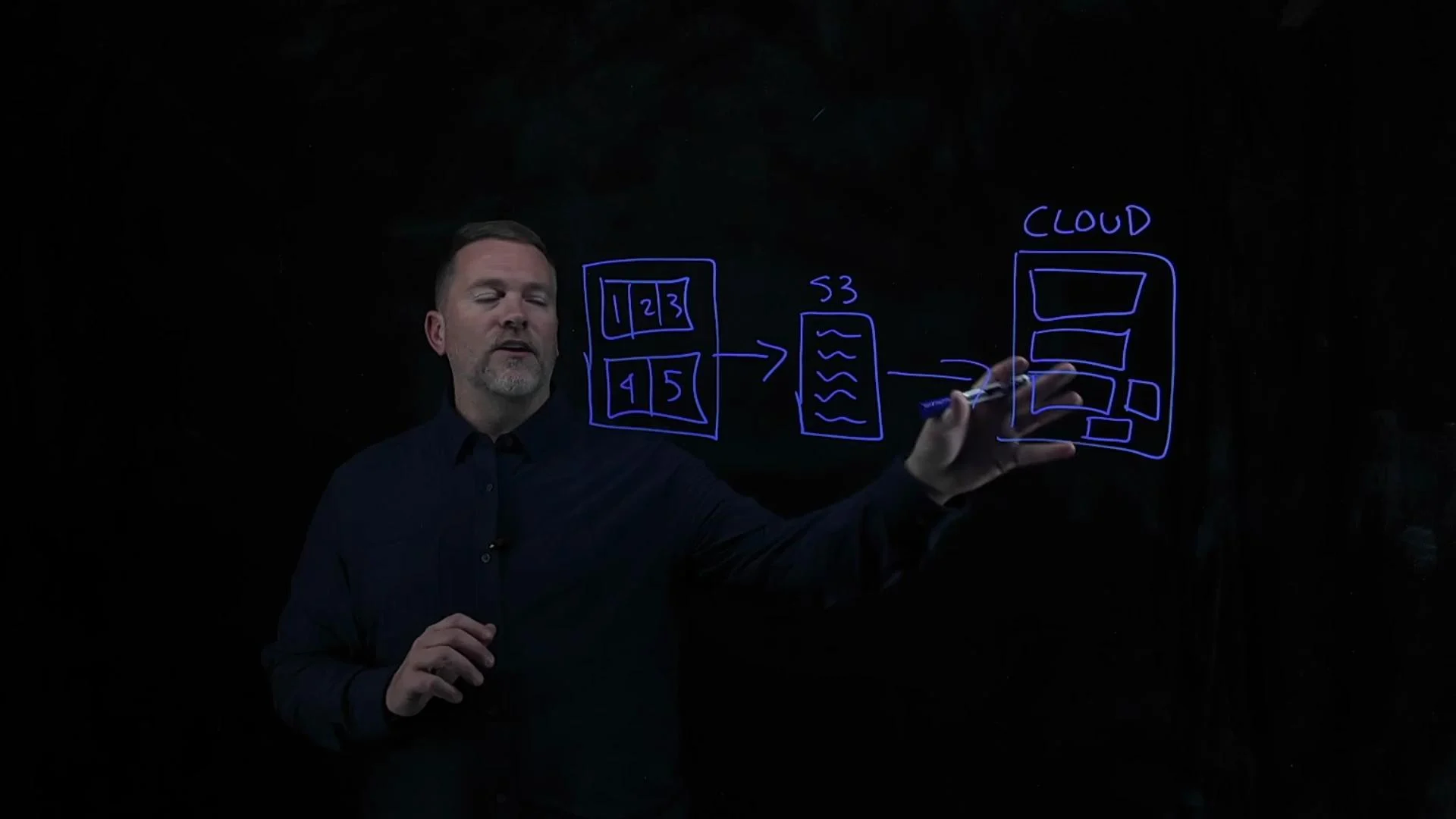 If the state file is deleted, corrupted, or otherwise inaccessible, Terraform no longer knows about the existing infrastructure. With the same configuration files, running `terraform plan` or `terraform apply` makes Terraform behave as if it’s starting from scratch.
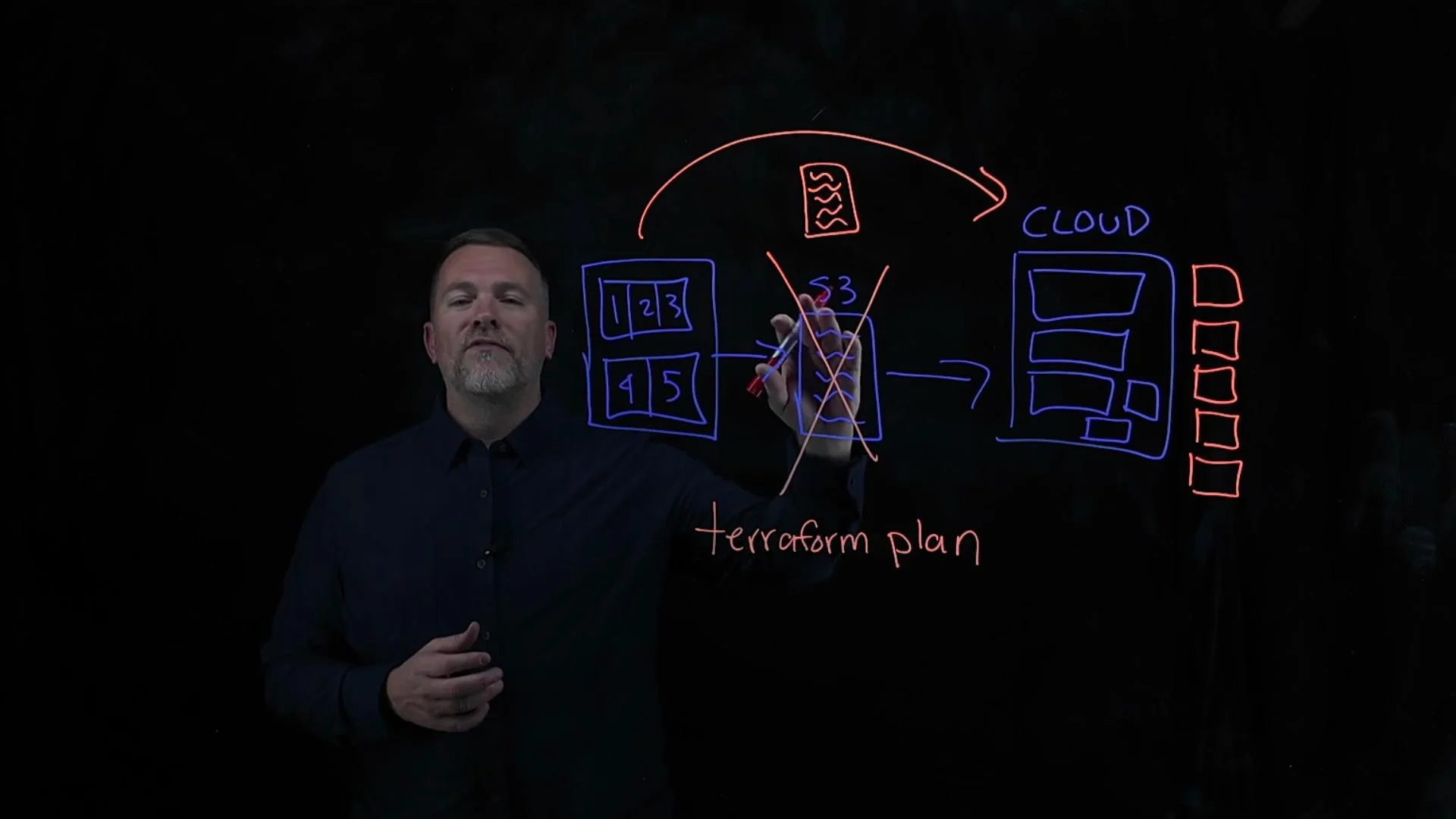
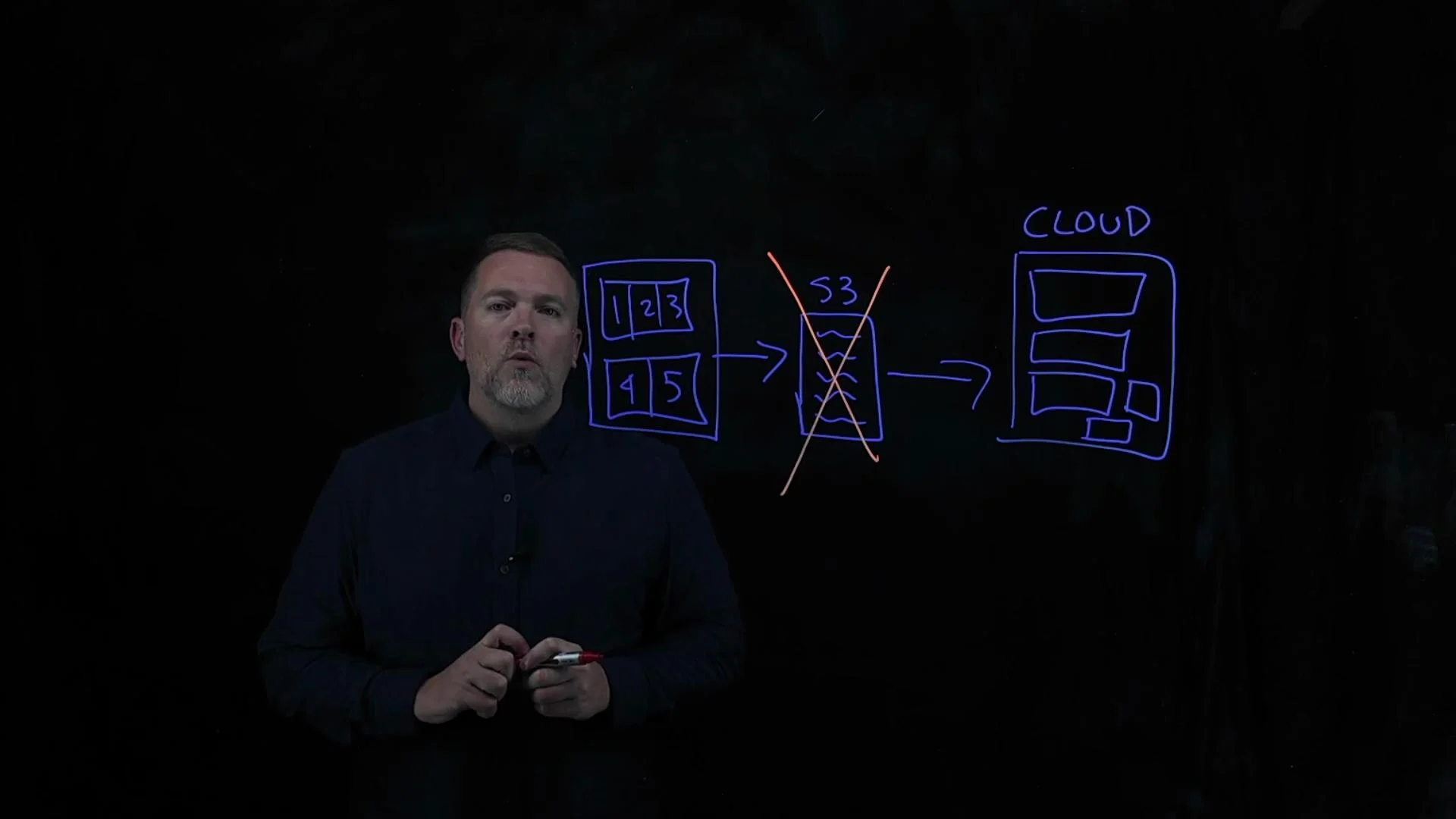 Because the state is missing, Terraform will query the cloud for resources but—finding no local state entries—it will plan to create the five VMs described in your configuration. This results in Terraform attempting to provision new resources in addition to the ones already running in your cloud, since it can’t tell they already exist.
In short: losing the Terraform state causes Terraform to try to re-create resources it believes are absent unless you recover the state or re-associate existing resources with your configuration.
Recovery options
1. Restore the state file
* If you use a remote backend (for example, an [Amazon S3](https://aws.amazon.com/s3/) bucket), check for backups or enablement of versioning. Restoring a prior `terraform.tfstate` is often the fastest way to recover.
* Restore the backup/version of `terraform.tfstate` into the remote backend so Terraform can pick it up.
Because the state is missing, Terraform will query the cloud for resources but—finding no local state entries—it will plan to create the five VMs described in your configuration. This results in Terraform attempting to provision new resources in addition to the ones already running in your cloud, since it can’t tell they already exist.
In short: losing the Terraform state causes Terraform to try to re-create resources it believes are absent unless you recover the state or re-associate existing resources with your configuration.
Recovery options
1. Restore the state file
* If you use a remote backend (for example, an [Amazon S3](https://aws.amazon.com/s3/) bucket), check for backups or enablement of versioning. Restoring a prior `terraform.tfstate` is often the fastest way to recover.
* Restore the backup/version of `terraform.tfstate` into the remote backend so Terraform can pick it up.
 Enable remote backend versioning and periodic backups (for example, S3 versioning or GCS object versioning). Store copies of `terraform.tfstate` so state restoration is straightforward when needed.
2. Re-import existing resources into state
If you cannot restore a prior state file, re-associate real resources with your Terraform configuration using `terraform import` (official docs: [https://developer.hashicorp.com/terraform/cli/commands/import](https://developer.hashicorp.com/terraform/cli/commands/import)). The workflow:
* Ensure your Terraform configuration contains resource blocks that match the resources you want to manage. Create or update resource blocks first so each real resource has a corresponding address.
* Use `terraform import` to map each existing cloud resource into the matching resource block address.
Example: import a single EC2 instance into a resource named `aws_instance.web`:
```bash theme={null}
terraform import aws_instance.web i-0123456789abcdef0
```
If the resources were created with `count` or `for_each`, import using the indexed address:
```bash theme={null}
terraform import 'aws_instance.web[0]' i-0123456789abcdef0
```
After importing every resource, run:
```bash theme={null}
terraform plan
```
Terraform will list imported resources in state and display differences between your configuration and the actual resource attributes. Adjust either the configuration or the real resources so they match.
Import is a per-resource operation and can be time-consuming for large fleets. Always run `terraform plan` after imports and review planned changes before `terraform apply` to avoid unintended modifications or replacements.
Tips for successful imports
* Add resource blocks to your configuration before importing so you have deterministic addresses to import into.
* Import each resource (or each indexed element) individually; there’s no bulk-import native to Terraform core.
* Use `terraform state list` and `terraform state show` after importing to inspect entries and verify attributes.
* When possible, prefer reconciling configuration to actual resource attributes rather than changing resources to match configuration.
Why a config-driven recovery is best
* A configuration-first approach (define resources in code, then import real resources into those blocks) restores state while preserving a version-controlled source of truth. This avoids adhoc fixes and helps teams understand intended infrastructure.
Recovery options at a glance
| Recovery method | When to use | Notes |
| ------------------- | -------------------------------------- | ------------------------------------------------------ |
| Restore state file | You have backups or backend versioning | Fastest, simplest; restores exact prior state |
| Re-import resources | No backups available | Safe but manual; ensure config matches real resources |
| Recreate resources | When resources are disposable or cheap | Risky for production—can cause duplicates or lost data |
Recap
* Losing Terraform state causes Terraform to treat existing resources as absent and plan to recreate them.
* Recovery approaches:
* Restore the state file from backend versioning or backups (recommended if available).
* Re-import existing resources into properly defined resource blocks using `terraform import`.
* Best practices to avoid or mitigate state loss:
* Use remote backends (S3, GCS, Terraform Cloud).
* Enable object/version backups.
* Store Terraform configuration in source control.
* Periodically back up state snapshots and test recovery procedures.
Links and references
* [Terraform import command docs](https://developer.hashicorp.com/terraform/cli/commands/import)
* [Amazon S3](https://aws.amazon.com/s3/)
* [Google Cloud Storage](https://cloud.google.com/storage/docs)
Enable remote backend versioning and periodic backups (for example, S3 versioning or GCS object versioning). Store copies of `terraform.tfstate` so state restoration is straightforward when needed.
2. Re-import existing resources into state
If you cannot restore a prior state file, re-associate real resources with your Terraform configuration using `terraform import` (official docs: [https://developer.hashicorp.com/terraform/cli/commands/import](https://developer.hashicorp.com/terraform/cli/commands/import)). The workflow:
* Ensure your Terraform configuration contains resource blocks that match the resources you want to manage. Create or update resource blocks first so each real resource has a corresponding address.
* Use `terraform import` to map each existing cloud resource into the matching resource block address.
Example: import a single EC2 instance into a resource named `aws_instance.web`:
```bash theme={null}
terraform import aws_instance.web i-0123456789abcdef0
```
If the resources were created with `count` or `for_each`, import using the indexed address:
```bash theme={null}
terraform import 'aws_instance.web[0]' i-0123456789abcdef0
```
After importing every resource, run:
```bash theme={null}
terraform plan
```
Terraform will list imported resources in state and display differences between your configuration and the actual resource attributes. Adjust either the configuration or the real resources so they match.
Import is a per-resource operation and can be time-consuming for large fleets. Always run `terraform plan` after imports and review planned changes before `terraform apply` to avoid unintended modifications or replacements.
Tips for successful imports
* Add resource blocks to your configuration before importing so you have deterministic addresses to import into.
* Import each resource (or each indexed element) individually; there’s no bulk-import native to Terraform core.
* Use `terraform state list` and `terraform state show` after importing to inspect entries and verify attributes.
* When possible, prefer reconciling configuration to actual resource attributes rather than changing resources to match configuration.
Why a config-driven recovery is best
* A configuration-first approach (define resources in code, then import real resources into those blocks) restores state while preserving a version-controlled source of truth. This avoids adhoc fixes and helps teams understand intended infrastructure.
Recovery options at a glance
| Recovery method | When to use | Notes |
| ------------------- | -------------------------------------- | ------------------------------------------------------ |
| Restore state file | You have backups or backend versioning | Fastest, simplest; restores exact prior state |
| Re-import resources | No backups available | Safe but manual; ensure config matches real resources |
| Recreate resources | When resources are disposable or cheap | Risky for production—can cause duplicates or lost data |
Recap
* Losing Terraform state causes Terraform to treat existing resources as absent and plan to recreate them.
* Recovery approaches:
* Restore the state file from backend versioning or backups (recommended if available).
* Re-import existing resources into properly defined resource blocks using `terraform import`.
* Best practices to avoid or mitigate state loss:
* Use remote backends (S3, GCS, Terraform Cloud).
* Enable object/version backups.
* Store Terraform configuration in source control.
* Periodically back up state snapshots and test recovery procedures.
Links and references
* [Terraform import command docs](https://developer.hashicorp.com/terraform/cli/commands/import)
* [Amazon S3](https://aws.amazon.com/s3/)
* [Google Cloud Storage](https://cloud.google.com/storage/docs)