> ## Documentation Index
> Fetch the complete documentation index at: https://notes.kodekloud.com/llms.txt
> Use this file to discover all available pages before exploring further.
# Vault Entities
> This guide explains how Vault consolidates identities and policies for users and machines across multiple authentication methods.
Vault’s Identity Secrets Engine (enabled by default) provides a unified way to map users and machines—across various auth methods—to logical entities. In this guide, you’ll learn how Vault auto-creates entities and aliases, understand the challenges of multiple auth methods, and see how to consolidate them into a single, manageable entity.
## 1. Entities and Aliases
An **entity** represents a user or machine in Vault with a unique ID, metadata, and attached policies. An **alias** links that entity to a specific auth method (e.g., auth mount accessor + username).
* **Entity**
* Unique identifier (ID)
* Optional metadata (e.g., email, department)
* Attached policies defining capabilities
* **Alias**
* Maps one auth method and credential identifier to an entity
* An entity can have zero or more aliases
When a user first logs in via any supported auth method (UserPass, LDAP, OIDC, AppRole, AWS, GitHub, etc.), Vault automatically:
1. Creates a new entity.
2. Creates an alias for that auth path and user identifier.
3. Applies policies attached to both the alias and the entity.
## 2. Single Auth Method Example
Julia Smith logs in with the UserPass method as `jsmith`:
1. Vault creates an entity for Julia (`ent-userpass-xxxx`).
2. Vault attaches an alias combining the UserPass accessor and `jsmith`.
3. Any policies assigned to that alias or entity govern her token’s permissions.
## 3. Multiple Auth Methods: The Challenge
If Julia also logs in via LDAP (`jsmith@example.com`) and GitHub (`JSmith22`), Vault will create separate entities and aliases for each method:
| Auth Method | Entity ID | Attached Policy |
| ----------- | ----------------- | ----------------- |
| UserPass | ent-userpass-1234 | accounting |
| LDAP | ent-ldap-5678 | finance |
| GitHub | ent-github-9012 | accounts\_payable |
Each login issues a token scoped only to that specific entity’s policies. To switch permissions, users must log out and authenticate with a different method.
## 4. Consolidating into a Single Entity
You can streamline user access by creating one master entity (e.g., “Julia Smith”) and assigning all auth-method aliases to it. Attach a shared policy (e.g., `management`) at the entity level so any login inherits both alias and entity policies.
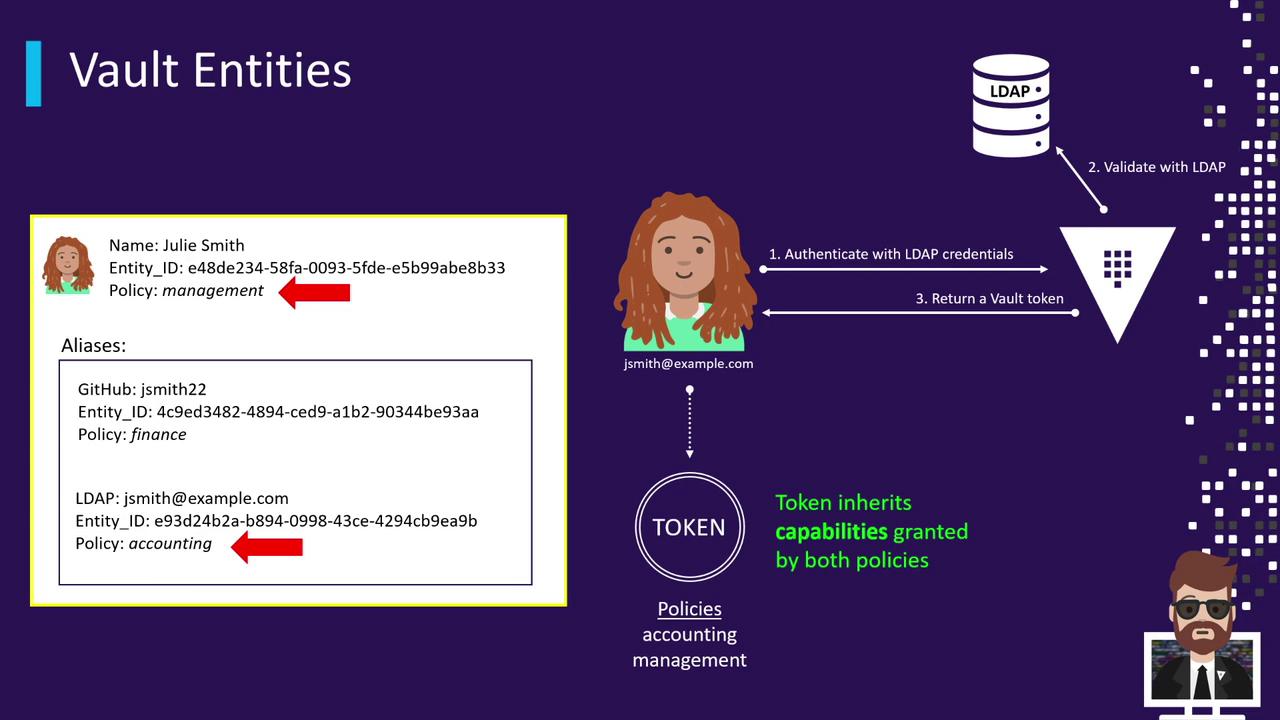
## 5. Login Workflow with a Consolidated Entity
1. User logs in via LDAP (`jsmith@example.com`).
2. Vault validates credentials against the LDAP server.
3. Vault resolves the LDAP alias to the master “Julia Smith” entity.
4. Vault issues a token that includes:
* Policies on the LDAP alias (e.g., `finance`)
* Policies on the entity (e.g., `management`)
## 6. Creating the Entity and Aliases
Use the Vault CLI to set up the consolidated entity and its aliases:
```shell theme={null}
# 1. Create the master entity with the 'management' policy
vault write identity/entity name="Julia Smith" policies="management"
# Capture the generated entity ID
ENTITY_ID=$(vault read -field=id identity/entity/name/Julia-Smith)
# UserPass alias
USERPASS_ACCESSOR=$(vault auth list -format=json | jq -r '.["userpass/"].accessor')
vault write identity/entity-alias \
name="jsmith" \
canonical_id="$ENTITY_ID" \
mount_accessor="$USERPASS_ACCESSOR"
# LDAP alias
LDAP_ACCESSOR=$(vault auth list -format=json | jq -r '.["ldap/"].accessor')
vault write identity/entity-alias \
name="jsmith@example.com" \
canonical_id="$ENTITY_ID" \
mount_accessor="$LDAP_ACCESSOR"
# GitHub alias
GITHUB_ACCESSOR=$(vault auth list -format=json | jq -r '.["github/"].accessor')
vault write identity/entity-alias \
name="JSmith22" \
canonical_id="$ENTITY_ID" \
mount_accessor="$GITHUB_ACCESSOR"
```
After this configuration, any login—UserPass, LDAP, or GitHub—will automatically combine the alias’s policies with the shared `management` policy on the entity.
## Links and References
* [Vault Identity Concepts](https://www.vaultproject.io/docs/concepts/identity)
* [Vault CLI Authentication](https://www.vaultproject.io/docs/commands/auth)
* [Configuring LDAP Auth](https://www.vaultproject.io/docs/auth/ldap)
* [GitHub Auth Method](https://www.vaultproject.io/docs/auth/github)