> ## Documentation Index
> Fetch the complete documentation index at: https://notes.kodekloud.com/llms.txt
> Use this file to discover all available pages before exploring further.
# Managing Policies using the UI
> Vaults web interface allows users to manage ACL policies, including creating, viewing, editing, and deleting them efficiently.
Vault provides an intuitive web interface for creating, viewing, editing, and deleting ACL policies. Use the top navigation bar to quickly switch between **Secrets**, **Access**, **Policies**, and **Tools**.
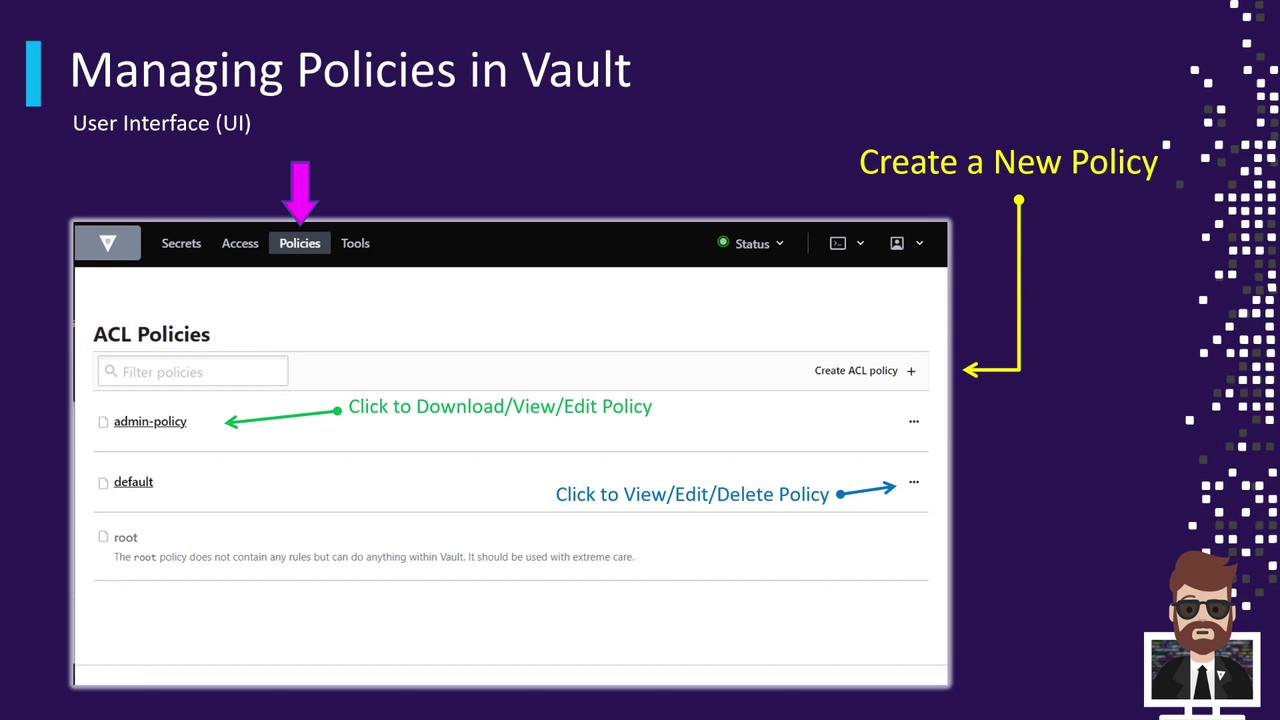
## Accessing the Policies Tab
1. Click on the **Policies** tab (highlighted by the pink arrow in the screenshot).
2. Vault lists all ACL policies, including built-in and any custom policies you’ve defined.
By default, Vault includes two core policies:
| Policy | Description |
| ------- | ------------------------------------------ |
| default | Minimal access scope applied to all tokens |
| root | Full administrative access |
In this example, you’ll also see a custom **Admin Policy** listed alongside the built-in entries.
## Viewing and Managing Policies
* Click a policy’s **name** to open its rule editor.
* Click the **⋮ (three-dot) menu** on the right to:
* Download the policy file
* View policy details in a modal
* Edit the policy rules inline
* Delete the policy
Changes take effect immediately for all tokens bound to the policy. Always review your updates before saving.
## Creating a New ACL Policy
1. Click **Create ACL Policy** on the right.
2. Enter a **unique name** for your policy.
3. Paste your HCL or JSON rule definitions into the editor.
4. Click **Save** to apply the new policy.
## Further Reading and References
* [Vault ACL Policies](https://www.vaultproject.io/docs/concepts/policies)
* [HCL Language Documentation](https://github.com/hashicorp/hcl)