> ## Documentation Index
> Fetch the complete documentation index at: https://notes.kodekloud.com/llms.txt
> Use this file to discover all available pages before exploring further.
# Storage Backends
> Vault’s storage backend determines data persistence options, supporting various backends for open source and enterprise users, with considerations for high availability and configuration.
Vault’s storage backend determines where and how your data is persisted. Open source users can choose from a variety of backends—such as S3 or DynamoDB on AWS, Azure Blob Storage on Azure, etc.—and should consider high availability (HA) requirements. Enterprise Vault clusters are supported on [HashiCorp Consul](https://www.consul.io/) or Integrated Storage (Raft). Introduced in Vault 1.4, Integrated Storage now (as of Vault 1.7) offers feature parity with Consul, including cloud auto-join, automated backups, and autopilot. Other community-supported backends (etcd, MySQL, PostgreSQL) suit non-Enterprise deployments.
## Supported Storage Backends
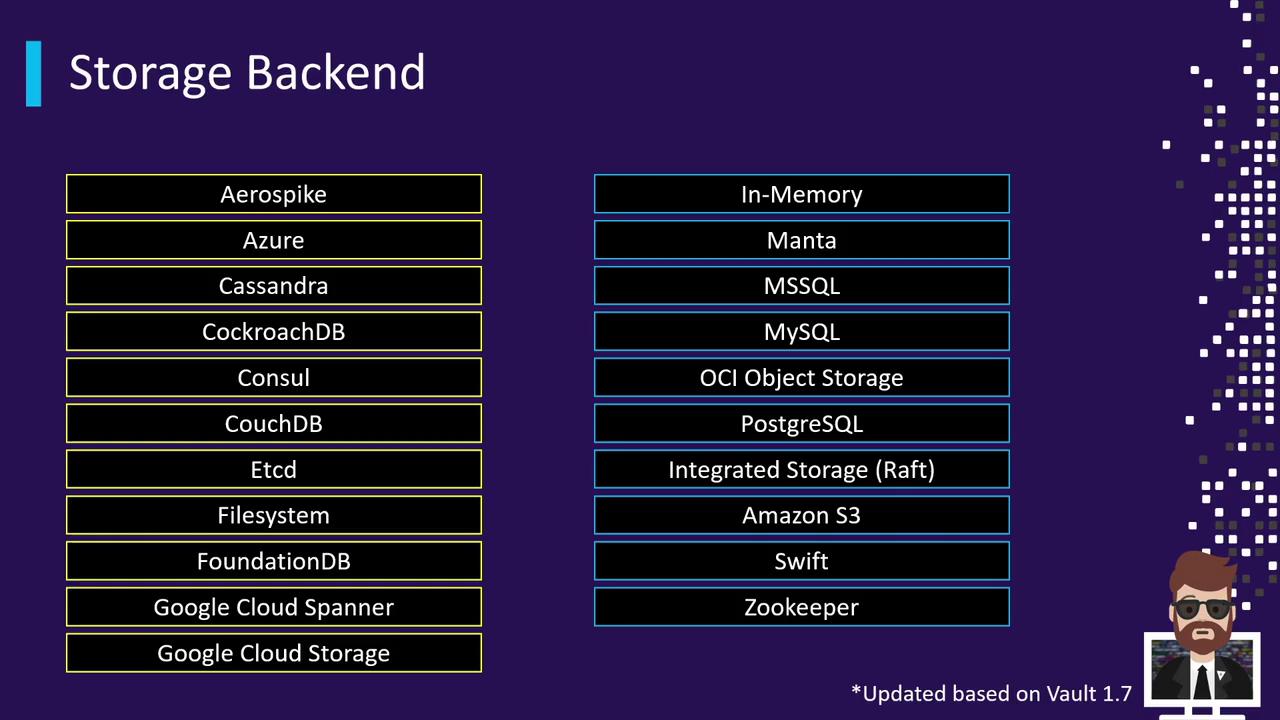
Vault 1.7 provides a broad selection of backends for any environment:
| Backend | Edition | Typical Use Case |
| ------------------------- | ------------------ | ------------------------------------- |
| Consul | Open Source & Ent. | HA clusters with mature ecosystem |
| Integrated Storage (Raft) | Open Source & Ent. | Built-in HA, auto-join, backups |
| S3 | Open Source | Simple scalable object storage |
| DynamoDB | Open Source | Key/value store with single-region HA |
| Azure Blob Storage | Open Source | Blob-based storage on Microsoft Azure |
| Google Cloud Storage | Open Source | Object storage on GCP |
| etcd, MySQL, PostgreSQL | Community | Custom database deployments |
| In-Memory (dev mode) | Open Source | Testing and non-production |
## Storage Backend Architecture
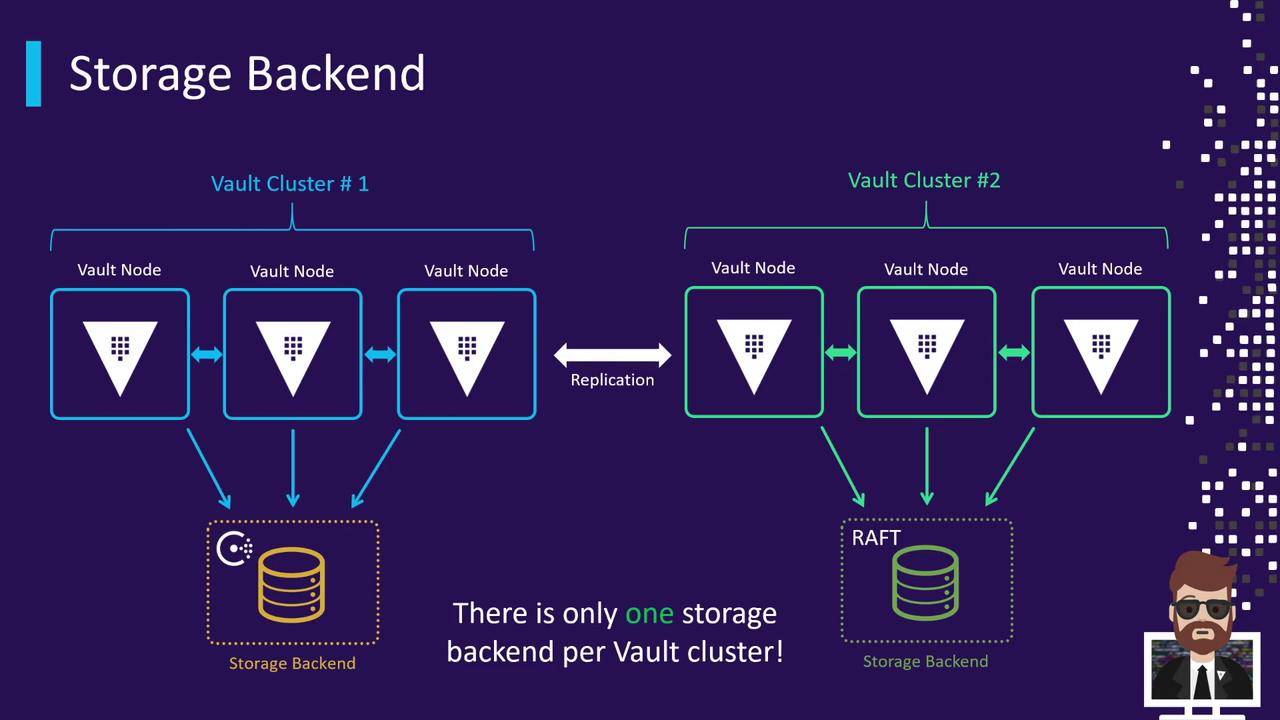
A Vault cluster consists of one active node and one or more standbys, all sharing a single storage backend. Every node reads from and writes to the same data store. If you deploy multiple clusters for geographic redundancy, each cluster uses its own backend. Enterprise-level replication is handled between Vault nodes via the Vault API—not directly between storage backends.
## Choosing a Storage Backend
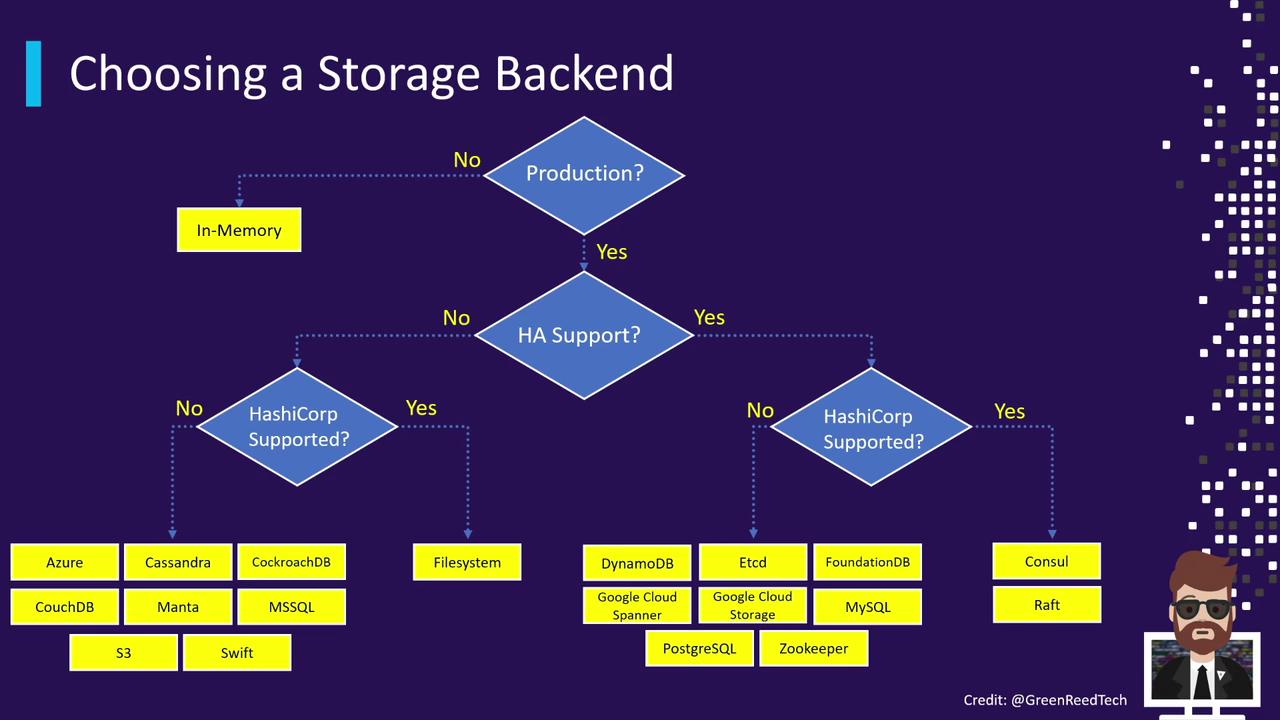
When evaluating storage backends, consider:
* Production vs. non-production environments
* HA requirements (single-node vs. multi-node)
* Whether Enterprise support and features are needed
Use this decision flow to match your requirements with the right backend. For simple testing or CI, in-memory dev mode may suffice. For critical production data, choose a robust HA backend like Consul or Raft.
## Configuring Your Storage Backend
Define your storage backend inside the `storage` stanza of your Vault HCL configuration file.
### Example: Consul
```hcl theme={null}
storage "consul" {
address = "127.0.0.1:8500" # Consul agent endpoint
path = "vault/" # KV namespace for Vault data
token = "1a2b3c4d-1234-abcd-1234-1a2b3c4d5e6a" # Consul ACL token
}
```
* **address**: Host and port of the Consul agent
* **path**: Prefix within Consul’s key/value store
* **token**: ACL token granting Vault access
### Example: Integrated Storage (Raft)
```hcl theme={null}
storage "raft" {
path = "/opt/vault/data" # Local directory for Raft logs and snapshots
node_id = "node-a-us-east-1.example.com" # Unique identifier for this node
retry_join {
auto_join = "provider=aws region=us-east-1 tag_key=vault tag_value=us-east-1"
}
}
```
* **path**: Filesystem path for replicated data
* **node\_id**: Identifier used by Raft to address each node
* **retry\_join.auto\_join**: Uses AWS EC2 tags to discover and join peers automatically
Do not commit configuration files containing plain-text tokens or credentials to version control. Use environment variables or a secure secrets manager to inject sensitive data.
For detailed configurations and advanced options, see the [Vault Storage Backends documentation](https://www.vaultproject.io/docs/configuration/storage).
## Links and References
* [HashiCorp Vault Documentation](https://www.vaultproject.io/docs)
* [Consul Storage Backend](https://www.vaultproject.io/docs/configuration/storage/consul)
* [Integrated Storage (Raft)](https://www.vaultproject.io/docs/configuration/storage/raft)
* [Vault Enterprise Features](https://www.vaultproject.io/docs/enterprise)