> ## Documentation Index
> Fetch the complete documentation index at: https://notes.kodekloud.com/llms.txt
> Use this file to discover all available pages before exploring further.

# Vault Agent Auto Auth and Token Sink

> This article explains how Vault Agent facilitates authentication and token management for legacy applications.

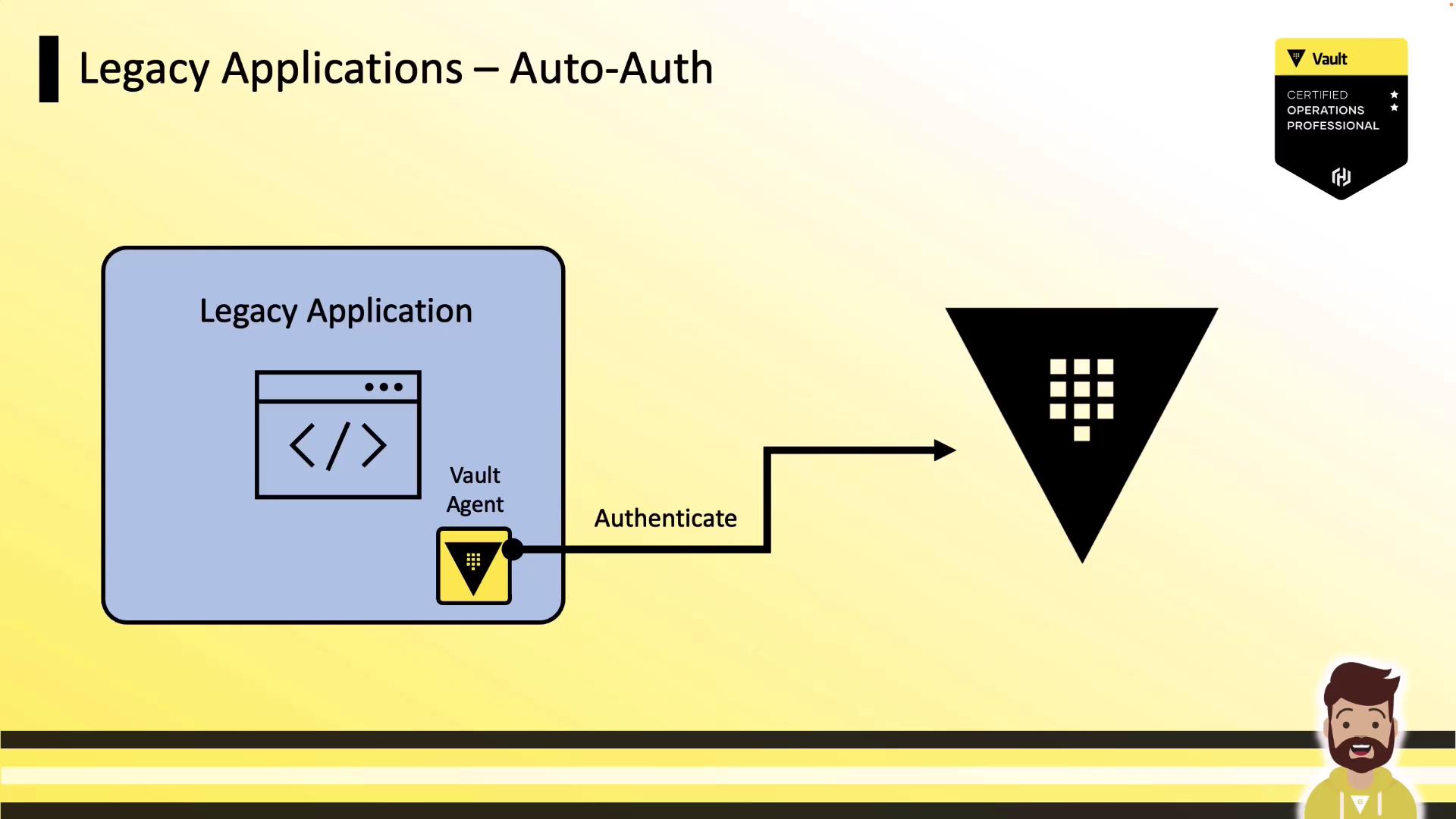
Legacy applications often lack built-in support for Vault authentication. By deploying a Vault Agent alongside each application server, you can offload authentication, token renewal, and secure token storage to the Agent. The application simply reads a local “sink” file to obtain a valid Vault token and perform secret operations.
<Frame>
  ![The image illustrates a process where a legacy application uses a Vault Agent to authenticate with a Vault system. It includes a certification badge for a Vault Certified Operations Professional.](https://kodekloud.com/kk-media/image/upload/v1752878244/notes-assets/images/HashiCorp-Certified-Vault-Associate-Certification-Vault-Agent-Auto-Auth-and-Token-Sink/legacy-application-vault-agent-authentication.jpg)
</Frame>

## Legacy Application Auto-Auth Workflow

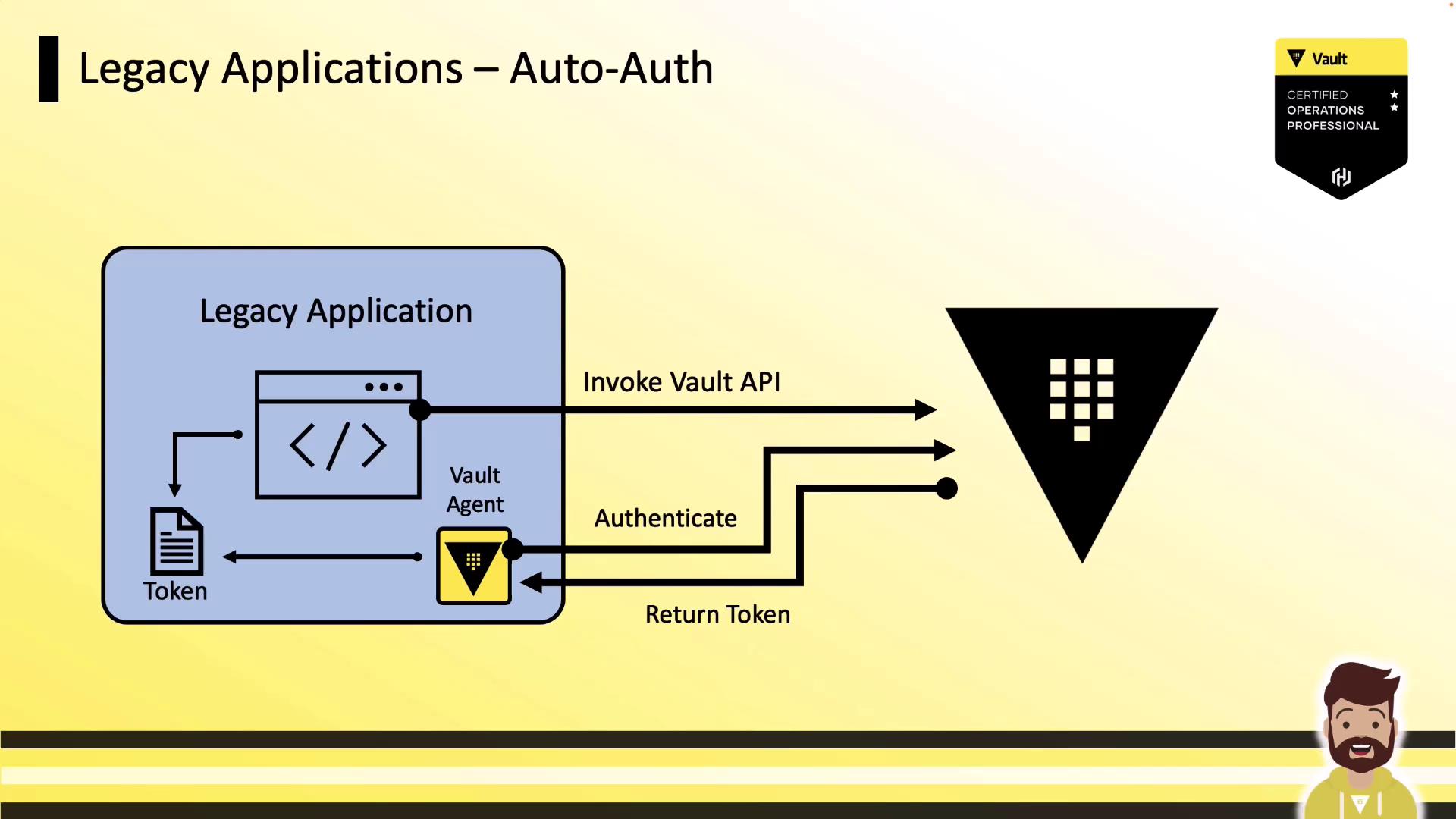
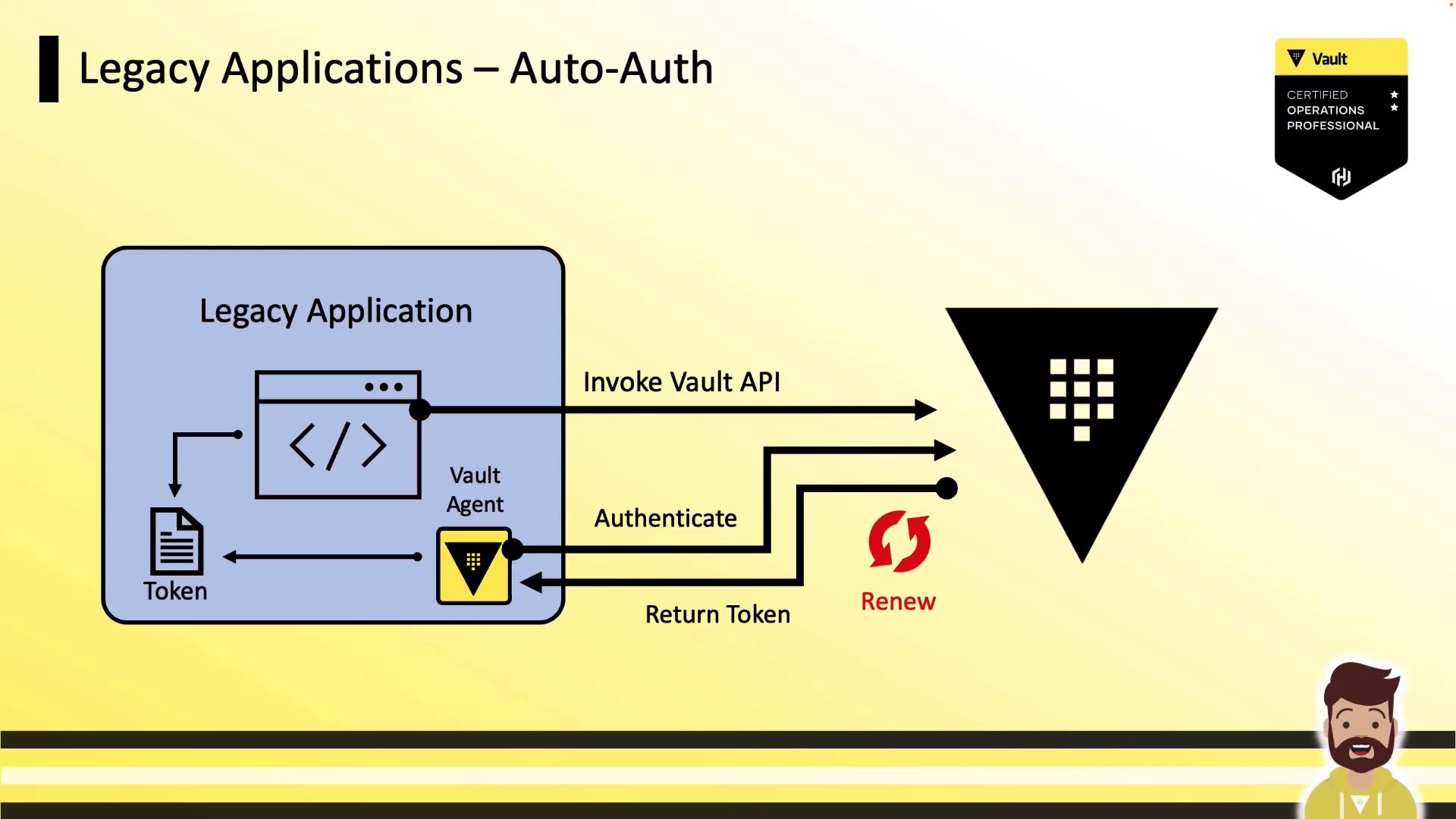
1. Vault Agent authenticates to Vault using a machine-oriented auth method (e.g., AppRole, Kubernetes).
2. Vault returns a token, which the Agent writes to a local sink file.
3. The legacy application reads the token from the sink and calls the Vault API for secret operations (read secrets, encrypt/decrypt).
<Frame>
  ![The image illustrates a process flow for "Legacy Applications – Auto-Auth," showing how a legacy application interacts with a Vault API for authentication and token retrieval. It includes a diagram with labeled steps and a Vault certification badge.](https://kodekloud.com/kk-media/image/upload/v1752878245/notes-assets/images/HashiCorp-Certified-Vault-Associate-Certification-Vault-Agent-Auto-Auth-and-Token-Sink/legacy-apps-auto-auth-process-flow.jpg)
</Frame>

The Vault Agent also tracks token TTL and automatically renews the token before expiration, ensuring the application always has a valid credential.
<Frame>
  ![The image is a diagram illustrating the auto-authentication process for legacy applications using a Vault API, involving a Vault Agent for token management.](https://kodekloud.com/kk-media/image/upload/v1752878247/notes-assets/images/HashiCorp-Certified-Vault-Associate-Certification-Vault-Agent-Auto-Auth-and-Token-Sink/auto-authentication-legacy-apps-vault-api.jpg)
</Frame>

## How Auto-Auth Works

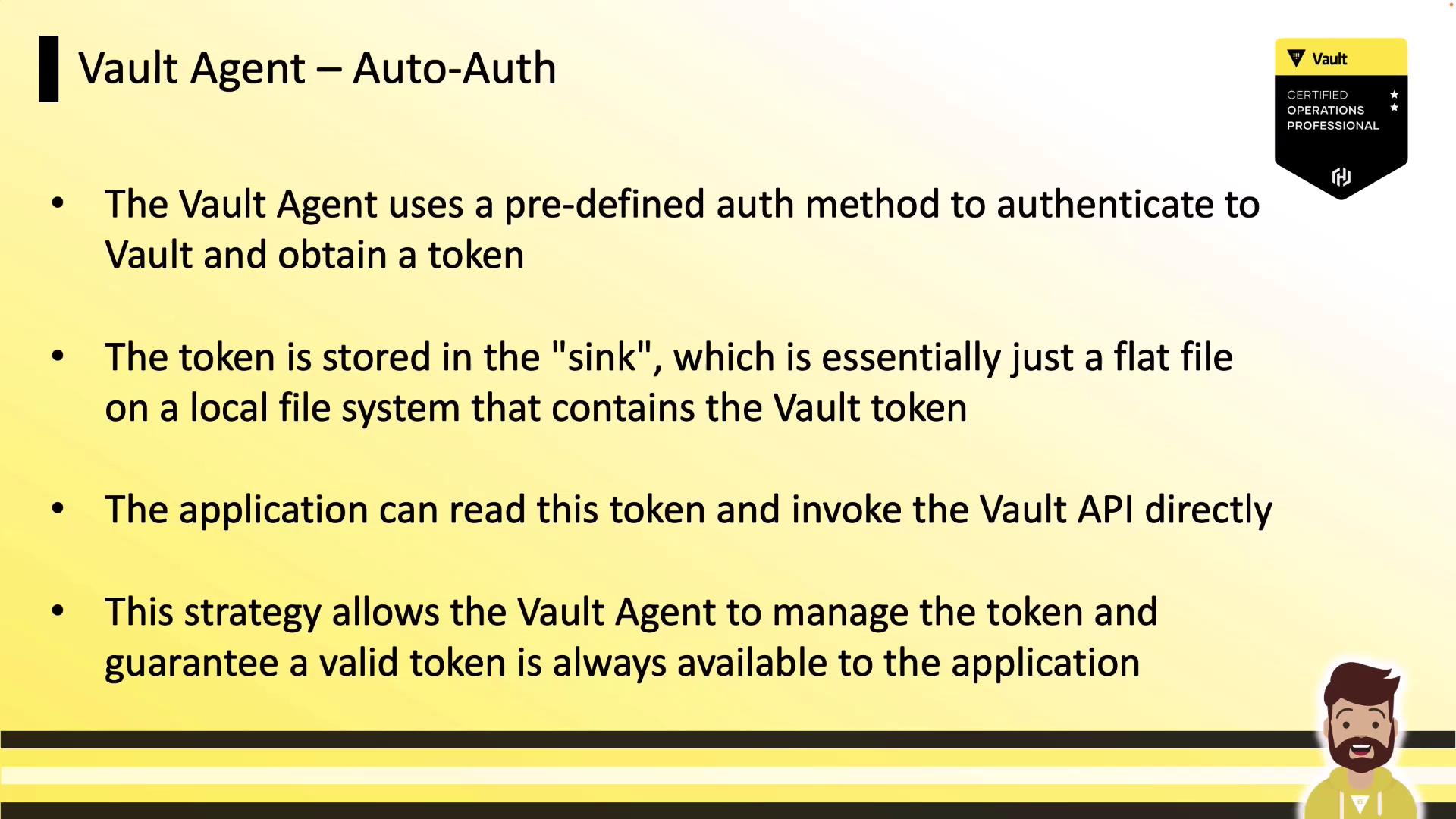
Vault Agent’s **auto-auth** feature is configured in a single HCL file. It authenticates using the specified method, writes the returned token to a flat file sink, and then handles reauthentication and renewal automatically.
<Frame>
  ![The image is a slide explaining the Vault Agent's auto-authentication process, detailing how it uses a predefined method to obtain and store a token, which applications can use to access the Vault API. It includes a certification badge and a cartoon character illustration.](https://kodekloud.com/kk-media/image/upload/v1752878248/notes-assets/images/HashiCorp-Certified-Vault-Associate-Certification-Vault-Agent-Auto-Auth-and-Token-Sink/vault-agent-auto-authentication-process-slide.jpg)
</Frame>

### Supported Auth Methods

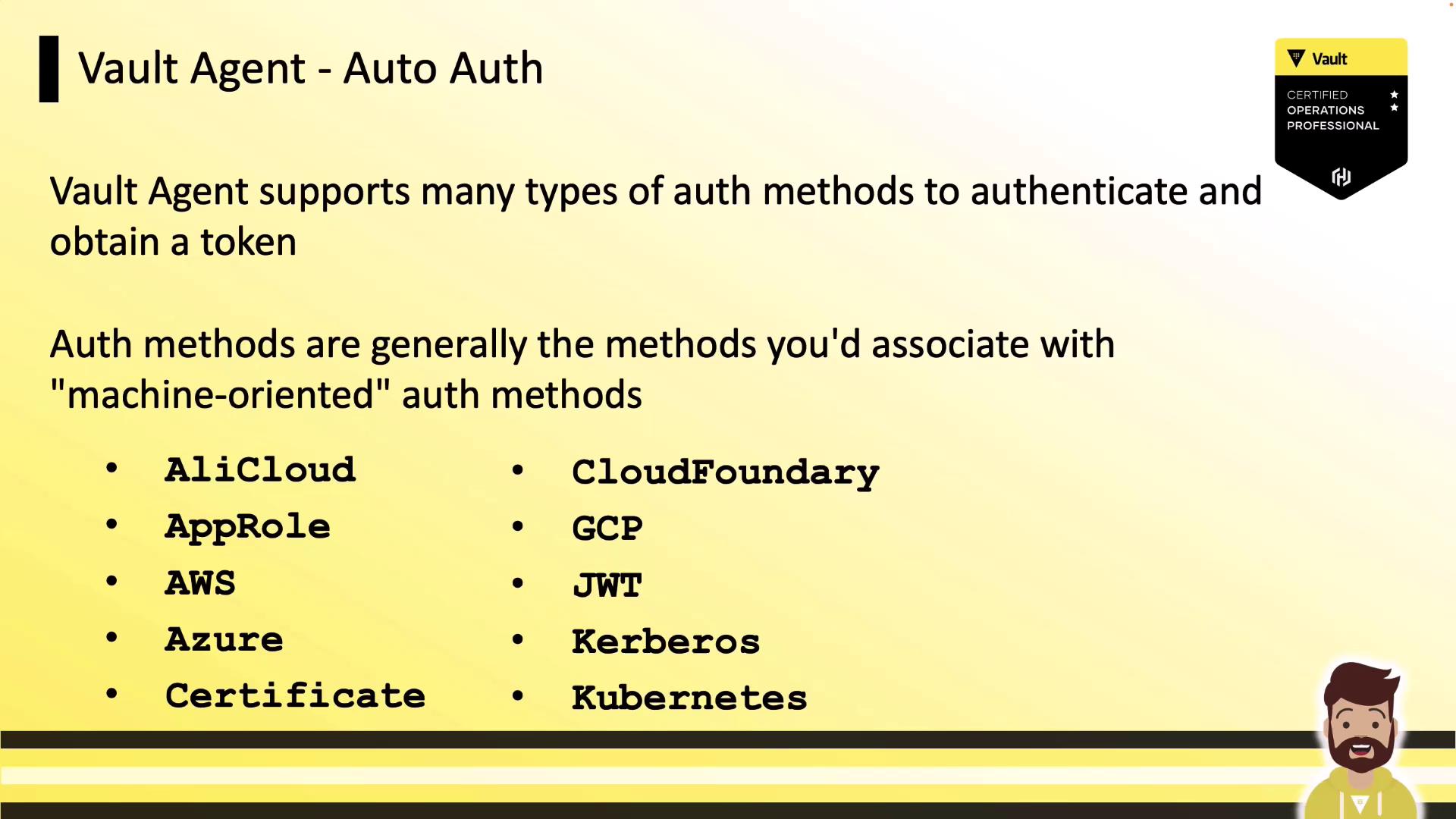
The Vault Agent supports all machine-oriented auth methods:

| Auth Method   | Use Case                               |
| ------------- | -------------------------------------- |
| AliCloud      | Vault on Alibaba Cloud                 |
| AWS           | IAM roles, EC2, ECS                    |
| Azure         | Managed identities, service principals |
| Certificate   | TLS certificate authentication         |
| Cloud Foundry | CF platform integration                |
| GCP           | GCE metadata, service accounts         |
| JWT           | Generic JWT validation                 |
| Kerberos      | Enterprise Kerberos realms             |
| Kubernetes    | ServiceAccount-based authentication    |
<Frame>
  ![The image is a presentation slide about Vault Agent's auto authentication methods, listing various machine-oriented auth methods like AliCloud, AWS, Azure, and Kubernetes. It also features a Vault certification badge and a cartoon character at the bottom.](https://kodekloud.com/kk-media/image/upload/v1752878249/notes-assets/images/HashiCorp-Certified-Vault-Associate-Certification-Vault-Agent-Auto-Auth-and-Token-Sink/vault-agent-auto-authentication-methods.jpg)
</Frame>

<Callout icon="lightbulb" color="#1CB2FE">
  For detailed configuration parameters (required and optional), see the [Vault Agent Auto-Auth documentation](https://www.vaultproject.io/docs/agent).
</Callout>

## Example: AppRole Auto-Auth Configuration

Below is a minimal HCL configuration for AppRole authentication, writing the token to a file sink:

```hcl theme={null}
auto_auth {
  method "approle" {
    mount_path = "auth/approle"
    config = {
      role_id_file_path   = "/etc/vault/role_id"
      secret_id_file_path = "/etc/vault/secret_id"
    }
  }
}

sink "file" {
  config = {
    path = "/etc/vault/token.txt"
  }
}

vault {
  address = "http://<cluster_IP>:8200"
}
```

## Sink Configuration

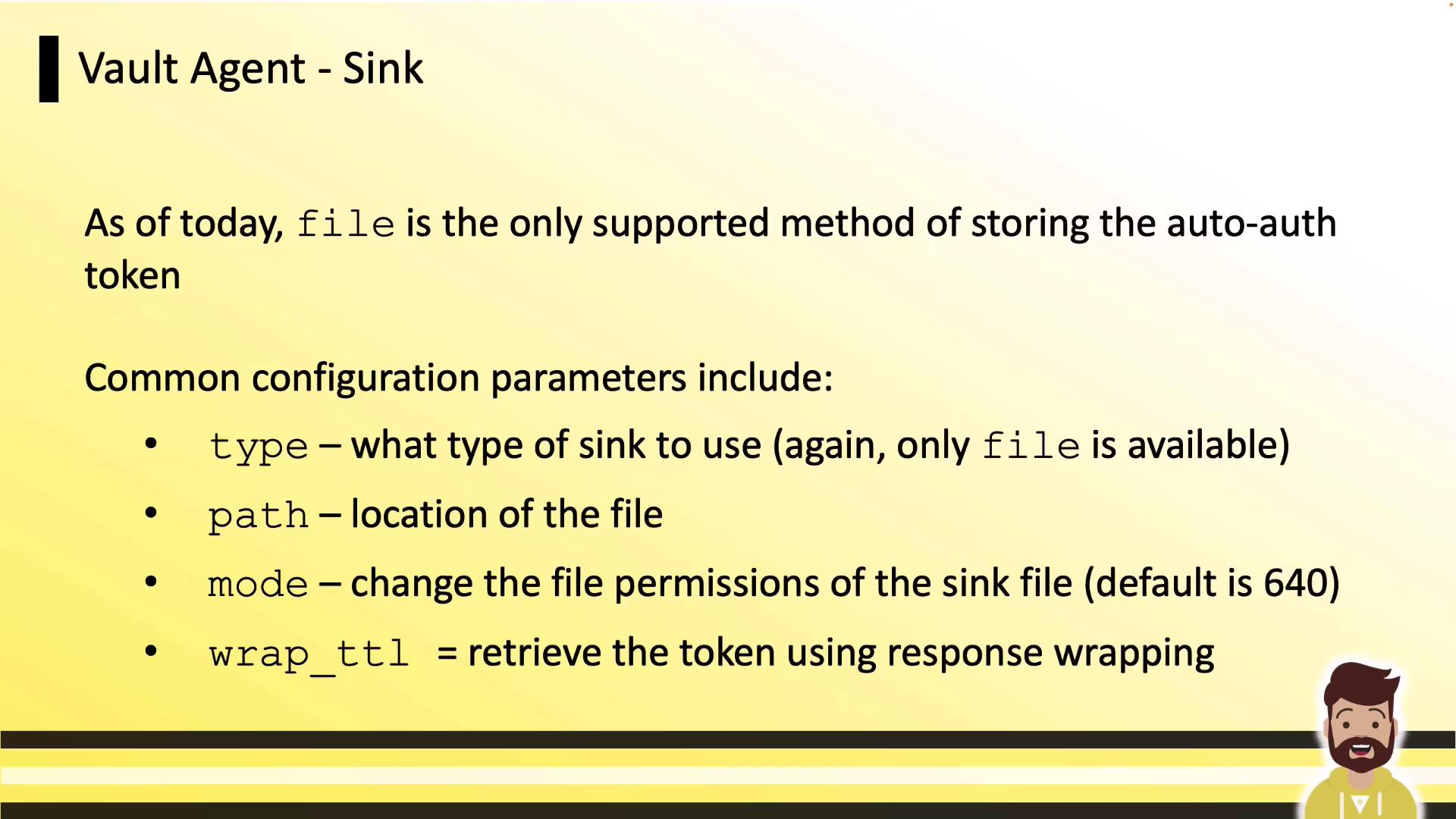
Vault Agent currently supports only the `file` sink type. Common parameters:

* `type` (always `file`)
* `path` (location for the token file)
* `mode` (file permissions, default `0640`)
* `wrap_ttl` (optional response-wrapping TTL)
<Frame>
  ![The image is a slide titled "Vault Agent - Sink," explaining that "file" is the only supported method for storing the auto-auth token, with configuration parameters like type, path, mode, and wrap\_ttl.](https://kodekloud.com/kk-media/image/upload/v1752878250/notes-assets/images/HashiCorp-Certified-Vault-Associate-Certification-Vault-Agent-Auto-Auth-and-Token-Sink/vault-agent-sink-auto-auth-token.jpg)
</Frame>

## Response Wrapping for Enhanced Security

To protect tokens in transit or at the host, Vault offers a [response-wrapping feature](https://www.vaultproject.io/docs/concepts/response-wrapping). You can apply wrapping at either the auth method or the sink.

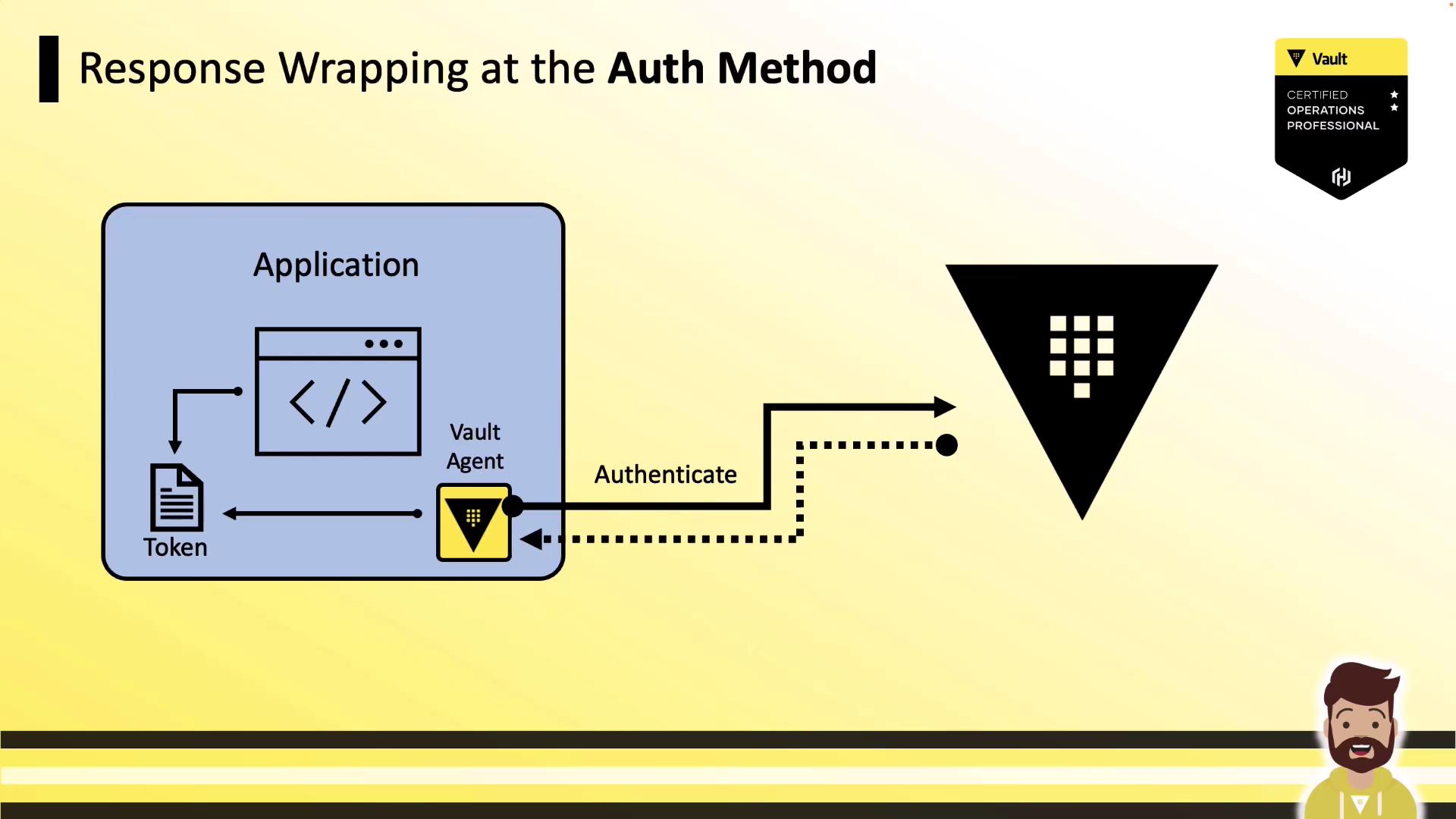
### 1. Wrap at the Auth Method

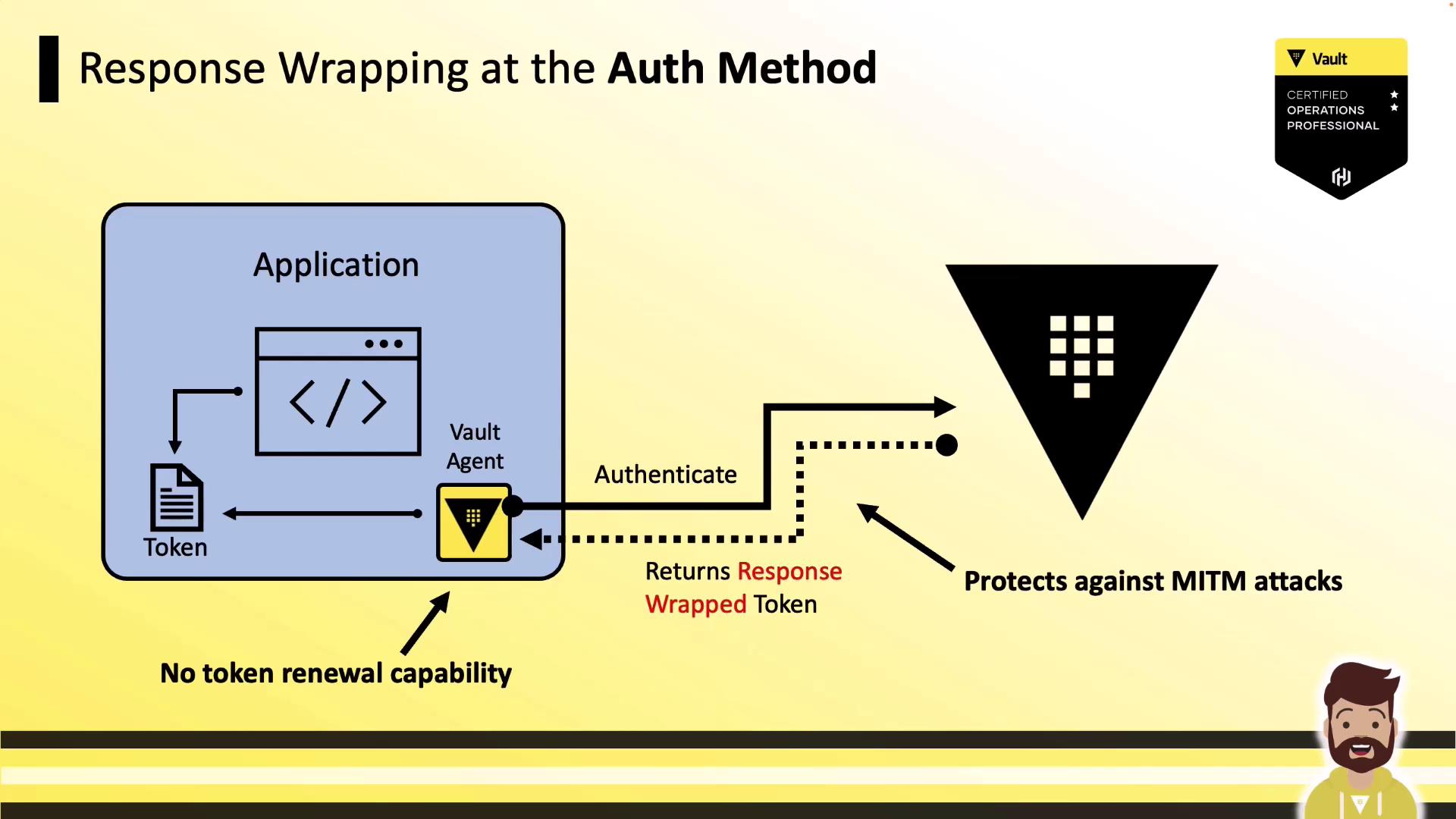
When you set `wrap_ttl` under the auth method, Vault returns a single-use wrapped token reference. This prevents eavesdropping on the actual token but means the Agent cannot renew it.

```hcl theme={null}
auto_auth {
  method "kubernetes" {
    mount_path = "auth/kubernetes"
    wrap_ttl   = "5m"         # wrap at auth method
    config = {
      role = "example-role"
    }
  }
}

vault {
  address = "http://<cluster_IP>:8200"
}
```

<Frame>
  ![The image illustrates a process of response wrapping at the authentication method, involving an application, a Vault agent, and a token. It includes a diagram showing the flow of authentication and token handling, with a Vault certification badge in the corner.](https://kodekloud.com/kk-media/image/upload/v1752878252/notes-assets/images/HashiCorp-Certified-Vault-Associate-Certification-Vault-Agent-Auto-Auth-and-Token-Sink/response-wrapping-authentication-diagram.jpg)
</Frame>

<Frame>
  ![The image illustrates the process of response wrapping at the authentication method, showing how a Vault Agent interacts with an application to protect against MITM attacks by returning a response-wrapped token. It highlights the lack of token renewal capability.](https://kodekloud.com/kk-media/image/upload/v1752878253/notes-assets/images/HashiCorp-Certified-Vault-Associate-Certification-Vault-Agent-Auto-Auth-and-Token-Sink/response-wrapping-authentication-vault-agent.jpg)
</Frame>

<Callout icon="triangle-alert" color="#FF6B6B">
  Response wrapping at the auth method protects against MITM but prevents token renewal.
</Callout>

### 2. Wrap at the Sink

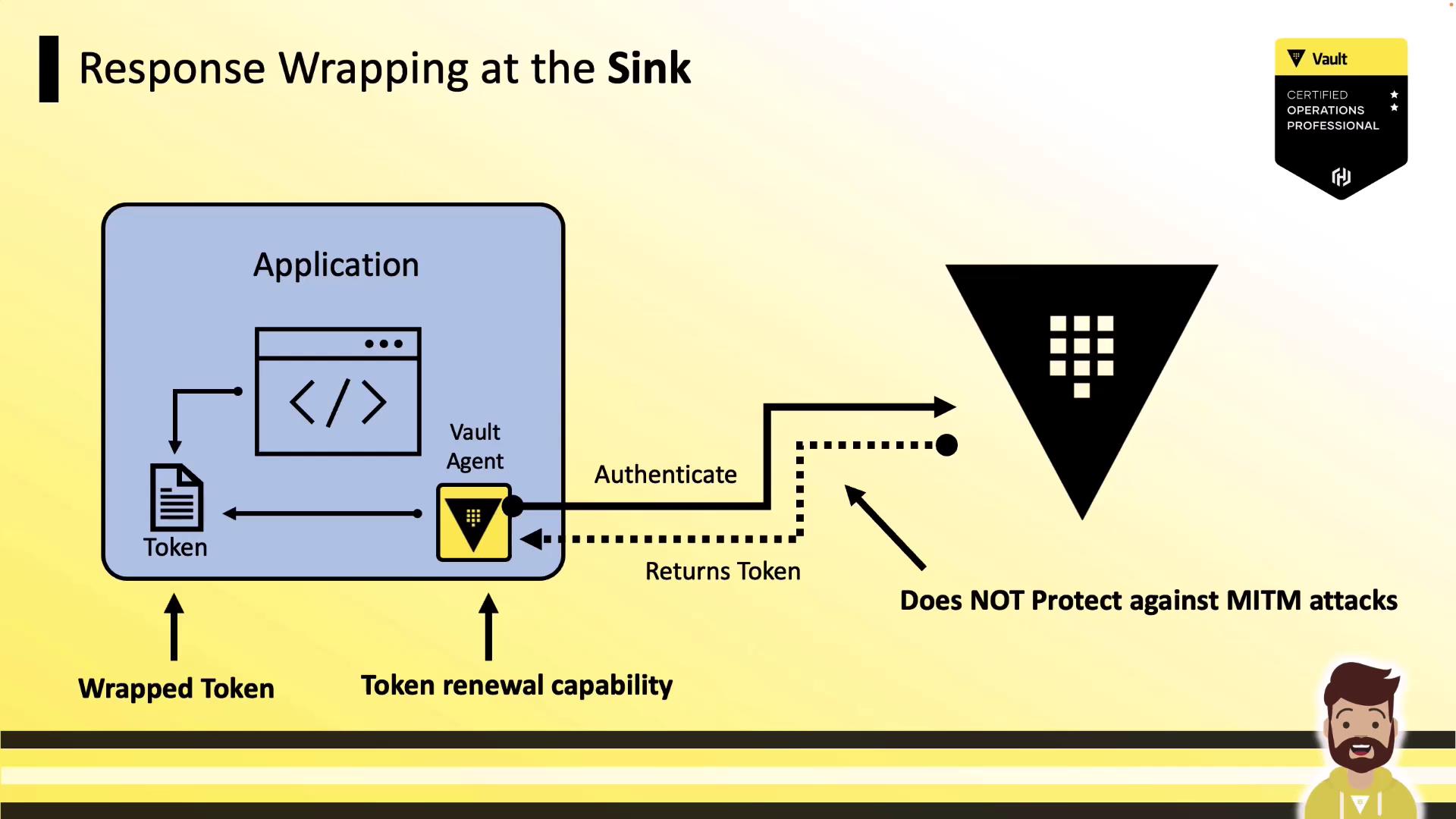
By setting `wrap_ttl` under the sink stanza, the Agent unwraps the Vault response and rewraps it for the application. The Agent can still renew the token, but the token travels in cleartext between Vault and the Agent.

```hcl theme={null}
auto_auth {
  method "kubernetes" {
    mount_path = "auth/kubernetes"
    config = {
      role = "example-role"
    }
  }
}

sink "file" {
  wrap_ttl = "5m"            # wrap at sink
  config = {
    path = "/etc/vault/token"
  }
}

vault {
  address = "http://<cluster_IP>:8200"
}
```

<Frame>
  ![The image illustrates a process of response wrapping at the sink, involving an application, a Vault agent, and token management, with a note that it does not protect against MITM attacks.](https://kodekloud.com/kk-media/image/upload/v1752878255/notes-assets/images/HashiCorp-Certified-Vault-Associate-Certification-Vault-Agent-Auto-Auth-and-Token-Sink/response-wrapping-sink-vault-token-management.jpg)
</Frame>

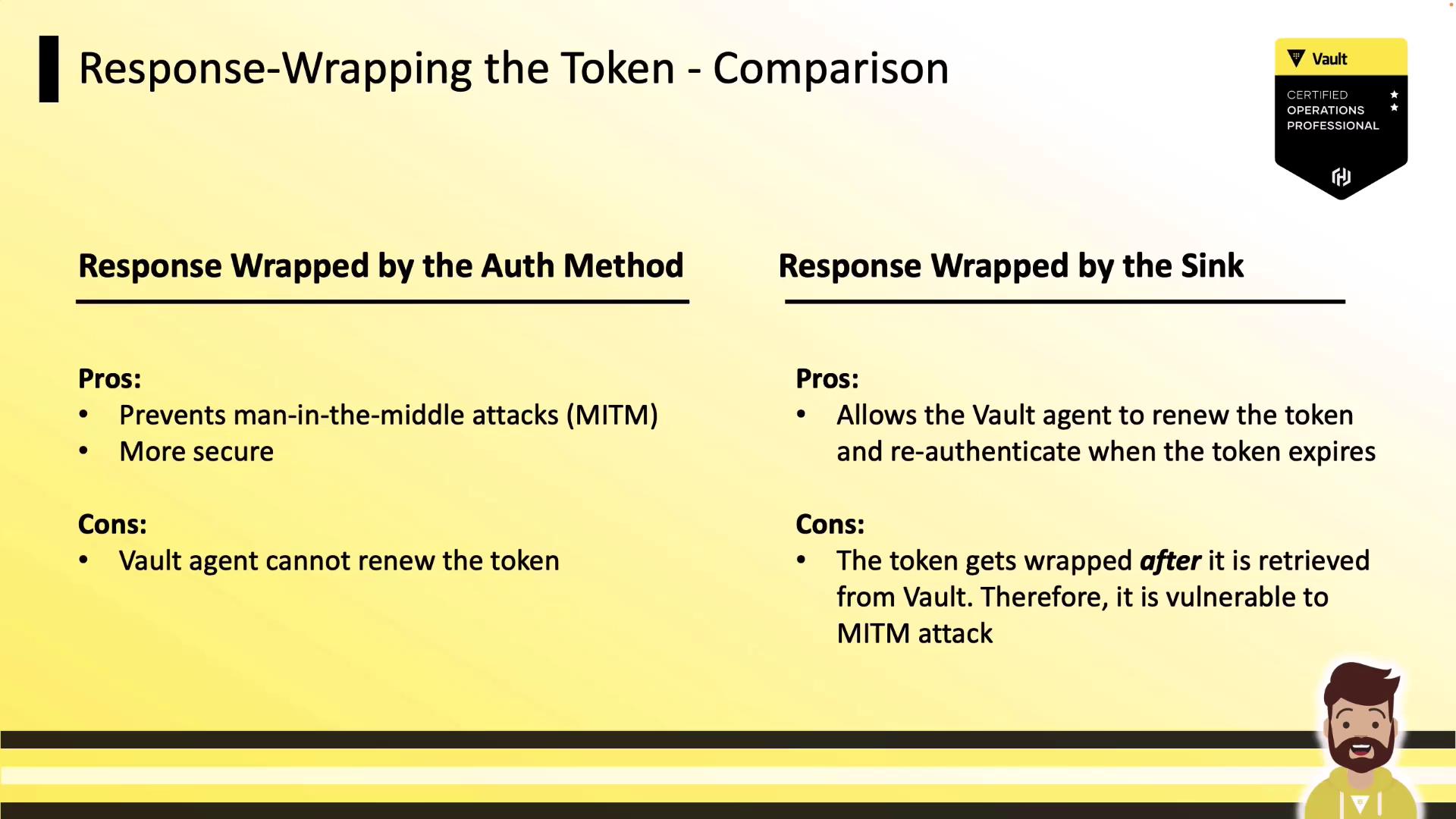
### Comparison of Wrapping Options

<Frame>
  ![The image is a comparison chart of two methods for response-wrapping tokens: "Response Wrapped by the Auth Method" and "Response Wrapped by the Sink," highlighting their pros and cons. It includes a Vault certification badge and a cartoon character at the bottom.](https://kodekloud.com/kk-media/image/upload/v1752878257/notes-assets/images/HashiCorp-Certified-Vault-Associate-Certification-Vault-Agent-Auto-Auth-and-Token-Sink/response-wrapping-comparison-chart.jpg)
</Frame>

| Option                 | Pro                                   | Con                                     |
| ---------------------- | ------------------------------------- | --------------------------------------- |
| Wrapped by Auth Method | Protects against network interception | Agent cannot renew the token            |
| Wrapped by Sink        | Agent can renew and manage the token  | Token is sent in cleartext to the Agent |

## Conclusion

Vault Agent’s Auto-Auth and Token Sink features simplify secret injection for legacy applications by centralizing authentication, renewal, and local storage of Vault tokens. Response wrapping further enhances security according to your threat model.

## Links and References

* [Vault Agent Auto-Auth Documentation](https://www.vaultproject.io/docs/agent)
* [Vault Response Wrapping](https://www.vaultproject.io/docs/concepts/response-wrapping)
* [HashiCorp Vault: AppRole Auth Method](https://www.vaultproject.io/docs/auth/approle)
* [Kubernetes Authentication](https://www.vaultproject.io/docs/auth/kubernetes)

<CardGroup>
  <Card title="Watch Video" icon="video" cta="Learn more" href="https://learn.kodekloud.com/user/courses/hashicorp-certified-vault-associate-certification/module/25b89318-77a0-4f52-a4d7-2df3696e3362/lesson/36f320d3-c826-4efa-a1e1-b495057a65bc" />
</CardGroup>