> ## Documentation Index
> Fetch the complete documentation index at: https://notes.kodekloud.com/llms.txt
> Use this file to discover all available pages before exploring further.
# Vault Agent Templating
> This article explains how Vault Agents templating feature allows legacy applications to access Vault secrets from a local file without direct API calls.
Learn how HashiCorp Vault Agent’s templating feature enables legacy applications to consume Vault secrets from a local file—no direct API calls required.
## The Challenge with Legacy Applications
Many legacy apps cannot call Vault’s HTTP API. Even if Vault Agent auto-authenticates and fetches a token, the application can’t use it without direct Vault access. To bridge this gap, Vault Agent can render secrets into a local file that the application reads like any other configuration.
## What Is Consul Template?
Vault Agent’s templating builds on [Consul Template](https://github.com/hashicorp/consul-template), a standalone utility that:
* Renders data from Vault or Consul into files
* Manages automatic secrets retrieval and renewal
* Operates without a running Consul cluster when used with Vault
### How Consul Template Works
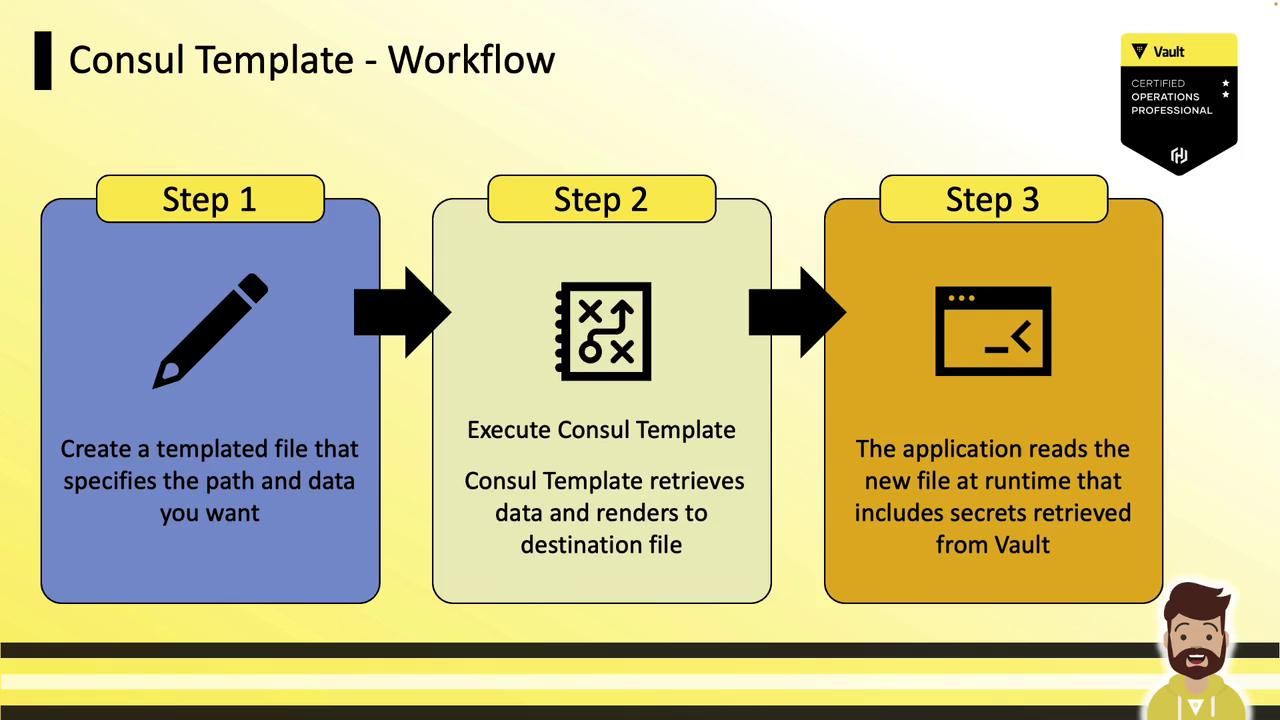
Consul Template follows a simple three-step workflow:
1. **Template Definition**\
Create a template file specifying Vault paths and placeholders.
2. **Rendering**\
Run Consul Template; it fetches secrets and writes them to the destination file.
3. **Application Consumption**\
The app reads the rendered file at runtime as a static config.
### Example Template (`config.tmpl`)
```yaml theme={null}
production:
adapter: postgresql
encoding: unicode
database: orders
host: postgres.hcvop.com
{{ with secret "database/creds/readonly" }}
username: "{{ .Data.username }}"
password: "{{ .Data.password }}"
{{ end }}
```
* `secret "database/creds/readonly"` points to the Vault secret path.
* `.Data.username` and `.Data.password` extract the JSON fields returned by Vault.
After rendering, `config.yml` contains:
```yaml theme={null}
production:
adapter: postgresql
encoding: unicode
database: orders
host: postgres.hcvop.com
username: "readonly-username"
password: "readonly-password"
```
The application simply reads `config.yml` for its credentials.
## Vault Agent Templating Overview
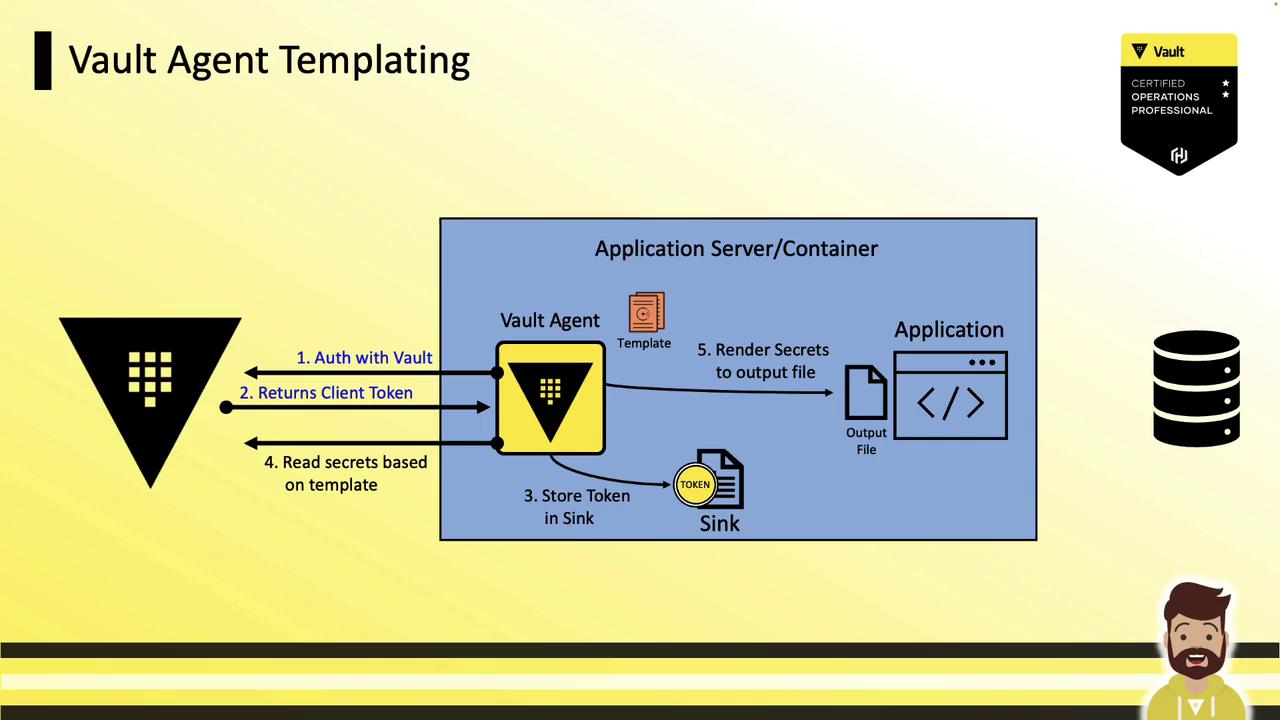
Vault Agent now embeds Consul Template functionality—no separate binary needed. It handles both auto-auth and templating in one process:
1. **Auto Auth**\
Vault Agent authenticates (e.g., [AppRole](/docs/auth/approle), [Kubernetes](/docs/auth/kubernetes)) and writes the token to a sink.
2. **Templating**\
It reads secrets via the template and renders them to a local file.
3. **Application**\
The app reads the rendered file and connects to external services using up-to-date credentials.
### Comparing Consul Template vs. Vault Agent Templating
| Feature | Consul Template | Vault Agent Templating |
| -------------- | -------------------------- | ------------------------ |
| Binary | Separate `consul-template` | Built into `vault agent` |
| Authentication | External token required | Integrated Auto Auth |
| Secret Renewal | Managed by Consul Template | Managed by Vault Agent |
| Configuration | HCL or CLI flags | HCL in `agent.hcl` |
## Example Vault Agent Configuration
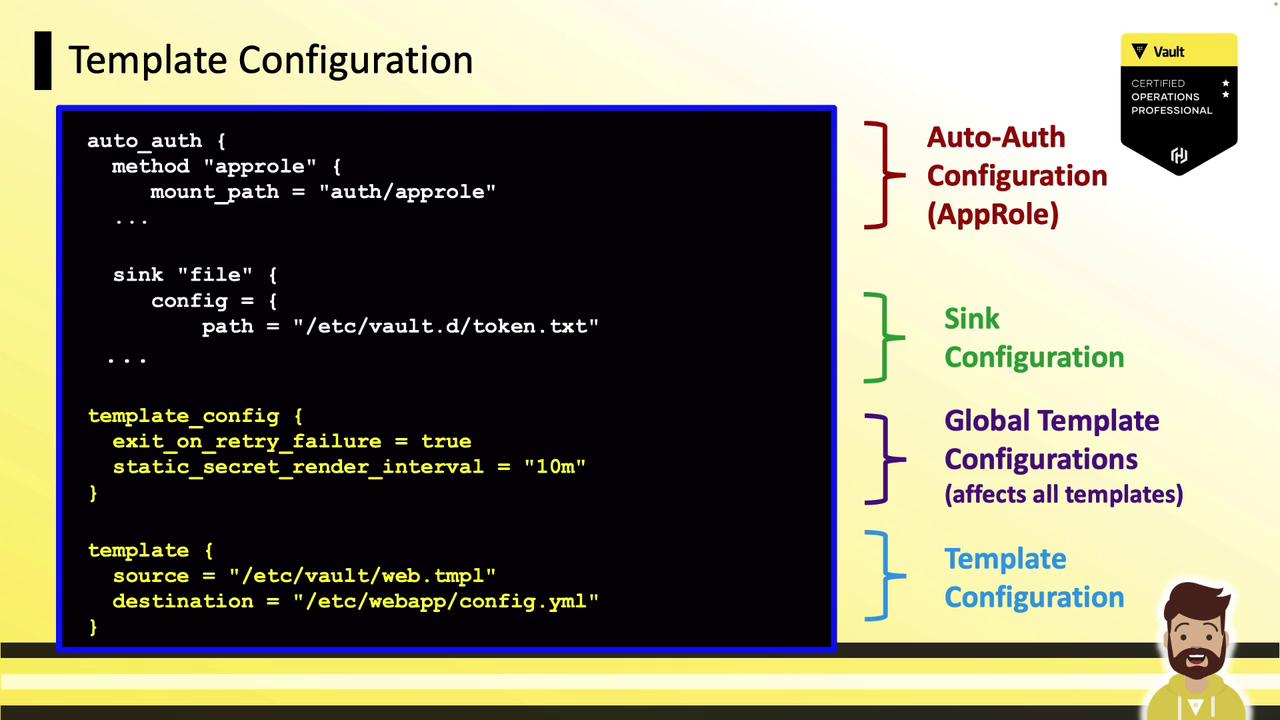
Use this HCL snippet to enable templating in Vault Agent:
Ensure you’re running Vault Agent version 1.5+ to use built-in templating.
```hcl theme={null}
auto_auth {
method "approle" {
mount_path = "auth/approle"
# AppRole role_id & secret_id will be supplied here
}
sink "file" {
config = {
path = "/etc/vault.d/token.txt"
mode = 0640
}
}
}
template_config {
exit_on_retry_failure = true # Exit if rendering fails permanently
static_secret_render_interval = "10m" # Refresh KV secrets every 10 minutes
}
template {
source = "/etc/vault/web.tmpl"
destination = "/etc/webapp/config.yml"
perms = "0640"
}
```
Storing tokens on disk can be a security risk. Protect the sink file with appropriate OS permissions.
The template file (`/etc/vault/web.tmpl`) can mirror the earlier Consul Template example.
With this setup, you can run legacy or unmodified applications without any Vault-specific code changes—they simply read secrets from a local file.
## Links and References
* [Vault Auto Auth (AppRole)](https://www.vaultproject.io/docs/auth/approle)
* [Vault Auto Auth (Kubernetes)](https://www.vaultproject.io/docs/auth/kubernetes)
* [Consul Template GitHub](https://github.com/hashicorp/consul-template)
* [HashiCorp Vault Documentation](https://www.vaultproject.io/docs/)