> ## Documentation Index
> Fetch the complete documentation index at: https://notes.kodekloud.com/llms.txt
> Use this file to discover all available pages before exploring further.
# Identity Secrets Engine
> Vault’s Identity Secrets Engine manages identities and policies, tracks clients, maps authentication methods, and enables scalable policy assignment using groups.
Vault’s Identity Secrets Engine is the core component for managing identities and policies in Vault. It tracks all clients (entities), maps authentication methods to those entities via aliases, and enables scalable policy assignment using groups.
## Overview
The Identity Secrets Engine is mounted by default in Vault (path: `identity/`). It cannot be disabled or moved.
Key characteristics:
* Represents every Vault client as an **entity**, each with:
* A unique entity ID.
* Zero or more **aliases** linking auth methods.
* Operators can manage entities, aliases, and groups via the **UI**, **CLI**, or **API**.
* On first login, Vault auto-creates an entity and alias if none exist.
| Feature | Description |
| ------------- | ------------------------------------------------------ |
| Entities | Unique identities for users or systems |
| Aliases | Links between auth methods and entities |
| Groups | Collections of entities for policy management at scale |
| Default Mount | Always enabled at `identity/` |
## Entities and Aliases
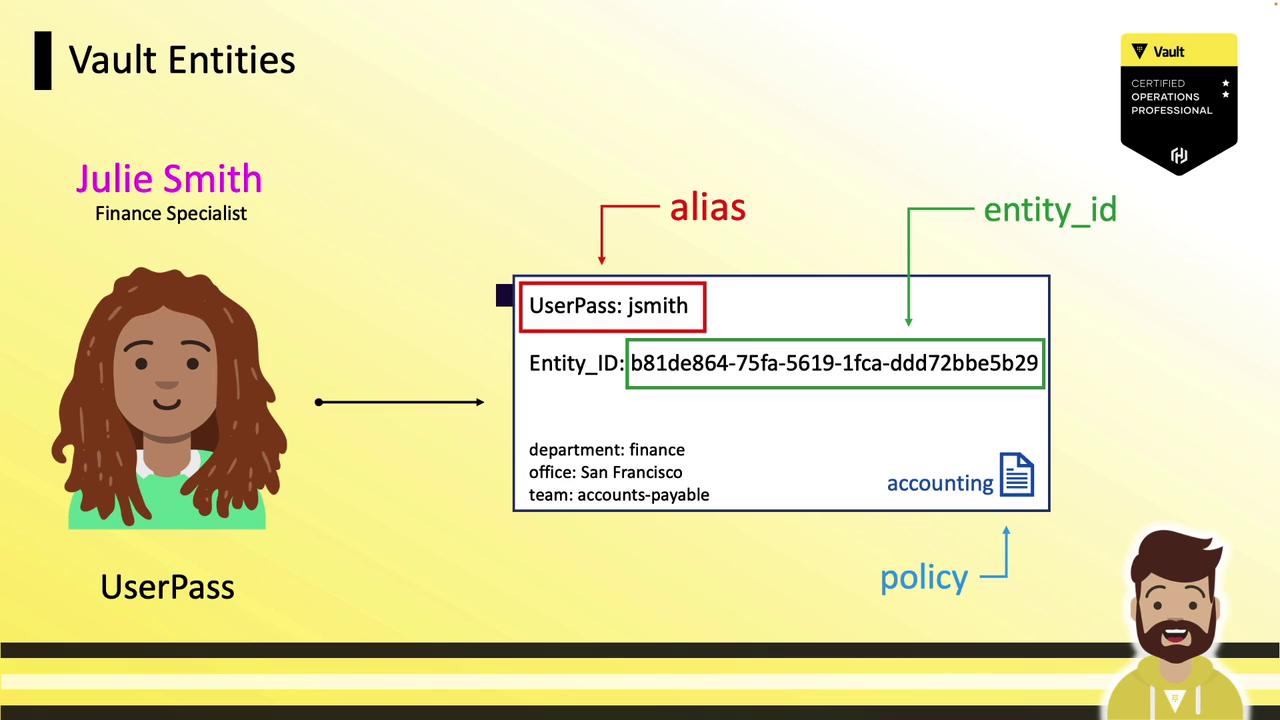
An **entity** represents one person or system. An **alias** maps a particular authentication method to that entity. You can pre-create entities and add aliases later or let Vault handle it automatically.
When a new user logs in via **userpass**, Vault:
1. Creates an entity (e.g., `b81de864-...`).
2. Attaches an alias combining the auth method (`userpass`) and username (`JSmith`).
3. Associates policies and optional metadata.
Example CLI commands:
```bash theme={null}
vault write identity/entity name="Julie Smith" metadata=department=finance policies="management"
vault write identity/entity-alias name="JSmith" canonical_id="E48C..." mount_accessor="$(vault auth list -format=json | jq -r '.userpass_accessor')"
```
## Multiple Authentication Methods
Without consolidation, multiple auth methods create separate entities:
* `userpass/JSmith` → entity `B81D…` (policy: `accounting`)
* `ldap/jsmith@example.com` → entity `E93D…` (policy: `finance`)
* `github/jsmith22` → entity `F45A…` (policy: `accounts-payable`)
This fragmentation can complicate policy management and reporting.

### Consolidating into a Single Entity
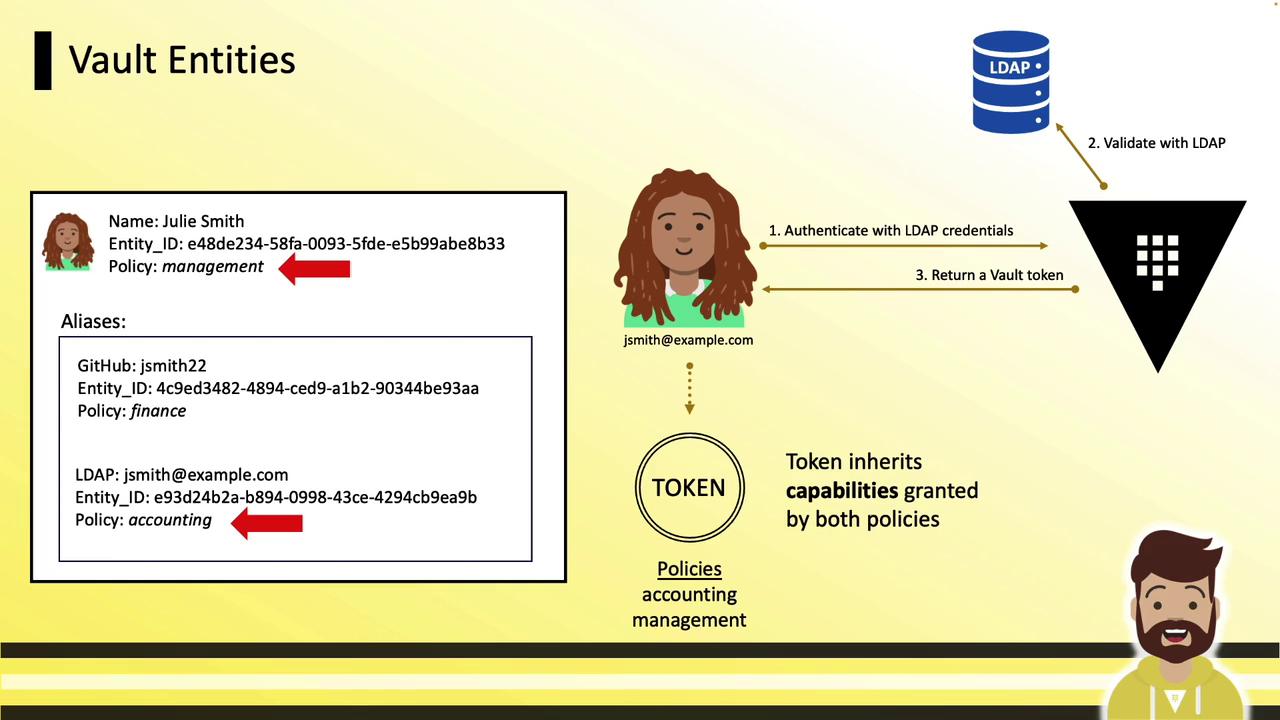
To unify access, create one **Julie Smith** entity and attach all auth method aliases:
1. Create the entity and assign shared policy (`management`):
```bash theme={null}
vault write identity/entity name="Julie Smith" policies="management"
```
2. Add aliases for each auth method:
```bash theme={null}
vault write identity/entity-alias name="JSmith" canonical_id="E48C..." mount_accessor="userpass_accessor"
vault write identity/entity-alias name="jsmith@example.com" canonical_id="E48C..." mount_accessor="ldap_accessor"
vault write identity/entity-alias name="jsmith22" canonical_id="E48C..." mount_accessor="github_accessor"
```
3. On login via any method, tokens inherit:
* Alias-level policy (e.g., `accounting`)
* Entity-level policy (`management`)
## Vault Groups
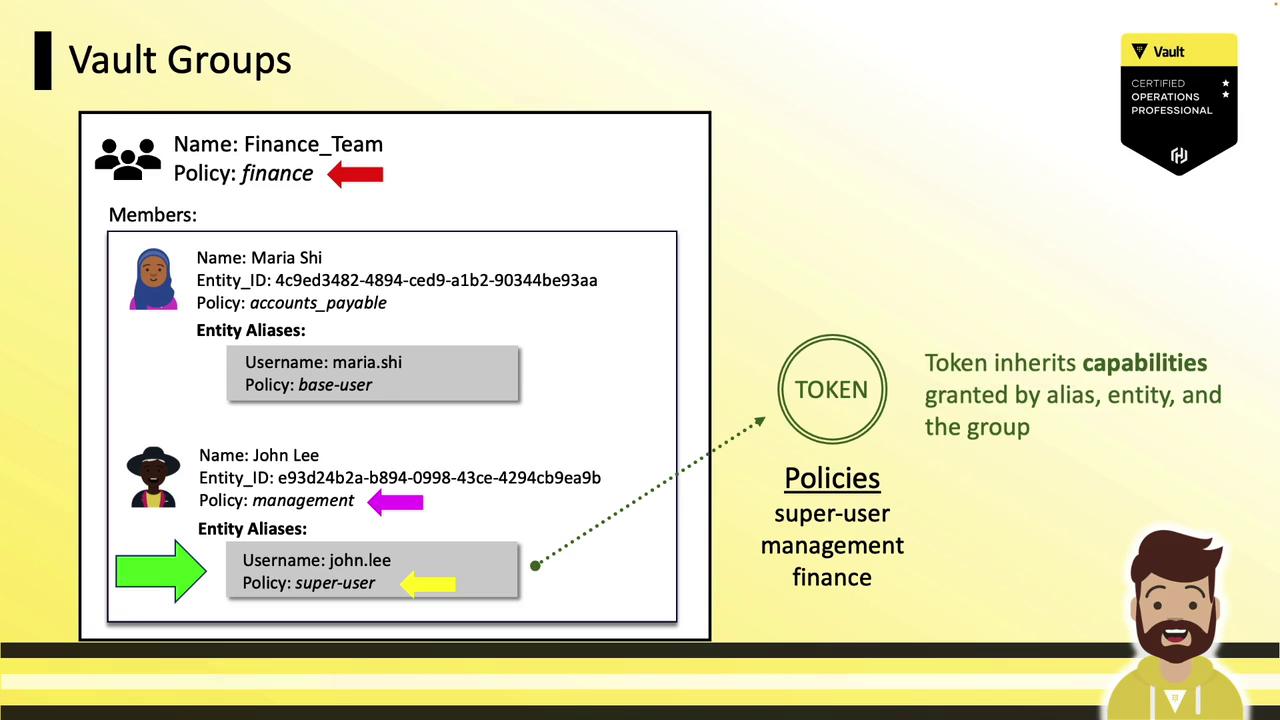
Groups enable policy management for many entities simultaneously:
* A **group** can contain entities and subgroups.
* Assign policies at the group level; all members inherit them.
* Similar to directory-based groups (LDAP/AD).
Example: A **Finance Team** group with the `finance` policy includes:
* Maria (entity-level `accounts-payable`)
* John (entity-level `management`)
On login, tokens merge policies from:
1. Alias
2. Entity
3. Group
## Internal vs. External Groups
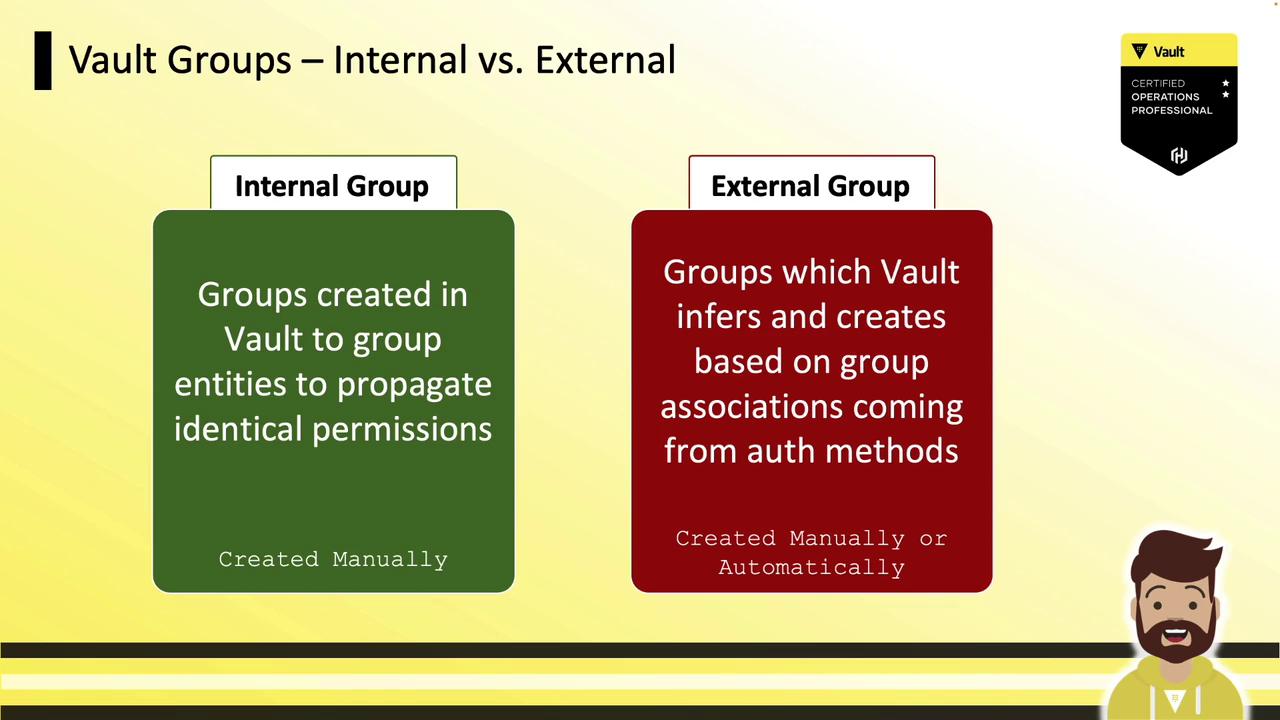
Vault supports two group types:
| Group Type | Creation | Membership Source | Use Case |
| -------------- | -------------------- | ---------------------- | ----------------------------------------------------- |
| Internal Group | Manually in Vault | Vault managed | Propagate permissions across namespaces |
| External Group | Auto-mapped from IdP | LDAP, OIDC, Okta, etc. | Mirror external identity provider groups and policies |
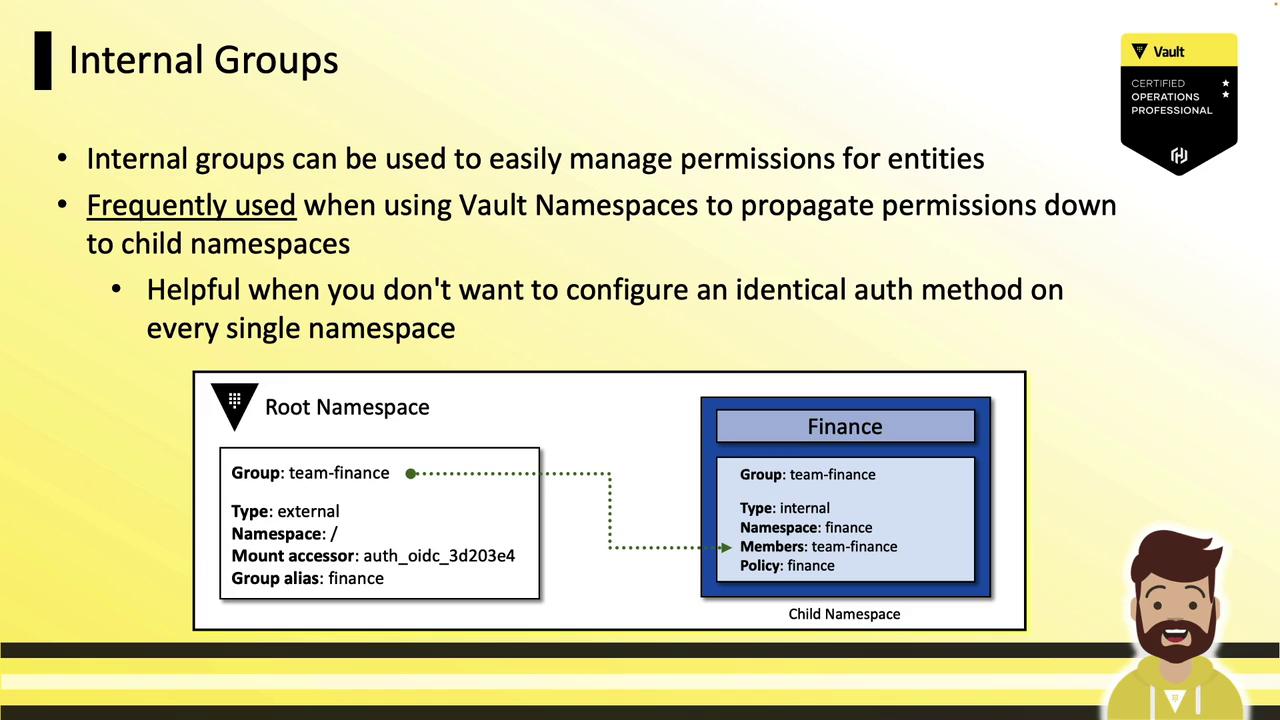
### Internal Groups and Namespaces
Use internal groups at the root namespace to grant child namespaces access without reconfiguring auth everywhere:
* At root: create an internal group `team-finance` with policy `finance`.
* In child namespace (`finance`): reference the root group as a subgroup.
* Users authenticated at root automatically gain child namespace permissions.
### External Groups
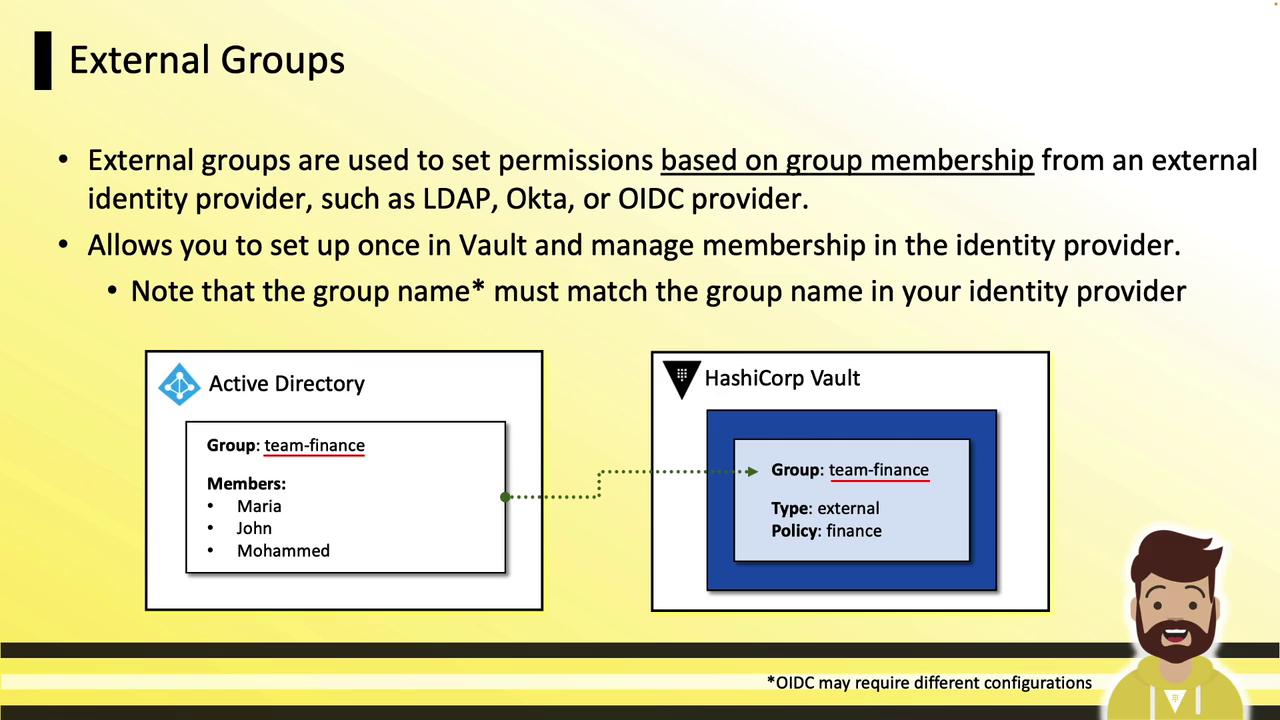
External groups sync with your identity provider’s groups:
* Create a Vault external group (e.g., `team-finance`).
* Map an alias to the provider’s group name or UUID.
* Assign policies in Vault; manage membership in your IdP.
On login, Vault reflects current IdP memberships and applies policies.
## Summary
* **Entities** unify clients under a unique identifier.
* **Aliases** link auth methods to entities for granular policies.
* **Groups** (internal/external) scale policy management across teams and namespaces.
* Use the Vault **CLI** and **UI** to configure entities, aliases, and groups.
## Links and References
* [Vault Identity Secrets Engine](https://www.vaultproject.io/docs/secrets/identity)
* [Managing Identities and Access](https://www.vaultproject.io/guides/identity)
* [HashiCorp Vault CLI](https://www.vaultproject.io/docs/commands)