> ## Documentation Index
> Fetch the complete documentation index at: https://notes.kodekloud.com/llms.txt
> Use this file to discover all available pages before exploring further.
# Userpass Auth Method
> The Userpass authentication method allows Vault clients to log in using a username and password stored in Vault for basic credential management.
The Userpass authentication method enables Vault clients to log in using a username and password stored in Vault itself. Since it doesn’t depend on an external identity provider, Userpass is perfect for quick labs, testing environments, and simple use cases where you need basic credential management without added complexity.
Userpass does not enforce password complexity, expiration, or rotation by default. For production workloads, consider integrating Vault with [external identity providers][vault-oidc] or LDAP.
## How It Works
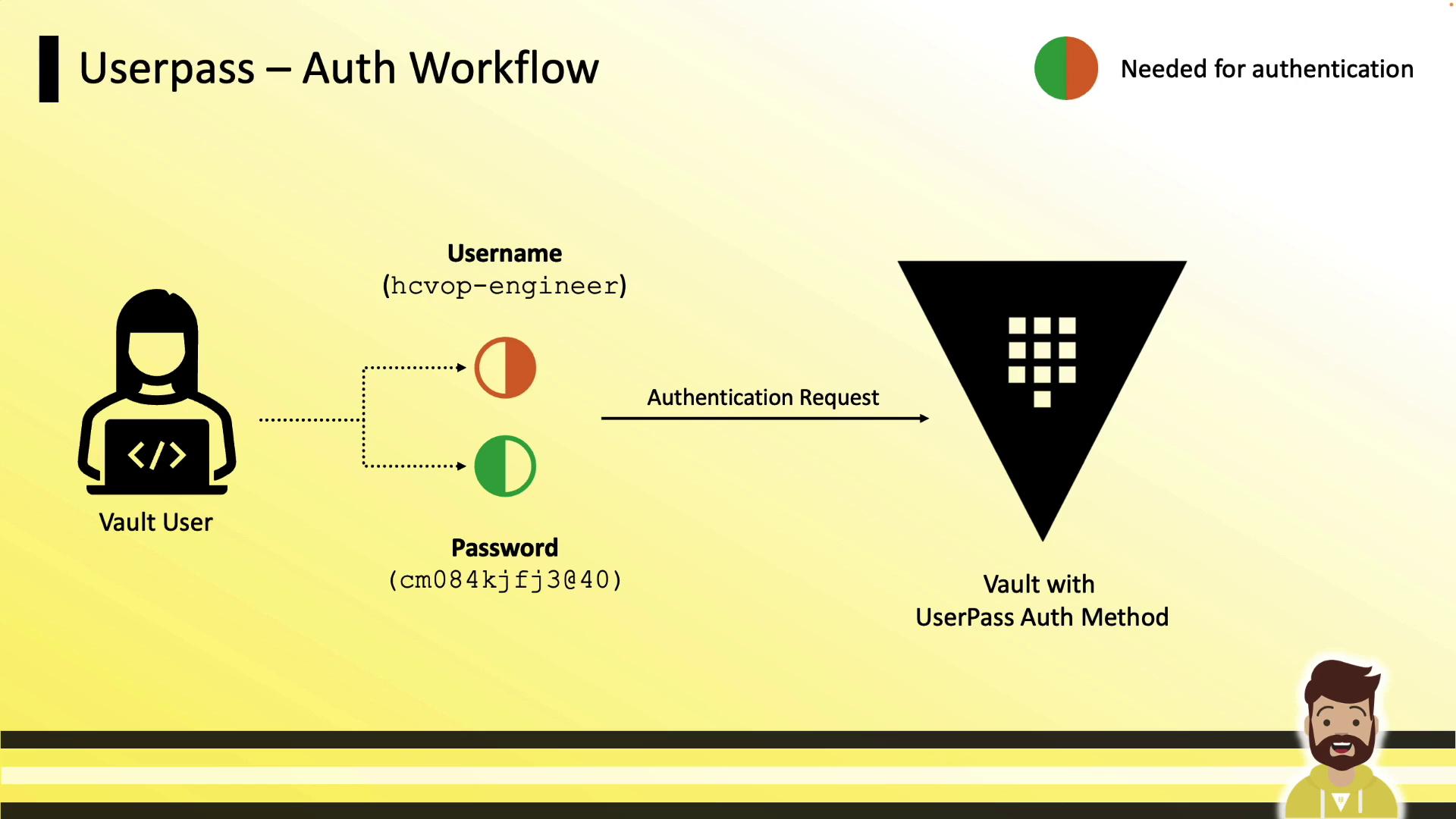
1. User provides **username** (e.g., `hcvop-engineer`) and **password**.
2. Vault validates credentials and issues a **token**.
3. The token is used to interact with Vault’s API and secrets engines.
## Configuration Workflow
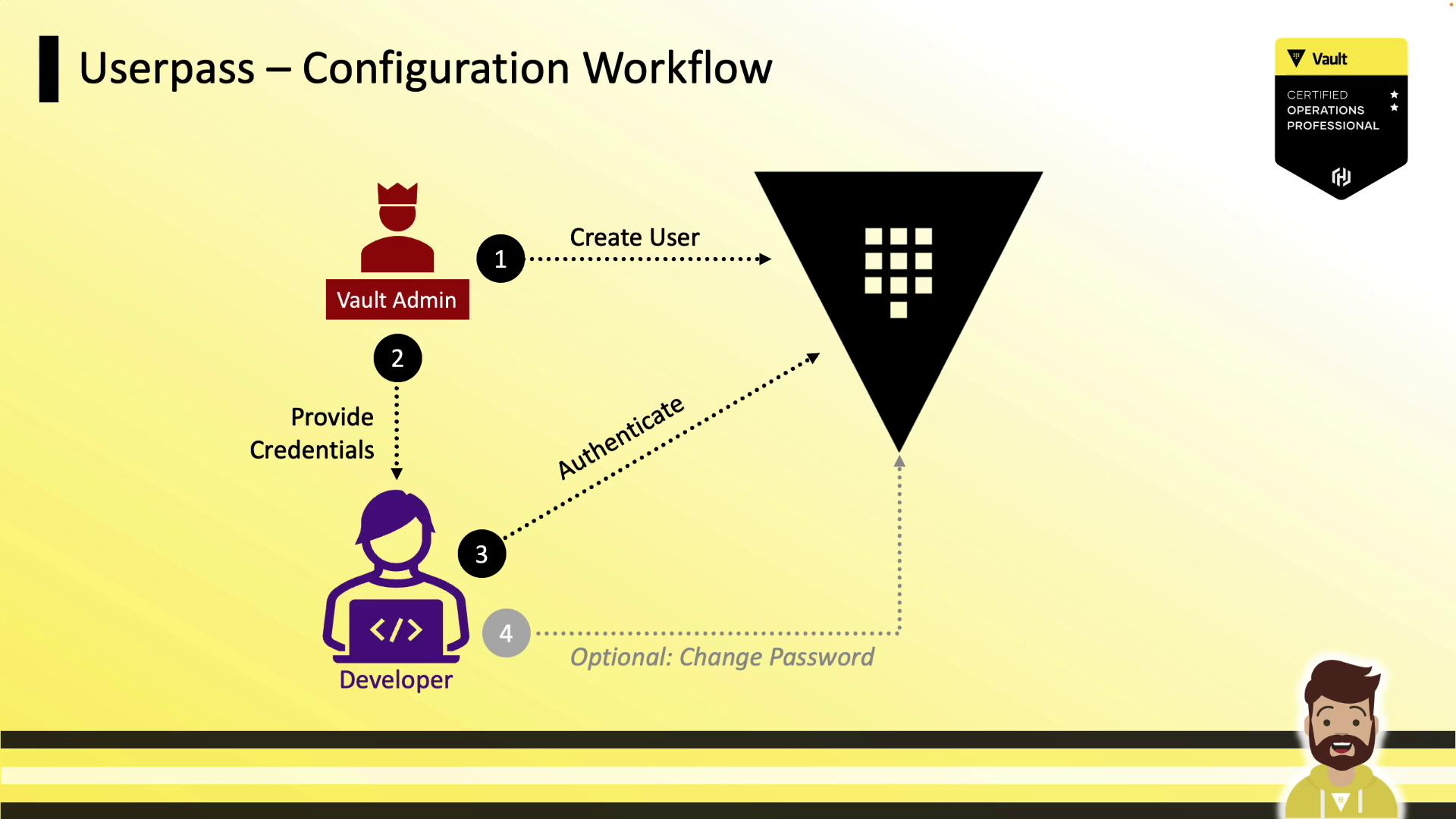
1. Vault Admin **enables** the `userpass` auth method.
2. Admin **creates** a user with policies and token settings.
3. Admin hands off credentials to the Developer.
4. Developer **logs in** and obtains a token.
5. Developer may **update** their password if allowed by policy.
## Enabling Userpass
```bash theme={null}
# Enable at default path (userpass/)
vault auth enable userpass
# Or enable at custom path (e.g., vault-local/)
vault auth enable -path=vault-local userpass
```
## Creating a User
Run `vault write` against the `auth/userpass/users/` path:
```bash theme={null}
vault write auth/userpass/users/hcvop-engineer \
password=cm084kjfj340 \
policies=engineering-policy \
token_ttl=15m \
token_max_ttl=8h
```
| Parameter | Description | Example |
| --------------- | ------------------------------------------------- | -------------------- |
| password | Initial user password | `cm084kjfj340` |
| policies | Comma-separated Vault policies | `engineering-policy` |
| token\_ttl | Time-to-live for issued tokens | `15m` |
| token\_max\_ttl | Maximum time-to-live before renewal is disallowed | `8h` |
You can assign multiple policies (e.g., `default`,`engineering-policy`) or fine-tune token parameters per user.
## Additional Token Configuration Options
| Option | Description | Example |
| ------------------- | ---------------------------------- | ---------------------------------- |
| token\_type | Token type (`default` or `batch`) | `token_type=batch` |
| token\_num\_uses | Maximum number of uses for a token | `token_num_uses=5` |
| token\_bound\_cidrs | CIDR list restricting token usage | `token_bound_cidrs="10.1.16.0/16"` |
| token\_period | Duration for periodic tokens | `token_period=1h` |
Include these flags in the same `vault write` command when creating or updating a user.
## Reading User Settings
Retrieve user configuration:
```bash theme={null}
vault read auth/userpass/users/hcvop-engineer
```
Sample output:
```text theme={null}
Key Value
--- -----
policies [engineering-policy]
token_bound_cidrs []
token_explicit_max_ttl 0s
token_max_ttl 8h
token_ttl 15m
token_type default
```
## Modifying User Configuration
To update a single attribute, re-run `vault write` with the changed flag:
```bash theme={null}
vault write auth/userpass/users/hcvop-engineer token_type=batch
```
Only the specified setting (`token_type`) is updated; other attributes remain intact.
## Authenticating with Userpass
```bash theme={null}
vault login -method=userpass username=hcvop-engineer
# Prompts for password (hidden)
```
Successful authentication returns:
* **Token**
* **Duration** (TTL)
* **Renewable** flag
* **Attached policies**
Your CLI automatically caches the token for subsequent commands.
## Password Rotation
Grant users the ability to update their own password by adding this to their policy:
```hcl theme={null}
path "auth/userpass/users/{{identity.entity.aliases.userpass.username}}/password" {
capabilities = ["update"]
}
```
Then users can run:
```bash theme={null}
vault write auth/userpass/users/hcvop-engineer/password password=xmeij9dk20je
```
This enables self-service rotation without exposing credentials to admins.
## Best Practices and Considerations
* Regularly **revoke** or **delete** user entries when access is no longer required.
* Implement an **external password policy** (complexity, expiry) via automation or scripts.
* For enterprise use, prefer **OIDC**, **LDAP**, or **Kerberos** auth methods to centralize identity management.
## Links and References
* [HashiCorp Vault Userpass Auth][vault-userpass]
* [Vault Authentication Methods][vault-auth-methods]
* [Vault CLI Commands][vault-cli]
[vault-userpass]: https://www.vaultproject.io/docs/auth/userpass
[vault-auth-methods]: https://www.vaultproject.io/docs/auth
[vault-cli]: https://www.vaultproject.io/docs/commands
[vault-oidc]: https://www.vaultproject.io/docs/auth/jwt#oidc-and-jwt-configuration