> ## Documentation Index
> Fetch the complete documentation index at: https://notes.kodekloud.com/llms.txt
> Use this file to discover all available pages before exploring further.
# Terraform Cloud Workspaces
> Terraform Cloud Workspaces are organizational units that manage and isolate infrastructure collections, each with its own state, variables, and run history.
Terraform Cloud Workspaces are the core organizational units within Terraform Cloud. They let you isolate, manage, and collaborate on collections of infrastructure—each with its own state, variables, and run history.
A workspace bundles everything Terraform needs to manage a specific environment or component in your Terraform Cloud organization:

Key features include:
* Linked Version Control System (VCS) repository for configuration
* Workspace-level variables (plaintext and sensitive)
* Remote, managed state storage
* Historical run logs, cost estimation, governance, and notifications
***
## Table of Contents
1. [Key Components](#key-components-of-a-workspace)
2. [Units of Isolation](#units-of-isolation)
3. [Real-World Example: Airline Corporation](#real-world-example-airline-corporation)
4. [Reducing the Blast Radius](#reducing-the-blast-radius)
5. [Naming Conventions](#naming-conventions)
6. [Workspace Settings](#workspace-settings)
7. [Execution Modes](#execution-modes)
8. [Getting Started](#getting-started-with-terraform-cloud)
9. [References](#references)
***
## Key Components of a Workspace
| Component | Description | Benefits |
| ----------------- | -------------------------------------------------------------------------------------- | --------------------------------------------- |
| Remote State | Stores Terraform state files centrally in Terraform Cloud. | Secure, shareable state with version history |
| Variables | Define environment-specific or secret values in the workspace UI or via API. | Centralized management of sensitive data |
| Operations & Logs | Execute `plan`, `apply`, and `destroy` remotely or locally, with complete run history. | Audit trail, notifications, and collaboration |
***
## Units of Isolation
Workspaces act as isolated directories, each maintaining its own state. This decomposition reduces risk by preventing unintended cross-environment changes:

Typical decomposition:
* **App** → Dedicated workspace
* **Network** → Shared workspace
* **Database** → Separate workspace
***
## Real-World Example: Airline Corporation
An airline might organize by application tier and environment:

Possible workspace layout:
| Component | Environments |
| ---------- | ----------------------- |
| Front End | dev, qa, prod |
| Back End | dev, qa, prod |
| Networking | shared network services |
***
## Reducing the Blast Radius
Combining multiple environments in one state file risks cross-environment side effects. By isolating Dev, QA, and Prod in separate workspaces, changes in QA can never impact Prod:
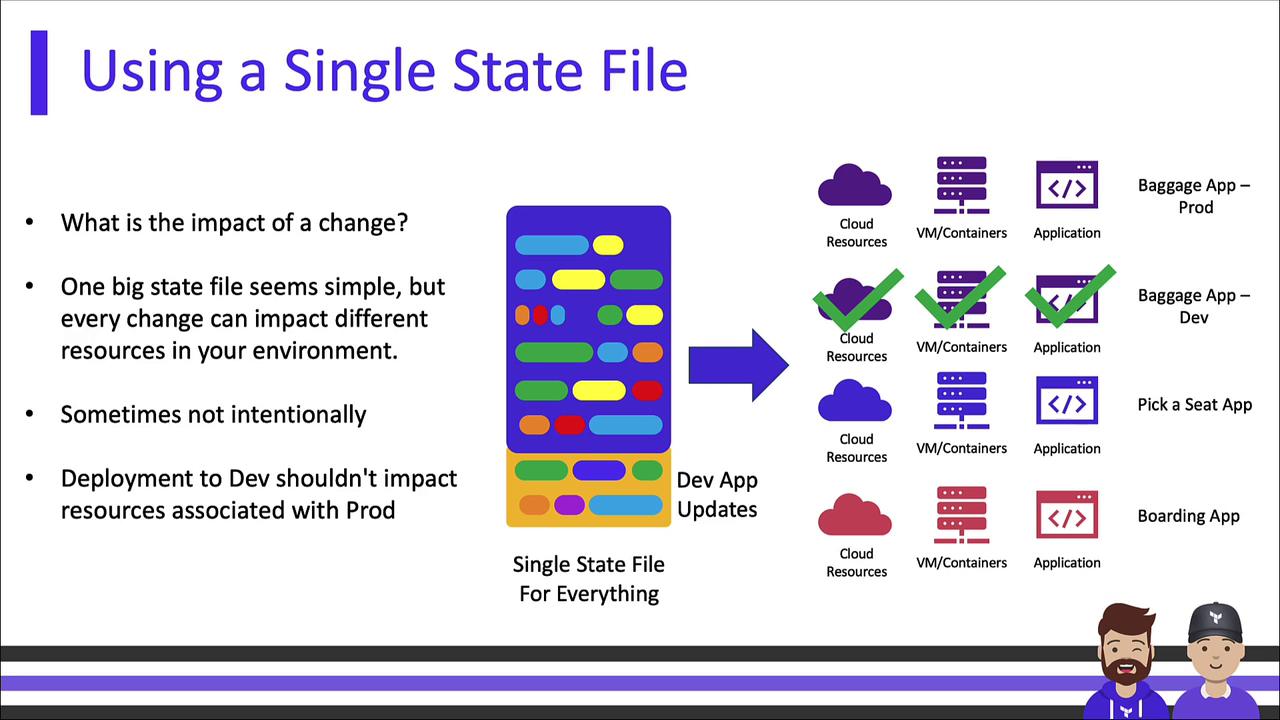
With dedicated `qa` and `prod` workspaces:

***
## Naming Conventions
Consistent workspace names simplify filtering, access control, and governance. Include:
* Application or component
* Environment (e.g., `dev`, `qa`, `prod`)
* Region or cloud provider
* Team or project prefix
Examples:
| Naming Pattern | Example |
| ---------------------- | ---------------- |
| `-` | `ecom-web-prod` |
| `--` | `adt-mobile-qa` |
| `--` | `ecom-usw1-prod` |
***
## Workspace Settings
Each workspace offers granular settings:

* Terraform version selection
* Run history, logs, and cost estimates
* Role-based access control (RBAC)
* Notifications (email, Slack, webhook)
* Governance & policy checks via Sentinel or OPA
***
## Execution Modes
Terraform Cloud supports two modes for running operations:
### Local Execution
Run Terraform commands on your workstation, but store state remotely in Terraform Cloud. Ideal for minimal workflow changes:

### Remote Execution
All operations execute within Terraform Cloud’s infrastructure, centralizing runs, logs, and policies:

To enable policy enforcement, advanced cost estimation, and team management, consider upgrading your Terraform Cloud plan.

***
## Getting Started with Terraform Cloud
Add a `backend` or `cloud` block in your `terraform` configuration, then initialize:
```hcl theme={null}
# Terraform 1.0 and Earlier
terraform {
backend "remote" {
hostname = "app.terraform.io"
organization = "my-organization"
workspaces {
name = "my-workspace"
}
}
}
# Terraform 1.1 and Later
terraform {
cloud {
hostname = "app.terraform.io"
organization = "my-organization"
workspaces {
name = "my-workspace"
}
}
}
```
Run:
```bash theme={null}
terraform init
```
This configures Terraform Cloud for state storage and workspace management.
You can also configure workspaces via the [Terraform Cloud API](https://www.terraform.io/docs/cloud/api/workspaces.html) or the `tfe` provider.
***
By leveraging Terraform Cloud Workspaces, you can clearly separate environments, enforce policy and governance, and scale collaborations across teams. Choose a naming convention, select the execution mode that fits your workflow, and get full visibility into your infrastructure changes.
***
## References
* [Terraform Cloud Documentation](https://www.terraform.io/docs/cloud/index.html)
* [Remote State in Terraform](https://www.terraform.io/docs/language/state/remote.html)
* [Terraform Sentinel Policies](https://www.terraform.io/docs/cloud/sentinel/index.html)