> ## Documentation Index
> Fetch the complete documentation index at: https://notes.kodekloud.com/llms.txt
> Use this file to discover all available pages before exploring further.
# DynamoDB Dax Demo
> Step by step guide to creating and configuring an Amazon DAX cluster, covering sizing, networking, IAM, encryption, parameter groups, monitoring, and operational best practices.
This guide walks you step-by-step through creating an Amazon DAX (DynamoDB Accelerator) cluster and highlights configuration choices to consider for development and production environments. It covers node sizing, networking, IAM, encryption, parameter groups, monitoring, and operational best practices.
Key topics: Amazon DAX, DynamoDB Accelerator, cluster creation, DAX endpoint, security groups, IAM policies, encryption, parameter group, monitoring, maintenance.
Prerequisites
* AWS account with permissions to create DAX clusters, IAM roles/policies, and VPC/subnet/security-group resources.
* A VPC with at least one subnet in each Availability Zone you plan to use.
* Applications or compute (EC2, ECS, EKS, Lambda in VPC) able to reach the DAX endpoint on the required port.
Useful references
* [Amazon DynamoDB Documentation](https://docs.aws.amazon.com/dynamodb/)
* [Amazon DAX Documentation](https://docs.aws.amazon.com/amazondynamodb/latest/developerguide/DAX.html)
## Step-by-step cluster creation
1. Open the DynamoDB console, choose **Clusters**, then **Create cluster**.\
Enter a cluster name — this example uses `cluster1`.
2. Choose a DAX node type (instance family and size). DAX supports families tuned for different workloads:
| Instance family | Use case |
| -------------------- | -------------------------------------------------------------------------- |
| T (burstable) | Cost-effective for light or variable workloads with occasional CPU bursts. |
| R (memory-optimized) | Higher memory and sustained performance for heavier caching needs. |
Select the instance size that fits your memory and CPU requirements. For demos or cost-sensitive tests, `dax.t2.small` (one vCPU) is a common choice.
3. Select the number of nodes. Recommendations:
* Development/testing: single-node clusters are possible for quick trials (console will warn).
* Production: use a multi-node cluster (AWS recommends a minimum of three nodes) to ensure availability and replication.
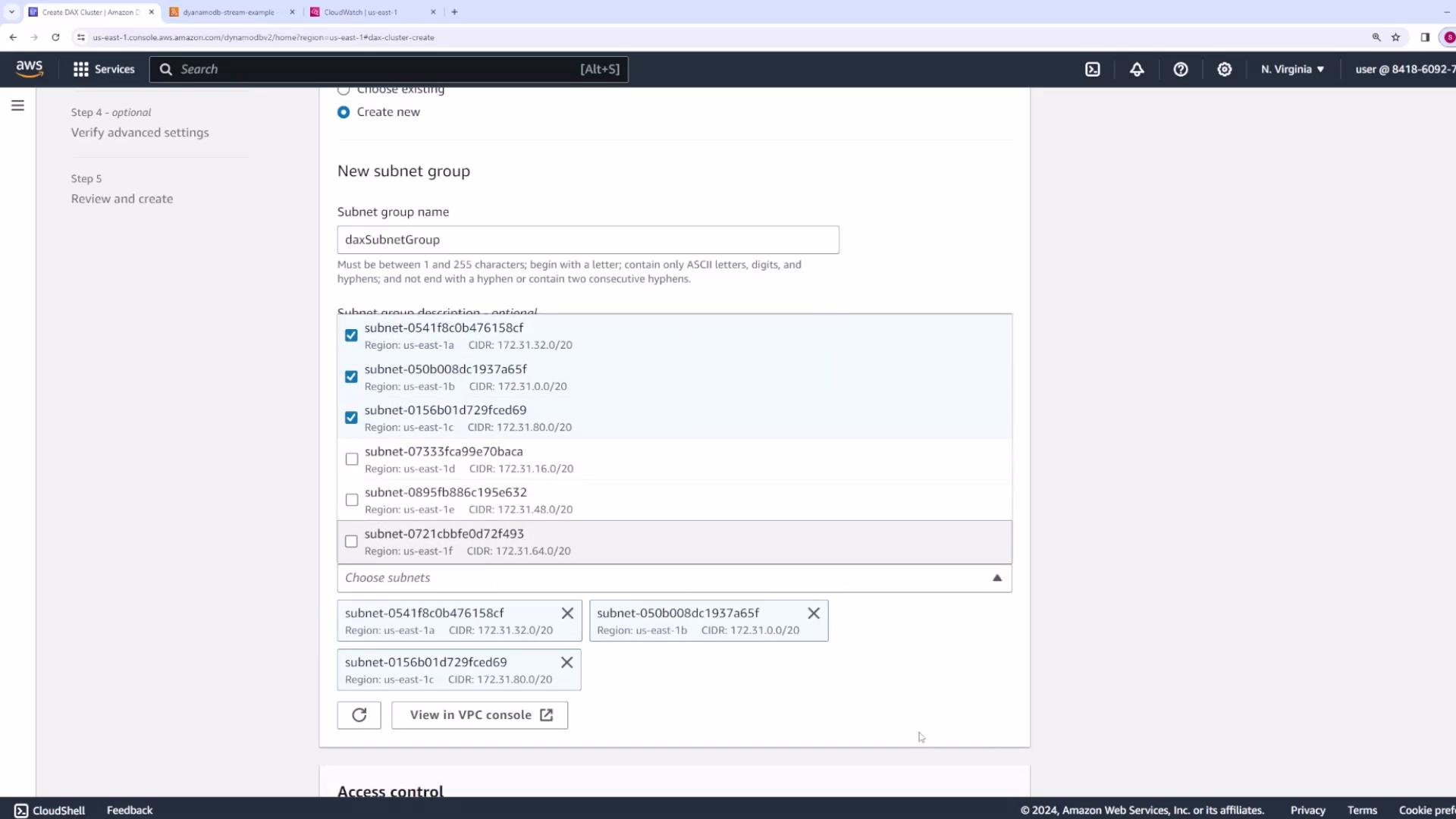
4. Create or pick a subnet group for DAX. Provide a name (for example, `DAX subnet group`), choose the VPC to deploy into (the default VPC can be used for demos), and add the subnets that will host cluster nodes.
 5. Configure security groups and network access. Make sure inbound rules allow clients to reach the DAX cluster on the DAX port:
* Port `8111` for DAX client traffic (TLS-enabled clients still use port `8111`).
* If you perform any management or custom networking that references different ports, document and open them only as required.
5. Configure security groups and network access. Make sure inbound rules allow clients to reach the DAX cluster on the DAX port:
* Port `8111` for DAX client traffic (TLS-enabled clients still use port `8111`).
* If you perform any management or custom networking that references different ports, document and open them only as required.
 Make sure your application instances (EC2, ECS tasks, Lambda functions in a VPC, etc.) are allowed to reach the DAX cluster on the required port. If using encryption in transit, ensure clients are configured to use TLS when connecting.
6. Availability Zones (AZs): choose whether AWS should select AZs automatically (recommended for even distribution) or choose specific AZs manually to meet locality or compliance requirements.
7. IAM role and policies:
* Create a service-linked role for DAX and attach an IAM policy that grants DAX access to DynamoDB tables.
* Decide scope:
* Read-write access when DAX should handle both reads and writes.
* Read-only access when DAX is used strictly for caching reads.
* For security, scope policies to only the required table ARNs rather than granting access to all tables.
Turn on encryption settings according to your security requirements:
* Encryption at rest (protects data stored on DAX nodes).
* Encryption in transit (TLS between client and DAX). Note: clients still connect on port `8111` when TLS is enabled.
Make sure your application instances (EC2, ECS tasks, Lambda functions in a VPC, etc.) are allowed to reach the DAX cluster on the required port. If using encryption in transit, ensure clients are configured to use TLS when connecting.
6. Availability Zones (AZs): choose whether AWS should select AZs automatically (recommended for even distribution) or choose specific AZs manually to meet locality or compliance requirements.
7. IAM role and policies:
* Create a service-linked role for DAX and attach an IAM policy that grants DAX access to DynamoDB tables.
* Decide scope:
* Read-write access when DAX should handle both reads and writes.
* Read-only access when DAX is used strictly for caching reads.
* For security, scope policies to only the required table ARNs rather than granting access to all tables.
Turn on encryption settings according to your security requirements:
* Encryption at rest (protects data stored on DAX nodes).
* Encryption in transit (TLS between client and DAX). Note: clients still connect on port `8111` when TLS is enabled.
 8. Parameter group: choose the default parameter group or create a custom one. Parameter groups control runtime settings such as:
* Item TTL (how long an item remains in the DAX cache).
* Query TTL (how long query results are cached).
Review default TTLs and create/attach a custom parameter group if you require different cache durations or other tuning parameters.
8. Parameter group: choose the default parameter group or create a custom one. Parameter groups control runtime settings such as:
* Item TTL (how long an item remains in the DAX cache).
* Query TTL (how long query results are cached).
Review default TTLs and create/attach a custom parameter group if you require different cache durations or other tuning parameters.
 9. Maintenance window: choose “No preference” or specify a preferred maintenance window for DAX patches and upgrades to minimize disruption.
10. Review all settings and click **Create cluster**.
After cluster creation, open the cluster details page to find important operational information:
* Cluster endpoint (use this in your DAX-enabled SDK client configuration so requests route through DAX).
* Cluster ARN and node list.
Example: configuring a Node.js DAX client (using the Amazon DAX client)
```javascript theme={null}
const AmazonDaxClient = require('amazon-dax-client');
const AWS = require('aws-sdk');
const dax = new AmazonDaxClient({endpoints: ['cluster1.abc123.clustercfg.dax.us-east-1.amazonaws.com:8111']});
const docClient = new AWS.DynamoDB.DocumentClient({service: dax});
// Use docClient as you would a normal DocumentClient; requests are routed through DAX
```
9. Maintenance window: choose “No preference” or specify a preferred maintenance window for DAX patches and upgrades to minimize disruption.
10. Review all settings and click **Create cluster**.
After cluster creation, open the cluster details page to find important operational information:
* Cluster endpoint (use this in your DAX-enabled SDK client configuration so requests route through DAX).
* Cluster ARN and node list.
Example: configuring a Node.js DAX client (using the Amazon DAX client)
```javascript theme={null}
const AmazonDaxClient = require('amazon-dax-client');
const AWS = require('aws-sdk');
const dax = new AmazonDaxClient({endpoints: ['cluster1.abc123.clustercfg.dax.us-east-1.amazonaws.com:8111']});
const docClient = new AWS.DynamoDB.DocumentClient({service: dax});
// Use docClient as you would a normal DocumentClient; requests are routed through DAX
```
 ## Monitoring, events, and settings
Monitoring: the Monitoring tab provides metrics per node and for the cluster, such as CPU utilization, cache memory usage, network throughput, estimated DB size, request counts, errors, throttles, and item cache hits/misses. Use these metrics to:
* Tune node sizes.
* Adjust TTLs and parameter-group settings.
* Detect cache effectiveness (hit/miss ratio).
## Monitoring, events, and settings
Monitoring: the Monitoring tab provides metrics per node and for the cluster, such as CPU utilization, cache memory usage, network throughput, estimated DB size, request counts, errors, throttles, and item cache hits/misses. Use these metrics to:
* Tune node sizes.
* Adjust TTLs and parameter-group settings.
* Detect cache effectiveness (hit/miss ratio).
 Events: the Events tab tracks lifecycle and node events (creation, node adds/removals, restarts). Use it to audit operational changes and correlate with monitoring alerts.
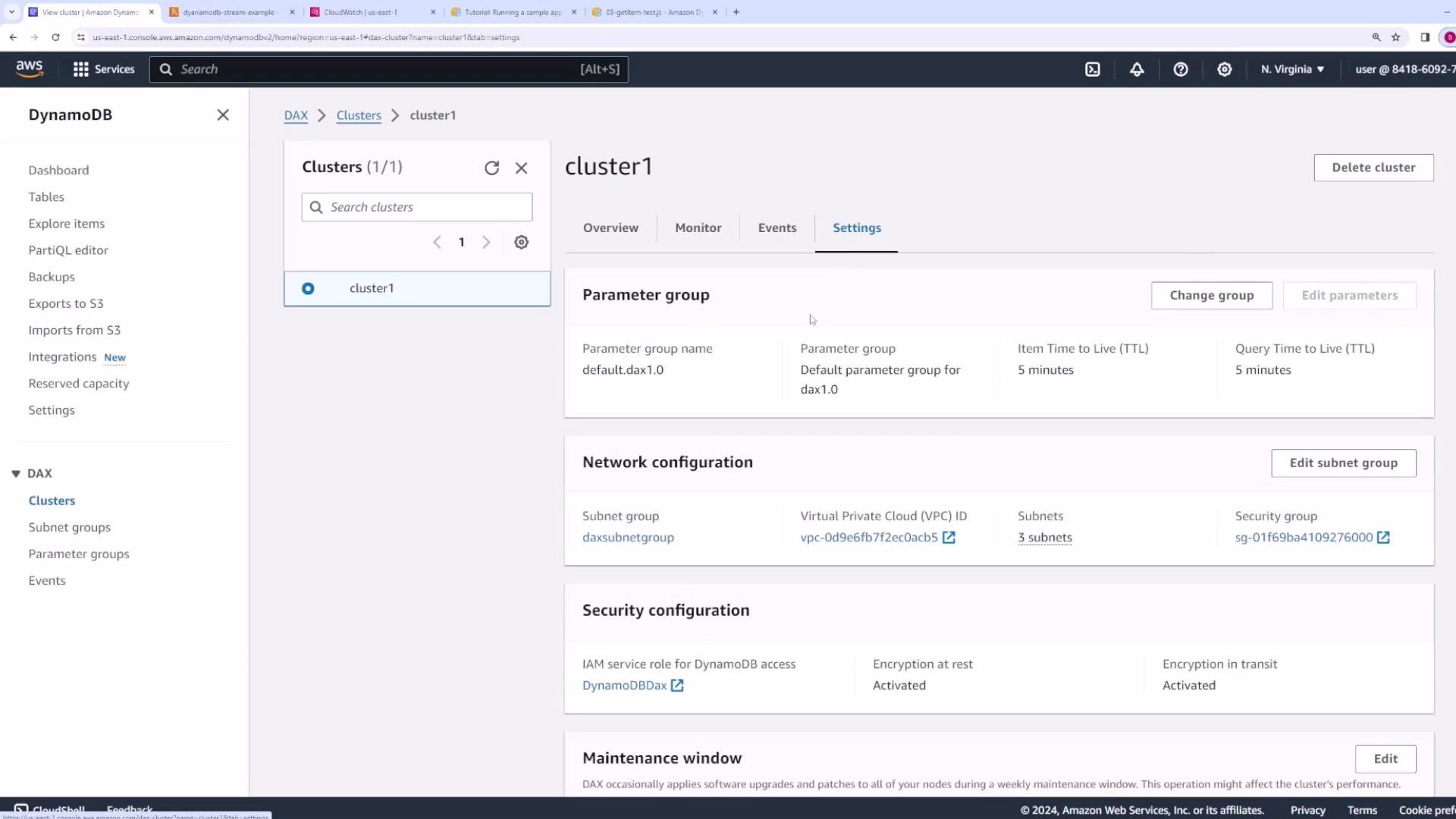
 Settings: on the Settings page you can change the parameter group, edit the subnet group, update security configuration, set maintenance windows, and manage tags. Cluster actions such as deleting the cluster are also available here.
 ## Quick reference: recommended settings
| Area | Development / Testing | Production |
| --------------- | -------------------------------------: | --------------------------------------------------- |
| Nodes | 1 node (cost-effective) | Minimum 3 nodes (high availability, replication) |
| Instance type | `dax.t2.small` for demos | Memory-optimized `R` family as needed |
| Subnet group | Single VPC/subnets | Multiple AZ subnets for redundancy |
| IAM scope | Scoped to test tables | Restrict to required table ARNs only |
| Encryption | Optional for quick tests | Enable encryption at rest and in transit (TLS) |
| Security groups | Allow port `8111` from trusted clients | Tight inbound rules, least-privilege access control |
## Cleanup and cost control
When finished experimenting, delete any test clusters to avoid ongoing charges.
For production deployments, use a multi-node cluster (minimum three nodes) for availability and replication, restrict IAM policies to only necessary tables, and secure network access with tightly scoped security group rules.
## Quick reference: recommended settings
| Area | Development / Testing | Production |
| --------------- | -------------------------------------: | --------------------------------------------------- |
| Nodes | 1 node (cost-effective) | Minimum 3 nodes (high availability, replication) |
| Instance type | `dax.t2.small` for demos | Memory-optimized `R` family as needed |
| Subnet group | Single VPC/subnets | Multiple AZ subnets for redundancy |
| IAM scope | Scoped to test tables | Restrict to required table ARNs only |
| Encryption | Optional for quick tests | Enable encryption at rest and in transit (TLS) |
| Security groups | Allow port `8111` from trusted clients | Tight inbound rules, least-privilege access control |
## Cleanup and cost control
When finished experimenting, delete any test clusters to avoid ongoing charges.
For production deployments, use a multi-node cluster (minimum three nodes) for availability and replication, restrict IAM policies to only necessary tables, and secure network access with tightly scoped security group rules.