> ## Documentation Index
> Fetch the complete documentation index at: https://notes.kodekloud.com/llms.txt
> Use this file to discover all available pages before exploring further.
# DynamoDB Dax
> Managed in-memory cache for Amazon DynamoDB that reduces read latency and offloads read traffic for read-heavy applications
This article explains DynamoDB DAX — a managed, in-memory caching service that reduces read latency and offloads read traffic from Amazon DynamoDB for read-heavy applications.
Imagine an application that performs many reads against an Amazon DynamoDB table. Introducing a caching layer in front of DynamoDB can reduce latency and lower the read load on your table. DynamoDB Accelerator (DAX) is an in-memory cache built specifically for DynamoDB to serve that purpose.
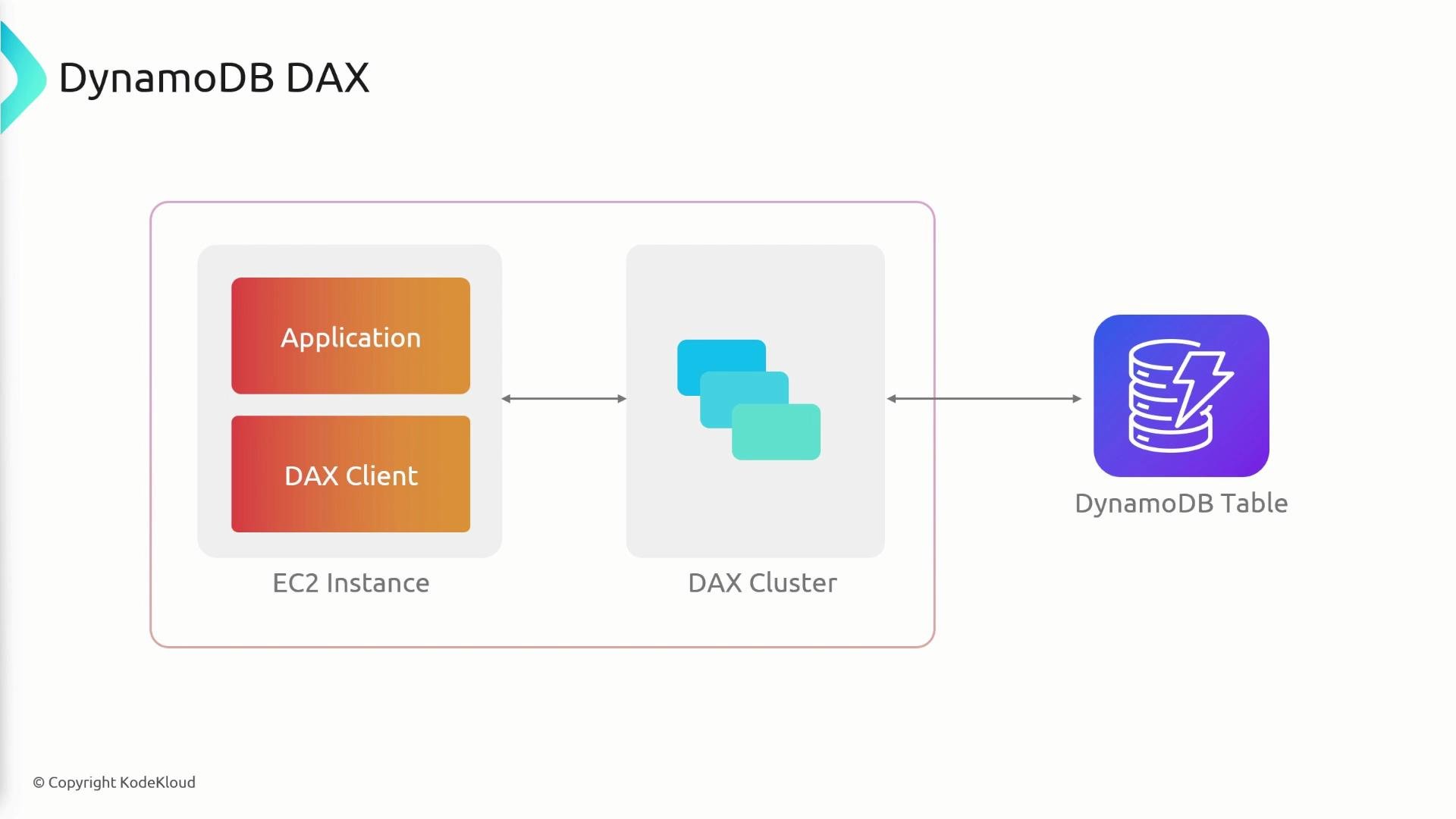
DAX stores frequently requested items in memory inside a DAX cluster so your application retrieves them with very low latency. On a cache miss, DAX fetches the item from the DynamoDB table and populates the cache for subsequent requests.
 ## How DAX works (high level)
* DAX runs as a clustered, in-memory cache that sits between your application and DynamoDB.
* Your application uses a DAX-enabled client (or AWS SDK wrapper) instead of the standard DynamoDB client.
* On a cache hit, DAX returns the cached item with very low latency (microseconds to milliseconds).
* On a cache miss, DAX reads from DynamoDB, returns the result to the application, and caches the item for future requests (read-through behavior).
## Key features and when to use them
| Feature | What it does | When to use |
| ------------------------------------------------------------------- | --------------------------------------------------------------------------------------- | ---------------------------------------------------------------- |
| Fully managed, in-memory cache | DAX is provided and maintained by AWS so you don't manage the cache nodes yourself | Use when you want a managed caching layer tailored for DynamoDB |
| API-compatible with DynamoDB | DAX is designed as a drop-in cache; use the DAX client/wrapper to minimize code changes | Use when you want minimal code changes to add a cache |
| Read-through caching | On cache miss DAX retrieves from DynamoDB and caches the response | Use for read-heavy workloads with frequent repeated reads |
| Supports GetItem, BatchGetItem, Query, Scan (eventually-consistent) | Accelerates common read APIs but not transactions or strong consistency | Use for workloads tolerant of eventual consistency |
| Configurable TTL | Control how long items remain in cache | Use when cached data can safely be stale for a limited time |
| Multi-AZ and up to 10-node clusters | Provides high availability and scale for read-heavy traffic | Use for production workloads requiring fault tolerance and scale |
## Supported operations and limitations
* Supported: GetItem, BatchGetItem, Query, Scan (eventually-consistent reads).
* Not supported: DynamoDB transactional APIs (TransactGetItems, TransactWriteItems) and strongly-consistent reads.
* DAX is not a replacement for DynamoDB’s durability or transactional guarantees — it is a performance layer for read optimization.
## How DAX works (high level)
* DAX runs as a clustered, in-memory cache that sits between your application and DynamoDB.
* Your application uses a DAX-enabled client (or AWS SDK wrapper) instead of the standard DynamoDB client.
* On a cache hit, DAX returns the cached item with very low latency (microseconds to milliseconds).
* On a cache miss, DAX reads from DynamoDB, returns the result to the application, and caches the item for future requests (read-through behavior).
## Key features and when to use them
| Feature | What it does | When to use |
| ------------------------------------------------------------------- | --------------------------------------------------------------------------------------- | ---------------------------------------------------------------- |
| Fully managed, in-memory cache | DAX is provided and maintained by AWS so you don't manage the cache nodes yourself | Use when you want a managed caching layer tailored for DynamoDB |
| API-compatible with DynamoDB | DAX is designed as a drop-in cache; use the DAX client/wrapper to minimize code changes | Use when you want minimal code changes to add a cache |
| Read-through caching | On cache miss DAX retrieves from DynamoDB and caches the response | Use for read-heavy workloads with frequent repeated reads |
| Supports GetItem, BatchGetItem, Query, Scan (eventually-consistent) | Accelerates common read APIs but not transactions or strong consistency | Use for workloads tolerant of eventual consistency |
| Configurable TTL | Control how long items remain in cache | Use when cached data can safely be stale for a limited time |
| Multi-AZ and up to 10-node clusters | Provides high availability and scale for read-heavy traffic | Use for production workloads requiring fault tolerance and scale |
## Supported operations and limitations
* Supported: GetItem, BatchGetItem, Query, Scan (eventually-consistent reads).
* Not supported: DynamoDB transactional APIs (TransactGetItems, TransactWriteItems) and strongly-consistent reads.
* DAX is not a replacement for DynamoDB’s durability or transactional guarantees — it is a performance layer for read optimization.
 Exam tip: If a question describes a read-heavy DynamoDB table that needs lower-latency reads, the correct service to consider is DynamoDB DAX.
## Best practices
* Use DAX for read-heavy, latency-sensitive workloads where eventual consistency is acceptable.
* Prefer DAX for workloads with a high cache hit ratio (frequent repeated reads of the same items).
* Configure TTLs appropriately to balance freshness vs. cache performance.
* Run DAX clusters in multiple Availability Zones for high availability.
* Monitor DAX and DynamoDB with Amazon CloudWatch (cache hit rate, latency, node health).
* Start with a small DAX cluster and scale up; DAX supports clusters up to 10 nodes.
* Test your application with realistic traffic to measure cache hit ratio and end-to-end latency improvements.
## Quick integration notes
* Switch your DynamoDB client to the DAX client or use the AWS-provided DAX client wrapper in your language SDK to keep application changes minimal.
* Ensure your application logic does not rely on strongly consistent reads when using DAX.
## References and further reading
* [Amazon DynamoDB](https://aws.amazon.com/dynamodb/)
* [DynamoDB Accelerator (DAX)](https://aws.amazon.com/dynamodb/dax/)
* AWS documentation: DynamoDB caching concepts and DAX developer guide
In summary, DAX is a managed, in-memory cache built specifically for DynamoDB that reduces read latency and offloads read traffic, making it an excellent choice for read-heavy, latency-sensitive applications.
Exam tip: If a question describes a read-heavy DynamoDB table that needs lower-latency reads, the correct service to consider is DynamoDB DAX.
## Best practices
* Use DAX for read-heavy, latency-sensitive workloads where eventual consistency is acceptable.
* Prefer DAX for workloads with a high cache hit ratio (frequent repeated reads of the same items).
* Configure TTLs appropriately to balance freshness vs. cache performance.
* Run DAX clusters in multiple Availability Zones for high availability.
* Monitor DAX and DynamoDB with Amazon CloudWatch (cache hit rate, latency, node health).
* Start with a small DAX cluster and scale up; DAX supports clusters up to 10 nodes.
* Test your application with realistic traffic to measure cache hit ratio and end-to-end latency improvements.
## Quick integration notes
* Switch your DynamoDB client to the DAX client or use the AWS-provided DAX client wrapper in your language SDK to keep application changes minimal.
* Ensure your application logic does not rely on strongly consistent reads when using DAX.
## References and further reading
* [Amazon DynamoDB](https://aws.amazon.com/dynamodb/)
* [DynamoDB Accelerator (DAX)](https://aws.amazon.com/dynamodb/dax/)
* AWS documentation: DynamoDB caching concepts and DAX developer guide
In summary, DAX is a managed, in-memory cache built specifically for DynamoDB that reduces read latency and offloads read traffic, making it an excellent choice for read-heavy, latency-sensitive applications.