> ## Documentation Index
> Fetch the complete documentation index at: https://notes.kodekloud.com/llms.txt
> Use this file to discover all available pages before exploring further.
# K8sGPT Demo
> Hands-on demonstration of K8sGPT, an AI assistant for Kubernetes diagnostics and remediation, covering authentication, cluster analysis, and common deployment errors.
Welcome to a hands-on demonstration of **K8sGPT**, your AI assistant for Kubernetes diagnostics and remediation. In this lesson, we’ll:
* Authenticate with your AI backend
* Scan and explain cluster issues
* Filter results by namespace and resource type
* Review common NGINX deployment errors and solutions
***
## 1. Authenticate Your AI Backend
Before using K8sGPT, add your OpenAI (or Hugging Face) API key:
```bash theme={null}
k8sgpt auth add
```
Sample output:
```bash theme={null}
ollama@Bakugo:~/demo-k8sgpt$ k8sgpt auth add
Warning: backend input is empty, will use the default value: openai
Warning: model input is empty, will use the default value: gpt-3.5-turbo
Enter openai Key:
```
K8sGPT supports multiple backends (e.g., [OpenAI](https://openai.com) and [Hugging Face](https://huggingface.co)). If you don’t specify, it defaults to OpenAI’s `gpt-3.5-turbo`.
***
## 2. Cluster Analysis Commands
| Command | Description | Example |
| ----------------------------------------------------------- | ------------------------------------------------- | ------- |
| `k8sgpt analyze` | Scan all namespaces | — |
| `k8sgpt analyze --explain --namespace k8sgpt` | Explain issues in a specific namespace | — |
| `k8sgpt analyze --explain --filter=Deployment` | Filter output by resource type (e.g., Deployment) | — |
| `k8sgpt analyze --explain --namespace k8sgpt --output=json` | Get machine-readable JSON output | — |
| `k8sgpt analyze ... --anonymize` | Remove sensitive data from output | — |
***
## 3. Scan Your Cluster
1. **All namespaces**
```bash theme={null}
ollama@Bakugo:~/demo-k8sgpt$ k8sgpt analyze
```
2. **Specific namespace**
```bash theme={null}
ollama@Bakugo:~/demo-k8sgpt$ k8sgpt analyze --explain --namespace k8sgpt
```
Sample output:
```plaintext theme={null}
15: Pod kube-system/etcd-docker-desktop/etcd()
- Error: {"level":"warn","ts":"2024-08-12T22:31:30.352021Z",...}
17: Pod kube-system/kube-controller-manager-docker-desktop/kube-controller-manager()
- Error: serviceaccount "k8sgpt" not found
19: Pod default/nginx/nginx()
- Error: no such file or directory
20: Pod k8sgpt/nginx-deployment-6f596f9bb9-8mw6m/nginx(Deployment/nginx-deployment)
- Error: The server rejected our request for an unknown reason (get pods nginx-deployment-6f596f9bb9-8mw6m)
```
***
## 4. Common NGINX Deployment Errors & Fixes
When focusing on the `k8sgpt` namespace’s NGINX deployment, K8sGPT may report:
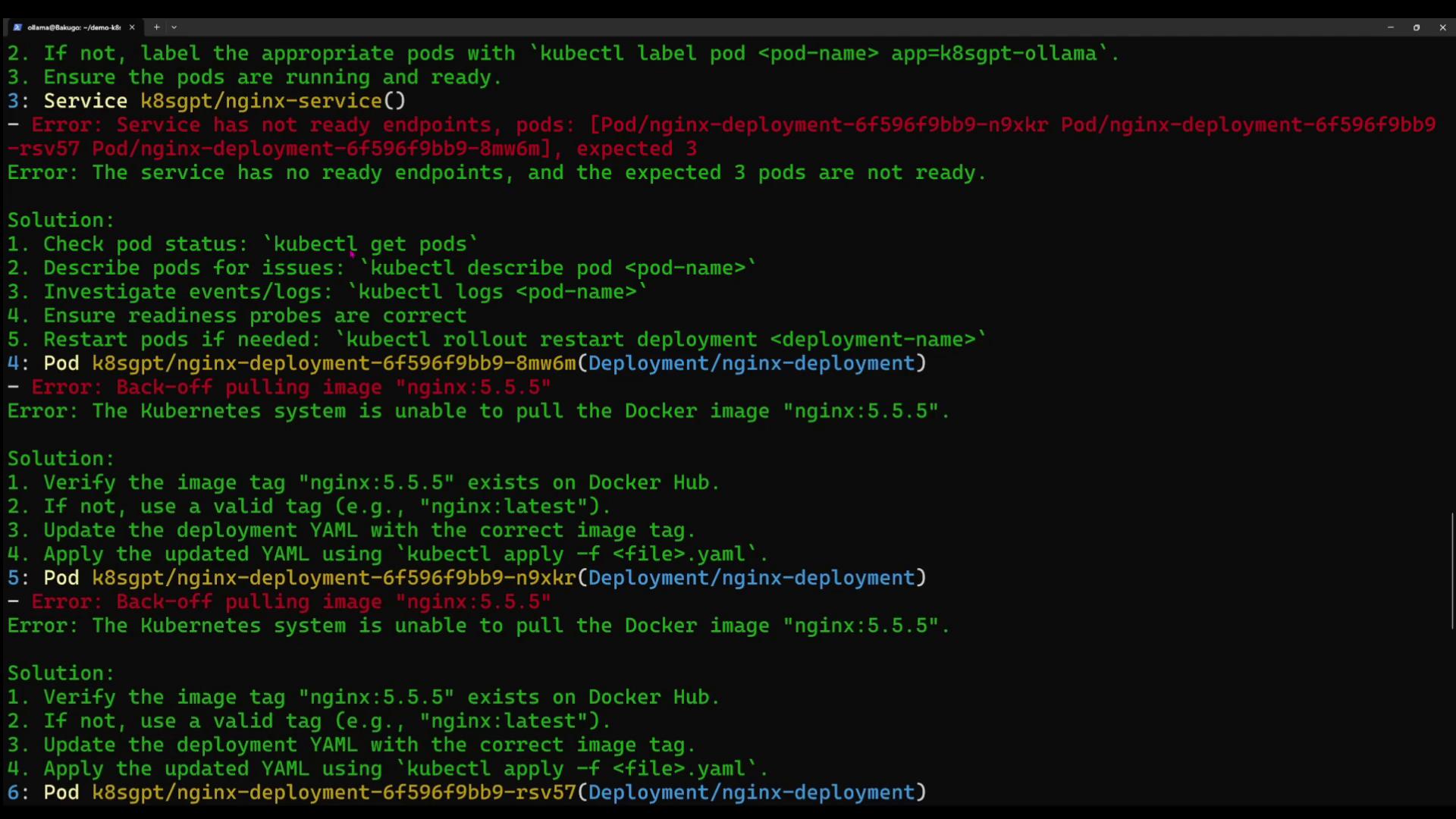
### 4.1 Error: Service has no ready endpoints
**Solution:**
1. Check pod status
```bash theme={null}
kubectl get pods -n k8sgpt
```
2. Describe the failing pod
```bash theme={null}
kubectl describe pod -n k8sgpt
```
3. Inspect logs
```bash theme={null}
kubectl logs -n k8sgpt
```
4. Verify readiness probes, then restart
```bash theme={null}
kubectl rollout restart deployment nginx-deployment -n k8sgpt
```
### 4.2 Error: Back-off pulling image "nginx:5.5"
**Solution:**
1. Confirm the tag exists on [Docker Hub](https://hub.docker.com).
2. If missing, update to a valid tag (e.g., `nginx:latest`) in your Deployment YAML.
3. Apply the updated manifest:
```bash theme={null}
kubectl apply -f .yaml -n k8sgpt
```
***
## 5. Filtering by Resource Type
### 5.1 Deployments Only
```bash theme={null}
k8sgpt analyze --explain --filter=Deployment --namespace k8sgpt
```
Sample output:
```plaintext theme={null}
0: Deployment k8sgpt/k8sgpt-ollama
- Error: Deployment has 1 replica but 0 are available.
```
**Solution Steps:**
1. `kubectl get pods -n k8sgpt`
2. `kubectl describe pod -n k8sgpt`
3. `kubectl logs -n k8sgpt`
4. Fix image or spec issues, then rollout restart.
### 5.2 Services Only
```bash theme={null}
k8sgpt analyze --explain --filter=Service --namespace k8sgpt
```
Sample output:
```plaintext theme={null}
0: Service k8sgpt/k8sgpt-ollama
- Error: No endpoints found; expected pods with label app=k8sgpt-ollama.
```
**Solution Steps:**
1. `kubectl get pods -l app=k8sgpt-ollama -n k8sgpt`
2. Label pods if missing:
```bash theme={null}
kubectl label pod app=k8sgpt-ollama -n k8sgpt
```
3. Ensure pods are `Running` and `Ready`.
***
## 6. JSON & Anonymized Output
* **JSON output**
```bash theme={null}
k8sgpt analyze --explain --namespace k8sgpt --output=json
```
* **Anonymize sensitive data**
```bash theme={null}
k8sgpt analyze --explain --namespace k8sgpt --output=json --anonymize
```
When sharing logs or JSON output publicly, use `--anonymize` to mask identifiers.
***
## 7. Next Steps
K8sGPT delivers natural-language diagnostics for [Kubernetes](https://kubernetes.io). Use it to troubleshoot Pods, Deployments, Services, and more. Head into your lab environment and let AI power your Kubernetes operations!
***
## Links & References
* [Kubernetes Documentation](https://kubernetes.io/docs/)
* [Docker Hub](https://hub.docker.com/)
* [OpenAI](https://openai.com)
* [Hugging Face](https://huggingface.co)