> ## Documentation Index
> Fetch the complete documentation index at: https://notes.kodekloud.com/llms.txt
> Use this file to discover all available pages before exploring further.
# What Are API Keys and How to Protect Them
> This article explains API keys, their functionality, and best practices for generating and protecting them.
APIs rely on secure authentication to ensure only authorized clients can access your services. In this guide, you’ll learn what API keys are, how they work, and best practices for generating and safeguarding them.
## Understanding API Keys
An **API key** is a unique token that identifies and authorizes a client application when calling your API endpoints. By issuing API keys, you can:
| Benefit | Description |
| ------------------ | ----------------------------------------------------------------- |
| Access Control | Restrict who can invoke your API and tailor permissions per key. |
| Usage Tracking | Monitor request volume and set rate limits to prevent abuse. |
| Scoped Permissions | Assign different access levels (read, write, admin) for each key. |
### How API Keys Work
1. A client includes the API key in the request header or query string.
2. Your server validates the key against its database.
3. If valid, the request is processed; otherwise, it’s rejected with an HTTP 401 or 403.
## Example: Calling the OpenAI API in Python
Here’s a simple Python snippet using the official OpenAI client library:
```python theme={null}
from openai import OpenAI
import os
# Load your API key from an environment variable
api_key = os.getenv("OPENAI_API_KEY")
client = OpenAI(api_key=api_key)
response = client.chat.completions.create(
model="gpt-4",
messages=[{"role": "user", "content": "Write a haiku about AI"}]
)
print(response.choices[0].message.content)
```
Never hard-code your API key in source files. Use environment variables or secret management tools instead.
For full reference, see the [OpenAI API Documentation](https://platform.openai.com/docs/api-reference).
## Generating and Protecting Your OpenAI API Key
Follow these steps to create and secure a new secret key on the OpenAI platform:
1. Sign in and click the **Settings** (cogwheel) icon in the lower-left corner.
2. Choose **API keys** from the sidebar menu.
3. Click **Create new secret key**, provide a descriptive name (e.g., *My Test API*), and set the required scopes.
4. Copy your newly generated key immediately—this is the only time it will be visible—and store it in a secure vault.
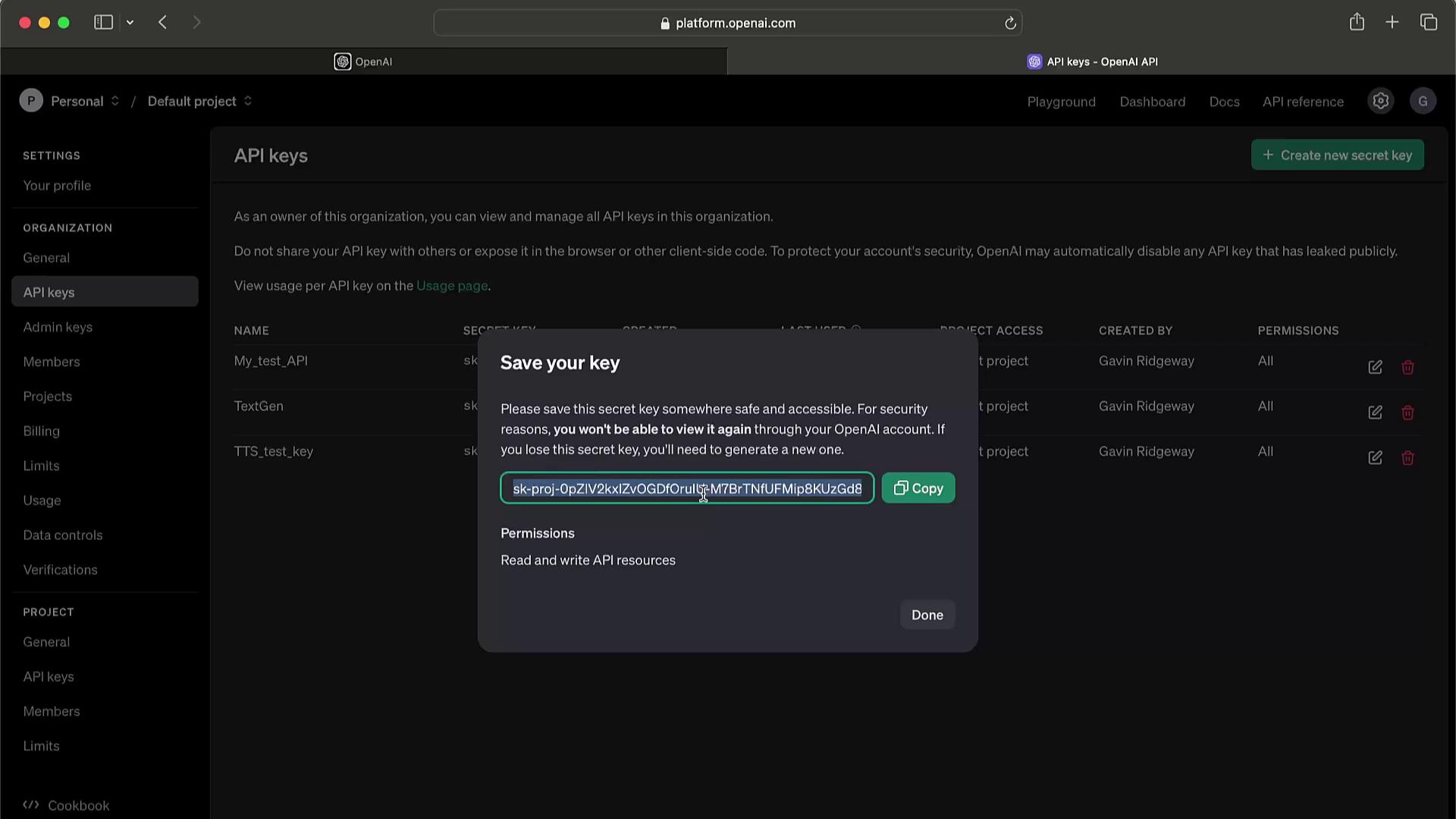
Never expose your secret key in client-side code, public repositories, or logs. If compromised, revoke it immediately to prevent unauthorized charges.
### Key Management Best Practices
| Practice | Recommendation |
| ---------------------------- | ---------------------------------------------------------------- |
| Unique Keys | Generate separate keys for development, staging, and production. |
| Principle of Least Privilege | Grant only the permissions necessary for each key. |
| Regular Rotation | Rotate keys periodically to minimize security risks. |
| Usage Monitoring | Set up alerts on unusual request patterns. |
If you suspect a key has been leaked or abused, delete it right away and issue a replacement.