> ## Documentation Index
> Fetch the complete documentation index at: https://notes.kodekloud.com/llms.txt
> Use this file to discover all available pages before exploring further.
# Authentication
> This article explores Istios authentication mechanisms for service-to-service and end-user access control using mTLS and JWT validation.
In this lesson, we explore how Istio implements authentication, covering both service-to-service and end-user access control. In service-oriented architectures, it is critical to verify that inter-service communications are legitimate. For example, when the product service sends a request to the review service, the latter must ensure that the request comes from the authorized product service and not from an imposter. Istio accomplishes this through mechanisms such as Mutual TLS (mTLS) and JSON Web Token (JWT) validation.
With mTLS, each service is assigned a unique identity secured by automatically managed certificate key pairs from Istiod. This leaves the services free from managing their own certificates, thereby simplifying the secure communication process.
In addition to authenticating service-to-service interactions, Istio also supports end-user authentication. This is achieved using JWT validation or via OpenID Connect providers like [Ory Hydra](https://www.ory.sh/hydra), [Keycloak](https://www.keycloak.org), [Firebase](https://firebase.google.com), or [Google](https://about.google).
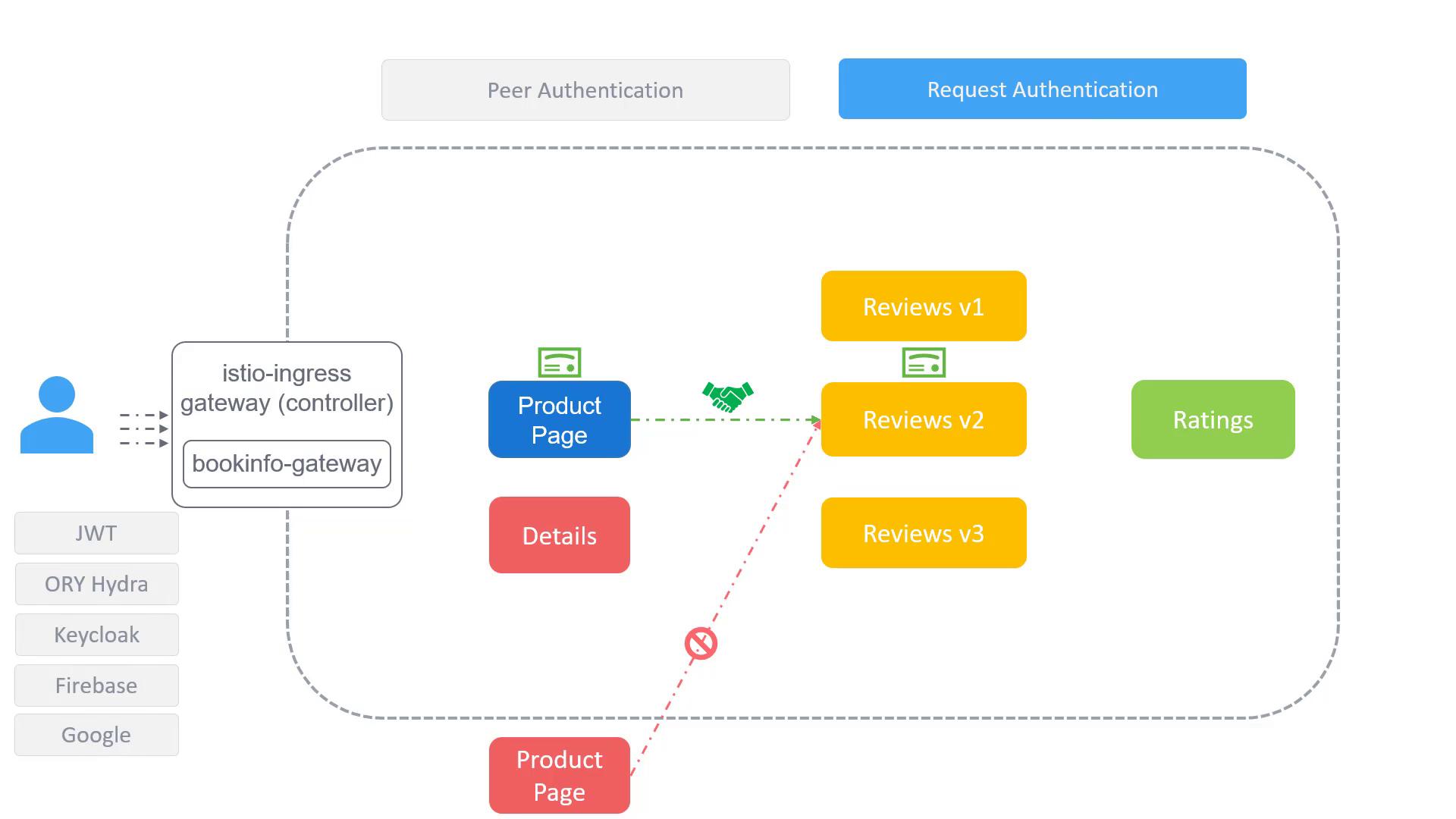
Below are examples of Istio's authentication configurations using PeerAuthentication resources. These configurations define authentication policies and determine how rules are applied to workloads.
For optimal security, consider applying stricter policies first on a per-workload basis before extending them to namespace or mesh-wide scopes.
## Workload-Specific Policy with PeerAuthentication
This configuration enforces a strict mTLS mode exclusively on workloads in the Bookinfo namespace that are labeled with `app: reviews`.
```yaml theme={null}
apiVersion: security.istio.io/v1beta1
kind: PeerAuthentication
metadata:
name: "example-peer-policy"
namespace: "book-info"
spec:
selector:
matchLabels:
app: reviews
mtls:
mode: STRICT
```
## Namespace-Wide Policy
Removing the selector applies the strict mTLS configuration across all workloads within the Bookinfo namespace, effectively creating a namespace-wide policy.
```yaml theme={null}
apiVersion: security.istio.io/v1beta1
kind: PeerAuthentication
metadata:
name: "example-peer-policy"
namespace: "book-info"
spec:
mtls:
mode: STRICT
```
## Mesh-Wide Policy
Assigning the policy to the root namespace (in this case, the `istio-system` namespace) extends the strict mTLS configuration to every workload throughout the entire mesh.
```yaml theme={null}
apiVersion: security.istio.io/v1beta1
kind: PeerAuthentication
metadata:
name: "example-peer-policy"
namespace: "istio-system"
spec:
mtls:
mode: STRICT
```
These examples illustrate how Istio supports comprehensive authentication policies, from targeting specific workloads to applying mesh-wide security protocols. For further details, refer to the [Istio Documentation](https://istio.io/latest/docs/).