> ## Documentation Index
> Fetch the complete documentation index at: https://notes.kodekloud.com/llms.txt
> Use this file to discover all available pages before exploring further.
# Configuring Jenkins Pipeline for Kubernetes
> This tutorial demonstrates setting up a CI/CD pipeline using Jenkins to deploy applications to Kubernetes clusters.
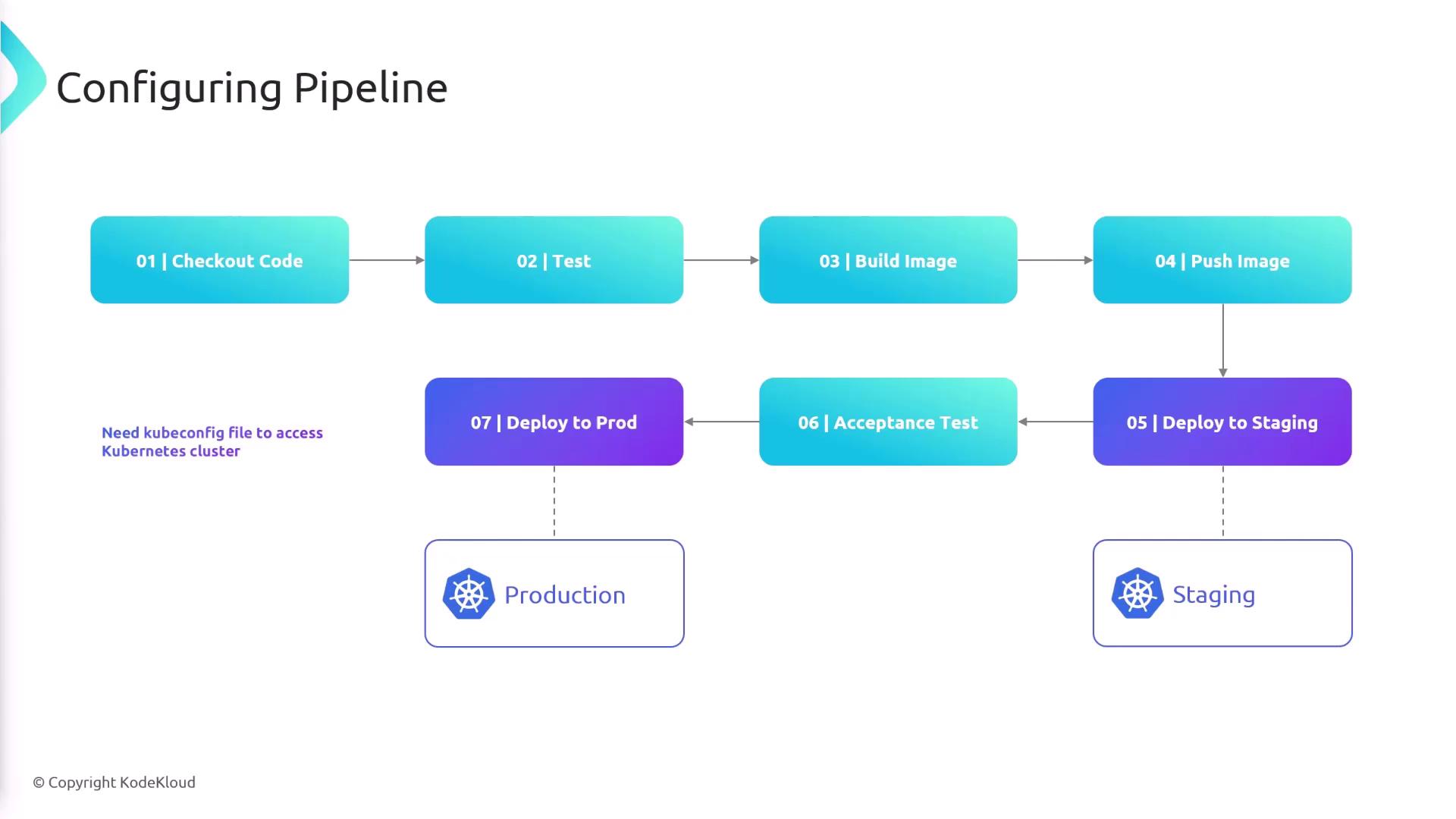
In this tutorial, we demonstrate how to set up a robust CI/CD pipeline using Jenkins to deploy applications to both staging and production Kubernetes clusters. The pipeline automates the following steps:
1. Check out code.
2. Run tests.
3. Build the Docker image.
4. Push the image to Docker Hub.
5. Deploy the image to the staging cluster.
6. Execute acceptance tests.
7. Promote deployment to production if tests pass.
For performance testing in the staging environment, we use the K6 tool to simulate traffic and record metrics. If the performance metrics meet the predefined criteria, the image is promoted to production.
Jenkins requires access to a valid kubectl configuration file (kubeconfig) to authenticate and communicate with Kubernetes clusters. Ensure you have set up the necessary credentials in Jenkins.
## Jenkins Credentials
Within Jenkins, you need to create two sets of credentials for smooth operation:
* **Kubectl configuration credentials**: For authenticating with Kubernetes clusters.
* **Docker Hub credentials**: For pushing Docker images.
## Pipeline Flow Diagram
The diagram below illustrates the complete pipeline flow, from code checkout through testing and image deployment, highlighting the essential role of the kubeconfig file for accessing Kubernetes clusters.
## Environment Variables in the Pipeline
Jenkins pipelines use several environment variables for configuration. Below is a summary of the main variables:
| Environment Variable | Description |
| ----------------------------------------------- | ------------------------------------------------------------- |
| IMAGE\_NAME | Docker repository or image name |
| IMAGE\_TAG | Complete Docker image tag (constructed using the commit hash) |
| KUBECONFIG | Credential for the Kubernetes configuration file |
| AWS\_ACCESS\_KEY\_ID / AWS\_SECRET\_ACCESS\_KEY | Credentials for Amazon EKS (if applicable) |
Below is the initial pipeline configuration snippet with the necessary environment variables defined:
```groovy theme={null}
pipeline {
agent any
environment {
IMAGE_NAME = 'sanjeevkt720/jenkins-flask-app'
IMAGE_TAG = "${IMAGE_NAME}:${env.GIT_COMMIT}"
KUBECONFIG = credentials('kubeconfig-credentials-id')
AWS_ACCESS_KEY_ID = credentials('aws-access-key')
AWS_SECRET_ACCESS_KEY = credentials('aws-secret-key')
}
// Further stages (e.g., Checkout, Test, Build, etc.) would follow here.
}
```
For clusters running on Amazon EKS, AWS access credentials are necessary, while for other Kubernetes clusters, only the kubeconfig is needed.
## Docker Hub Login Stage
The pipeline installs dependencies using pip, runs tests with pytest, and logs into Docker Hub. Jenkins supplies the Docker credentials to build and push the image. The snippet below demonstrates the Docker Hub login stage:
```groovy theme={null}
stage('Login to Docker Hub') {
steps {
withCredentials([usernamePassword(credentialsId: 'docker-creds', usernameVariable: 'USERNAME', passwordVariable: 'PASSWORD')]) {
sh 'echo ${PASSWORD} | docker login -u ${USERNAME} --password-stdin'
echo 'Login successful'
}
}
}
```
## Deployment to Staging
After pushing the Docker image to Docker Hub, the pipeline deploys it to the staging Kubernetes cluster by switching contexts, verifying the current context, and updating the deployment image:
```groovy theme={null}
stage('Deploy to Staging') {
steps {
sh 'kubectl config use-context '
sh 'kubectl config current-context'
sh "kubectl set image deployment/flask-app flask-app=${IMAGE_TAG}"
}
}
```
## Running Acceptance Tests with K6
Once the staging deployment is updated, the pipeline retrieves the service endpoint and extracts the domain name and port from the running service. This information is then passed to K6 for acceptance testing:
```groovy theme={null}
stage('Acceptance Test') {
steps {
script {
def service = sh(
script: "kubectl get svc flask-app-service -o jsonpath='{.status.loadBalancer.ingress[0].hostname}:{.spec.ports[0].port}'",
returnStdout: true
).trim()
echo "${service}"
sh "k6 run -e SERVICE=${service} acceptance-test.js"
}
}
}
```
## Production Deployment
After successful acceptance tests, the pipeline switches to the production context and updates the deployment with the new Docker image:
```groovy theme={null}
stage('Deploy to Prod') {
steps {
sh 'kubectl config use-context '
sh 'kubectl config current-context'
sh "kubectl set image deployment/flask-app flask-app=${IMAGE_TAG}"
}
}
```
Make sure that all credentials for Docker Hub and Kubernetes are correctly configured in Jenkins to prevent deployment failures.
This concludes the configuration of the Jenkins pipeline for deploying to Kubernetes clusters. Follow these steps carefully to ensure your deployments are automated efficiently and securely. For more detailed documentation, consider exploring [Kubernetes Documentation](https://kubernetes.io/docs/) and [Docker Hub](https://hub.docker.com/).