> ## Documentation Index
> Fetch the complete documentation index at: https://notes.kodekloud.com/llms.txt
> Use this file to discover all available pages before exploring further.
# Jinja2 Basics
> Introduction to Jinja2 templating covering variables, filters, loops, conditionals, and use in web development and automation such as Ansible
In this lesson we cover the essentials of Jinja2: what templating is, how templates are used in IT automation and web development, and the core syntax for substitutions, filters, loops, and conditionals.
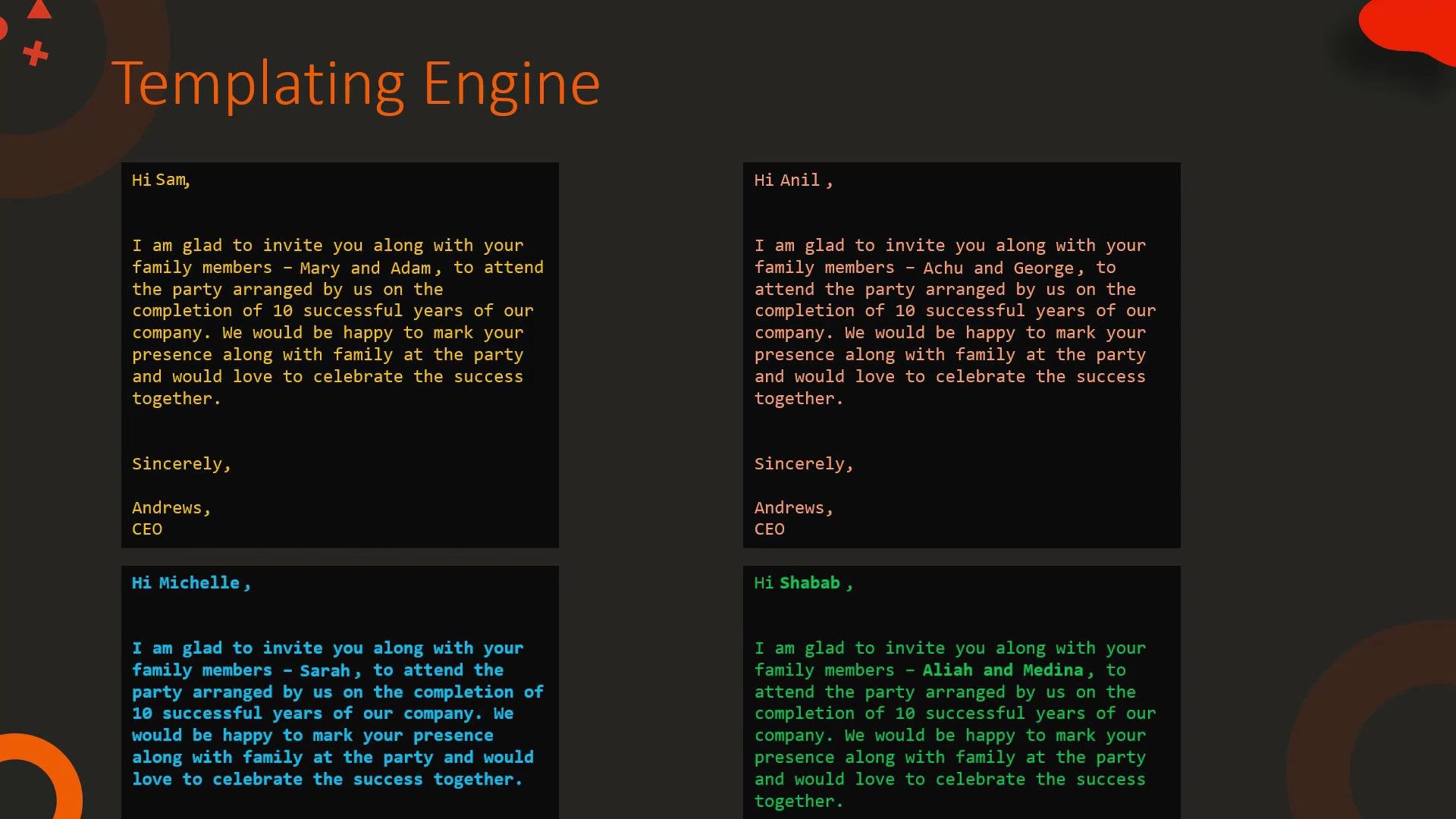
What is templating? Think of an invitation letter: the body (event details, venue, signature) stays the same for all recipients, while the addressee and family member names change. The invitation format is the template and the names are variables. A templating engine takes a template plus variables and renders the final personalized output — one email or hundreds.
 Templates are widely used in web pages (HTML templates -> rendered HTML) and in automation tools like Ansible (templates -> configuration or files on remote hosts). Jinja2 is the templating engine commonly used in Python projects and many automation frameworks.
Templating helps you reuse structure and separate content/data from presentation. You can render the same template with different data to produce many customized outputs.
## Basic HTML example (Jinja2 template)
Template:
```html theme={null}
{{ title }}
{{ msg }}
```
Variables (YAML):
```yaml theme={null}
title: Our Site
msg: Welcome!
```
Rendered HTML:
```html theme={null}
Our Site
Welcome!
```
## Templating in Ansible
Ansible uses Jinja2 extensively for templates and variable interpolation. Example task that touches a file whose path is provided as a variable:
```yaml theme={null}
- hosts: web1
tasks:
- file:
path: "{{ file }}"
state: touch
```
If you supply `file: /tmp/1.txt`, the task will operate on `/tmp/1.txt`.
Templates are also used to generate configuration files. Example Jinja2 template for a MySQL configuration:
```ini theme={null}
[mysqld]
innodb_buffer_pool_size={{ pool_size }}
datadir={{ datadir }}
user={{ mysql }}
```
When `pool_size`, `datadir`, and `mysql` are provided, the template renders into a ready-to-use configuration file for the target host.
For more on Ansible templating, see the Ansible documentation and tutorials such as the KodeKloud course linked below.
* [Ansible Templating Guide (Docs)](https://docs.ansible.com/)
* [Learn Ansible Basics (KodeKloud)](https://learn.kodekloud.com/user/courses/learn-ansible-basics-beginners-course)
## What is Jinja2?
Jinja2 is a full-featured templating engine for Python. It supports:
* Variable substitution
* Filters to transform values
* Control structures: loops and conditionals
* Blocks and template inheritance
* Macros for reusable snippets
Example using a block and a loop:
```text theme={null}
{% block title %}{% endblock %}
```
## Variables and Filters
A simple substitution uses `{{ variable }}`. Filters modify values using the pipe `|` syntax.
Examples:
```text theme={null}
The name is {{ my_name }} => The name is Bond
The name is {{ my_name | upper }} => The name is BOND
The name is {{ my_name | lower }} => The name is bond
The name is {{ my_name | title }} => The name is Bond
The name is {{ my_name | replace("Bond", "Bourne") }} => The name is Bourne
The name is {{ first_name | default("James") }} {{ my_name }} => The name is James Bond
```
Undefined variables can cause unexpected output. Use `default(...)` or enable strict undefined checks during rendering to catch missing values early.
## Common filters (overview)
| Filter | Purpose | Example | | |
| ------------------------- | ------------------------------------- | ------------------ | ------------------------------ | -------- |
| `upper`, `lower`, `title` | Change string case | \`\{\{ my\_name | upper }}\` | |
| `replace(old, new)` | Replace substrings | \`\{\{ my\_name | replace("Bond", "Bourne") }}\` | |
| `default(value)` | Provide fallback for undefined values | \`\{\{ first\_name | default("James") }}\` | |
| `join(sep)` | Join list items into a string | \`\{\{ my\_list | join(", ") }}\` | |
| `random` | Select a random element | \`\{\{ my\_list | random }}\` | |
| `unique` | Remove duplicates from a list | \`\{\{ \[1,2,2,3] | unique }}\` | |
| `min`, `max` | Minimum/maximum of a list | \`\{\{ \[1,2,3] | min }}`/`\{\{ \[1,2,3] | max }}\` |
| `union(list2)` | Merge lists and remove duplicates | \`\{\{ \[1,2] | union(\[2,3]) }}\` | |
## List and set-based filters (examples)
```text theme={null}
{{ [1, 2, 3] | min }} => 1
{{ [1, 2, 3] | max }} => 3
{{ [1, 2, 3, 2] | unique }} => [1, 2, 3]
{{ [1, 2, 3, 4] | union([4, 5]) }} => [1, 2, 3, 4, 5]
```
## Control structures: loops and conditionals
Jinja2 control structures use `{% ... %}` tags. Common constructs:
* For loop:
```text theme={null}
{% for number in [0, 1, 2, 3, 4] %}
{{ number }}
{% endfor %}
```
Rendered:
```text theme={null}
0
1
2
3
4
```
* Loop with conditional (print only number equal to 2):
```text theme={null}
{% for number in [0, 1, 2, 3, 4] %}
{% if number == 2 %}
{{ number }}
{% endif %}
{% endfor %}
```
Rendered:
```text theme={null}
2
```
* If/elif/else example:
```text theme={null}
{% if users | length == 0 %}
No users found.
{% elif users | length == 1 %}
One user found.
{% else %}
Multiple users found.
{% endif %}
```
## Summary
* Jinja2 templates mix static text with placeholders, filters, loops, and conditionals to produce dynamic outputs.
* Use filters to transform values and control structures to repeat or conditionally render content.
* Templating is invaluable in automation (Ansible), configuration management, and web development for reusing structure while rendering variable data.
Further reading and references:
* [Jinja2 Documentation](https://jinja.palletsprojects.com/)
* [Ansible Documentation](https://docs.ansible.com/)
* [Learn Ansible Basics (KodeKloud)](https://learn.kodekloud.com/user/courses/learn-ansible-basics-beginners-course)
Templates are widely used in web pages (HTML templates -> rendered HTML) and in automation tools like Ansible (templates -> configuration or files on remote hosts). Jinja2 is the templating engine commonly used in Python projects and many automation frameworks.
Templating helps you reuse structure and separate content/data from presentation. You can render the same template with different data to produce many customized outputs.
## Basic HTML example (Jinja2 template)
Template:
```html theme={null}
{{ title }}
{{ msg }}
```
Variables (YAML):
```yaml theme={null}
title: Our Site
msg: Welcome!
```
Rendered HTML:
```html theme={null}
Our Site
Welcome!
```
## Templating in Ansible
Ansible uses Jinja2 extensively for templates and variable interpolation. Example task that touches a file whose path is provided as a variable:
```yaml theme={null}
- hosts: web1
tasks:
- file:
path: "{{ file }}"
state: touch
```
If you supply `file: /tmp/1.txt`, the task will operate on `/tmp/1.txt`.
Templates are also used to generate configuration files. Example Jinja2 template for a MySQL configuration:
```ini theme={null}
[mysqld]
innodb_buffer_pool_size={{ pool_size }}
datadir={{ datadir }}
user={{ mysql }}
```
When `pool_size`, `datadir`, and `mysql` are provided, the template renders into a ready-to-use configuration file for the target host.
For more on Ansible templating, see the Ansible documentation and tutorials such as the KodeKloud course linked below.
* [Ansible Templating Guide (Docs)](https://docs.ansible.com/)
* [Learn Ansible Basics (KodeKloud)](https://learn.kodekloud.com/user/courses/learn-ansible-basics-beginners-course)
## What is Jinja2?
Jinja2 is a full-featured templating engine for Python. It supports:
* Variable substitution
* Filters to transform values
* Control structures: loops and conditionals
* Blocks and template inheritance
* Macros for reusable snippets
Example using a block and a loop:
```text theme={null}
{% block title %}{% endblock %}
```
## Variables and Filters
A simple substitution uses `{{ variable }}`. Filters modify values using the pipe `|` syntax.
Examples:
```text theme={null}
The name is {{ my_name }} => The name is Bond
The name is {{ my_name | upper }} => The name is BOND
The name is {{ my_name | lower }} => The name is bond
The name is {{ my_name | title }} => The name is Bond
The name is {{ my_name | replace("Bond", "Bourne") }} => The name is Bourne
The name is {{ first_name | default("James") }} {{ my_name }} => The name is James Bond
```
Undefined variables can cause unexpected output. Use `default(...)` or enable strict undefined checks during rendering to catch missing values early.
## Common filters (overview)
| Filter | Purpose | Example | | |
| ------------------------- | ------------------------------------- | ------------------ | ------------------------------ | -------- |
| `upper`, `lower`, `title` | Change string case | \`\{\{ my\_name | upper }}\` | |
| `replace(old, new)` | Replace substrings | \`\{\{ my\_name | replace("Bond", "Bourne") }}\` | |
| `default(value)` | Provide fallback for undefined values | \`\{\{ first\_name | default("James") }}\` | |
| `join(sep)` | Join list items into a string | \`\{\{ my\_list | join(", ") }}\` | |
| `random` | Select a random element | \`\{\{ my\_list | random }}\` | |
| `unique` | Remove duplicates from a list | \`\{\{ \[1,2,2,3] | unique }}\` | |
| `min`, `max` | Minimum/maximum of a list | \`\{\{ \[1,2,3] | min }}`/`\{\{ \[1,2,3] | max }}\` |
| `union(list2)` | Merge lists and remove duplicates | \`\{\{ \[1,2] | union(\[2,3]) }}\` | |
## List and set-based filters (examples)
```text theme={null}
{{ [1, 2, 3] | min }} => 1
{{ [1, 2, 3] | max }} => 3
{{ [1, 2, 3, 2] | unique }} => [1, 2, 3]
{{ [1, 2, 3, 4] | union([4, 5]) }} => [1, 2, 3, 4, 5]
```
## Control structures: loops and conditionals
Jinja2 control structures use `{% ... %}` tags. Common constructs:
* For loop:
```text theme={null}
{% for number in [0, 1, 2, 3, 4] %}
{{ number }}
{% endfor %}
```
Rendered:
```text theme={null}
0
1
2
3
4
```
* Loop with conditional (print only number equal to 2):
```text theme={null}
{% for number in [0, 1, 2, 3, 4] %}
{% if number == 2 %}
{{ number }}
{% endif %}
{% endfor %}
```
Rendered:
```text theme={null}
2
```
* If/elif/else example:
```text theme={null}
{% if users | length == 0 %}
No users found.
{% elif users | length == 1 %}
One user found.
{% else %}
Multiple users found.
{% endif %}
```
## Summary
* Jinja2 templates mix static text with placeholders, filters, loops, and conditionals to produce dynamic outputs.
* Use filters to transform values and control structures to repeat or conditionally render content.
* Templating is invaluable in automation (Ansible), configuration management, and web development for reusing structure while rendering variable data.
Further reading and references:
* [Jinja2 Documentation](https://jinja.palletsprojects.com/)
* [Ansible Documentation](https://docs.ansible.com/)
* [Learn Ansible Basics (KodeKloud)](https://learn.kodekloud.com/user/courses/learn-ansible-basics-beginners-course)