> ## Documentation Index
> Fetch the complete documentation index at: https://notes.kodekloud.com/llms.txt
> Use this file to discover all available pages before exploring further.
# Demo Standard K8s Issues and Explore MCP Tools
> Hands-on lab demonstrating troubleshooting of Kubernetes service selector and HPA quota issues, comparing manual kubectl diagnostics with AI-assisted KAgent remediation.
Hello everyone — welcome to the first lab. In this hands-on lesson we will reproduce two common Kubernetes cluster issues, troubleshoot them manually, and then repeat the same analysis using KAgent (an AI-assisted Kubernetes agent). The goal is to show how correlating diagnostics (kubectl, events, metrics, quotas) leads to the root cause, and how AI can speed up discovery and remediation.
Task summary
| Problem | Namespace | Symptom |
| ---------------------------------------------------: | :------------: | :------------------------------------------------------------------------------- |
| `order-api` Service not routing traffic | `default` | Service exists but has no endpoints; curl to NodePort fails |
| `inventory-service` HPA not scaling to `minReplicas` | `backend-apps` | HPA shows `minReplicas=3` but only 1 pod runs; events show pod creation failures |
Follow a reproducible troubleshooting pattern: observe symptoms, gather cluster state (svc/pods/endpoints/events/metrics/quotas), link evidence to possible causes, and apply the smallest safe remediation. Use `kubectl` + events + metrics to avoid misdirection.
***
## Task 1 — Order API: Service exists but traffic not routed
Reproduce symptom:
1. From the host try the NodePort:
```bash theme={null}
curl http://localhost:30081
```
(Initially this will fail because the Service has no endpoints.)
2. Gather basic cluster state in the `default` namespace:
```bash theme={null}
kubectl get svc -n default
kubectl get pods -n default --show-labels
kubectl get endpoints -n default
```
You should see the `order-api` Service present but with empty endpoints. Inspect the Service manifest to check selectors:
```yaml theme={null}
metadata:
annotations:
kubectl.kubernetes.io/last-applied-configuration: |
{"apiVersion":"v1","kind":"Service","metadata":{"annotations":{},"name":"order-api","namespace":"default"},"spec":{"ports":[{"nodePort":30081,"port":80,"targetPort":80}],"selector":{"app":"order-api","version":"v1"},"type":"NodePort"}}
creationTimestamp: "2025-12-16T10:29:13Z"
name: order-api
namespace: default
spec:
clusterIP: 10.43.187.240
ports:
- nodePort: 30081
port: 80
protocol: TCP
targetPort: 80
selector:
app: order-api
version: v1
type: NodePort
```
Diagnosis:
* Running pods show label `app=order-api` but `version=v2` (pod template uses `v2`).
* The Service selector is `version=v1`. This selector mismatch means the Service selects no pods → no endpoints → traffic not routed.
Fix options:
* Edit the Service selector to match pods, or update the Deployment labels to match the Service.
* To change the Service selector to `v2` (example using `kubectl patch`):
```bash theme={null}
kubectl patch svc order-api -n default --type='json' -p='[{"op":"replace","path":"/spec/selector/version","value":"v2"}]'
```
* Alternatively, edit the Service interactively:
```bash theme={null}
kubectl edit svc order-api -n default
# change spec.selector.version: v1 -> v2
```
Verify:
```bash theme={null}
kubectl get endpoints -n default
curl http://localhost:30081
```
After the fix the Service endpoints are populated and the curl returns the application page (or the pod's default page if using an nginx image).
Root cause: label/selector mismatch (`version=v1` vs `version=v2`) between the Service and the Deployment pods.
***
## Task 2 — HPA not reaching minReplicas in `backend-apps`
Scenario: An HPA is configured for `inventory-service` with:
* CPU target: 80%
* `minReplicas: 3`
* `maxReplicas: 10`
Steps to investigate:
1. Inspect HPA and pods:
```bash theme={null}
kubectl get hpa -n backend-apps
kubectl get pods -n backend-apps
```
Example HPA output:
```text theme={null}
NAME REFERENCE TARGETS MINPODS MAXPODS REPLICAS AGE
inventory-service Deployment/inventory-service cpu: 0%/80% 3 10 3 22m
```
But pods show only 1 replica running.
2. Describe the HPA to view events/conditions:
```bash theme={null}
kubectl describe hpa -n backend-apps
```
You may see events like:
```text theme={null}
Warning FailedGetResourceMetric failed to get cpu utilization: unable to get metrics for resource cpu: no metrics returned from resource metrics API
Warning FailedComputeMetricsReplicas invalid metrics (1 invalid out of 1), first error is: failed to get cpu resource metric value
```
3. Check cluster metrics availability:
```bash theme={null}
kubectl top nodes
```
If `kubectl top nodes` returns values, node metrics server is responding. HPA CPU/resource metrics may still be affected if Pods' metrics are missing or metrics-server has issues.
4. Inspect namespace events for pod creation failures:
```bash theme={null}
kubectl get events -n backend-apps --sort-by='.lastTimestamp'
```
Look for events such as `Pod ... Forbidden: exceeded quota` or `FailedScheduling`.
5. Check ResourceQuota in the namespace:
```bash theme={null}
kubectl get resourcequota -n backend-apps
```
Example output:
```text theme={null}
NAME REQUEST AGE LIMIT
compute-quota pods: 1/1, requests.cpu: 100m/2, requests.memory: 128Mi/2903Mi 25m limits.cpu: 200m/2, limits.memory: 256Mi/2903Mi
```
Here the namespace quota limits pods to `1/1`, preventing the HPA from creating the `minReplicas=3`.
Fix:
* Update the ResourceQuota to allow more pods (for example `pods: 10`) or adjust quota to match expected application scale.
```bash theme={null}
kubectl edit resourcequota compute-quota -n backend-apps
# change pods: 1 to pods: 10 (or apply an updated manifest)
kubectl rollout restart deployment inventory-service -n backend-apps
```
* After increasing the quota, the cluster can create additional pods and the HPA should converge to the desired replicas.
Verify:
```bash theme={null}
kubectl get pods -n backend-apps
kubectl get events -n backend-apps --sort-by='.lastTimestamp'
kubectl describe hpa -n backend-apps
```
Important diagnosis notes:
* The HPA warnings about metrics indicate a metrics failure path that should be investigated (metrics-server, kubelet metrics, scraping), but the immediate blocker preventing scale-up was the `ResourceQuota` restricting pods to 1. Always correlate events + quotas + metrics to determine the decisive cause.
Do not increase namespace quotas indiscriminately in production. Align quota changes with capacity planning and organizational policies. If unsure, request approval or test changes in a non-production environment first.
***
## Manual troubleshooting summary
| Issue | Evidence | Fix |
| ----------------------------------- | -----------------------------------------------------: | ----------------------------------------------------------------------- |
| `order-api` Service no endpoints | Service selector `version=v1` vs pods `version=v2` | Patch Service selector to `v2` or reconcile Deployment labels |
| `inventory-service` HPA not scaling | HPA shows metric errors; events show `pods: 1/1` quota | Increase namespace `ResourceQuota` pods limit and re-rollout deployment |
Troubleshooting tip: Combine `kubectl get/describe`, events, metrics (`kubectl top`), and namespace quotas to build the causal chain.
***
## KAgent: AI-powered Kubernetes troubleshooting
KAgent exposes a chat-style UI and executes a defined toolset (get resources, describe, get YAML, apply manifests, etc.). When given a natural language prompt such as:
"Why isn't the service `order-api` in namespace `default` routing?"
the agent runs investigative commands, aggregates the results, and sends them to an LLM for analysis. The agent can iterate (requesting additional data) until it provides a prioritized diagnosis and actionable remediation.
Example metadata the agent uses to identify resources:
```json theme={null}
{
"namespace": "default",
"resource_name": "order-api",
"resource_type": "service"
}
```
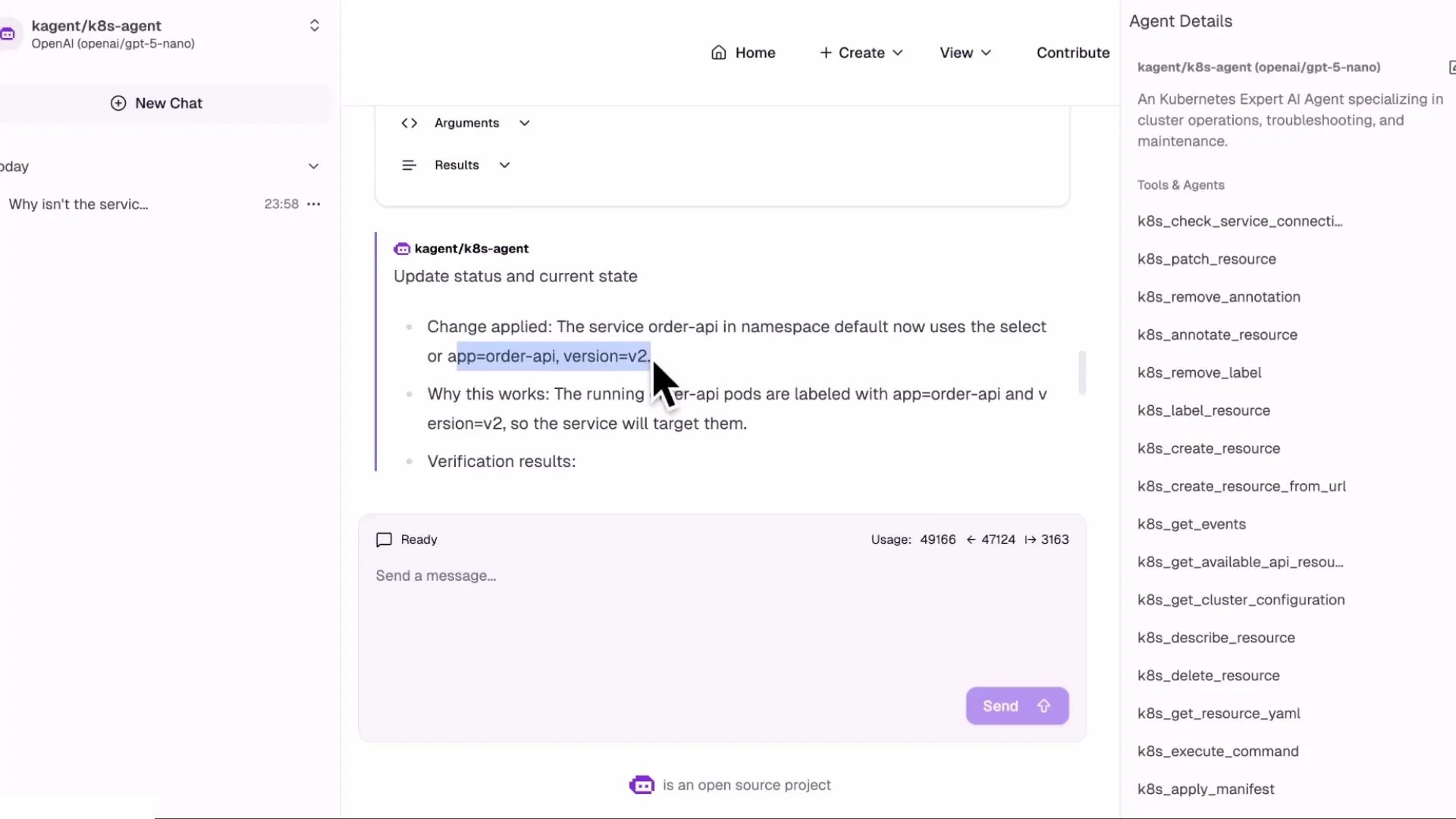
The agent detects the selector mismatch (`version=v1` vs pods `version=v2`), recommends updating the Service selector to `version=v2`, and can apply that change automatically (via a manifest or `kubectl apply`) and then re-check endpoints.
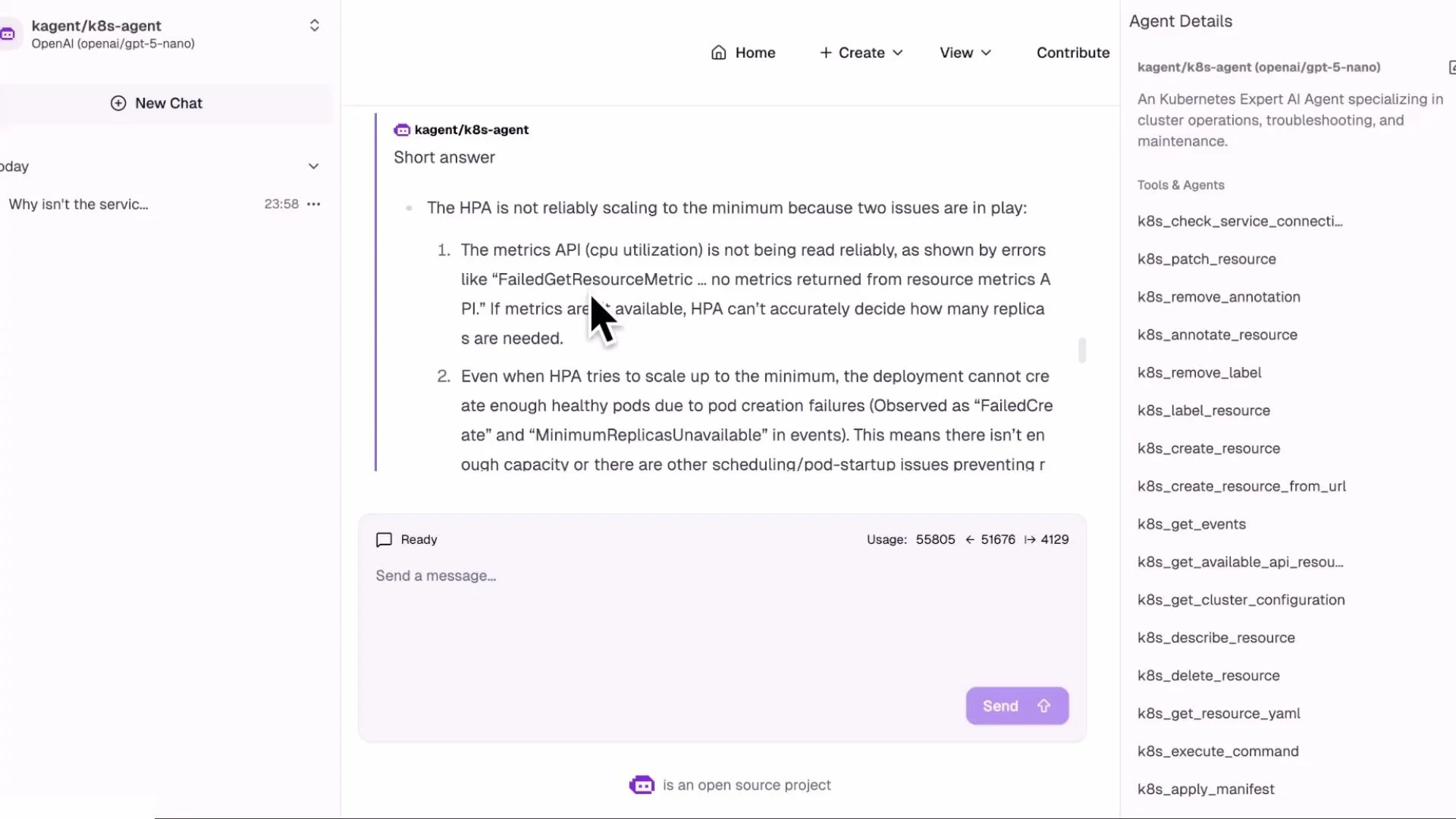
 KAgent follows a similar investigation for the HPA + `inventory-service`: describe HPA, check events, inspect ReplicaSet/Deployment, and verify ResourceQuota. It produces a prioritized list of causes (metrics-server issues vs quota) and recommends changing the `ResourceQuota` to allow more pods as the decisive remediation.
 Advantages of using KAgent
* Natural language triage: describe the issue in plain English and let the agent gather evidence.
* Faster discovery: consistent, repeatable investigative flow reduces manual rework.
* Evidence surfacing: shows exactly which commands and outputs lead to a conclusion.
* Improved MTTR and operational consistency across teams.
***
## Closing and next steps
In this lesson we:
* Manually diagnosed two common Kubernetes problems: a Service selector mismatch and a namespace `ResourceQuota` preventing HPA scaling.
* Demonstrated how KAgent can automate the same investigative steps and recommend or perform safe remediation.
Next lessons will cover:
* Building custom agents and configuring LLM providers
* Defining a safe toolset and guardrails for automated remediation
* Instrumenting clusters to improve metrics and observability
References and further reading
* [Kubernetes Services](https://kubernetes.io/docs/concepts/services-networking/service/)
* [Horizontal Pod Autoscaler (HPA)](https://kubernetes.io/docs/tasks/run-application/horizontal-pod-autoscale/)
* [ResourceQuota](https://kubernetes.io/docs/concepts/policy/resource-quotas/)
* [kubectl documentation](https://kubernetes.io/docs/reference/kubectl/)
Advantages of using KAgent
* Natural language triage: describe the issue in plain English and let the agent gather evidence.
* Faster discovery: consistent, repeatable investigative flow reduces manual rework.
* Evidence surfacing: shows exactly which commands and outputs lead to a conclusion.
* Improved MTTR and operational consistency across teams.
***
## Closing and next steps
In this lesson we:
* Manually diagnosed two common Kubernetes problems: a Service selector mismatch and a namespace `ResourceQuota` preventing HPA scaling.
* Demonstrated how KAgent can automate the same investigative steps and recommend or perform safe remediation.
Next lessons will cover:
* Building custom agents and configuring LLM providers
* Defining a safe toolset and guardrails for automated remediation
* Instrumenting clusters to improve metrics and observability
References and further reading
* [Kubernetes Services](https://kubernetes.io/docs/concepts/services-networking/service/)
* [Horizontal Pod Autoscaler (HPA)](https://kubernetes.io/docs/tasks/run-application/horizontal-pod-autoscale/)
* [ResourceQuota](https://kubernetes.io/docs/concepts/policy/resource-quotas/)
* [kubectl documentation](https://kubernetes.io/docs/reference/kubectl/)