> ## Documentation Index
> Fetch the complete documentation index at: https://notes.kodekloud.com/llms.txt
> Use this file to discover all available pages before exploring further.
# Demo Create AI Agents Using AWS MCP Servers In action
> Lab walkthrough to deploy declarative AI agents with AWS MCP servers and KAgent UI to query real-time AWS pricing, attach pricing tools, run queries, and troubleshoot
Welcome to this lab-style walkthrough. We'll extend the previously deployed AWS MCP server by connecting declarative agents to it, then use those agents to query real-time AWS pricing. This guide shows how to:
* Inspect MCP servers and agents in the KAgent UI
* Deploy a declarative LLM-only agent and observe its behavior
* Update the agent to attach AWS Pricing MCP server tools and compare results
* Run simple and complex pricing queries through the agent
This content assumes you have the AWS Pricing MCP server and KAgent UI already running in your cluster.
## Overview — What you'll learn
* How to register an agent that relies only on the LLM (no tools)
* How to attach MCP server tools to the agent so it can call AWS Pricing APIs
* How the agent invokes tools, receives structured pricing JSON, and produces human-friendly responses
* Operational checks and debugging patterns for agents + MCP servers
## Access the KAgent UI
* Open the KAgent UI (top-right in your environment).
* Skip the initial wizard if prompted and go to the main view.
## Inspect running agents
* In the KAgent UI, go to View → Agents to see registered agents.
* At the start of this demo there are no agents registered.
## Deploy an LLM-only agent (no tools)
A declarative agent manifest is provided at `/root/no_tool_aws-price-checker.yaml`. This agent is named `aws-price-check` and declares no tools, so it will rely entirely on the LLM (no live pricing calls).
Example agent manifest (LLM-only)
```yaml theme={null}
apiVersion: kagent.dev/v1alpha2
kind: Agent
metadata:
name: aws-price-check
namespace: kagent
spec:
declarative:
modelConfig: default-model-config
stream: true
systemMessage: |-
You are an AWS Pricing Expert Agent, designed to help users get accurate and comprehensive AWS pricing information.
# Core Responsibilities
- Provide real-time AWS service pricing data using available pricing tools
- Generate detailed cost reports and analysis
- Compare pricing across different AWS regions and configurations
- Help users understand AWS pricing models and cost optimization opportunities
# Instructions
- Always use the available AWS pricing tools to get accurate, real-time data
- If user question is unclear, ask for specific details like service name, region, instance type, or usage patterns
- Provide pricing in the requested currency and region when specified
- Include relevant pricing attributes and dimensions in your analysis
- Always be helpful and provide actionable cost insights
- If you don't know how to answer, tell the user "Sorry, I don't have that pricing information available" and suggest what details might help
# Response format:
- ALWAYS format your response as Markdown
- Include a summary of pricing queries performed and tools used
- Present pricing data in clear, easy-to-read tables or lists
- Provide cost optimization recommendations when relevant
- Include any assumptions made in pricing calculations
```
Apply the agent manifest and check status
```bash theme={null}
# Apply the agent manifest
kubectl apply -f /root/no_tool_aws-price-checker.yaml
# Watch pods in the kagent namespace
kubectl get pod -n kagent
# Inspect registered agents
kubectl get agent -n kagent
```
Representative status progression (condensed)
```bash theme={null}
# Shortly after apply:
NAME READY STATUS RESTARTS AGE
aws-price-check-694757df-x7552 0/1 ContainerCreating 0 8s
awslabs-aws-pricing-mcp-server-latest-... 1/1 Running 0 12m
kagent-ui-... 1/1 Running 0 15m
# A short while later (agent pod ready):
NAME READY STATUS RESTARTS AGE
aws-price-check-694757df-x7552 1/1 Running 0 69s
awslabs-aws-pricing-mcp-server-latest-... 1/1 Running 0 13m
kagent-ui-... 1/1 Running 0 16m
# Agent resource shows READY toggling to True once pod is ready
kubectl get agent -n kagent
NAME TYPE READY ACCEPTED
aws-price-check Declarative True True
```
Agents without declared tools rely entirely on the LLM and cannot fetch live pricing. To obtain live pricing you must attach MCP server tools to the agent.
Try a pricing query (LLM-only)
* Ask the LLM-only agent about the on-demand price for `g4dn.16xlarge` on Linux with shared tenancy in `us-east-1` and `ap-southeast-2`.
* Because the agent has no tool access, results will either be an LLM-derived estimate or a refusal like "Sorry, I do not have that pricing information available."
## Attach the AWS Pricing MCP server tools to the agent
Next, configure the agent to call the MCP server tools that expose the AWS Pricing List API.
In the KAgent UI:
* View → MCP servers → select the AWS Pricing MCP server (e.g. `awslabs-aws-pricing-mcp-server-latest`)
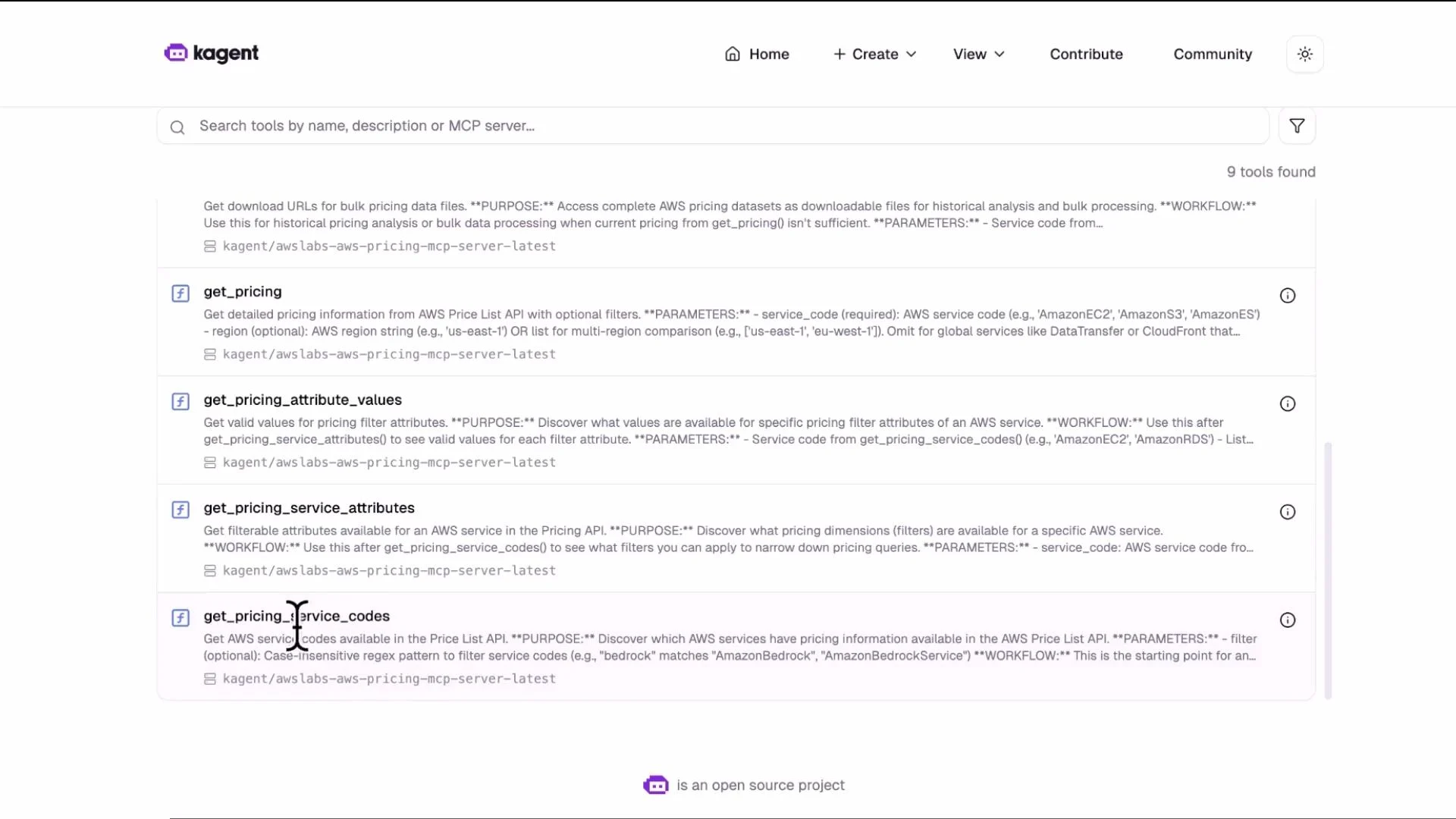
* View → Tools to inspect available functions such as `get_pricing`, `get_pricing_attribute_values`, `get_pricing_service_codes`, `generate_cost_report`, etc.
Image: list and search of AWS pricing API tools in the KAgent UI
 Example tools block added to the agent manifest
```yaml theme={null}
tools:
- mcpServer:
apiGroup: kagent.dev
kind: MCPServer
name: awslabs-aws-pricing-mcp-server-latest
toolNames:
- get_pricing_service_codes
- get_pricing_service_attributes
- get_pricing_attribute_values
- get_pricing
- get_price_list_urls
- generate_cost_report
type: McpServer
description: aws price checker api
type: Declarative
```
Apply the edited manifest and confirm
```bash theme={null}
kubectl apply -f /root/with_tool_aws-price-checker.yaml
# Confirm the agent's tools are registered in the resource YAML
kubectl get agent aws-price-check -n kagent -o yaml | grep -A20 "tools:"
```
Representative pod listing and agent YAML summary
```bash theme={null}
kubectl get pod -n kagent
NAME READY STATUS RESTARTS AGE
aws-price-check-b9476b56c-qbpt5 1/1 Running 0 28s
awslabs-aws-pricing-mcp-server-latest-58cc4cc799-6cgbs 1/1 Running 0 26m
kagent-ui-59d5bbd564-6ssnm 1/1 Running 0 29m
# Agent resource shows the tools block (see example above)
kubectl get agent aws-price-check -n kagent -o yaml | grep -A20 "tools:"
```
Table: Common tool names exposed by the AWS Pricing MCP server
| Tool name | Purpose / Example usage |
| -------------------------------- | ---------------------------------------------------------------------- |
| `get_pricing_service_codes` | Enumerate available pricing service codes (e.g., `AmazonEC2`). |
| `get_pricing_service_attributes` | Retrieve service attributes (e.g., `instanceType`, `operatingSystem`). |
| `get_pricing_attribute_values` | Fetch all values for an attribute (e.g., all EC2 instance families). |
| `get_pricing` | Query price terms and priceDimensions for a specific product filter. |
| `get_price_list_urls` | Get Price List API URLs for a service and region. |
| `generate_cost_report` | Produce aggregated cost reports across resources or time windows. |
## Run the same pricing query with tools attached
Re-run the earlier query for `g4dn.16xlarge` (Linux, shared tenancy) in `us-east-1` and `ap-southeast-2`. With tools attached:
How the call flow works
1. The agent invokes an MCP server tool such as `get_pricing` with filters for `region`, `operatingSystem`, `instanceType`, and `tenancy`.
2. The MCP server calls the AWS Pricing List API and returns structured JSON to the agent.
3. The agent's LLM processes the JSON and formats a human-readable response (tables, lists, or cost recommendations).
Tool response (excerpt)
```json theme={null}
{
"terms": {
"OnDemand": {
"MD2NZEY6DE5PD6FG.JRTCKXETXF": {
"priceDimensions": {
"MD2NZEY6DE5PD6FG.JRTCKXETXF.6YS6EN2CT7": {
"unit": "Hrs",
"endRange": "Inf",
"description": "$5.659 per Unused Reservation Linux g4dn.16xlarge Instance Hour",
"appliesTo": [],
"rateCode": "MD2NZEY6DE5PD6FG.JRTCKXETXF.6YS6EN2CT7",
"beginRange": "0",
"pricePerUnit": {
"USD": "5.6590000000"
}
}
}
}
}
}
}
```
Agent response (with tools)
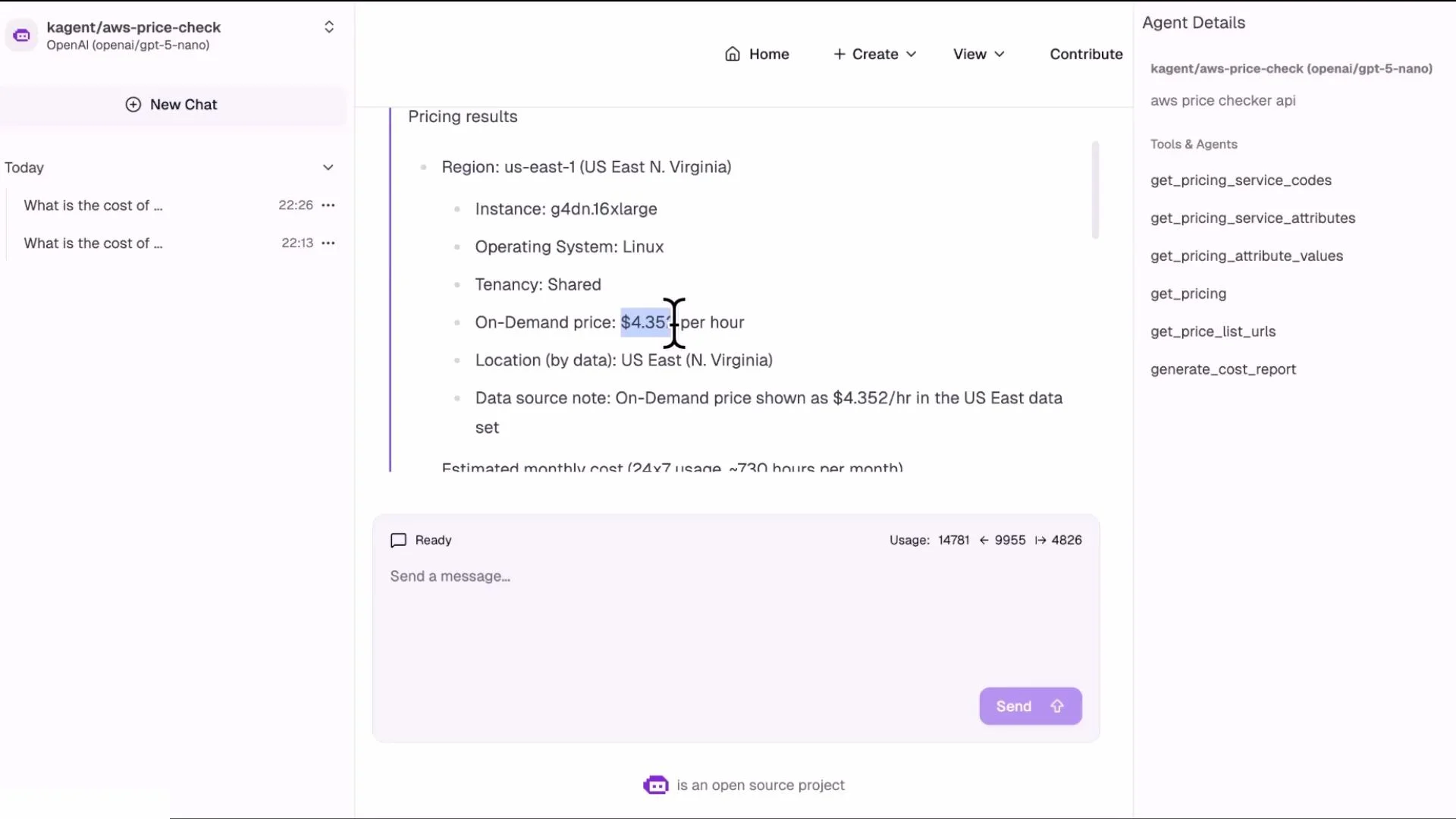
* Using the returned pricing data the agent can provide accurate results, for example:
* us-east-1 on-demand price for Linux `g4dn.16xlarge`: approximately \$4.35/hour
* ap-southeast-2 on-demand price for Linux `g4dn.16xlarge`: approximately \$5.65/hour
Image: chat UI showing pricing result for g4dn.16xlarge in us-east-1
Example tools block added to the agent manifest
```yaml theme={null}
tools:
- mcpServer:
apiGroup: kagent.dev
kind: MCPServer
name: awslabs-aws-pricing-mcp-server-latest
toolNames:
- get_pricing_service_codes
- get_pricing_service_attributes
- get_pricing_attribute_values
- get_pricing
- get_price_list_urls
- generate_cost_report
type: McpServer
description: aws price checker api
type: Declarative
```
Apply the edited manifest and confirm
```bash theme={null}
kubectl apply -f /root/with_tool_aws-price-checker.yaml
# Confirm the agent's tools are registered in the resource YAML
kubectl get agent aws-price-check -n kagent -o yaml | grep -A20 "tools:"
```
Representative pod listing and agent YAML summary
```bash theme={null}
kubectl get pod -n kagent
NAME READY STATUS RESTARTS AGE
aws-price-check-b9476b56c-qbpt5 1/1 Running 0 28s
awslabs-aws-pricing-mcp-server-latest-58cc4cc799-6cgbs 1/1 Running 0 26m
kagent-ui-59d5bbd564-6ssnm 1/1 Running 0 29m
# Agent resource shows the tools block (see example above)
kubectl get agent aws-price-check -n kagent -o yaml | grep -A20 "tools:"
```
Table: Common tool names exposed by the AWS Pricing MCP server
| Tool name | Purpose / Example usage |
| -------------------------------- | ---------------------------------------------------------------------- |
| `get_pricing_service_codes` | Enumerate available pricing service codes (e.g., `AmazonEC2`). |
| `get_pricing_service_attributes` | Retrieve service attributes (e.g., `instanceType`, `operatingSystem`). |
| `get_pricing_attribute_values` | Fetch all values for an attribute (e.g., all EC2 instance families). |
| `get_pricing` | Query price terms and priceDimensions for a specific product filter. |
| `get_price_list_urls` | Get Price List API URLs for a service and region. |
| `generate_cost_report` | Produce aggregated cost reports across resources or time windows. |
## Run the same pricing query with tools attached
Re-run the earlier query for `g4dn.16xlarge` (Linux, shared tenancy) in `us-east-1` and `ap-southeast-2`. With tools attached:
How the call flow works
1. The agent invokes an MCP server tool such as `get_pricing` with filters for `region`, `operatingSystem`, `instanceType`, and `tenancy`.
2. The MCP server calls the AWS Pricing List API and returns structured JSON to the agent.
3. The agent's LLM processes the JSON and formats a human-readable response (tables, lists, or cost recommendations).
Tool response (excerpt)
```json theme={null}
{
"terms": {
"OnDemand": {
"MD2NZEY6DE5PD6FG.JRTCKXETXF": {
"priceDimensions": {
"MD2NZEY6DE5PD6FG.JRTCKXETXF.6YS6EN2CT7": {
"unit": "Hrs",
"endRange": "Inf",
"description": "$5.659 per Unused Reservation Linux g4dn.16xlarge Instance Hour",
"appliesTo": [],
"rateCode": "MD2NZEY6DE5PD6FG.JRTCKXETXF.6YS6EN2CT7",
"beginRange": "0",
"pricePerUnit": {
"USD": "5.6590000000"
}
}
}
}
}
}
}
```
Agent response (with tools)
* Using the returned pricing data the agent can provide accurate results, for example:
* us-east-1 on-demand price for Linux `g4dn.16xlarge`: approximately \$4.35/hour
* ap-southeast-2 on-demand price for Linux `g4dn.16xlarge`: approximately \$5.65/hour
Image: chat UI showing pricing result for g4dn.16xlarge in us-east-1
 ## Run more complex queries
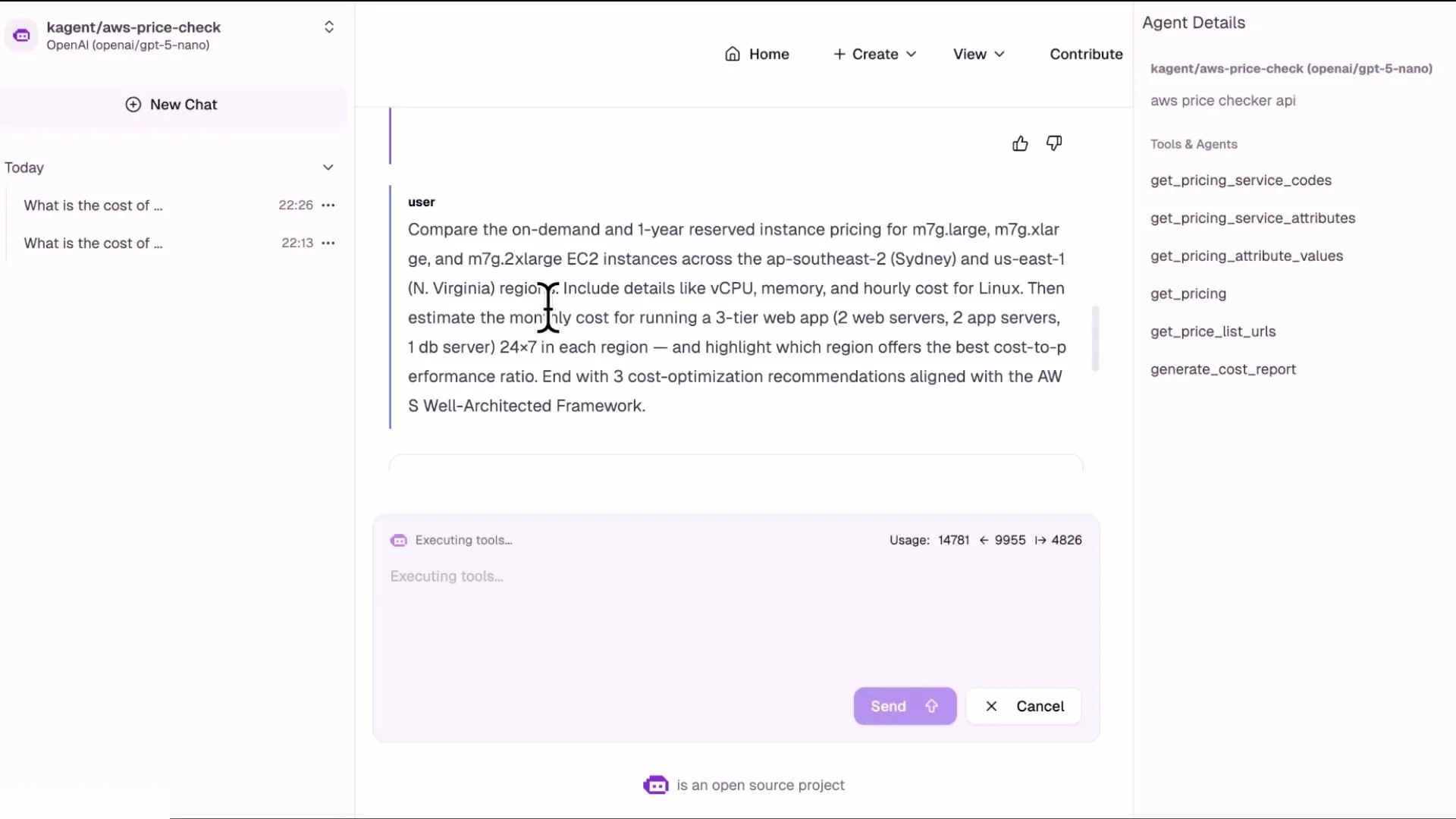
You can request multi-dimensional comparisons in a single user prompt. The agent will orchestrate multiple tool calls (one per region/offer/purchase option), aggregate results, and return a consolidated table or list.
Example complex query:
* Compare on-demand and 1-year reserved pricing for an `m7g` instance across `ap-southeast-2` (Sydney) and `us-east-1` (N. Virginia). The agent will:
* Call `get_price_list_urls` and `get_pricing` for each region and purchase option
* Parse `pricePerUnit` from the returned JSON
* Compute and present the comparisons in a table
Image: chat UI where the user requests a cross-region comparison for m7g instances
## Run more complex queries
You can request multi-dimensional comparisons in a single user prompt. The agent will orchestrate multiple tool calls (one per region/offer/purchase option), aggregate results, and return a consolidated table or list.
Example complex query:
* Compare on-demand and 1-year reserved pricing for an `m7g` instance across `ap-southeast-2` (Sydney) and `us-east-1` (N. Virginia). The agent will:
* Call `get_price_list_urls` and `get_pricing` for each region and purchase option
* Parse `pricePerUnit` from the returned JSON
* Compute and present the comparisons in a table
Image: chat UI where the user requests a cross-region comparison for m7g instances
 ## Operational notes and best practices
Table: Troubleshooting checklist
| Symptom | Check |
| ---------------------------------- | ----------------------------------------------------------------------------------------------------------------------------- |
| Agent does not return pricing | Verify agent pod is Running; check agent YAML includes `tools → mcpServer → toolNames`. |
| Tools not listed in UI | Verify MCP server is Running and healthy; open View → Tools for that MCP server. |
| Tool calls time out or fail | Check network connectivity, MCP server logs, and required AWS credentials/permissions. |
| Slow responses for complex queries | Reduce parallel calls or cache repeated price list results; consider pre-generating cost reports with `generate_cost_report`. |
Additional patterns
* Team workflow: Expose centralized pricing tools via an MCP server and create a pricing agent teams can call from CI/CD or chat to get cost estimates during planning or deployment.
* Debugging: Review logs for the MCP server and agent pods (`kubectl logs`) to troubleshoot tool invocation failures.
* Performance: Tool calls depend on MCP server latency, AWS Pricing API response time, and the number of distinct queries; batch or cache where appropriate.
Ensure the MCP server has the necessary AWS credentials and IAM permissions to call the AWS Pricing API. Without proper credentials, tool calls will fail even if the MCP server pod is Running.
## References and further reading
* [Kubernetes Basics](https://kubernetes.io/docs/concepts/overview/what-is-kubernetes/)
* [AWS Pricing API / Pricing List API](https://docs.aws.amazon.com/awsaccountbilling/latest/aboutv2/price-changes.html)
* KAgent documentation (see your platform’s KAgent docs for agent manifest details and modelConfig options)
That’s it for this lab-style lesson. Experiment with different tool combinations, regions, instance families, and purchase options to explore the full capabilities of agents + MCP servers.
## Operational notes and best practices
Table: Troubleshooting checklist
| Symptom | Check |
| ---------------------------------- | ----------------------------------------------------------------------------------------------------------------------------- |
| Agent does not return pricing | Verify agent pod is Running; check agent YAML includes `tools → mcpServer → toolNames`. |
| Tools not listed in UI | Verify MCP server is Running and healthy; open View → Tools for that MCP server. |
| Tool calls time out or fail | Check network connectivity, MCP server logs, and required AWS credentials/permissions. |
| Slow responses for complex queries | Reduce parallel calls or cache repeated price list results; consider pre-generating cost reports with `generate_cost_report`. |
Additional patterns
* Team workflow: Expose centralized pricing tools via an MCP server and create a pricing agent teams can call from CI/CD or chat to get cost estimates during planning or deployment.
* Debugging: Review logs for the MCP server and agent pods (`kubectl logs`) to troubleshoot tool invocation failures.
* Performance: Tool calls depend on MCP server latency, AWS Pricing API response time, and the number of distinct queries; batch or cache where appropriate.
Ensure the MCP server has the necessary AWS credentials and IAM permissions to call the AWS Pricing API. Without proper credentials, tool calls will fail even if the MCP server pod is Running.
## References and further reading
* [Kubernetes Basics](https://kubernetes.io/docs/concepts/overview/what-is-kubernetes/)
* [AWS Pricing API / Pricing List API](https://docs.aws.amazon.com/awsaccountbilling/latest/aboutv2/price-changes.html)
* KAgent documentation (see your platform’s KAgent docs for agent manifest details and modelConfig options)
That’s it for this lab-style lesson. Experiment with different tool combinations, regions, instance families, and purchase options to explore the full capabilities of agents + MCP servers.