> ## Documentation Index
> Fetch the complete documentation index at: https://notes.kodekloud.com/llms.txt
> Use this file to discover all available pages before exploring further.
# Demo Reading InferenceService Status
> Guide to diagnosing and fixing KServe InferenceService readiness failures when serving Qwen on Kubernetes, covering storage authentication/path errors and memory OOMKilled issues.
If you've deployed models on Kubernetes before, you've probably seen `READY: False` and had to wait. That's normal — downloading and initializing a model from remote storage can take time.
But what if `READY` stays `False` for many minutes? Or never becomes `True`? Kubernetes contains the diagnostic information you need — you just need to know where to look and how to interpret it.
 This article walks through two realistic failure scenarios when serving the Qwen model with KServe, and shows how to read the Kubernetes/KServe output to find root causes and fixes. One scenario involves an authentication/path issue that can be misleading at first.
Quick first step — check the InferenceService status:
```bash theme={null}
kubectl get inferenceservice -n kserve-inference
```
* If `READY` is `False` and `AGE` is only tens of seconds, the service is usually still initializing (storage initializer downloading files).
* If several minutes pass with no `URL` and `READY: False`, start troubleshooting — something likely failed.
This article walks through two realistic failure scenarios when serving the Qwen model with KServe, and shows how to read the Kubernetes/KServe output to find root causes and fixes. One scenario involves an authentication/path issue that can be misleading at first.
Quick first step — check the InferenceService status:
```bash theme={null}
kubectl get inferenceservice -n kserve-inference
```
* If `READY` is `False` and `AGE` is only tens of seconds, the service is usually still initializing (storage initializer downloading files).
* If several minutes pass with no `URL` and `READY: False`, start troubleshooting — something likely failed.
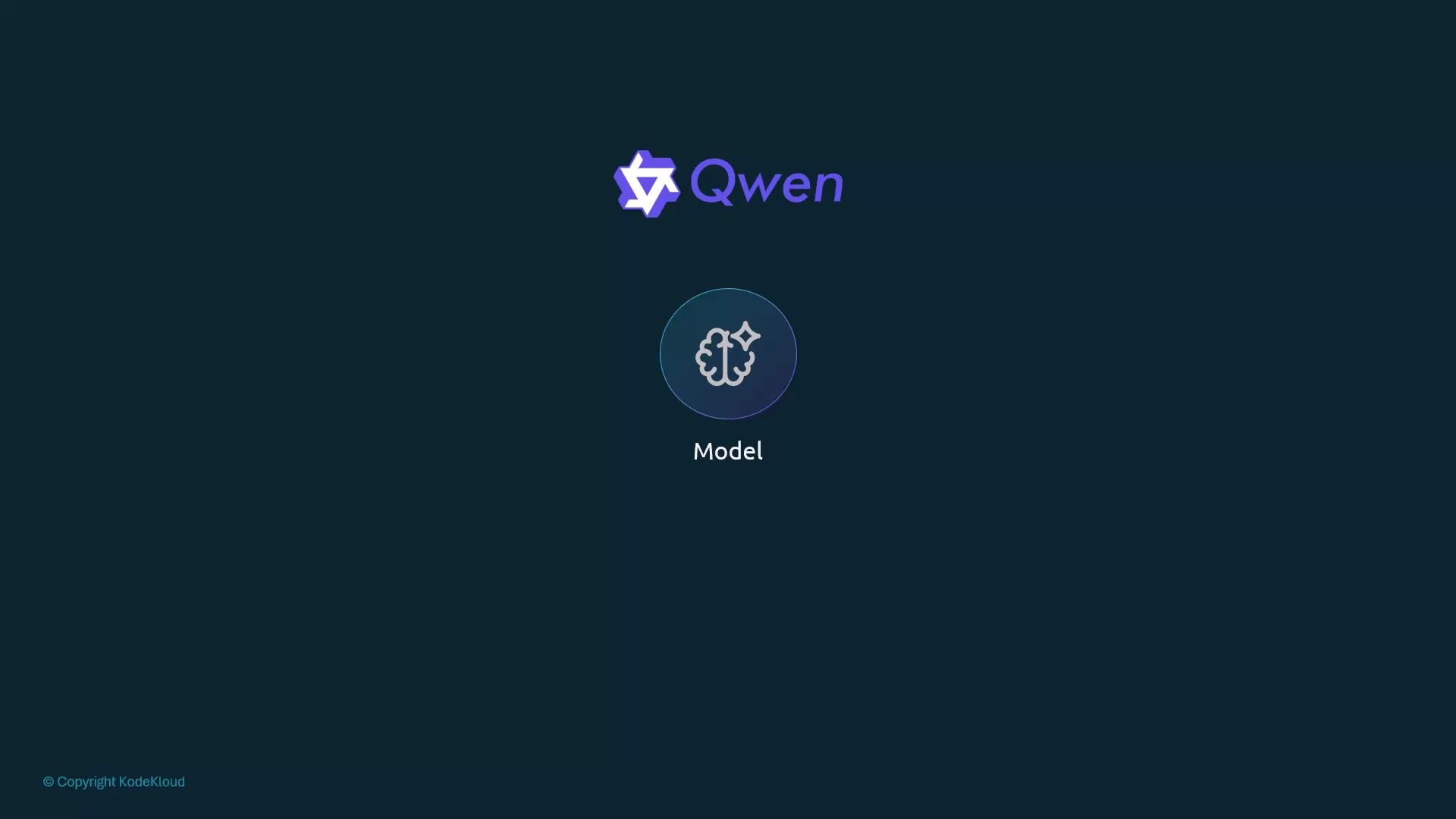 The `AGE` column is a helpful clue: if a service deployed five minutes ago is still `False` with no URL, it likely failed during initialization.
 Below are two common scenarios, how the failure appears, and how to fix it.
***
## Scenario 1 — Broken storage URI (typo or wrong repo)
Apply a deliberately broken InferenceService to reproduce the error:
```bash theme={null}
kubectl apply -f qwen-model-broken.yaml
kubectl get inferenceservice -n kserve-inference
```
Short example output:
```bash theme={null}
NAME URL READY PREV LATEST PREVROLLEDOUTREVISION LATESTREADYREVISION AGE
qwen-model False
```
Describe the InferenceService for more detail:
```bash theme={null}
kubectl describe inferenceservice qwen-model -n kserve-inference
```
Look at the `status` section, especially `conditions`. A healthy condition shows `Status: True` and `Type: PredictorReady` (or `Ready`). For failures, you'll see `Status: False` and `reason` + `message` fields with diagnostic text.
Example storage-initializer failure (truncated for clarity):
```plaintext theme={null}
Status: False
Type: Stopped
Deployment Mode: Standard
Model Status:
Copies:
Failed Copies: 0
Last Failure Info:
Exit Code: 1
2026-05-29 18:05:31.179 storage.initialize INFO Initializing, args: (src_uri, dest_path)
2026-05-29 18:05:31.179 storage.initialize INFO Copying contents of hf://Qwen/Qwen2.5-0.5B-Instruct to local
2026-05-29 18:05:31.615 storage.initialize ERROR Storage error when accessing hf://Qwen/Qwen2.5-0.5B-Instruct: 401 Client Error.
Repository Not Found for url: https://huggingface.co/api/models/Qwen/Qwen2.5-0.5B-Instruct/revision/main.
Please make sure you specified the correct `repo_id` and `repo_type`.
If you are trying to access a private or gated repo, make sure you are authenticated. For more details, see https://huggingface.co/docs/huggingface_hub/authentication
Invalid username or password.
2026-05-29 18:05:31.615 storage.initialize ERROR Storage initialization failed: HuggingFace authentication failed. Set HF_TOKEN or request access to the gated repository.
Reason: ModelLoadFailed
States:
Active Model State: FailedToLoad
Target Model State: FailedToLoad
Transition Status: BlockedByFailedLoad
Observed Generation: 1
Events:
Warning VirtualServiceCRDNotFound Istio VirtualService CRD not present; VirtualService reconciliation skipped. If you do not use Istio, set ingress.disableIstioVirtualHost=true.
```
Important context: the combination of `Repository Not Found` and `401` can be confusing. It may indicate:
* A typo in the `storageUri` (e.g., `Instruct` vs `Instuct`) — the path is wrong, so the API returns "not found".
* Or a private/gated repository that requires authentication (e.g., an `HF_TOKEN`).
When `kubectl describe` is ambiguous, inspect pod and init container logs:
```bash theme={null}
kubectl get pods -n kserve-inference -w
# or
kubectl describe pod -n kserve-inference
kubectl logs -c storage-initializer -n kserve-inference
```
With Hugging Face URIs, if you must be logged in on huggingface.co to view the model, KServe also needs credentials (for example, set `HF_TOKEN`). If the path is wrong, correct the `storageUri` in your manifest and reapply.
***
## Scenario 2 — Out of memory (OOMKilled)
ML models include weights that must be loaded into RAM. If a container is constrained to less memory than required, the kubelet will kill it (OOMKilled). This leads to restarts and the Revision/Deployment failing to reach minimum availability, causing the InferenceService to remain `False`.
Apply a manifest that intentionally causes OOM:
```bash theme={null}
kubectl apply -f qwen-model-oomkilled.yaml
kubectl get pods -n kserve-inference
```
You may observe init containers or the main container being restarted with `OOMKilled`. Describing the InferenceService will show `PredictorReady: False` and messages about minimum availability or scheduling:
```yaml theme={null}
Predictor:
Conditions:
- Last Transition Time: 2026-05-29T18:10:52Z
Reason: Predictor ingress not created
Status: False
Type: IngressReady
- Last Transition Time: 2026-05-29T18:10:52Z
Message: Deployment does not have minimum availability.
Reason: MinimumReplicasUnavailable
Status: False
Type: PredictorReady
- Last Transition Time: 2026-05-29T18:11:24Z
Reason: Predictor ingress not created
Status: False
Type: Ready
Severity: Info
Last Transition Time: 2026-05-29T18:10:52Z
Status: False
Type: Stopped
Deployment Mode: Standard
Model Status:
Copies:
Failed Copies: 0
States:
Active Model State:
Target Model State: Pending
Transition Status: InProgress
Observed Generation: 1
Events:
Warning VirtualServiceCRDNotFound Istio VirtualService CRD not present; VirtualService reconciliation skipped. If you do not use Istio, set ingress.disableIstioVirtualHost=true.
```
`Deployment does not have minimum availability` commonly indicates:
* Kubernetes couldn't schedule the pod because nodes lack sufficient memory.
* Or the pod is repeatedly OOMKilled because requests/limits are too low.
Example manifest that intentionally sets too-small memory requests/limits:
```yaml theme={null}
apiVersion: serving.kserve.io/v1beta1
kind: InferenceService
metadata:
name: qwen-model
namespace: kserve-inference
spec:
predictor:
model:
modelFormat:
name: huggingface
storageUri: "hf://Qwen/Qwen-2.5-0.5B-Instruct"
args:
- --backend=huggingface
resources:
requests:
memory: "512Mi"
limits:
memory: "512Mi"
```
Setting both `requests` and `limits` to `512Mi` is too small for the Qwen model and will likely produce `OOMKilled`. A common starting point for Qwen is `requests: 2Gi` and `limits: 4Gi`. Adjust these values according to the model size and available node resources, or schedule on nodes with more memory.
Below are two common scenarios, how the failure appears, and how to fix it.
***
## Scenario 1 — Broken storage URI (typo or wrong repo)
Apply a deliberately broken InferenceService to reproduce the error:
```bash theme={null}
kubectl apply -f qwen-model-broken.yaml
kubectl get inferenceservice -n kserve-inference
```
Short example output:
```bash theme={null}
NAME URL READY PREV LATEST PREVROLLEDOUTREVISION LATESTREADYREVISION AGE
qwen-model False
```
Describe the InferenceService for more detail:
```bash theme={null}
kubectl describe inferenceservice qwen-model -n kserve-inference
```
Look at the `status` section, especially `conditions`. A healthy condition shows `Status: True` and `Type: PredictorReady` (or `Ready`). For failures, you'll see `Status: False` and `reason` + `message` fields with diagnostic text.
Example storage-initializer failure (truncated for clarity):
```plaintext theme={null}
Status: False
Type: Stopped
Deployment Mode: Standard
Model Status:
Copies:
Failed Copies: 0
Last Failure Info:
Exit Code: 1
2026-05-29 18:05:31.179 storage.initialize INFO Initializing, args: (src_uri, dest_path)
2026-05-29 18:05:31.179 storage.initialize INFO Copying contents of hf://Qwen/Qwen2.5-0.5B-Instruct to local
2026-05-29 18:05:31.615 storage.initialize ERROR Storage error when accessing hf://Qwen/Qwen2.5-0.5B-Instruct: 401 Client Error.
Repository Not Found for url: https://huggingface.co/api/models/Qwen/Qwen2.5-0.5B-Instruct/revision/main.
Please make sure you specified the correct `repo_id` and `repo_type`.
If you are trying to access a private or gated repo, make sure you are authenticated. For more details, see https://huggingface.co/docs/huggingface_hub/authentication
Invalid username or password.
2026-05-29 18:05:31.615 storage.initialize ERROR Storage initialization failed: HuggingFace authentication failed. Set HF_TOKEN or request access to the gated repository.
Reason: ModelLoadFailed
States:
Active Model State: FailedToLoad
Target Model State: FailedToLoad
Transition Status: BlockedByFailedLoad
Observed Generation: 1
Events:
Warning VirtualServiceCRDNotFound Istio VirtualService CRD not present; VirtualService reconciliation skipped. If you do not use Istio, set ingress.disableIstioVirtualHost=true.
```
Important context: the combination of `Repository Not Found` and `401` can be confusing. It may indicate:
* A typo in the `storageUri` (e.g., `Instruct` vs `Instuct`) — the path is wrong, so the API returns "not found".
* Or a private/gated repository that requires authentication (e.g., an `HF_TOKEN`).
When `kubectl describe` is ambiguous, inspect pod and init container logs:
```bash theme={null}
kubectl get pods -n kserve-inference -w
# or
kubectl describe pod -n kserve-inference
kubectl logs -c storage-initializer -n kserve-inference
```
With Hugging Face URIs, if you must be logged in on huggingface.co to view the model, KServe also needs credentials (for example, set `HF_TOKEN`). If the path is wrong, correct the `storageUri` in your manifest and reapply.
***
## Scenario 2 — Out of memory (OOMKilled)
ML models include weights that must be loaded into RAM. If a container is constrained to less memory than required, the kubelet will kill it (OOMKilled). This leads to restarts and the Revision/Deployment failing to reach minimum availability, causing the InferenceService to remain `False`.
Apply a manifest that intentionally causes OOM:
```bash theme={null}
kubectl apply -f qwen-model-oomkilled.yaml
kubectl get pods -n kserve-inference
```
You may observe init containers or the main container being restarted with `OOMKilled`. Describing the InferenceService will show `PredictorReady: False` and messages about minimum availability or scheduling:
```yaml theme={null}
Predictor:
Conditions:
- Last Transition Time: 2026-05-29T18:10:52Z
Reason: Predictor ingress not created
Status: False
Type: IngressReady
- Last Transition Time: 2026-05-29T18:10:52Z
Message: Deployment does not have minimum availability.
Reason: MinimumReplicasUnavailable
Status: False
Type: PredictorReady
- Last Transition Time: 2026-05-29T18:11:24Z
Reason: Predictor ingress not created
Status: False
Type: Ready
Severity: Info
Last Transition Time: 2026-05-29T18:10:52Z
Status: False
Type: Stopped
Deployment Mode: Standard
Model Status:
Copies:
Failed Copies: 0
States:
Active Model State:
Target Model State: Pending
Transition Status: InProgress
Observed Generation: 1
Events:
Warning VirtualServiceCRDNotFound Istio VirtualService CRD not present; VirtualService reconciliation skipped. If you do not use Istio, set ingress.disableIstioVirtualHost=true.
```
`Deployment does not have minimum availability` commonly indicates:
* Kubernetes couldn't schedule the pod because nodes lack sufficient memory.
* Or the pod is repeatedly OOMKilled because requests/limits are too low.
Example manifest that intentionally sets too-small memory requests/limits:
```yaml theme={null}
apiVersion: serving.kserve.io/v1beta1
kind: InferenceService
metadata:
name: qwen-model
namespace: kserve-inference
spec:
predictor:
model:
modelFormat:
name: huggingface
storageUri: "hf://Qwen/Qwen-2.5-0.5B-Instruct"
args:
- --backend=huggingface
resources:
requests:
memory: "512Mi"
limits:
memory: "512Mi"
```
Setting both `requests` and `limits` to `512Mi` is too small for the Qwen model and will likely produce `OOMKilled`. A common starting point for Qwen is `requests: 2Gi` and `limits: 4Gi`. Adjust these values according to the model size and available node resources, or schedule on nodes with more memory.
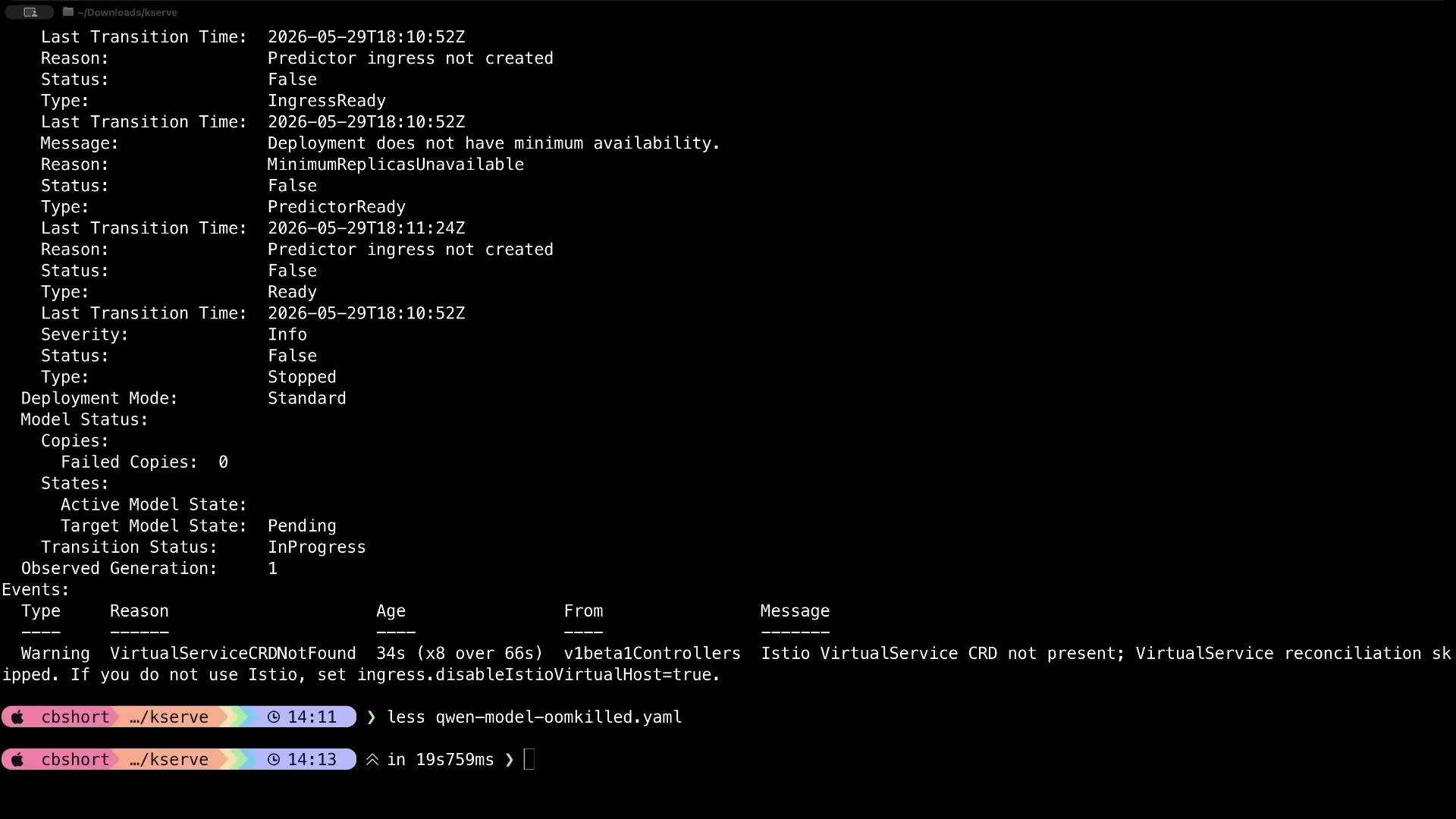 When you see `Deployment does not have minimum availability`, either increase the pod memory request/limit or provision nodes with sufficient memory so Kubernetes can schedule the pod.
***
## Troubleshooting checklist (quick reference)
| Step | Command / Action | Purpose |
| ---------------------- | -------------------------------------------------------------------- | --------------------------------------------------------- |
| Check InferenceService | `kubectl get inferenceservice -n kserve-inference` | See basic `READY`, `URL`, `AGE` status |
| Inspect conditions | `kubectl describe inferenceservice qwen-model -n kserve-inference` | Read `status.conditions` -> `reason` and `message` |
| Watch pods | `kubectl get pods -n kserve-inference -w` | See pod creation, restarts, scheduling events |
| Pod details | `kubectl describe pod -n kserve-inference` | Check events, status, and reasons (OOMKilled, scheduling) |
| Init container logs | `kubectl logs -c storage-initializer -n kserve-inference` | See storage initialization errors (auth, repo not found) |
| Predictor logs | `kubectl logs -c predictor -n kserve-inference` | Runtime errors from the serving process |
Read the `conditions` -> `message` field first. It's the single most useful piece of information KServe provides about why an InferenceService isn't becoming ready.
Practical troubleshooting based on messages:
* If `message` indicates storage or repository errors:
* Verify the `storageUri` for typos (e.g., `Instruct` vs `Instuct`).
* If the model is private/gated, set `HF_TOKEN` in your environment or use a repo you have access to. See Hugging Face authentication docs: [https://huggingface.co/docs/huggingface\_hub/authentication](https://huggingface.co/docs/huggingface_hub/authentication)
* Inspect storage-initializer logs:
```bash theme={null}
kubectl logs -c storage-initializer -n kserve-inference
```
* If `message` indicates scheduling/minimum availability or pods show `OOMKilled`:
* Check pod status and events:
```bash theme={null}
kubectl get pods -n kserve-inference
kubectl describe pod -n kserve-inference
```
* Increase `resources.requests.memory` and `resources.limits.memory` in your InferenceService manifest to meet the model’s RAM needs (for example, `requests: "2Gi"`, `limits: "4Gi"` for Qwen as a starting point), then reapply.
After applying fixes, watch the InferenceService until `READY` becomes `True`:
```bash theme={null}
kubectl get inferenceservice -n kserve-inference -w
```
If the `conditions`/`events` don’t provide enough detail, inspect pod logs (init and main containers). Storage initializer and predictor logs typically reveal the root cause: bad path, authentication failure, or memory allocation problems.
Useful links and references:
* KServe documentation: [https://kserve.github.io/](https://kserve.github.io/) (KServe concepts and troubleshooting)
* Kubernetes docs: [https://kubernetes.io/docs/](https://kubernetes.io/docs/) (kubectl, pods, events)
* Hugging Face authentication: [https://huggingface.co/docs/huggingface\_hub/authentication](https://huggingface.co/docs/huggingface_hub/authentication)
By following this checklist and reading the `reason` and `message` fields in KServe conditions, you can distinguish a slow initial load from an actual failure and take the correct corrective action.
When you see `Deployment does not have minimum availability`, either increase the pod memory request/limit or provision nodes with sufficient memory so Kubernetes can schedule the pod.
***
## Troubleshooting checklist (quick reference)
| Step | Command / Action | Purpose |
| ---------------------- | -------------------------------------------------------------------- | --------------------------------------------------------- |
| Check InferenceService | `kubectl get inferenceservice -n kserve-inference` | See basic `READY`, `URL`, `AGE` status |
| Inspect conditions | `kubectl describe inferenceservice qwen-model -n kserve-inference` | Read `status.conditions` -> `reason` and `message` |
| Watch pods | `kubectl get pods -n kserve-inference -w` | See pod creation, restarts, scheduling events |
| Pod details | `kubectl describe pod -n kserve-inference` | Check events, status, and reasons (OOMKilled, scheduling) |
| Init container logs | `kubectl logs -c storage-initializer -n kserve-inference` | See storage initialization errors (auth, repo not found) |
| Predictor logs | `kubectl logs -c predictor -n kserve-inference` | Runtime errors from the serving process |
Read the `conditions` -> `message` field first. It's the single most useful piece of information KServe provides about why an InferenceService isn't becoming ready.
Practical troubleshooting based on messages:
* If `message` indicates storage or repository errors:
* Verify the `storageUri` for typos (e.g., `Instruct` vs `Instuct`).
* If the model is private/gated, set `HF_TOKEN` in your environment or use a repo you have access to. See Hugging Face authentication docs: [https://huggingface.co/docs/huggingface\_hub/authentication](https://huggingface.co/docs/huggingface_hub/authentication)
* Inspect storage-initializer logs:
```bash theme={null}
kubectl logs -c storage-initializer -n kserve-inference
```
* If `message` indicates scheduling/minimum availability or pods show `OOMKilled`:
* Check pod status and events:
```bash theme={null}
kubectl get pods -n kserve-inference
kubectl describe pod -n kserve-inference
```
* Increase `resources.requests.memory` and `resources.limits.memory` in your InferenceService manifest to meet the model’s RAM needs (for example, `requests: "2Gi"`, `limits: "4Gi"` for Qwen as a starting point), then reapply.
After applying fixes, watch the InferenceService until `READY` becomes `True`:
```bash theme={null}
kubectl get inferenceservice -n kserve-inference -w
```
If the `conditions`/`events` don’t provide enough detail, inspect pod logs (init and main containers). Storage initializer and predictor logs typically reveal the root cause: bad path, authentication failure, or memory allocation problems.
Useful links and references:
* KServe documentation: [https://kserve.github.io/](https://kserve.github.io/) (KServe concepts and troubleshooting)
* Kubernetes docs: [https://kubernetes.io/docs/](https://kubernetes.io/docs/) (kubectl, pods, events)
* Hugging Face authentication: [https://huggingface.co/docs/huggingface\_hub/authentication](https://huggingface.co/docs/huggingface_hub/authentication)
By following this checklist and reading the `reason` and `message` fields in KServe conditions, you can distinguish a slow initial load from an actual failure and take the correct corrective action.