> ## Documentation Index
> Fetch the complete documentation index at: https://notes.kodekloud.com/llms.txt
> Use this file to discover all available pages before exploring further.
# What You Will Build in This Course
> Building and operating an end-to-end Kubeflow ML platform covering notebooks, pipelines, Katib tuning, KServe deployment, and multi-user collaboration.
One common challenge when learning a platform like Kubeflow is that it’s easy to get lost in the individual components. Students often learn notebooks, pipelines, Katib, and KServe in isolation and miss how those pieces integrate into a production ML platform.
This lesson presents the end-to-end journey we’ll follow in the course so you can see how the parts fit together before we dive into each component in detail.
Many learners understand individual tools but not how to combine them into a repeatable, scalable ML workflow. In this course we’ll build a complete machine learning platform workflow: start with experimentation in notebooks, automate that work using pipelines, optimize models with Katib, deploy with KServe, and finally enable multi-user collaboration. By the end you’ll understand not just the individual components, but how
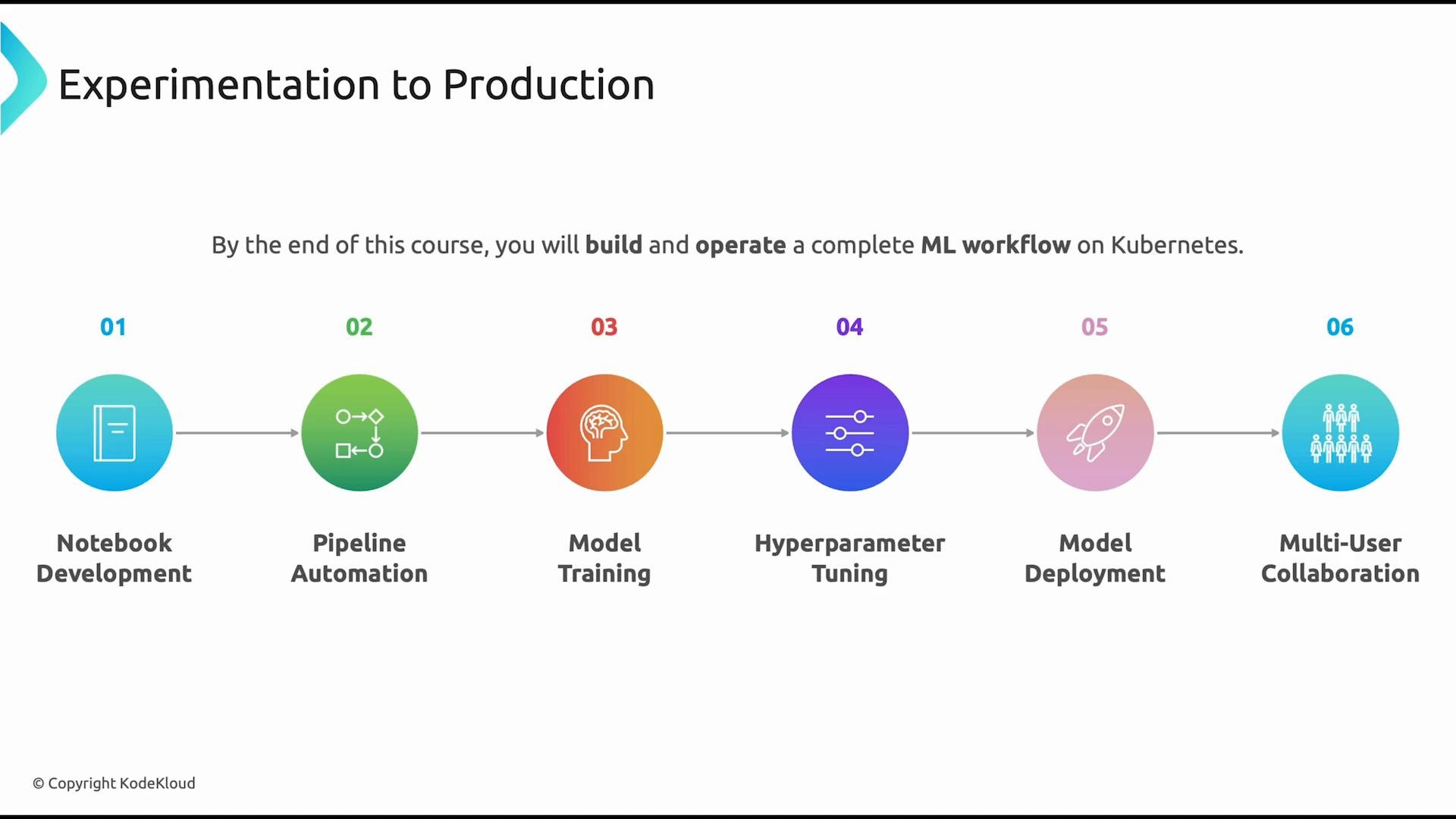 they work together as a part of a production AI platform.
Kubeflow is intentionally designed as a set of interoperable projects that map to different stages of the ML lifecycle. Below is a concise roadmap of the core components we’ll cover and why they matter.
## Roadmap: Core Kubeflow Components
| Component | Purpose | What you’ll learn |
| - | - | - |
| Notebooks | Interactive development and experimentation on Kubernetes | Create containerized JupyterLab notebooks, share compute, and reproduce experiments |
| Pipelines | Automated, repeatable ML workflows | Break workflows into components, pass parameters/artifacts, schedule and control execution |
| Katib | Hyperparameter tuning and automated model search | Define search spaces, run experiments (random, grid, Bayesian), and use early stopping |
| KServe | Kubernetes-native model serving | Package and deploy models for real-time and batch inference with autoscaling and GPU support |
| Profiles & RBAC | Multi-tenant workspaces and access control | Configure namespaces, Profiles, and RBAC to enable safe team collaboration |
## Notebooks
* Kubeflow Notebooks deliver an interactive development environment where data scientists and ML engineers explore data, prototype models, and run experiments.
* Rather than running Jupyter locally, Kubeflow launches notebooks inside Kubernetes for centralized infrastructure, consistent environments, and shared compute.
* Notebooks typically run JupyterLab, but can also include other IDEs such as code-server or RStudio when those tools are present in the container image.
## Automation with Pipelines
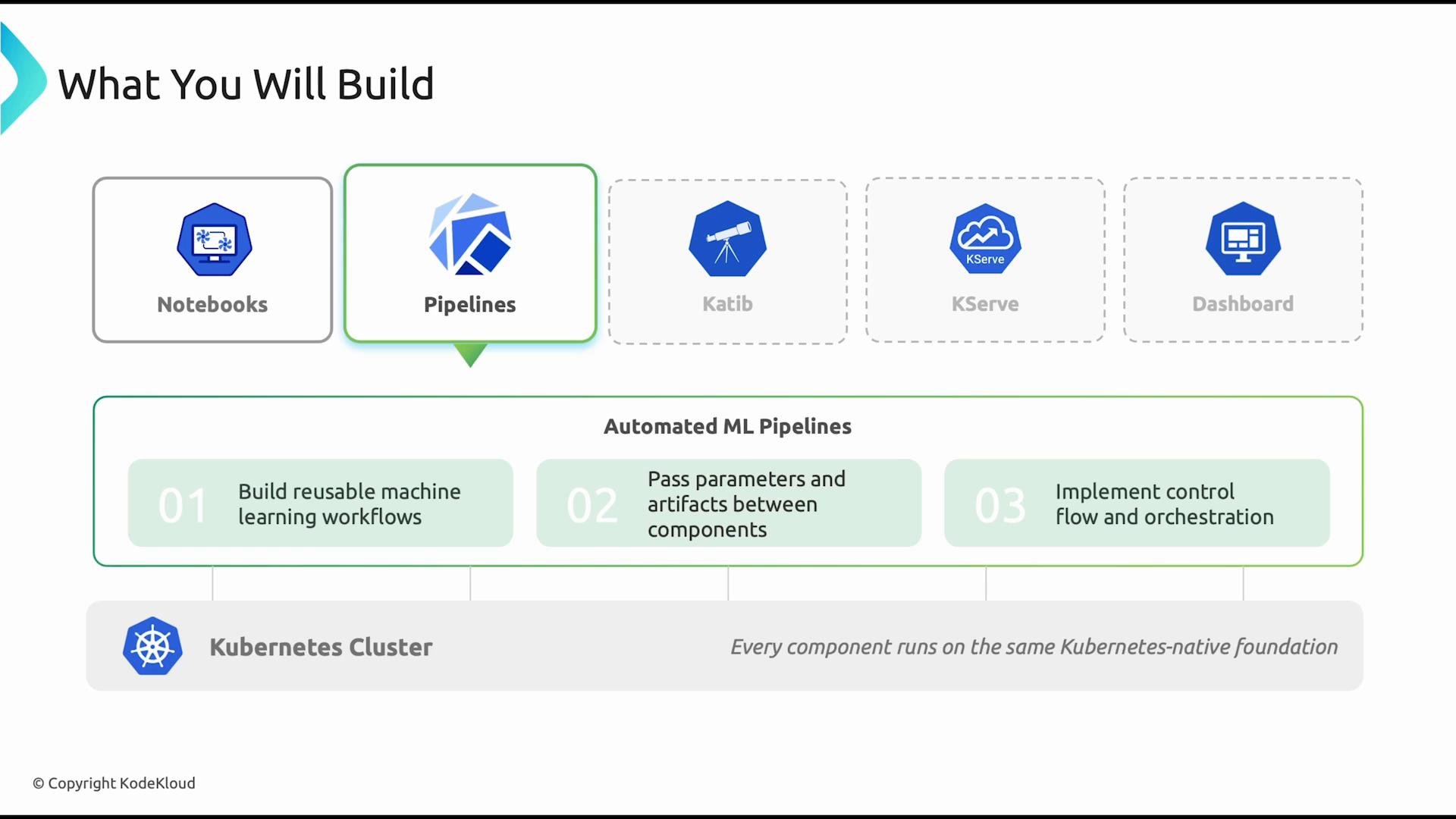
* Manually running notebooks is not scalable for production workflows. Kubeflow Pipelines enables repeatable, automated workflows that run reliably on Kubernetes.
* We’ll decompose workflows into reusable components, pass parameters and artifacts between steps, and implement control flow so pipelines run on schedules or on demand.
* Kubeflow Pipelines is container-native and portable, designed for building scalable ML workflows that integrate with CI/CD and observability tooling.
they work together as a part of a production AI platform.
Kubeflow is intentionally designed as a set of interoperable projects that map to different stages of the ML lifecycle. Below is a concise roadmap of the core components we’ll cover and why they matter.
## Roadmap: Core Kubeflow Components
| Component | Purpose | What you’ll learn |
| - | - | - |
| Notebooks | Interactive development and experimentation on Kubernetes | Create containerized JupyterLab notebooks, share compute, and reproduce experiments |
| Pipelines | Automated, repeatable ML workflows | Break workflows into components, pass parameters/artifacts, schedule and control execution |
| Katib | Hyperparameter tuning and automated model search | Define search spaces, run experiments (random, grid, Bayesian), and use early stopping |
| KServe | Kubernetes-native model serving | Package and deploy models for real-time and batch inference with autoscaling and GPU support |
| Profiles & RBAC | Multi-tenant workspaces and access control | Configure namespaces, Profiles, and RBAC to enable safe team collaboration |
## Notebooks
* Kubeflow Notebooks deliver an interactive development environment where data scientists and ML engineers explore data, prototype models, and run experiments.
* Rather than running Jupyter locally, Kubeflow launches notebooks inside Kubernetes for centralized infrastructure, consistent environments, and shared compute.
* Notebooks typically run JupyterLab, but can also include other IDEs such as code-server or RStudio when those tools are present in the container image.
## Automation with Pipelines
* Manually running notebooks is not scalable for production workflows. Kubeflow Pipelines enables repeatable, automated workflows that run reliably on Kubernetes.
* We’ll decompose workflows into reusable components, pass parameters and artifacts between steps, and implement control flow so pipelines run on schedules or on demand.
* Kubeflow Pipelines is container-native and portable, designed for building scalable ML workflows that integrate with CI/CD and observability tooling.
 ## Model Optimization with Katib
* Building a model is only part of the task — tuning hyperparameters is essential for peak performance. Katib automates hyperparameter search using strategies like grid search, random search, and Bayesian optimization.
* You’ll learn to define search spaces and configure experiments, and let Katib evaluate many configurations automatically, including early stopping and custom metrics.
* Katib is Kubeflow’s Kubernetes-native AutoML component for systematic hyperparameter tuning and model optimization.
## Model Serving with KServe
* A trained model only creates value when it serves predictions. KServe provides Kubernetes-native model serving, exposing inference endpoints for real-time or batch predictions.
* We’ll package trained models, deploy them as scalable services, and cover operational concerns such as autoscaling, GPU-backed inference, canary rollouts, and traffic splitting.
* KServe integrates with monitoring and logging so you can track inference performance and observability.
## Multi-user Collaboration and Operations
* Production platforms are shared: data scientists, ML engineers, and platform operators need isolated but integrated workspaces.
* Kubeflow uses Profiles, Kubernetes namespaces, and RBAC to give teams isolated environments while enabling centralized platform management.
* We’ll cover how to set up Profiles, control access, manage quotas, and share common resources so teams can work independently while contributing to a unified platform.
Course goal: gain hands-on experience across the full ML lifecycle—from experimentation and training to tuning, deployment, and multi-user operations—so you can design, operate, and maintain production-ready ML platforms with Kubeflow.
## What you’ll be able to do after this course
* Design an end-to-end ML workflow that spans development, training, tuning, deployment, and operations.
* Run reproducible experiments in Kubeflow Notebooks and automate them with Kubeflow Pipelines.
* Optimize models with Katib and deploy production-grade inference with KServe.
* Configure Profiles, namespaces, and RBAC for safe multi-user collaboration and platform governance.
## Links and references
* [Kubeflow documentation](https://www.kubeflow.org/docs/)
* [Kubernetes documentation](https://kubernetes.io/docs/)
* [Jupyter Project](https://jupyter.org/)
* [JupyterLab](https://jupyter.org/)
* [Katib (Kubeflow AutoML)](https://www.kubeflow.org/docs/components/hyperparameter-tuning/overview/)
* [KServe (model serving)](https://kserve.github.io/)
By the end of the course you’ll understand how Notebooks, Pipelines, Katib, KServe, and Profiles fit together to form a production AI platform and how to operate that platform for real-world ML use cases.
This documentation is built and hosted on [Mintlify](https://mintlify.com), a developer documentation platform.
## Model Optimization with Katib
* Building a model is only part of the task — tuning hyperparameters is essential for peak performance. Katib automates hyperparameter search using strategies like grid search, random search, and Bayesian optimization.
* You’ll learn to define search spaces and configure experiments, and let Katib evaluate many configurations automatically, including early stopping and custom metrics.
* Katib is Kubeflow’s Kubernetes-native AutoML component for systematic hyperparameter tuning and model optimization.
## Model Serving with KServe
* A trained model only creates value when it serves predictions. KServe provides Kubernetes-native model serving, exposing inference endpoints for real-time or batch predictions.
* We’ll package trained models, deploy them as scalable services, and cover operational concerns such as autoscaling, GPU-backed inference, canary rollouts, and traffic splitting.
* KServe integrates with monitoring and logging so you can track inference performance and observability.
## Multi-user Collaboration and Operations
* Production platforms are shared: data scientists, ML engineers, and platform operators need isolated but integrated workspaces.
* Kubeflow uses Profiles, Kubernetes namespaces, and RBAC to give teams isolated environments while enabling centralized platform management.
* We’ll cover how to set up Profiles, control access, manage quotas, and share common resources so teams can work independently while contributing to a unified platform.
Course goal: gain hands-on experience across the full ML lifecycle—from experimentation and training to tuning, deployment, and multi-user operations—so you can design, operate, and maintain production-ready ML platforms with Kubeflow.
## What you’ll be able to do after this course
* Design an end-to-end ML workflow that spans development, training, tuning, deployment, and operations.
* Run reproducible experiments in Kubeflow Notebooks and automate them with Kubeflow Pipelines.
* Optimize models with Katib and deploy production-grade inference with KServe.
* Configure Profiles, namespaces, and RBAC for safe multi-user collaboration and platform governance.
## Links and references
* [Kubeflow documentation](https://www.kubeflow.org/docs/)
* [Kubernetes documentation](https://kubernetes.io/docs/)
* [Jupyter Project](https://jupyter.org/)
* [JupyterLab](https://jupyter.org/)
* [Katib (Kubeflow AutoML)](https://www.kubeflow.org/docs/components/hyperparameter-tuning/overview/)
* [KServe (model serving)](https://kserve.github.io/)
By the end of the course you’ll understand how Notebooks, Pipelines, Katib, KServe, and Profiles fit together to form a production AI platform and how to operate that platform for real-world ML use cases.
This documentation is built and hosted on [Mintlify](https://mintlify.com), a developer documentation platform.