> ## Documentation Index
> Fetch the complete documentation index at: https://notes.kodekloud.com/llms.txt
> Use this file to discover all available pages before exploring further.
# Kubeflow Architecture
> Overview of Kubeflow architecture on Kubernetes explaining layered infrastructure, CRDs and controllers, pipelines, notebooks, training, Katib, KServe, networking, storage, and ML lifecycle integration.
This lesson explains Kubeflow’s architecture and how its components fit together on top of Kubernetes. The content is organized from the lowest infrastructure layer up to the user-facing dashboard and ML workflow components so you can quickly understand deployment, orchestration, and integration points.
## Layered view: infrastructure → Kubernetes → Kubeflow
* Physical infrastructure: your servers or cloud provider (AWS, Azure, GCP, on-prem) provide compute, networking, and storage.
* Kubernetes: runs on that infrastructure and supplies container orchestration, networking primitives, storage (PersistentVolumes), and RBAC.
* Kubeflow: installed on top of Kubernetes, Kubeflow extends Kubernetes by registering Custom Resource Definitions (CRDs) and controllers. Those controllers watch CRDs and map them to underlying Kubernetes resources (Pods, Services, Jobs, etc.), enabling ML-native concepts (notebooks, training jobs, pipelines).
When Kubeflow is installed, it registers several CRDs with the Kubernetes API. These CRDs define resources such as profiles, notebook servers, training jobs, experiments, and pipeline runs. Kubernetes controllers included with Kubeflow reconcile those resources and create the required Kubernetes objects to execute them.
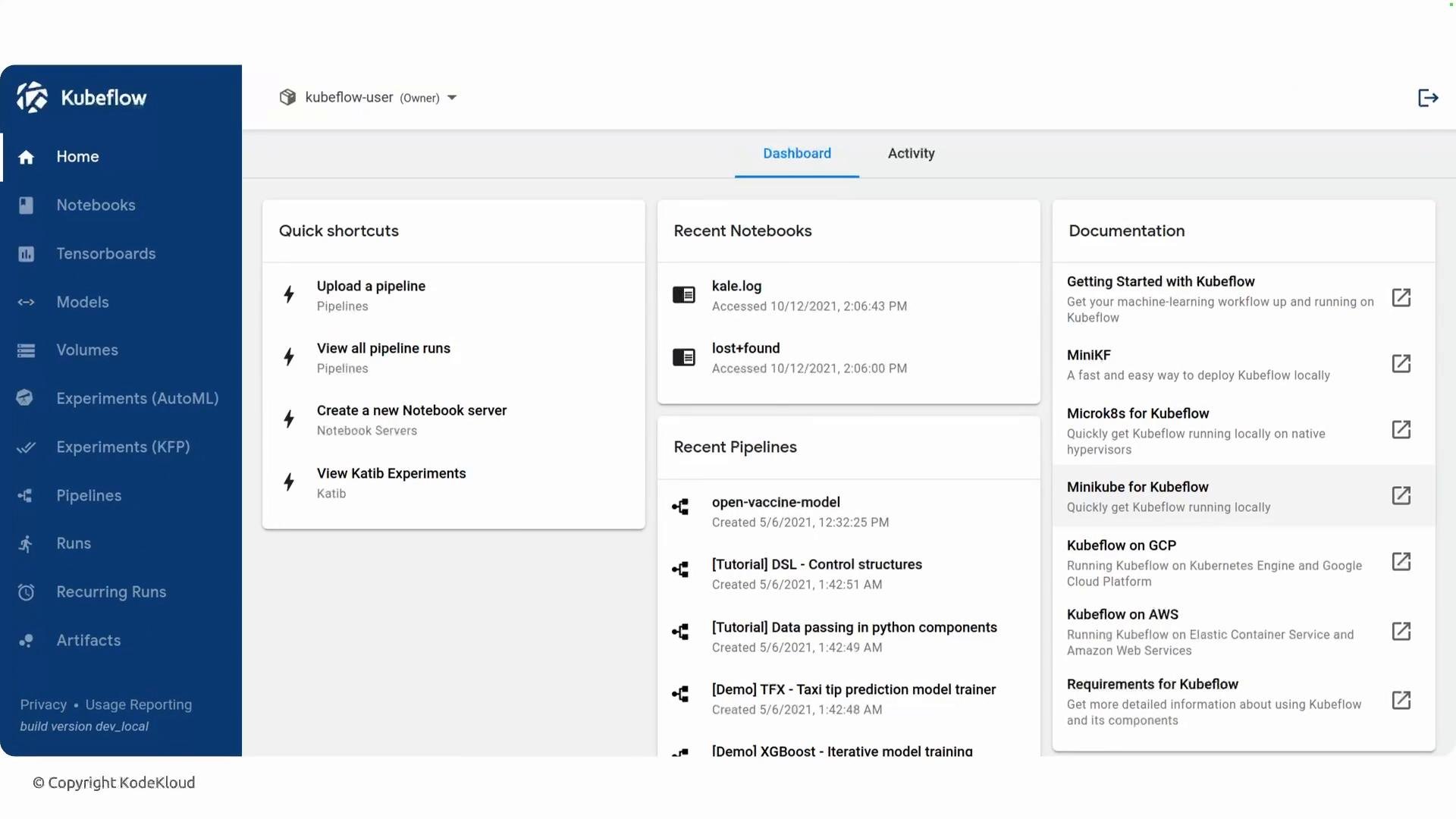
Below is the Kubeflow dashboard — the central UI that most users interact with to create and manage notebooks, pipelines, experiments, and models. The dashboard itself runs as pods inside the cluster and provides access to most Kubeflow features.
 ## Orchestration: Pipelines and workflow engines
Kubeflow Pipelines (KFP) translates pipeline definitions into workflow manifests that run on Kubernetes. Historically KFP uses Argo Workflows as the default engine; each pipeline step becomes one or more Kubernetes pods orchestrated by the workflow engine. KFP v2 also supports alternate backends such as Tekton depending on installation choices.
Example commands and checks:
* List CRDs registered by Kubeflow:
```bash theme={null}
kubectl get crd | grep kubeflow
```
* Inspect running pipeline workflows (if using Argo):
```bash theme={null}
kubectl get workflows -n kubeflow
```
## Networking and service mesh
Many Kubeflow deployments include a service mesh or ingress solution to manage cross-service traffic, mTLS, ingress/egress routing, and some auth flows. Istio has historically been a common choice, but many installations select lighter-weight or alternative ingress/service-mesh technologies (Emissary/Ambassador, NGINX, Linkerd) based on operational needs.
Kubeflow is modular: many components are optional and can be installed independently. The set of installed components and how they are exposed (Istio, Emissary/Ambassador, ingress controllers, external auth) depends on your deployment choices.
## Key Kubeflow components (what you’ll encounter)
| Component | Purpose | Typical CRD / Operator | Notes & Links |
| - | -: | - | - |
| Pipelines (KFP) | Create, run, and track reproducible ML workflows | `PipelineRun`, workflow engine (Argo/Tekton) | Integrates with metadata store and artifact storage. See: [Kubeflow Pipelines](https://www.kubeflow.org/docs/components/pipelines/) |
| Notebooks | Managed Jupyter notebook servers inside the cluster | `Notebook` CRD | Request notebooks with specific CPU/GPU and PVs; controller manages lifecycle. |
| Training (distributed) | Run distributed training jobs (TensorFlow, PyTorch, MXNet) | `TFJob`, `PyTorchJob`, `MXJob` CRDs | Operators coordinate distributed pods for scalable training. |
| Katib | Hyperparameter tuning and AutoML | `Experiment` CRD | Runs trial jobs, coordinates search algorithms. [Katib docs](https://www.kubeflow.org/docs/components/katib/) |
| Metadata & Model Registry | Track runs, artifacts, and model lineage | ML Metadata integration, backing DB | Stores experiment metadata and artifact URIs (S3, GCS, etc.). |
| KServe (model serving) | Serve models as scalable HTTP endpoints | `InferenceService` CRD | Built on Knative serving primitives; supports autoscaling and rollout strategies. [KServe](https://kserve.github.io/) |
## Supporting infrastructure and services
* Artifact storage: S3 / MinIO, GCS, Azure Blob for datasets and model binaries.
* Metadata store: ML Metadata with a backing database (MySQL / PostgreSQL).
* PersistentVolumes and dynamic provisioners for notebook and training storage.
* Authentication/authorization: Dex, OIDC providers, or cluster-native solutions.
* Ingress/service mesh: Istio (historically), Emissary/Ambassador, NGINX, Linkerd, Knative for serverless serving.
## How components interact (workflow summary)
1. Developer requests a notebook or launches a pipeline via the Kubeflow dashboard (or CLI/API).
2. The dashboard creates the corresponding CRD (e.g., `Notebook`, `PipelineRun`) in Kubernetes.
3. Kubeflow controllers reconcile the CRD and create the necessary Kubernetes objects (Pods, Services, PVCs).
4. For pipelines, the workflow engine (Argo/Tekton) executes each step as pods; artifacts and metadata are stored in the configured artifact store and metadata DB.
5. Training operators manage distributed training across nodes, coordinating replicas and GPUs.
6. After training, models can be registered in a model store and served using KServe (exposed via ingress/service mesh for traffic management).
This architecture enables full ML lifecycle operations on top of Kubernetes: iterative development in notebooks, reproducible pipeline orchestration, hyperparameter tuning, scalable training, artifact tracking, and production-grade model serving.
## References and further reading
* [Kubeflow documentation](https://www.kubeflow.org/docs/)
* [Kubeflow Pipelines](https://www.kubeflow.org/docs/components/pipelines/)
* [Argo Workflows](https://argoproj.github.io/argo-workflows/)
* [KServe (serving)](https://kserve.github.io/)
* [Katib (hyperparameter tuning)](https://www.kubeflow.org/docs/components/katib/)
* [Istio service mesh](https://istio.io/)
This documentation is built and hosted on [Mintlify](https://mintlify.com), a developer documentation platform.
## Orchestration: Pipelines and workflow engines
Kubeflow Pipelines (KFP) translates pipeline definitions into workflow manifests that run on Kubernetes. Historically KFP uses Argo Workflows as the default engine; each pipeline step becomes one or more Kubernetes pods orchestrated by the workflow engine. KFP v2 also supports alternate backends such as Tekton depending on installation choices.
Example commands and checks:
* List CRDs registered by Kubeflow:
```bash theme={null}
kubectl get crd | grep kubeflow
```
* Inspect running pipeline workflows (if using Argo):
```bash theme={null}
kubectl get workflows -n kubeflow
```
## Networking and service mesh
Many Kubeflow deployments include a service mesh or ingress solution to manage cross-service traffic, mTLS, ingress/egress routing, and some auth flows. Istio has historically been a common choice, but many installations select lighter-weight or alternative ingress/service-mesh technologies (Emissary/Ambassador, NGINX, Linkerd) based on operational needs.
Kubeflow is modular: many components are optional and can be installed independently. The set of installed components and how they are exposed (Istio, Emissary/Ambassador, ingress controllers, external auth) depends on your deployment choices.
## Key Kubeflow components (what you’ll encounter)
| Component | Purpose | Typical CRD / Operator | Notes & Links |
| - | -: | - | - |
| Pipelines (KFP) | Create, run, and track reproducible ML workflows | `PipelineRun`, workflow engine (Argo/Tekton) | Integrates with metadata store and artifact storage. See: [Kubeflow Pipelines](https://www.kubeflow.org/docs/components/pipelines/) |
| Notebooks | Managed Jupyter notebook servers inside the cluster | `Notebook` CRD | Request notebooks with specific CPU/GPU and PVs; controller manages lifecycle. |
| Training (distributed) | Run distributed training jobs (TensorFlow, PyTorch, MXNet) | `TFJob`, `PyTorchJob`, `MXJob` CRDs | Operators coordinate distributed pods for scalable training. |
| Katib | Hyperparameter tuning and AutoML | `Experiment` CRD | Runs trial jobs, coordinates search algorithms. [Katib docs](https://www.kubeflow.org/docs/components/katib/) |
| Metadata & Model Registry | Track runs, artifacts, and model lineage | ML Metadata integration, backing DB | Stores experiment metadata and artifact URIs (S3, GCS, etc.). |
| KServe (model serving) | Serve models as scalable HTTP endpoints | `InferenceService` CRD | Built on Knative serving primitives; supports autoscaling and rollout strategies. [KServe](https://kserve.github.io/) |
## Supporting infrastructure and services
* Artifact storage: S3 / MinIO, GCS, Azure Blob for datasets and model binaries.
* Metadata store: ML Metadata with a backing database (MySQL / PostgreSQL).
* PersistentVolumes and dynamic provisioners for notebook and training storage.
* Authentication/authorization: Dex, OIDC providers, or cluster-native solutions.
* Ingress/service mesh: Istio (historically), Emissary/Ambassador, NGINX, Linkerd, Knative for serverless serving.
## How components interact (workflow summary)
1. Developer requests a notebook or launches a pipeline via the Kubeflow dashboard (or CLI/API).
2. The dashboard creates the corresponding CRD (e.g., `Notebook`, `PipelineRun`) in Kubernetes.
3. Kubeflow controllers reconcile the CRD and create the necessary Kubernetes objects (Pods, Services, PVCs).
4. For pipelines, the workflow engine (Argo/Tekton) executes each step as pods; artifacts and metadata are stored in the configured artifact store and metadata DB.
5. Training operators manage distributed training across nodes, coordinating replicas and GPUs.
6. After training, models can be registered in a model store and served using KServe (exposed via ingress/service mesh for traffic management).
This architecture enables full ML lifecycle operations on top of Kubernetes: iterative development in notebooks, reproducible pipeline orchestration, hyperparameter tuning, scalable training, artifact tracking, and production-grade model serving.
## References and further reading
* [Kubeflow documentation](https://www.kubeflow.org/docs/)
* [Kubeflow Pipelines](https://www.kubeflow.org/docs/components/pipelines/)
* [Argo Workflows](https://argoproj.github.io/argo-workflows/)
* [KServe (serving)](https://kserve.github.io/)
* [Katib (hyperparameter tuning)](https://www.kubeflow.org/docs/components/katib/)
* [Istio service mesh](https://istio.io/)
This documentation is built and hosted on [Mintlify](https://mintlify.com), a developer documentation platform.