> ## Documentation Index
> Fetch the complete documentation index at: https://notes.kodekloud.com/llms.txt
> Use this file to discover all available pages before exploring further.
# Demo Deploying Iris Trained Model on KServe
> Step-by-step guide to run KServe on a local Kind cluster and deploy a pre-trained scikit-learn Iris model, creating an InferenceService and testing via kubectl port-forward and curl.
This guide shows how to run KServe locally on a Kind cluster and deploy a pre-trained scikit-learn Iris model. Step-by-step you'll: confirm prerequisites, create a Kind cluster, install KServe, create an `InferenceService`, and test the model via `kubectl port-forward`.
## Prerequisites (local)
Install the following CLI tools on your workstation:
| Tool | Purpose | Install / Check |
| - | - | - |
| Docker | Container runtime (Docker Desktop recommended) | `docker --version` |
| kubectl | Kubernetes CLI (client) | `kubectl version --client` — on macOS: `brew install kubectl` |
| kind | Local Kubernetes (Kubernetes IN Docker) | `kind version` — on macOS: `brew install kind` |
Quick checks:
```bash theme={null}
# Docker
docker --version
# kubectl (client only)
kubectl version --client
# kind version
kind version
```
If you run into permission errors with Docker on Linux, ensure your user is in the `docker` group or use `sudo` for commands that need elevated privileges.
## Create a local Kind cluster
Create a cluster with a default configuration:
```bash theme={null}
kind create cluster
```
Example condensed output:
```bash theme={null}
$ kind create cluster
Creating cluster "kind" ...
✅ Ensuring node image (kindest/node:v1.37.0) 🖼️
✅ Preparing nodes 📦
✅ Writing configuration 📜
✅ Starting control-plane 🕹️
✅ Installing CNI 🔧
✅ Installing StorageClass 💾
Set kubectl context to "kind-kind"
You can now use your cluster with:
kubectl cluster-info --context kind-kind
```
Verify the node(s):
```bash theme={null}
kubectl get nodes
```
Expected output:
```bash theme={null}
NAME STATUS ROLES AGE VERSION
kind-control-plane Ready control-plane 33s v1.37.0
```
## Install KServe
KServe adds a CustomResourceDefinition (CRD) `InferenceService` and a controller that manages serving resources. Install the KServe release used in this demo:
```bash theme={null}
curl -sL \
"https://github.com/kserve/kserve/releases/download/v0.20.0/kserve-standard-mode-full-install-with-manifests.sh" \
| bash
```
Verify the CRD is installed:
```bash theme={null}
kubectl get crd | grep inferenceservice
```
Expected output:
```bash theme={null}
inferenceservices.serving.kserve.io Namespaced v1beta1(storage)
```
A CRD extends Kubernetes with new resource types. Here, `InferenceService` lets KServe translate a high-level serving spec into Deployments, Services, and other Kubernetes resources for you.
## Create a namespace for the demo
Use a dedicated namespace to keep demo resources isolated:
```bash theme={null}
kubectl create namespace kserve-test
```
## Deploy the Iris InferenceService
Create an `iris.yaml` with this `InferenceService` spec:
```yaml theme={null}
apiVersion: serving.kserve.io/v1beta1
kind: InferenceService
metadata:
name: sklearn-iris
spec:
predictor:
model:
modelFormat:
name: sklearn
storageUri: gs://kfserving-examples/models/sklearn/1.0/model
```
Apply it in the `kserve-test` namespace:
```bash theme={null}
kubectl apply -n kserve-test -f iris.yaml
```
Verify the `InferenceService`:
```bash theme={null}
kubectl get inferenceservice -n kserve-test
```
Sample output:
```bash theme={null}
NAME URL READY AGE
sklearn-iris http://sklearn-iris-kserve-test.example.com True 2m24s
```
## KServe runtime and resources
KServe controller watches `InferenceService` CRs and creates the required resources (Deployments, Services, etc.). Check pods and services that KServe provisioned:
```bash theme={null}
kubectl get pods -n kserve-test
kubectl get svc -n kserve-test
```
Example pods output:
```bash theme={null}
NAME READY STATUS RESTARTS AGE
sklearn-iris-predictor-8489884bc5-4c5pm 1/1 Running 0 4m31s
```
Example services output:
```bash theme={null}
NAME TYPE CLUSTER-IP EXTERNAL-IP PORT(S)
sklearn-iris-predictor ClusterIP 10.96.201.53 80/TCP
```
## Test the model (port-forward + curl)
Because ClusterIP services are only accessible inside the cluster, use `kubectl port-forward` to expose the predictor service on localhost for local testing.
Start port-forwarding (run in one terminal):
```bash theme={null}
kubectl port-forward -n kserve-test svc/sklearn-iris-predictor 8080:80
```
You should see:
```bash theme={null}
Forwarding from 127.0.0.1:8080 -> 8080
Forwarding from [::1]:8080 -> 8080
```
Prepare the input file `iris-input.json` with two instances:
```json theme={null}
{
"instances": [
[6.8, 2.8, 4.8, 1.4],
[6.0, 3.4, 4.5, 1.6]
]
}
```
From another terminal, call the model:
```bash theme={null}
curl -X POST \
-H "Content-Type: application/json" \
http://localhost:8080/v1/models/sklearn-iris:predict \
-d @iris-input.json
```
Expected response:
```json theme={null}
{
"predictions": [1, 1]
}
```
Interpretation: `1` typically corresponds to the Versicolor class (class mapping depends on the trained model; commonly 0 = Setosa, 1 = Versicolor, 2 = Virginica).
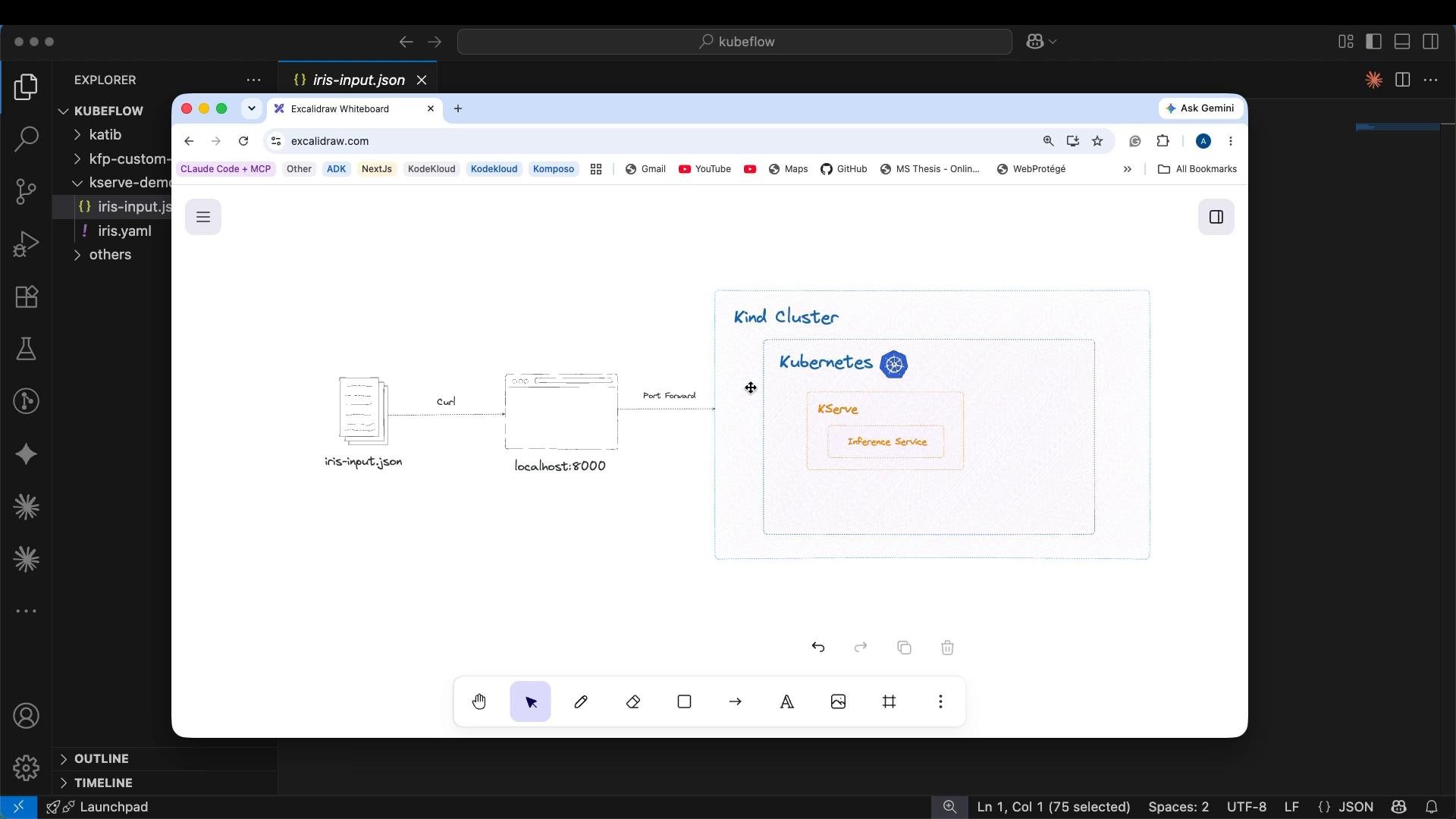 ## Summary of the request flow
* Your `curl` targets `localhost:8080`, where `kubectl port-forward` exposes the predictor Service.
* The ClusterIP Service routes the request to the predictor pod(s).
* The KServe controller created those pods and the Service from the `InferenceService` spec.
* The predictor runtime (scikit-learn server) returns the JSON predictions.
## Next steps & tips
* Expose an `InferenceService` externally for production using an Ingress, LoadBalancer, or NodePort depending on your cluster environment (this demo uses port-forward for local testing).
* Inspect KServe controller logs if resources fail to come up:
* `kubectl logs -n kserve-system deploy/kserve-controller`
* Customize the `InferenceService` spec to set resources, replicas, or advanced runtime settings for production workloads.
* For more details, refer to the KServe docs: [https://kserve.github.io](https://kserve.github.io)
Avoid exposing models directly to the public without proper authentication, rate limiting, and monitoring. Use ingress authentication or API gateways in production.
This completes the basic demo of deploying an Iris-trained scikit-learn model using KServe on a local Kind cluster.
This documentation is built and hosted on [Mintlify](https://mintlify.com), a developer documentation platform.
## Summary of the request flow
* Your `curl` targets `localhost:8080`, where `kubectl port-forward` exposes the predictor Service.
* The ClusterIP Service routes the request to the predictor pod(s).
* The KServe controller created those pods and the Service from the `InferenceService` spec.
* The predictor runtime (scikit-learn server) returns the JSON predictions.
## Next steps & tips
* Expose an `InferenceService` externally for production using an Ingress, LoadBalancer, or NodePort depending on your cluster environment (this demo uses port-forward for local testing).
* Inspect KServe controller logs if resources fail to come up:
* `kubectl logs -n kserve-system deploy/kserve-controller`
* Customize the `InferenceService` spec to set resources, replicas, or advanced runtime settings for production workloads.
* For more details, refer to the KServe docs: [https://kserve.github.io](https://kserve.github.io)
Avoid exposing models directly to the public without proper authentication, rate limiting, and monitoring. Use ingress authentication or API gateways in production.
This completes the basic demo of deploying an Iris-trained scikit-learn model using KServe on a local Kind cluster.
This documentation is built and hosted on [Mintlify](https://mintlify.com), a developer documentation platform.