> ## Documentation Index
> Fetch the complete documentation index at: https://notes.kodekloud.com/llms.txt
> Use this file to discover all available pages before exploring further.
# Demo Running Experiments on Katib
> Guide demonstrating how to run a Katib Experiment using a BusyBox trial to emit and optimize a score metric, including YAML, namespace setup, applying the experiment, and troubleshooting
This guide walks through running a simple Katib Experiment CR that launches a few trials using a BusyBox job and reports a single metric called `score`. Katib will attempt to maximize this metric across trials.
Prerequisite: Katib must be installed so the Experiment CRD and controllers are available in your cluster. The controllers interpret `kind: Experiment` and create Trial resources according to the Experiment spec.
Ensure Katib (CRDs and controllers) is installed before applying Experiment resources. If you want Katib to collect metrics by injecting a metrics-collector into trial pods, label the target namespace for metrics-collector injection (see the namespace section below).
## Experiment YAML (single-file example)
Below is the complete Experiment YAML used in this demo. It defines:
* a single integer parameter `x` (feasible space 1–10),
* the `random` algorithm,
* up to 3 trials with 1 running at a time,
* a trial template implemented as a Kubernetes `Job` that runs BusyBox and echoes `score`, which Katib collects.
```yaml theme={null}
apiVersion: kubeflow.org/v1beta1
kind: Experiment
metadata:
name: simple-katib-demo
namespace: kubeflow
spec:
objective:
type: maximize
objectiveMetricName: score
algorithm:
algorithmName: random
maxTrialCount: 3
parallelTrialCount: 1
parameters:
- name: x
parameterType: int
feasibleSpace:
min: "1"
max: "10"
trialTemplate:
primaryContainerName: trial
trialParameters:
- name: x
reference: x
trialSpec:
apiVersion: batch/v1
kind: Job
spec:
template:
spec:
restartPolicy: Never
containers:
- name: trial
image: busybox:1.36
command:
- sh
- -c
args:
- |
echo "Trying x=${trialParameters.x}"
echo "score=${trialParameters.x}"
```
## Key fields explained
| Field | Purpose | Example / Notes |
| - | - | - |
| `objective` | What Katib optimizes — metric name and direction | `type: maximize`, `objectiveMetricName: score` |
| `algorithm.algorithmName` | Search algorithm that suggests parameter values | `random` |
| `maxTrialCount` | Total number of trials to run | `3` |
| `parallelTrialCount` | How many trials run concurrently | `1` |
| `parameters` | Hyperparameters to search and their feasible space | `x` between `1` and `10` |
| `trialTemplate` | Template for the trial workload (pod/job), how trial parameters are injected | Trial prints `score=` to stdout for collection |
## Create or reuse the namespace
Create the `kubeflow` namespace if it doesn't exist:
```bash theme={null}
kubectl create namespace kubeflow
# If it already exists you may see:
# Error from server (AlreadyExists): namespaces "kubeflow" already exists
```
List namespaces:
```bash theme={null}
kubectl get namespaces
```
Example output:
```bash theme={null}
NAME STATUS AGE
cert-manager Active 117m
default Active 118m
kserve Active 114m
kserve-test Active 108m
kube-node-lease Active 118m
kube-public Active 118m
kube-system Active 118m
kubeflow Active 27m
local-path-storage Active 118m
```
If you want Katib to inject the metrics collector into trial pods in the `kubeflow` namespace (so the collector can scrape stdout), label the namespace:
```bash theme={null}
kubectl label namespace kubeflow katib.kubeflow.org/metrics-collector-injection=enabled
```
Expected output after labeling:
```bash theme={null}
namespace/kubeflow labeled
```
## Apply the experiment
Save the YAML above to `experiment.yaml` and apply it:
```bash theme={null}
kubectl apply -f experiment.yaml
```
Example response (resource unchanged):
```bash theme={null}
experiment.kubeflow.org/simple-katib-demo unchanged
```
List Experiments in the namespace:
```bash theme={null}
kubectl get experiments -n kubeflow
```
Example output:
```bash theme={null}
NAME TYPE STATUS AGE
simple-katib-demo Running 30m
```
Watch Trials as they are created:
```bash theme={null}
kubectl get trials -n kubeflow -w
```
## What a trial does
Each Trial uses the trial template with a sampled value for `x`. In this demo the trial container runs:
* `Trying x=` — informational
* `score=` — metric output Katib collects
The metric lines are the only thing Katib needs to parse an objective value. For example, if a trial runs with `x=7`, the trial prints `score=7` and Katib interprets that trial's objective metric as `7`. Because the objective is `maximize`, trials returning higher `score` are preferred.
The trial command lines that emit the score:
```bash theme={null}
echo "Trying x=${trialParameters.x}"
echo "score=${trialParameters.x}"
```
(These lines appear in the `args` block of the `trialSpec` in the YAML above.)
## Inspecting Katib components and UI
List Katib services in the `kubeflow` namespace to find the controller, DB manager, UI, and related components:
```bash theme={null}
kubectl get services -n kubeflow
```
Example output:
```bash theme={null}
NAME TYPE CLUSTER-IP EXTERNAL-IP PORT(S) AGE
katib-controller ClusterIP 10.96.245.8 443/TCP,8080/TCP,18080/TCP 35m
katib-db-manager ClusterIP 10.96.44.118 6789/TCP 35m
katib-mysql ClusterIP 10.96.138.7 3306/TCP 35m
katib-ui ClusterIP 10.96.163.8 80/TCP 35m
simple-katib-demo-random-p ClusterIP 10.96.123.156 6789/TCP 33m
```
Port-forward the Katib UI and open it in your browser:
```bash theme={null}
kubectl port-forward svc/katib-ui -n kubeflow 8080:80
```
Open: [http://localhost:8080](http://localhost:8080)
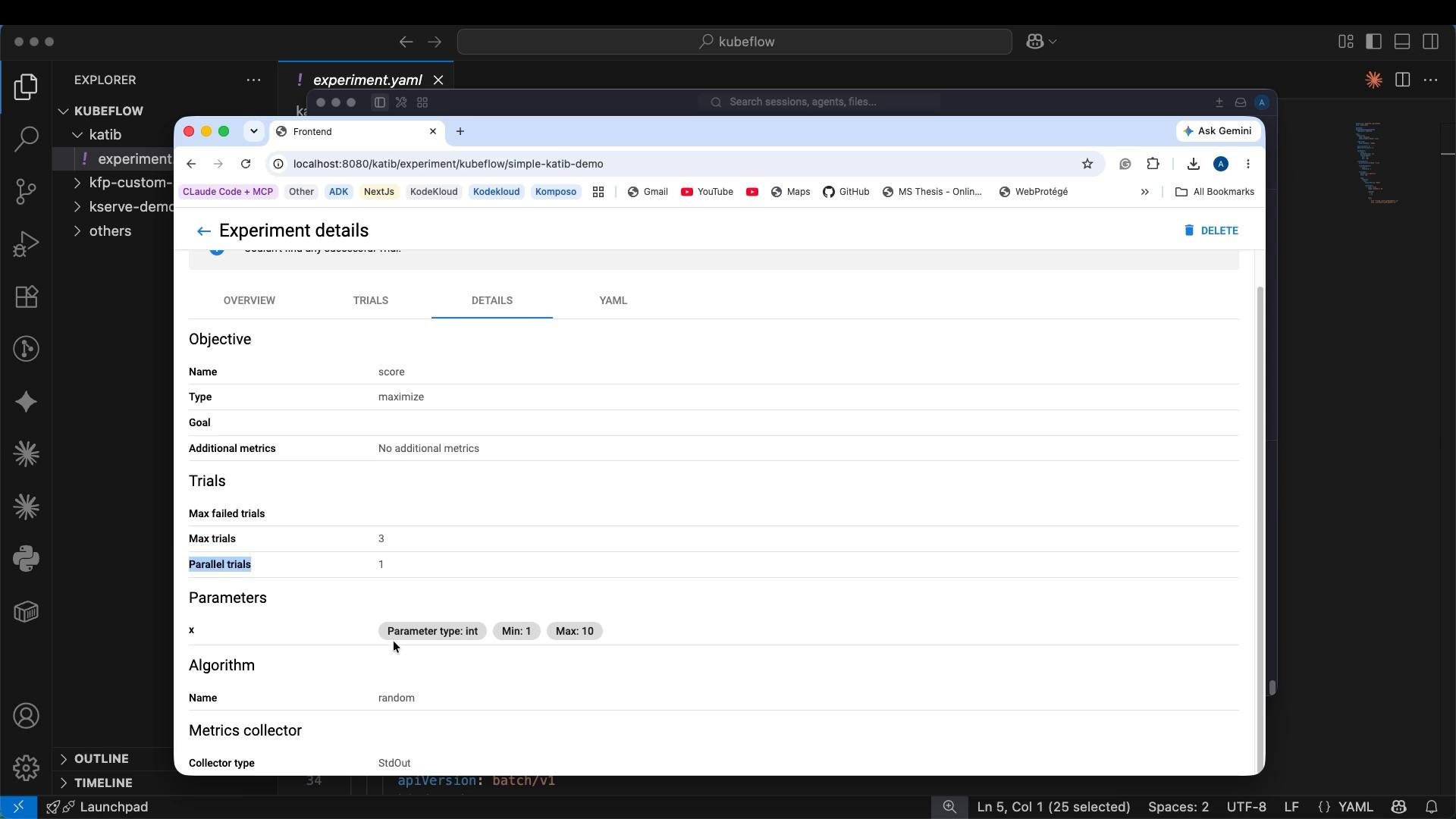
The UI shows experiments, objectives, trial status, parameter values, and logs. In the screenshot below you can see the `simple-katib-demo` experiment listing objective, trials, parameters, and algorithm settings.
 The controller also stores Experiment resource metadata and annotations (for example the last-applied configuration), which can be viewed in the UI or by running `kubectl describe` or `kubectl get -o yaml` on the Experiment resource.
Example metadata snippet:
```yaml theme={null}
metadata:
name: simple-katib-demo
namespace: kubeflow
uid: fe78a974-30fc-4040-92f7-165e839adc41
resourceVersion: '12343'
generation: 1
creationTimestamp: '2026-09-04T11:37:25Z'
annotations:
kubectl.kubernetes.io/last-applied-configuration: >
{"apiVersion":"kubeflow.org/v1beta1","kind":"Experiment","metadata":{"annotations":{},"name":"simple-katib-demo","namespace":"kubeflow"},"spec":{"algorithm":"random","maxTrialCount":3,"objective":{"objectiveMetricName":"score","type":"maximize"},"parallelTrialCount":1,"parameters":[{"feasibleSpace":{"max":"10","min":"1"},"name":"x","parameterType":"int"}],"trialTemplate":{"primaryContainerName":"trial","trialParameters":[{"name":"x","reference":"x"}],"trialSpec":{"apiVersion":"batch/v1","kind":"Job","spec":{"template":{"spec":{"containers":[{"args":["echo \"Trying x=${trialParameters.x}\\n\"","echo \"score=${trialParameters.x}\\n\""],"command":["sh","-c"],"image":"busybox:1.36","name":"trial"}],"restartPolicy":"Never"}}}}}}
finalizers:
- update-prometheus-metrics
```
## Troubleshooting tips
* If Trials are not created, ensure the Katib controller is running and the Experiment CR was accepted (`kubectl get events -n kubeflow`).
* If metrics are not being collected, confirm the metrics-collector injection label is set on the namespace (or use an external collector) and check trial pod logs for the `score=` output.
* Use `kubectl logs -n kubeflow` to view the BusyBox output from a trial to confirm it printed `score=`.
## Summary
* Katib experiments are defined by the Experiment CRD. Install Katib and its CRDs first.
* This demo uses a BusyBox trial that emits `score=`; Katib collects that output and optimizes `score`.
* Use `kubectl` to create namespaces, apply the Experiment, and watch Trials. Port-forward `katib-ui` to inspect experiments and metrics in the UI.
* The trial template and the printed metric lines are the core pieces — whatever Katib can parse as the objective metric is what it will optimize.
## Links and references
* Katib documentation: [https://www.kubeflow.org/docs/components/katib/](https://www.kubeflow.org/docs/components/katib/)
* Kubeflow docs: [https://www.kubeflow.org/docs/](https://www.kubeflow.org/docs/)
* Kubernetes basics: [https://kubernetes.io/docs/concepts/overview/what-is-kubernetes/](https://kubernetes.io/docs/concepts/overview/what-is-kubernetes/)
This documentation is built and hosted on [Mintlify](https://mintlify.com), a developer documentation platform.
The controller also stores Experiment resource metadata and annotations (for example the last-applied configuration), which can be viewed in the UI or by running `kubectl describe` or `kubectl get -o yaml` on the Experiment resource.
Example metadata snippet:
```yaml theme={null}
metadata:
name: simple-katib-demo
namespace: kubeflow
uid: fe78a974-30fc-4040-92f7-165e839adc41
resourceVersion: '12343'
generation: 1
creationTimestamp: '2026-09-04T11:37:25Z'
annotations:
kubectl.kubernetes.io/last-applied-configuration: >
{"apiVersion":"kubeflow.org/v1beta1","kind":"Experiment","metadata":{"annotations":{},"name":"simple-katib-demo","namespace":"kubeflow"},"spec":{"algorithm":"random","maxTrialCount":3,"objective":{"objectiveMetricName":"score","type":"maximize"},"parallelTrialCount":1,"parameters":[{"feasibleSpace":{"max":"10","min":"1"},"name":"x","parameterType":"int"}],"trialTemplate":{"primaryContainerName":"trial","trialParameters":[{"name":"x","reference":"x"}],"trialSpec":{"apiVersion":"batch/v1","kind":"Job","spec":{"template":{"spec":{"containers":[{"args":["echo \"Trying x=${trialParameters.x}\\n\"","echo \"score=${trialParameters.x}\\n\""],"command":["sh","-c"],"image":"busybox:1.36","name":"trial"}],"restartPolicy":"Never"}}}}}}
finalizers:
- update-prometheus-metrics
```
## Troubleshooting tips
* If Trials are not created, ensure the Katib controller is running and the Experiment CR was accepted (`kubectl get events -n kubeflow`).
* If metrics are not being collected, confirm the metrics-collector injection label is set on the namespace (or use an external collector) and check trial pod logs for the `score=` output.
* Use `kubectl logs -n kubeflow` to view the BusyBox output from a trial to confirm it printed `score=`.
## Summary
* Katib experiments are defined by the Experiment CRD. Install Katib and its CRDs first.
* This demo uses a BusyBox trial that emits `score=`; Katib collects that output and optimizes `score`.
* Use `kubectl` to create namespaces, apply the Experiment, and watch Trials. Port-forward `katib-ui` to inspect experiments and metrics in the UI.
* The trial template and the printed metric lines are the core pieces — whatever Katib can parse as the objective metric is what it will optimize.
## Links and references
* Katib documentation: [https://www.kubeflow.org/docs/components/katib/](https://www.kubeflow.org/docs/components/katib/)
* Kubeflow docs: [https://www.kubeflow.org/docs/](https://www.kubeflow.org/docs/)
* Kubernetes basics: [https://kubernetes.io/docs/concepts/overview/what-is-kubernetes/](https://kubernetes.io/docs/concepts/overview/what-is-kubernetes/)
This documentation is built and hosted on [Mintlify](https://mintlify.com), a developer documentation platform.