> ## Documentation Index
> Fetch the complete documentation index at: https://notes.kodekloud.com/llms.txt
> Use this file to discover all available pages before exploring further.
# Deploying Iris Trained Model on KServe
> Guide to train, serialize and upload a scikit-learn Iris model and deploy it as a KServe InferenceService on Kubernetes for scalable inference.
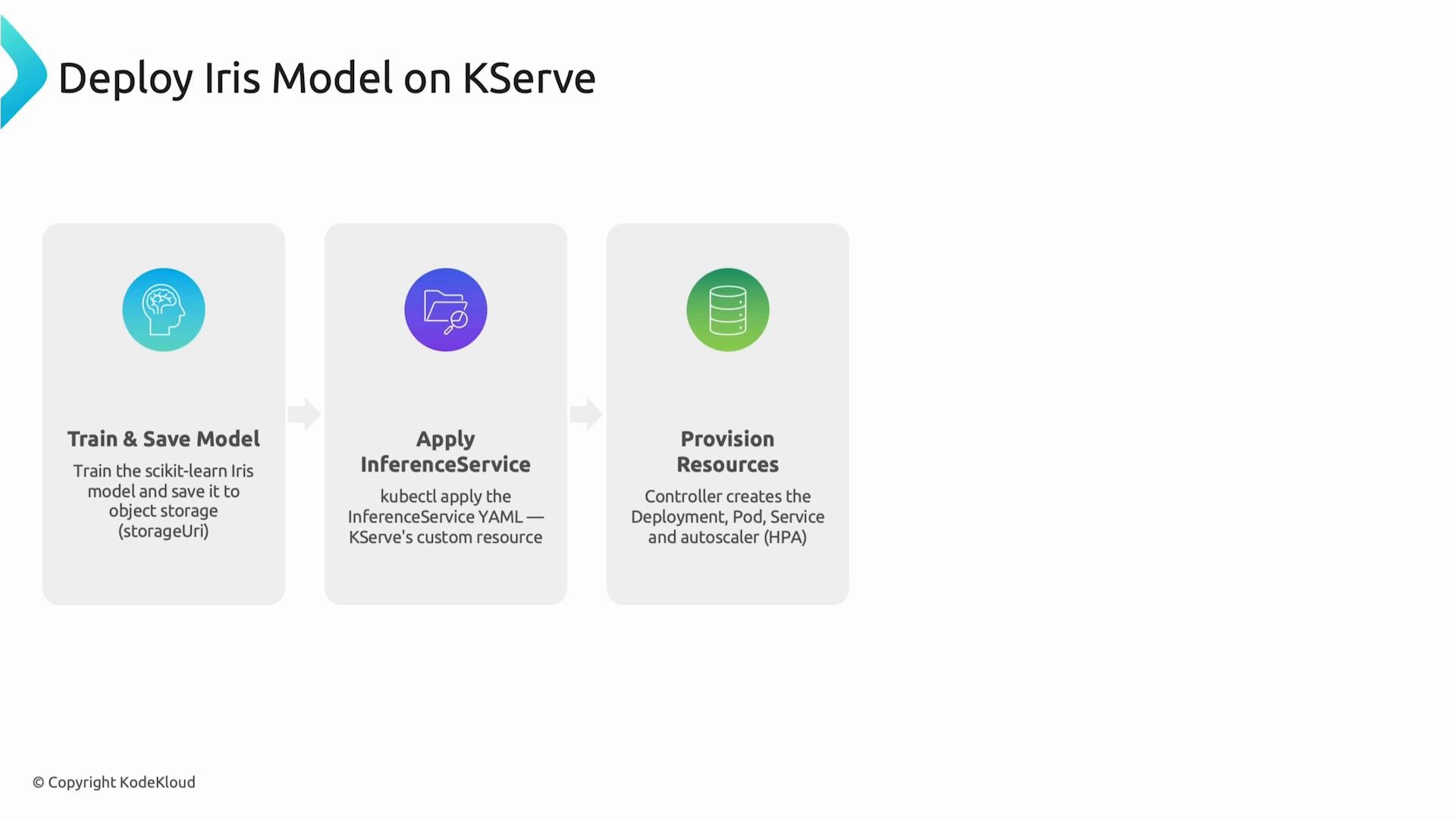
This guide shows how to train a scikit-learn Iris classifier, serialize it with `joblib`, upload the artifact to object storage, and deploy it as a scalable inference service on Kubernetes using KServe's `InferenceService` CRD.
## Prerequisites
* A Kubernetes cluster with KServe installed and its CRDs applied.
* `kubectl` configured to talk to your cluster.
* Access to object storage reachable from your cluster (S3, MinIO, GCS, etc.).
* Python environment with `scikit-learn` and `joblib` installed.
Install the Python packages:
```bash theme={null}
pip install scikit-learn joblib
```
## 1) Train and Serialize the Iris Model
Train a RandomForest classifier on the Iris dataset and save the model to a file that you can upload to object storage.
```python theme={null}
from sklearn.datasets import load_iris
from sklearn.ensemble import RandomForestClassifier
import joblib
iris = load_iris()
X = iris.data
y = iris.target
model = RandomForestClassifier()
model.fit(X, y)
# Save the trained model to a file that can be uploaded to object storage
joblib.dump(model, "model.joblib")
```
Upload `model.joblib` to your object storage bucket (for example, `s3://my-bucket/models/iris/model.joblib`) so KServe can fetch it when deploying the service.
 ## 2) Create the KServe InferenceService Manifest
KServe uses a Kubernetes CRD called `InferenceService` to describe model serving resources. The manifest specifies:
* the framework (sklearn),
* the `model.uri` pointing to your model artifact in object storage,
* optional runtime configuration (resources, predictors, etc).
Example `iris.yaml` (minimal):
```yaml theme={null}
apiVersion: "serving.kserve.io/v1beta1"
kind: InferenceService
metadata:
name: iris-classifier
spec:
predictor:
sklearn:
storageUri: "s3://my-bucket/models/iris/"
```
Notes:
* For scikit-learn models, KServe expects the model file in the storage URI path. You can provide a folder containing `model.joblib` or the direct file path depending on the server implementation/version.
* Replace the `storageUri` with your object storage URL and ensure credentials/configuration for that storage are available to the cluster.
## 3) Apply the InferenceService and Verify
Apply the YAML to create the inference service:
```bash theme={null}
kubectl apply -f iris.yaml
```
Check that the resource exists and see its status:
```bash theme={null}
kubectl get inferenceservices
kubectl describe inferenceservice iris-classifier
# or output full YAML
kubectl get inferenceservice iris-classifier -o yaml
```
KServe will create the necessary Kubernetes resources (Deployment/Pods, Service, and autoscaler). Wait until the `InferenceService` reports readiness before sending requests.
## Quick reference: Deploy steps
| Step | Purpose | Example / Command |
| - | - | - |
| Train & Save | Train a scikit-learn model and serialize it | `joblib.dump(model, "model.joblib")` |
| Upload | Make model accessible to KServe | `s3://my-bucket/models/iris/model.joblib` |
| Create InferenceService | Describe serving runtime and model location | `kubectl apply -f iris.yaml` |
| Verify | Check resource state and readiness | `kubectl get inferenceservices` |
| Test | Send prediction requests | see curl example below |
## 4) Test the Model Endpoint
When the service is ready, call the REST prediction endpoint. Replace `MODEL_URL` with your external service URL (for example, `http:///v1/models/iris-classifier:predict`).
```bash theme={null}
curl -X POST "http://MODEL_URL/v1/models/iris-classifier:predict" \
-H "Content-Type: application/json" \
-d '{
"instances": [[5.1, 3.5, 1.4, 0.2]]
}'
```
Example of the target URL format (use backticks when documenting placeholders): `http:///v1/models/iris-classifier:predict`.
The request sends a single Iris feature vector \[sepal length, sepal width, petal length, petal width]. The response will contain predicted classes or probabilities depending on your model runtime configuration.
Ensure the model file is accessible to the KServe runtime. Common approaches are uploading `model.joblib` to S3/MinIO/GCS and using that remote URL in the `model.uri` (or `storageUri`) field of your `InferenceService` YAML (for example, `s3://my-bucket/models/iris/model.joblib`). Also confirm any storage credentials are configured in-cluster.
Make sure KServe and its CustomResourceDefinitions (CRDs) are installed and the KServe controller is running in the cluster before applying the `InferenceService` manifest. Without the controller and CRDs, `kubectl apply -f iris.yaml` will fail.
## Troubleshooting & Debugging Tips
* Use `kubectl logs` for the predictor pod to inspect startup errors:
```bash theme={null}
kubectl get pods -l serving.kserve.io/inferenceservice=iris-classifier
kubectl logs
```
* If the model cannot be downloaded, check storage credentials, bucket policies, and the `storageUri` value.
* To inspect network accessibility, forward or expose the service temporarily:
```bash theme={null}
kubectl port-forward svc/istio-ingressgateway 8080:80 -n istio-system
```
Then call `http://localhost:8080/v1/models/iris-classifier:predict`.
## Links and References
* [KServe documentation](https://kserve.github.io/)
* [scikit-learn](https://scikit-learn.org/stable/)
* [joblib](https://joblib.readthedocs.io/)
* [Kubernetes documentation](https://kubernetes.io/)
* [S3 (AWS)](https://aws.amazon.com/s3/)
* [MinIO](https://min.io/)
* [Google Cloud Storage (GCS)](https://cloud.google.com/storage)
This documentation is built and hosted on [Mintlify](https://mintlify.com), a developer documentation platform.
## 2) Create the KServe InferenceService Manifest
KServe uses a Kubernetes CRD called `InferenceService` to describe model serving resources. The manifest specifies:
* the framework (sklearn),
* the `model.uri` pointing to your model artifact in object storage,
* optional runtime configuration (resources, predictors, etc).
Example `iris.yaml` (minimal):
```yaml theme={null}
apiVersion: "serving.kserve.io/v1beta1"
kind: InferenceService
metadata:
name: iris-classifier
spec:
predictor:
sklearn:
storageUri: "s3://my-bucket/models/iris/"
```
Notes:
* For scikit-learn models, KServe expects the model file in the storage URI path. You can provide a folder containing `model.joblib` or the direct file path depending on the server implementation/version.
* Replace the `storageUri` with your object storage URL and ensure credentials/configuration for that storage are available to the cluster.
## 3) Apply the InferenceService and Verify
Apply the YAML to create the inference service:
```bash theme={null}
kubectl apply -f iris.yaml
```
Check that the resource exists and see its status:
```bash theme={null}
kubectl get inferenceservices
kubectl describe inferenceservice iris-classifier
# or output full YAML
kubectl get inferenceservice iris-classifier -o yaml
```
KServe will create the necessary Kubernetes resources (Deployment/Pods, Service, and autoscaler). Wait until the `InferenceService` reports readiness before sending requests.
## Quick reference: Deploy steps
| Step | Purpose | Example / Command |
| - | - | - |
| Train & Save | Train a scikit-learn model and serialize it | `joblib.dump(model, "model.joblib")` |
| Upload | Make model accessible to KServe | `s3://my-bucket/models/iris/model.joblib` |
| Create InferenceService | Describe serving runtime and model location | `kubectl apply -f iris.yaml` |
| Verify | Check resource state and readiness | `kubectl get inferenceservices` |
| Test | Send prediction requests | see curl example below |
## 4) Test the Model Endpoint
When the service is ready, call the REST prediction endpoint. Replace `MODEL_URL` with your external service URL (for example, `http:///v1/models/iris-classifier:predict`).
```bash theme={null}
curl -X POST "http://MODEL_URL/v1/models/iris-classifier:predict" \
-H "Content-Type: application/json" \
-d '{
"instances": [[5.1, 3.5, 1.4, 0.2]]
}'
```
Example of the target URL format (use backticks when documenting placeholders): `http:///v1/models/iris-classifier:predict`.
The request sends a single Iris feature vector \[sepal length, sepal width, petal length, petal width]. The response will contain predicted classes or probabilities depending on your model runtime configuration.
Ensure the model file is accessible to the KServe runtime. Common approaches are uploading `model.joblib` to S3/MinIO/GCS and using that remote URL in the `model.uri` (or `storageUri`) field of your `InferenceService` YAML (for example, `s3://my-bucket/models/iris/model.joblib`). Also confirm any storage credentials are configured in-cluster.
Make sure KServe and its CustomResourceDefinitions (CRDs) are installed and the KServe controller is running in the cluster before applying the `InferenceService` manifest. Without the controller and CRDs, `kubectl apply -f iris.yaml` will fail.
## Troubleshooting & Debugging Tips
* Use `kubectl logs` for the predictor pod to inspect startup errors:
```bash theme={null}
kubectl get pods -l serving.kserve.io/inferenceservice=iris-classifier
kubectl logs
```
* If the model cannot be downloaded, check storage credentials, bucket policies, and the `storageUri` value.
* To inspect network accessibility, forward or expose the service temporarily:
```bash theme={null}
kubectl port-forward svc/istio-ingressgateway 8080:80 -n istio-system
```
Then call `http://localhost:8080/v1/models/iris-classifier:predict`.
## Links and References
* [KServe documentation](https://kserve.github.io/)
* [scikit-learn](https://scikit-learn.org/stable/)
* [joblib](https://joblib.readthedocs.io/)
* [Kubernetes documentation](https://kubernetes.io/)
* [S3 (AWS)](https://aws.amazon.com/s3/)
* [MinIO](https://min.io/)
* [Google Cloud Storage (GCS)](https://cloud.google.com/storage)
This documentation is built and hosted on [Mintlify](https://mintlify.com), a developer documentation platform.