> ## Documentation Index
> Fetch the complete documentation index at: https://notes.kodekloud.com/llms.txt
> Use this file to discover all available pages before exploring further.
# Demo Passing Data Between Components Artifacts
> Guide demonstrating passing files and structured data between Kubeflow Pipelines components using artifacts, with an example pipeline that transfers CSV datasets, a pickled model, and logged metrics.
In this lesson you'll learn how to pass files and structured data between Kubeflow Pipelines components using artifacts. Artifacts are the recommended mechanism when you need to exchange datasets, trained models, or other files that are larger or structured. For small scalar values, pipeline parameters still make sense.
This guide demonstrates a simple, end‑to‑end pipeline that uses artifacts to move:
* a CSV dataset,
* a processed CSV,
* a pickled model file,
* and logged metrics.
The typical flow in the example pipeline below is:
1. `retrieve_data` — generate and write a CSV dataset (artifact).
2. `preprocess_data` — read the CSV, add a feature, write a processed CSV.
3. `train_model` — read the processed CSV, train a trivial model, write a pickled model artifact.
4. `evaluate_model` — read the pickled model, compute and log a metric.
Use artifacts whenever you need to exchange files or structured data between components. Inside a component the artifact location is available via the `.path` attribute on `Input[...]` and `Output[...]` typed arguments.
When to use artifacts vs parameters:
* Use artifacts for files, datasets, models, and any structured or large content.
* Use parameters for scalars (strings, numbers, booleans) and small configuration values.
Quick reference table for commonly used artifact types:
| Artifact Type | Typical use case | Example declaration |
| - | -: | - |
| Dataset | CSVs, parquet, data files | `output_data: Output[Dataset]` |
| Model | Serialized model files (pickle, savedmodel) | `model: Output[Model]` |
| Metrics | Logging metrics for UI visualization | `metrics: Output[Metrics]` |
| Input counterpart | Read artifacts produced by upstream tasks | `raw_data: Input[Dataset]` |
Complete example pipeline
Below is a complete, cleaned example implementing the pipeline described above. Save it as `pipeline_artifact.py` and compile to YAML to upload to the Kubeflow Pipelines UI.
```python theme={null}
# pipeline_artifact.py
from kfp import compiler
from kfp.dsl import component, pipeline, Output, Input, Dataset, Model, Metrics
@component(
packages_to_install=["pandas"]
)
def retrieve_data(output_data: Output[Dataset]):
"""Generate a small dataframe and write it to output_data.path as CSV."""
import pandas as pd
df = pd.DataFrame({
"x": [1, 2, 3, 4, 5],
"y": [2, 4, 6, 8, 10]
})
# Write CSV to the provided artifact location
df.to_csv(output_data.path, index=False)
@component(
packages_to_install=["pandas"]
)
def preprocess_data(raw_data: Input[Dataset], processed_data: Output[Dataset]):
"""Read raw CSV from raw_data.path, add a feature, and write processed CSV."""
import pandas as pd
df = pd.read_csv(raw_data.path)
# Simple "feature engineering"
df["x_squared"] = df["x"] ** 2
# Write processed CSV to the provided artifact location
df.to_csv(processed_data.path, index=False)
@component(
packages_to_install=["pandas"]
)
def train_model(training_data: Input[Dataset], model: Output[Model]):
"""
Read processed CSV from training_data.path, compute a trivial model (a coefficient),
and serialize it to model.path as a pickle file.
"""
import pandas as pd
import pickle
df = pd.read_csv(training_data.path)
# "Training": learn a single coefficient (simple example)
coef = (df["y"] / df["x"]).mean()
# Save the model (a dict in this toy example) to the model artifact location
with open(model.path, "wb") as f:
pickle.dump({"coef": float(coef)}, f)
@component(
packages_to_install=[]
)
def evaluate_model(model: Input[Model], metrics: Output[Metrics]):
"""
Load the pickled model from model.path, compute a dummy accuracy, and log it.
"""
import pickle
with open(model.path, "rb") as f:
model_data = pickle.load(f)
coef = model_data["coef"]
# Dummy evaluation: accuracy depends on coef value (illustrative only)
accuracy = 1.0 if coef == 2.0 else 0.9
# Log the metric so it appears in the Kubeflow UI
metrics.log_metric("accuracy", accuracy)
@pipeline(name="dummy-artifact-pipeline")
def dummy_pipeline():
# 1) Retrieve raw data
data_task = retrieve_data()
# 2) Preprocess: pass the 'output_data' artifact from retrieve_data to preprocess_data
preprocess_task = preprocess_data(raw_data=data_task.outputs["output_data"])
# 3) Train: pass the 'processed_data' artifact from preprocess_task to train_model
train_task = train_model(training_data=preprocess_task.outputs["processed_data"])
# 4) Evaluate: pass the 'model' artifact from train_task to evaluate_model
evaluate_model(model=train_task.outputs["model"])
if __name__ == "__main__":
# Compile to a YAML file you can upload to the Kubeflow Pipelines UI
compiler.Compiler().compile(pipeline_func=dummy_pipeline,
package_path="artifact_pipeline.yaml")
```
Key implementation details and patterns
* Declare artifact inputs and outputs as typed function arguments:
* Example outputs: `output_data: Output[Dataset]`, `model: Output[Model]`, `metrics: Output[Metrics]`
* Example inputs: `raw_data: Input[Dataset]`, `training_data: Input[Dataset]`, `model: Input[Model]`
* Use the `.path` attribute inside the component to read/write the artifact contents:
* Write CSV: `df.to_csv(processed_data.path, index=False)`
* Read CSV: `df = pd.read_csv(raw_data.path)`
* Save model: `with open(model.path, "wb") as f: pickle.dump(..., f)`
* Load model: `with open(model.path, "rb") as f: model_data = pickle.load(f)`
* Wire components in the pipeline by referencing a producer task’s outputs by name:
* `preprocess_data(raw_data=data_task.outputs["output_data"])`
* `train_model(training_data=preprocess_task.outputs["processed_data"])`
* `evaluate_model(model=train_task.outputs["model"])`
Avoid passing large files as parameters. Parameters are for small scalar values — use `Input[...]` / `Output[...]` artifacts for files and structured data to prevent serialization and size issues.
Compile, upload, and inspect
1. Compile the pipeline: python `pipeline_artifact.py` will generate `artifact_pipeline.yaml`.
2. Upload `artifact_pipeline.yaml` to the Kubeflow Pipelines UI and run the pipeline.
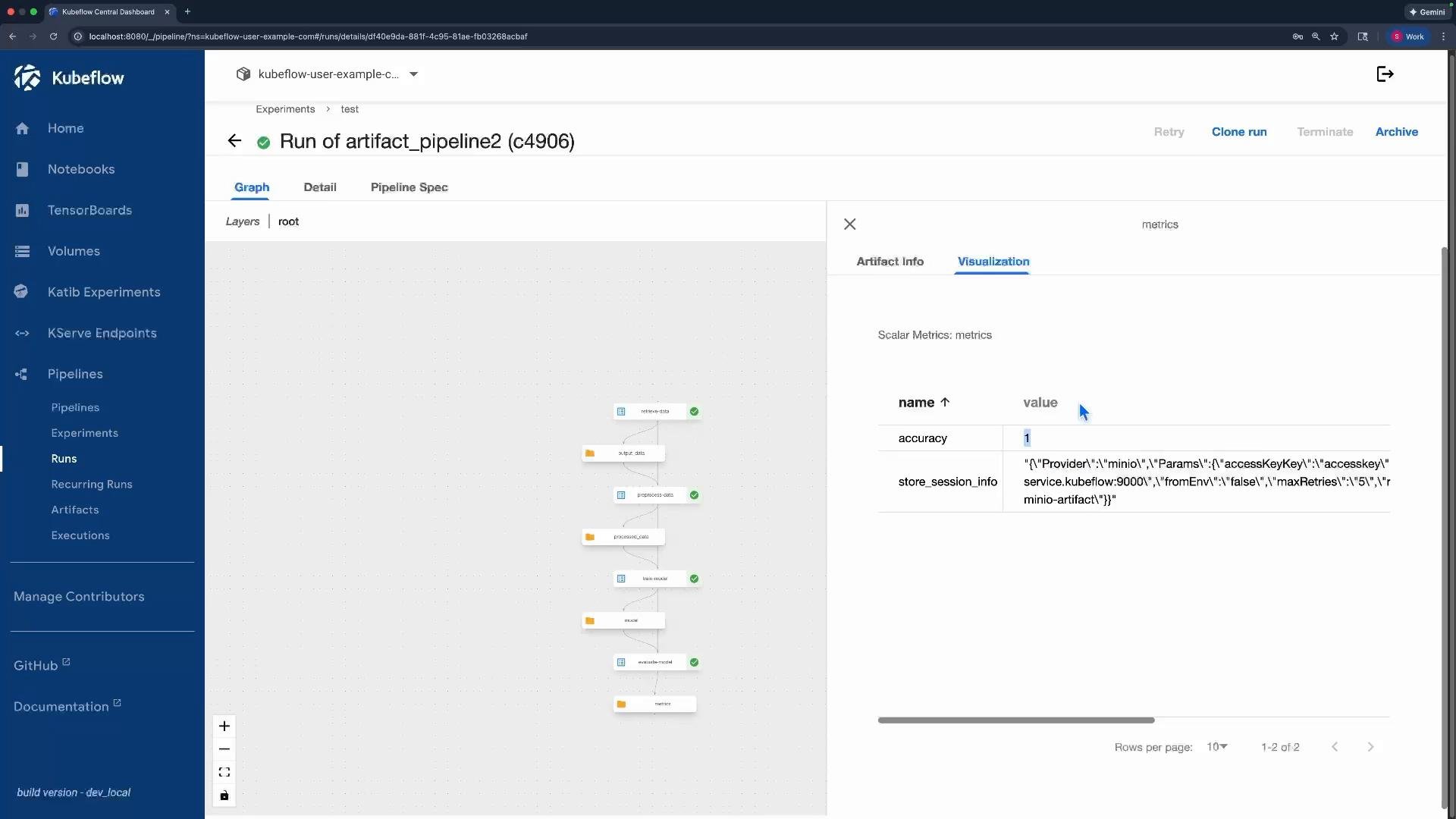
3. In the UI you can inspect:
* Input/output artifacts for each task,
* Object storage locations (e.g., MinIO),
* Previews of supported artifact types,
* Logged metrics such as `accuracy`.
You should see artifacts in the run UI for the original CSV, the processed CSV (with `x_squared`), the pickled model file, and the metrics output.
 Links and references
* [Kubeflow Pipelines documentation](https://www.kubeflow.org/docs/components/pipelines/)
* [MinIO (object storage example)](https://min.io/)
* KFP SDK: component, pipeline, Input/Output typing patterns (see the Kubeflow Pipelines SDK docs)
This documentation is built and hosted on [Mintlify](https://mintlify.com), a developer documentation platform.
Links and references
* [Kubeflow Pipelines documentation](https://www.kubeflow.org/docs/components/pipelines/)
* [MinIO (object storage example)](https://min.io/)
* KFP SDK: component, pipeline, Input/Output typing patterns (see the Kubeflow Pipelines SDK docs)
This documentation is built and hosted on [Mintlify](https://mintlify.com), a developer documentation platform.