> ## Documentation Index
> Fetch the complete documentation index at: https://notes.kodekloud.com/llms.txt
> Use this file to discover all available pages before exploring further.
# Demo Pipeline Control Flow
> Demonstrates running a component in parallel across learning rates, collecting outputs, and selecting the best learning rate based on aggregated accuracies
This lesson demonstrates how to execute a component (task) multiple times in parallel inside a Kubeflow Pipeline, collect outputs from each parallel run, and then select the best result.
Use case summary:
* Run a `train_and_evaluate` component for several `learning_rate` values in parallel.
* Aggregate accuracies and learning rates from each parallel iteration.
* Use a selector component (`pick_best_learning_rate`) to choose the learning rate that produced the highest accuracy.
Key ideas used:
* `ParallelFor` to iterate and launch parallel runs.
* `Collected` to gather outputs from parallel iterations into Python lists.
* `NamedTuple` return type so component outputs are named and accessible by downstream steps.
Quick overview of tools in this example:
| Resource / Construct | Purpose | Example usage |
| - | -: | - |
| Component | Encapsulated, reusable pipeline step | `@component def train_and_evaluate(...)` |
| `ParallelFor` | Launch the same component across multiple inputs in parallel | `with ParallelFor(learning_rates) as lr:` |
| `Collected` | Aggregate one output across all parallel iterations into a list | `Collected(run.outputs["accuracy"])` |
| Named outputs | Make outputs addressable by name in `run.outputs` | `-> NamedTuple("Outputs", [("accuracy", float), ("learning_rate", float)])` |
Below is a compact, corrected, and working pipeline example that demonstrates this pattern.
```python theme={null}
from kfp.dsl import component, pipeline, ParallelFor, Collected
from kfp import compiler
from typing import NamedTuple, List
import random
@component
def train_and_evaluate(learning_rate: float) -> NamedTuple(
"Outputs",
[
("accuracy", float),
("learning_rate", float),
],
):
"""
Dummy training component that returns a random accuracy and echoes the learning rate.
"""
# Simulate training and evaluation
accuracy = random.uniform(0.90, 1.00)
return accuracy, learning_rate
@component
def pick_best_learning_rate(accuracies: List[float], learning_rates: List[float]) -> float:
"""
Selects and returns the learning rate that produced the best (maximum) accuracy.
"""
# Pair learning rates with accuracies and find the pair with the max accuracy
pairs = list(zip(learning_rates, accuracies))
best_pair = max(pairs, key=lambda x: x[1])
print(f"Best LR = {best_pair[0]} with accuracy = {best_pair[1]}")
# Return the best learning rate as a float so downstream components can consume it.
return float(best_pair[0])
@pipeline(name="lr-sweep-metrics-only")
def ml_pipeline():
# The list of learning rates to sweep over
learning_rates = [0.001, 0.01, 0.1]
# Run train_and_evaluate in parallel for each value in learning_rates
with ParallelFor(learning_rates) as lr:
run = train_and_evaluate(learning_rate=lr)
# Collect outputs from the parallel runs into Python lists
accuracies = Collected(run.outputs["accuracy"])
lrs_collected = Collected(run.outputs["learning_rate"])
# Pass collected lists to a component that picks the best learning rate
best_lr = pick_best_learning_rate(
accuracies=accuracies,
learning_rates=lrs_collected,
)
if __name__ == "__main__":
compiler.Compiler().compile(pipeline_func=ml_pipeline, package_path="par.yaml")
```
How it works — step-by-step:
1. Define `train_and_evaluate` to return a `NamedTuple` with `("accuracy", float)` and `("learning_rate", float)`.
2. In the pipeline, prepare the list of learning rates to try: `[0.001, 0.01, 0.1]`.
3. Use `with ParallelFor(learning_rates) as lr:` to execute `train_and_evaluate(learning_rate=lr)` for each value concurrently.
4. Use `Collected(run.outputs["accuracy"])` and `Collected(run.outputs["learning_rate"])` to aggregate each output across all parallel iterations into lists.
5. Call `pick_best_learning_rate` with the collected lists; it zips them, finds the maximum accuracy, and returns the corresponding learning rate.
6. Compile the pipeline to a package (here `par.yaml`) and upload it to Kubeflow Pipelines.
When executed in the Kubeflow UI you will see a DAG representing each parallel iteration for each learning rate; each iteration runs `train-and-evaluate` with the corresponding `learning_rate`. After all iterations finish, the `pick-best-learning-rate` step runs using the collected lists.
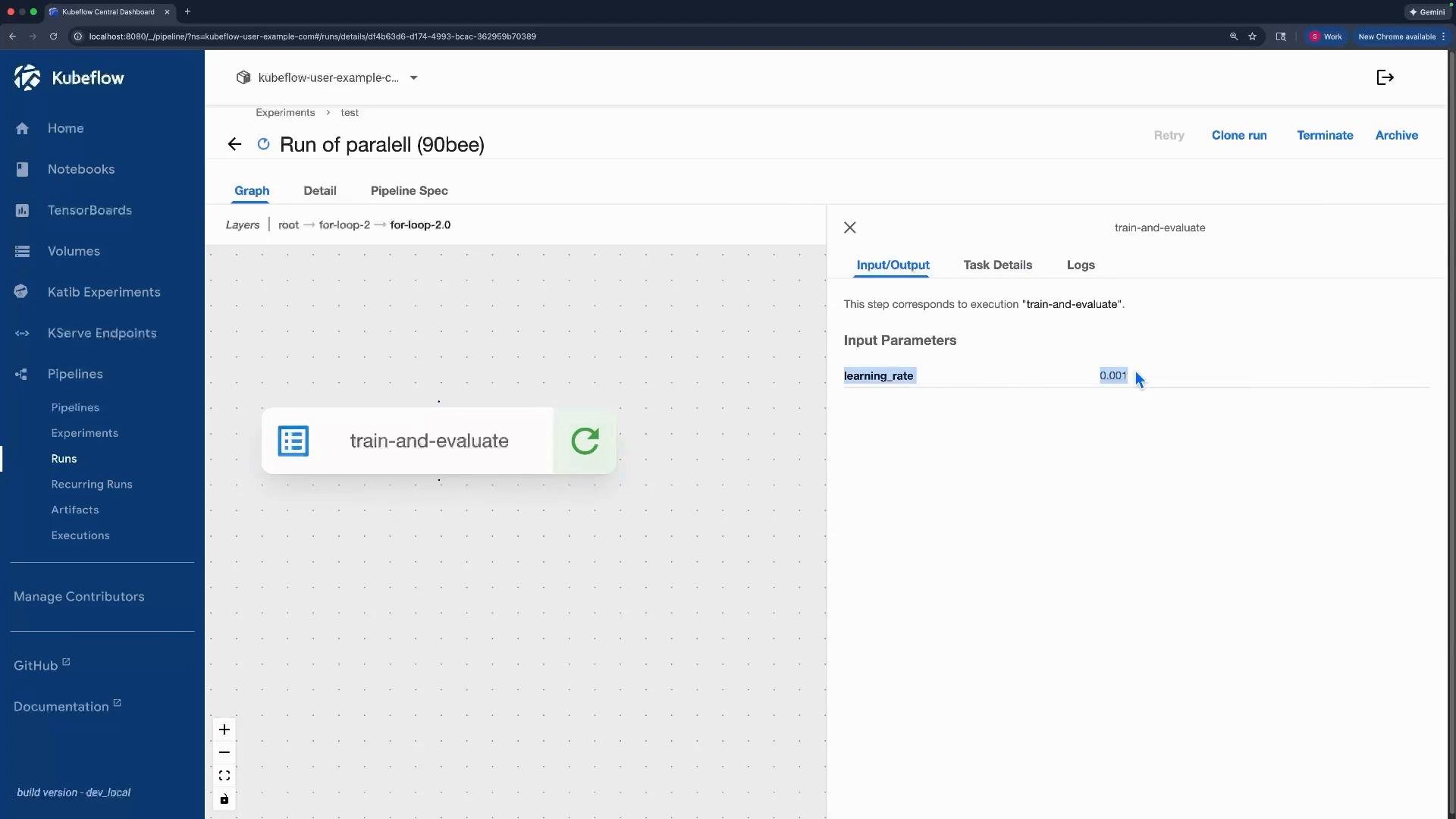 Example viewable outputs after a run (example random outputs from this dummy training):
```text theme={null}
[
0.9236584810034232,
0.9306029262789163,
0.9145041373531706
]
[
0.001,
0.01,
0.1
]
Output
0.01
```
Use `Collected` only on an output of a `ParallelFor` iteration (for example, `run.outputs["accuracy"]`). `Collected` aggregates that output over all iterations into a list that can be passed to downstream components.
This pattern is ideal for hyperparameter sweeps, ensemble experiments, or any workflow that runs the same step with different inputs and then aggregates and selects the best result.
Links and references:
* Kubeflow Pipelines: [https://www.kubeflow.org/docs/components/pipelines/](https://www.kubeflow.org/docs/components/pipelines/)
* KFP SDK: [https://github.com/kubeflow/pipelines](https://github.com/kubeflow/pipelines)
* Example concepts: `ParallelFor`, `Collected`, component outputs (NamedTuple)
This documentation is built and hosted on [Mintlify](https://mintlify.com), a developer documentation platform.
Example viewable outputs after a run (example random outputs from this dummy training):
```text theme={null}
[
0.9236584810034232,
0.9306029262789163,
0.9145041373531706
]
[
0.001,
0.01,
0.1
]
Output
0.01
```
Use `Collected` only on an output of a `ParallelFor` iteration (for example, `run.outputs["accuracy"]`). `Collected` aggregates that output over all iterations into a list that can be passed to downstream components.
This pattern is ideal for hyperparameter sweeps, ensemble experiments, or any workflow that runs the same step with different inputs and then aggregates and selects the best result.
Links and references:
* Kubeflow Pipelines: [https://www.kubeflow.org/docs/components/pipelines/](https://www.kubeflow.org/docs/components/pipelines/)
* KFP SDK: [https://github.com/kubeflow/pipelines](https://github.com/kubeflow/pipelines)
* Example concepts: `ParallelFor`, `Collected`, component outputs (NamedTuple)
This documentation is built and hosted on [Mintlify](https://mintlify.com), a developer documentation platform.