> ## Documentation Index
> Fetch the complete documentation index at: https://notes.kodekloud.com/llms.txt
> Use this file to discover all available pages before exploring further.
# Kubeflow Pipelines
> Kubeflow Pipelines automates end to end ML workflows on Kubernetes by running Python authored components as isolated pods, compiling pipelines to YAML for reproducible orchestration.
In this lesson we'll explore Kubeflow Pipelines — the component of Kubeflow that automates and orchestrates end-to-end ML workflows. A typical ML workflow includes tasks such as data collection, validation, cleaning, feature engineering, model training, evaluation, versioning, deployment, monitoring, and retraining. Kubeflow Pipelines runs each step inside its own Kubernetes pod so tasks are isolated, scalable, and managed by Kubernetes while Kubeflow handles orchestration, retries, and artifact tracking.
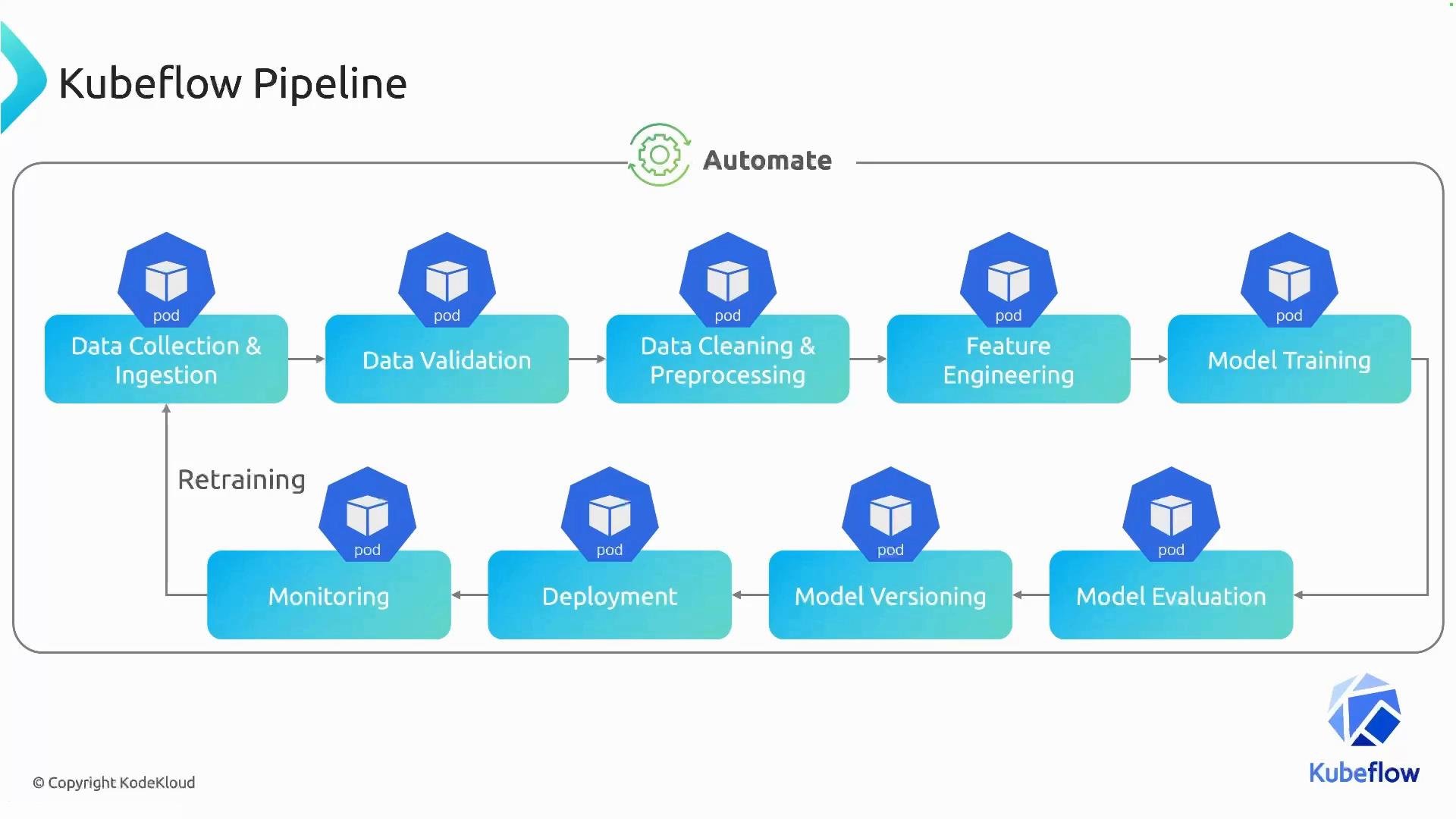 Kubeflow executes the first step (for example, data collection) inside one pod, waits for it to complete, then runs the next step (data validation) in a different pod, and so on. This stepwise execution enforces task dependencies and makes the workflow reproducible and auditable.
## How pipelines are authored
Pipelines are defined in Python using the Kubeflow Pipelines SDK and then compiled into a YAML package that Kubeflow accepts. Writing pipelines in Python gives you access to the broader Python ecosystem (libraries, testing, packaging) while letting the SDK generate the YAML representation for runtime execution.
Kubeflow executes the first step (for example, data collection) inside one pod, waits for it to complete, then runs the next step (data validation) in a different pod, and so on. This stepwise execution enforces task dependencies and makes the workflow reproducible and auditable.
## How pipelines are authored
Pipelines are defined in Python using the Kubeflow Pipelines SDK and then compiled into a YAML package that Kubeflow accepts. Writing pipelines in Python gives you access to the broader Python ecosystem (libraries, testing, packaging) while letting the SDK generate the YAML representation for runtime execution.
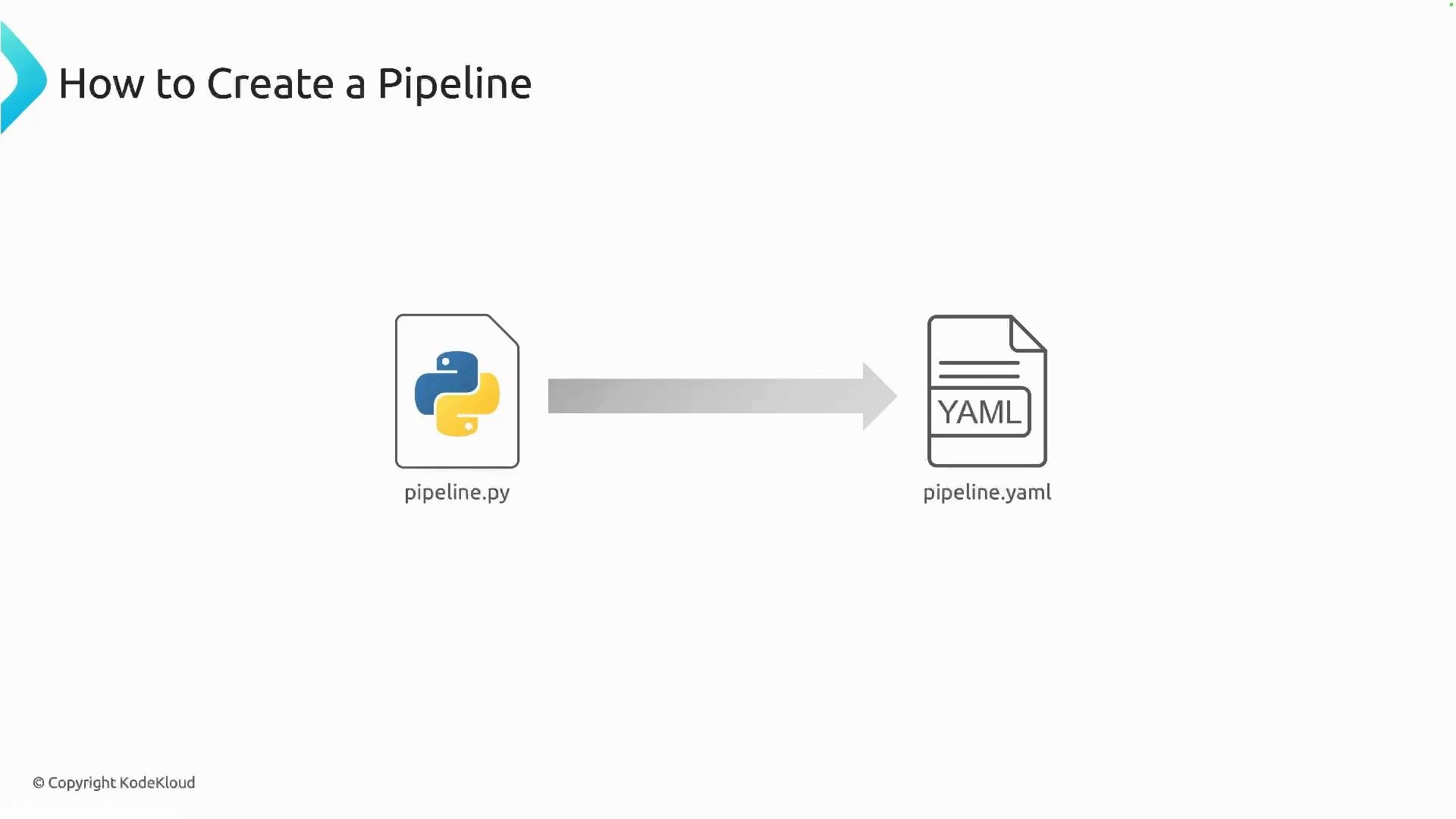 After compilation you can upload the YAML package to Kubeflow either via the web UI or programmatically (for CI/CD). Kubeflow will render the pipeline graph, allow parameterization, and trigger runs.
## Pipeline structure and components
Consider a simple pipeline consisting of three stages: data collection & ingestion, data cleaning & preprocessing, and model training. In Kubeflow Pipelines each stage is modeled as a component. Components are isolated units of work that run in their own pods and encapsulate one distinct step of the workflow.
After compilation you can upload the YAML package to Kubeflow either via the web UI or programmatically (for CI/CD). Kubeflow will render the pipeline graph, allow parameterization, and trigger runs.
## Pipeline structure and components
Consider a simple pipeline consisting of three stages: data collection & ingestion, data cleaning & preprocessing, and model training. In Kubeflow Pipelines each stage is modeled as a component. Components are isolated units of work that run in their own pods and encapsulate one distinct step of the workflow.
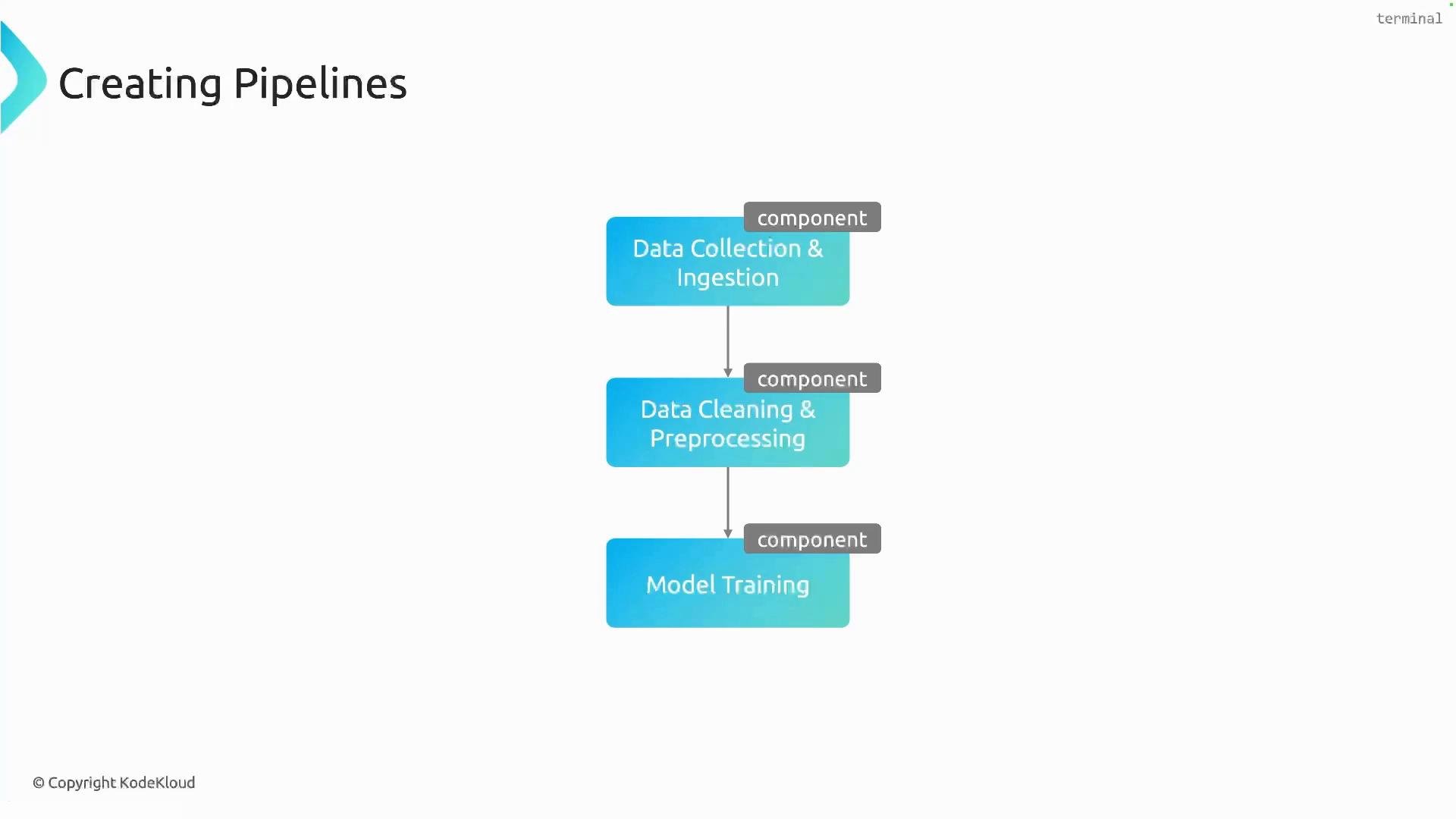 Key concepts at a glance:
| Concept | What it represents | Example / Command |
| - | - | - |
| Component | Reusable unit of work (runs in a pod) | Python function decorated as a component |
| Task | A component invocation within a pipeline | `data_collection()` call inside pipeline |
| Pipeline | Orchestrates tasks and dependencies | `@dsl.pipeline`-decorated function |
| Compiler | Generates YAML for Kubeflow | `compiler.Compiler().compile(...)` |
| Artifact | Files or data produced/consumed by components | model weights, CSVs, metrics |
## Install the Kubeflow Pipelines SDK
Install the SDK locally before authoring pipelines:
```bash theme={null}
pip install kfp
```
Check the Kubeflow Pipelines SDK version compatibility with your Kubeflow deployment. The SDK API can vary between major versions (for example, v1 vs v2), so install the version that matches your cluster's Pipelines component.
## Writing a simple pipeline
Each component can be defined as a Python function and decorated to become a Kubeflow component. The pipeline itself is a function decorated with `@dsl.pipeline`. Invoking component functions inside the pipeline function creates tasks; you can set ordering with `.after()` or rely on implicit dependencies when a task's output is passed to another.
Example pipeline code:
```python theme={null}
from kfp import dsl, compiler
@dsl.component
def data_collection() -> None:
print("collecting data")
@dsl.component
def data_preprocessing() -> None:
print("processing data")
@dsl.component
def model_training() -> None:
print("training model")
@dsl.pipeline
def demo_pipeline() -> None:
dc = data_collection()
dp = data_preprocessing().after(dc)
mt = model_training().after(dp)
if __name__ == "__main__":
compiler.Compiler().compile(
pipeline_func=demo_pipeline,
package_path="demo_pipeline.yaml"
)
```
Notes on the example:
* Each `@dsl.component`-decorated function becomes a reusable pipeline component that will be executed inside its own pod.
* Calling a component (for example, `data_collection()`) returns a task object. Use `.after()` to enforce ordering for tasks that do not exchange data.
* If a component returns a value or artifact that is consumed by another component, the SDK infers the dependency automatically — you do not need `.after()`.
* `compiler.Compiler().compile(...)` converts the Python pipeline into a YAML package (`demo_pipeline.yaml`) which you can upload to Kubeflow.
If your components exchange data (for example, one component returns a file path or artifact consumed by the next), the dependency is implicit and you do not need to call `.after()`. Use `.after()` when components have no direct data edges but you still need to enforce ordering.
## Uploading and running the pipeline
Once the YAML package is generated, upload it to Kubeflow:
1. In the Kubeflow UI go to Pipelines → Upload Pipeline.
2. Choose Import from file or URL and provide a pipeline name.
3. Select the compiled YAML file (`demo_pipeline.yaml`) and click Create.
4. The UI displays the pipeline graph and lets you start a new run with parameters and experiment settings.
After you launch a run, Kubeflow creates pods for each task, shows logs per step, and stores artifacts and metadata for lineage and reproducibility.
## Useful links and references
* Kubeflow Pipelines SDK documentation: [https://www.kubeflow.org/docs/components/pipelines/sdk/](https://www.kubeflow.org/docs/components/pipelines/sdk/)
* Kubeflow Pipelines concepts overview: [https://www.kubeflow.org/docs/components/pipelines/](https://www.kubeflow.org/docs/components/pipelines/)
* Kubernetes documentation: [https://kubernetes.io/docs/](https://kubernetes.io/docs/)
This documentation is built and hosted on [Mintlify](https://mintlify.com), a developer documentation platform.
Key concepts at a glance:
| Concept | What it represents | Example / Command |
| - | - | - |
| Component | Reusable unit of work (runs in a pod) | Python function decorated as a component |
| Task | A component invocation within a pipeline | `data_collection()` call inside pipeline |
| Pipeline | Orchestrates tasks and dependencies | `@dsl.pipeline`-decorated function |
| Compiler | Generates YAML for Kubeflow | `compiler.Compiler().compile(...)` |
| Artifact | Files or data produced/consumed by components | model weights, CSVs, metrics |
## Install the Kubeflow Pipelines SDK
Install the SDK locally before authoring pipelines:
```bash theme={null}
pip install kfp
```
Check the Kubeflow Pipelines SDK version compatibility with your Kubeflow deployment. The SDK API can vary between major versions (for example, v1 vs v2), so install the version that matches your cluster's Pipelines component.
## Writing a simple pipeline
Each component can be defined as a Python function and decorated to become a Kubeflow component. The pipeline itself is a function decorated with `@dsl.pipeline`. Invoking component functions inside the pipeline function creates tasks; you can set ordering with `.after()` or rely on implicit dependencies when a task's output is passed to another.
Example pipeline code:
```python theme={null}
from kfp import dsl, compiler
@dsl.component
def data_collection() -> None:
print("collecting data")
@dsl.component
def data_preprocessing() -> None:
print("processing data")
@dsl.component
def model_training() -> None:
print("training model")
@dsl.pipeline
def demo_pipeline() -> None:
dc = data_collection()
dp = data_preprocessing().after(dc)
mt = model_training().after(dp)
if __name__ == "__main__":
compiler.Compiler().compile(
pipeline_func=demo_pipeline,
package_path="demo_pipeline.yaml"
)
```
Notes on the example:
* Each `@dsl.component`-decorated function becomes a reusable pipeline component that will be executed inside its own pod.
* Calling a component (for example, `data_collection()`) returns a task object. Use `.after()` to enforce ordering for tasks that do not exchange data.
* If a component returns a value or artifact that is consumed by another component, the SDK infers the dependency automatically — you do not need `.after()`.
* `compiler.Compiler().compile(...)` converts the Python pipeline into a YAML package (`demo_pipeline.yaml`) which you can upload to Kubeflow.
If your components exchange data (for example, one component returns a file path or artifact consumed by the next), the dependency is implicit and you do not need to call `.after()`. Use `.after()` when components have no direct data edges but you still need to enforce ordering.
## Uploading and running the pipeline
Once the YAML package is generated, upload it to Kubeflow:
1. In the Kubeflow UI go to Pipelines → Upload Pipeline.
2. Choose Import from file or URL and provide a pipeline name.
3. Select the compiled YAML file (`demo_pipeline.yaml`) and click Create.
4. The UI displays the pipeline graph and lets you start a new run with parameters and experiment settings.
After you launch a run, Kubeflow creates pods for each task, shows logs per step, and stores artifacts and metadata for lineage and reproducibility.
## Useful links and references
* Kubeflow Pipelines SDK documentation: [https://www.kubeflow.org/docs/components/pipelines/sdk/](https://www.kubeflow.org/docs/components/pipelines/sdk/)
* Kubeflow Pipelines concepts overview: [https://www.kubeflow.org/docs/components/pipelines/](https://www.kubeflow.org/docs/components/pipelines/)
* Kubernetes documentation: [https://kubernetes.io/docs/](https://kubernetes.io/docs/)
This documentation is built and hosted on [Mintlify](https://mintlify.com), a developer documentation platform.