> ## Documentation Index
> Fetch the complete documentation index at: https://notes.kodekloud.com/llms.txt
> Use this file to discover all available pages before exploring further.
# Pipeline Control Flow
> Explains Kubeflow Pipelines control flow patterns including conditional If Else and ParallelFor with Collected for decision making, model promotion, and parallel hyperparameter sweeps.
This lesson covers control flow patterns in Kubeflow Pipelines (KFP): conditional execution (If / Else) and parallel execution with result aggregation (ParallelFor + Collected). These primitives let you build robust ML pipelines that make decisions (promote or notify) and scale tasks (hyperparameter sweeps) while keeping downstream logic simple.
## Conditional execution (If / Else)
Use conditional blocks when some pipeline stages should only run when a condition is met. A typical example: after training and evaluation, register and deploy a model only if its evaluation accuracy meets a threshold; otherwise, notify the team of failure.
The example below demonstrates this pattern. It assumes the components `train_model`, `evaluate_model`, `register_model`, `deploy_model`, and `notify_failure` are available in your environment.
```python theme={null}
from kfp.dsl import pipeline, component, If, Else
@pipeline(name="conditional-model-promotion")
def ml_pipeline(accuracy_threshold: float = 0.90):
train_task = train_model()
eval_task = evaluate_model(
model=train_task.outputs["model"]
)
# If accuracy meets threshold, register & deploy; otherwise notify failure
with If(eval_task.outputs["accuracy"] >= accuracy_threshold):
register_task = register_model(
model=train_task.outputs["model"],
accuracy=eval_task.outputs["accuracy"]
)
deploy_model(
model=register_task.outputs["registered_model"]
)
with Else():
notify_failure(
accuracy=eval_task.outputs["accuracy"]
)
```
How it works:
* `train_model()` runs first, producing a `model` output.
* `evaluate_model()` consumes that model and produces an `accuracy` output.
* The `If` block checks `eval_task.outputs["accuracy"]` against `accuracy_threshold`. If true, `register_model` and `deploy_model` run. If false, the `Else` block runs `notify_failure`.
Make sure your components expose the output names you reference (for example: `"model"`, `"accuracy"`, `"registered_model"`). The `If` / `Else` control flow evaluates expressions based on component outputs.
## Parallel runs and collecting results (ParallelFor / Collected)
ParallelFor runs the same component multiple times (one iteration per input value) and Collected aggregates simple outputs (scalars, small JSON-serializable values) across those parallel iterations. This pattern is ideal for hyperparameter sweeps and parameter search.
The diagram below illustrates running the "Train Model" component three times with different learning rates, then passing results to a "Select Best Model" component.
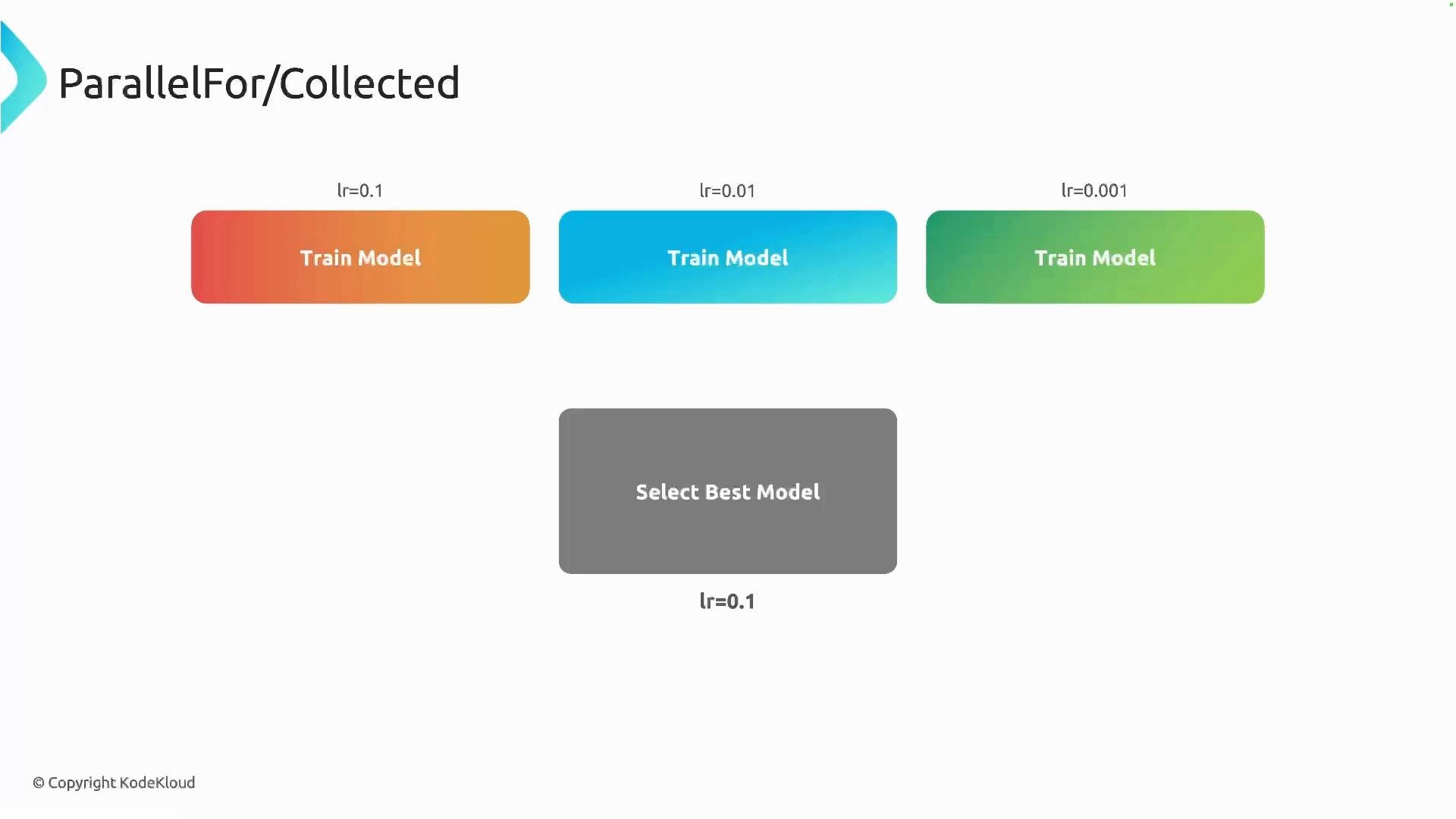 Example: run `train_and_evaluate` in parallel for multiple learning rates, collect the outputs, and select the best learning rate.
```python theme={null}
from typing import NamedTuple
from kfp.dsl import component, pipeline, ParallelFor, Collected
@component
def train_and_evaluate(
learning_rate: float,
) -> NamedTuple(
"Outputs",
[
("accuracy", float),
("learning_rate", float),
],
):
import random
# Simulate training and return an accuracy and the learning rate used
accuracy = random.uniform(0.90, 1.00)
return accuracy, learning_rate
@component
def pick_best_learning_rate(
accuracies: list,
learning_rates: list
) -> float:
# Pair learning rates with their accuracies
pairs = list(zip(learning_rates, accuracies))
# Find the pair with the maximum accuracy
best_pair = max(pairs, key=lambda x: x[1])
print(f"Best LR = {best_pair[0]} with accuracy = {best_pair[1]}")
return best_pair[0]
@pipeline(name="lr-sweep-metrics-only")
def ml_pipeline():
learning_rates = [0.001, 0.01, 0.1]
# Run train_and_evaluate once per learning rate (in parallel)
with ParallelFor(learning_rates) as lr:
run = train_and_evaluate(
learning_rate=lr
)
# Collected aggregates the outputs from all runs into lists
best_lr = pick_best_learning_rate(
accuracies=Collected(run.outputs["accuracy"]),
learning_rates=Collected(run.outputs["learning_rate"])
)
```
Key points:
* `ParallelFor(learning_rates)` launches one task for each learning rate in parallel.
* Each iteration returns a task reference (here `run`), representing the per-iteration outputs.
* `Collected(run.outputs["accuracy"])` and `Collected(run.outputs["learning_rate"])` gather scalar outputs across iterations into lists for downstream consumption by `pick_best_learning_rate`.
Use `Collected()` only for small, JSON-serializable outputs (metrics, scalars, short strings). Do not use `Collected()` for large artifacts (models, large files). For artifacts, store them in artifact storage (e.g., MinIO, GCS) and pass references instead.
## Comparison: If / Else vs ParallelFor / Collected
| Control Primitive | Best for | Example usage |
| - | -: | - |
| `If` / `Else` | Conditional branching based on task outputs | Promote model only if accuracy ≥ threshold |
| `ParallelFor` | Parallel iterations over a list of values | Hyperparameter sweep across learning rates |
| `Collected` | Aggregate simple outputs from ParallelFor iterations | Gather accuracies into a list for selection |
## Common pitfalls and tips
* Ensure component outputs are named and typed consistently; mismatched names are a common source of runtime errors.
* Keep Collected payloads small to avoid serialization/memory issues.
* When running many parallel tasks, watch cluster resource limits (CPU, memory, GPU) and set concurrency or resource requests/limits appropriately.
* For reproducible experiments, fix random seeds or use deterministic training where possible.
## Links and references
* Kubeflow Pipelines SDK documentation: [https://kubeflow-pipelines.readthedocs.io/](https://kubeflow-pipelines.readthedocs.io/)
* Kubeflow official docs: [https://www.kubeflow.org/docs/](https://www.kubeflow.org/docs/)
* KFP control-flow examples and patterns: [https://github.com/kubeflow/pipelines/tree/master/samples](https://github.com/kubeflow/pipelines/tree/master/samples)
Use these control-flow patterns to make your ML pipelines more modular, scalable, and production-ready.
This documentation is built and hosted on [Mintlify](https://mintlify.com), a developer documentation platform.
Example: run `train_and_evaluate` in parallel for multiple learning rates, collect the outputs, and select the best learning rate.
```python theme={null}
from typing import NamedTuple
from kfp.dsl import component, pipeline, ParallelFor, Collected
@component
def train_and_evaluate(
learning_rate: float,
) -> NamedTuple(
"Outputs",
[
("accuracy", float),
("learning_rate", float),
],
):
import random
# Simulate training and return an accuracy and the learning rate used
accuracy = random.uniform(0.90, 1.00)
return accuracy, learning_rate
@component
def pick_best_learning_rate(
accuracies: list,
learning_rates: list
) -> float:
# Pair learning rates with their accuracies
pairs = list(zip(learning_rates, accuracies))
# Find the pair with the maximum accuracy
best_pair = max(pairs, key=lambda x: x[1])
print(f"Best LR = {best_pair[0]} with accuracy = {best_pair[1]}")
return best_pair[0]
@pipeline(name="lr-sweep-metrics-only")
def ml_pipeline():
learning_rates = [0.001, 0.01, 0.1]
# Run train_and_evaluate once per learning rate (in parallel)
with ParallelFor(learning_rates) as lr:
run = train_and_evaluate(
learning_rate=lr
)
# Collected aggregates the outputs from all runs into lists
best_lr = pick_best_learning_rate(
accuracies=Collected(run.outputs["accuracy"]),
learning_rates=Collected(run.outputs["learning_rate"])
)
```
Key points:
* `ParallelFor(learning_rates)` launches one task for each learning rate in parallel.
* Each iteration returns a task reference (here `run`), representing the per-iteration outputs.
* `Collected(run.outputs["accuracy"])` and `Collected(run.outputs["learning_rate"])` gather scalar outputs across iterations into lists for downstream consumption by `pick_best_learning_rate`.
Use `Collected()` only for small, JSON-serializable outputs (metrics, scalars, short strings). Do not use `Collected()` for large artifacts (models, large files). For artifacts, store them in artifact storage (e.g., MinIO, GCS) and pass references instead.
## Comparison: If / Else vs ParallelFor / Collected
| Control Primitive | Best for | Example usage |
| - | -: | - |
| `If` / `Else` | Conditional branching based on task outputs | Promote model only if accuracy ≥ threshold |
| `ParallelFor` | Parallel iterations over a list of values | Hyperparameter sweep across learning rates |
| `Collected` | Aggregate simple outputs from ParallelFor iterations | Gather accuracies into a list for selection |
## Common pitfalls and tips
* Ensure component outputs are named and typed consistently; mismatched names are a common source of runtime errors.
* Keep Collected payloads small to avoid serialization/memory issues.
* When running many parallel tasks, watch cluster resource limits (CPU, memory, GPU) and set concurrency or resource requests/limits appropriately.
* For reproducible experiments, fix random seeds or use deterministic training where possible.
## Links and references
* Kubeflow Pipelines SDK documentation: [https://kubeflow-pipelines.readthedocs.io/](https://kubeflow-pipelines.readthedocs.io/)
* Kubeflow official docs: [https://www.kubeflow.org/docs/](https://www.kubeflow.org/docs/)
* KFP control-flow examples and patterns: [https://github.com/kubeflow/pipelines/tree/master/samples](https://github.com/kubeflow/pipelines/tree/master/samples)
Use these control-flow patterns to make your ML pipelines more modular, scalable, and production-ready.
This documentation is built and hosted on [Mintlify](https://mintlify.com), a developer documentation platform.