> ## Documentation Index
> Fetch the complete documentation index at: https://notes.kodekloud.com/llms.txt
> Use this file to discover all available pages before exploring further.
# Pipeline Parameters
> Explains how to define and use pipeline parameters in Kubeflow Pipelines to run reusable ML pipelines with runtime-configurable hyperparameters and defaults via UI or SDK
Pipeline parameters let you change a pipeline's behavior at runtime without modifying its code. This is useful for workflows such as a three-stage ML pipeline: Fetch Data → Process Data → Train Model, where you may want to run the same pipeline multiple times while tweaking hyperparameters (for example, `epochs` or learning rate) for each run.
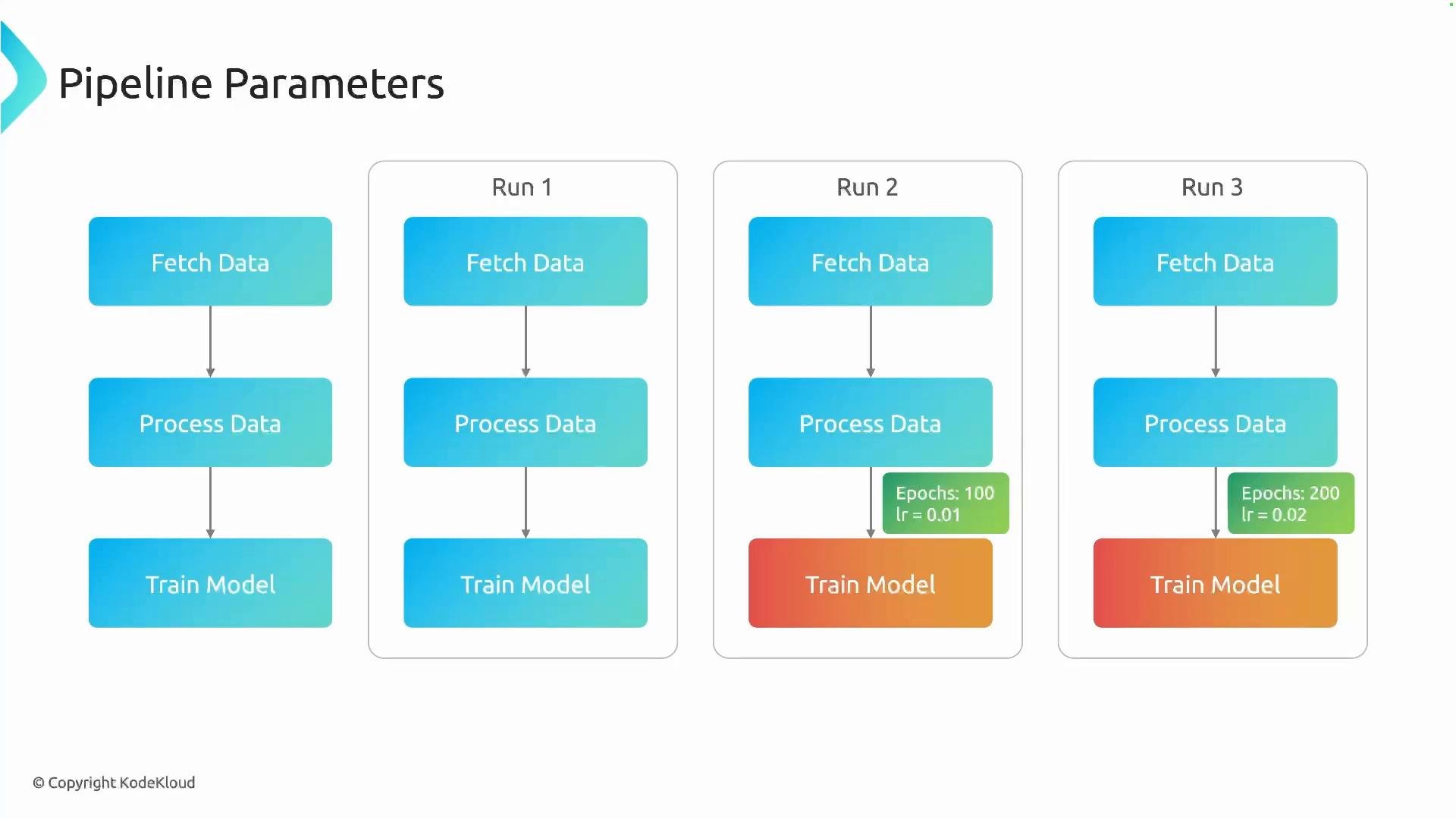 How it works at a high level:
* Define parameters on the pipeline function signature (with optional default values).
* Make components accept those parameters in their signatures.
* Pass the pipeline parameters into component invocations so the component receives the runtime values.
This pattern enables you to run the same pipeline multiple times with different parameter sets (for tuning, experiments, A/B runs, etc.) without changing the pipeline source.
Example: pipeline with `epochs` and `lr`
```python theme={null}
@component
def train_model(epochs: int, lr: float) -> None:
print(f"Training model with epochs: {epochs}, lr: {lr}")
@component
def evaluate_model() -> None:
print("Model passed with accuracy: 97%")
@pipeline(name="parameter-passing-example")
def ml_pipeline(epochs: int = 10, lr: float = 0.01):
train_task = train_model(epochs=epochs, lr=lr)
evaluate_model().after(train_task)
```
Explanation
* `ml_pipeline` declares pipeline-level parameters `epochs` and `lr` with defaults `10` and `0.01`.
* `train_model` accepts `epochs` and `lr`, so it can use the values passed from the pipeline.
* When launching a run you can override `epochs` and `lr` to customize that execution.
UI behavior
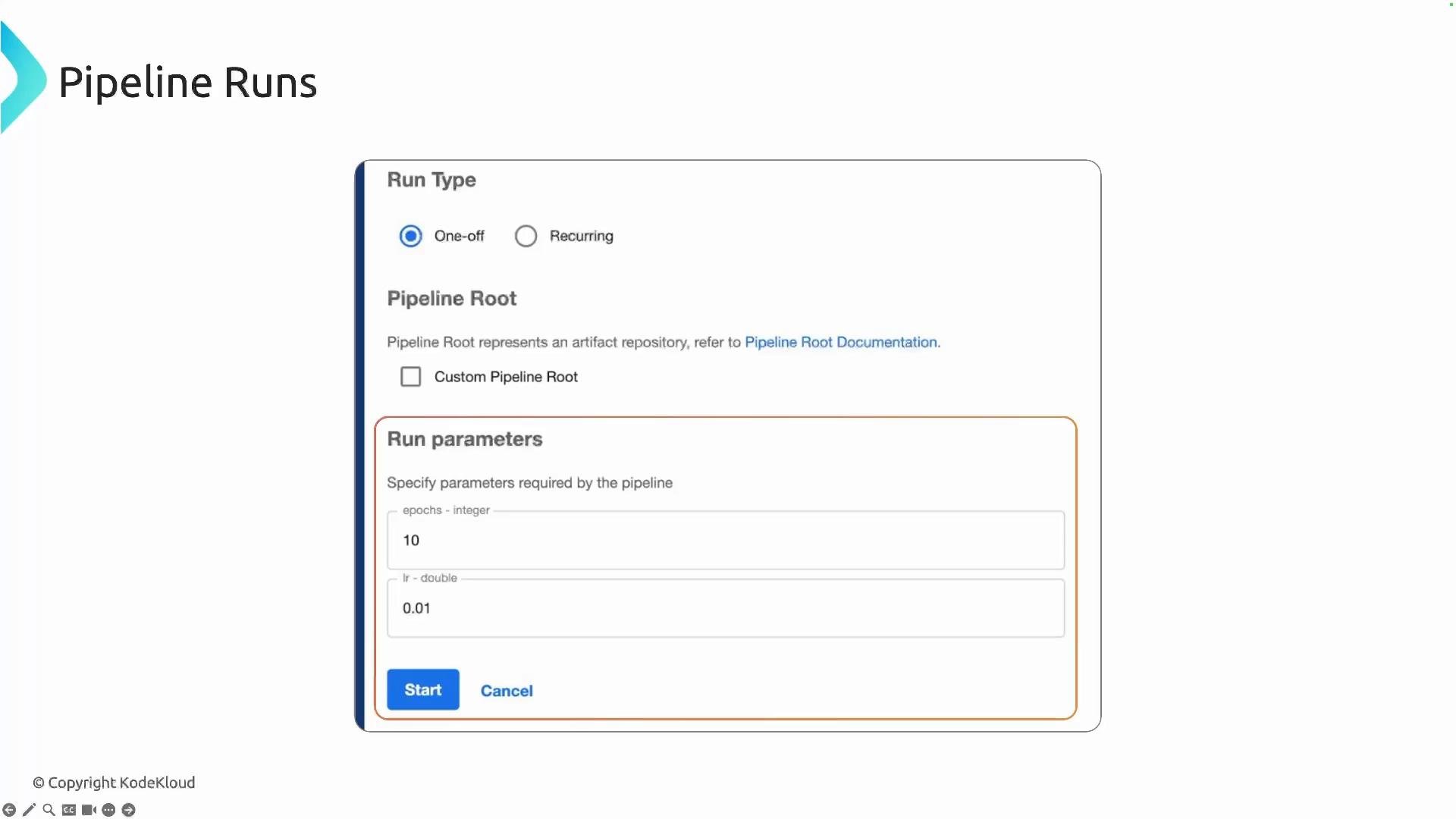
When you start a run from the Kubeflow Pipelines UI (or via the SDK/CLI), the pipeline parameters appear as editable fields. The UI shows default values and lets you override them before submitting the run, which is convenient for quick experiments or scheduled runs.
How it works at a high level:
* Define parameters on the pipeline function signature (with optional default values).
* Make components accept those parameters in their signatures.
* Pass the pipeline parameters into component invocations so the component receives the runtime values.
This pattern enables you to run the same pipeline multiple times with different parameter sets (for tuning, experiments, A/B runs, etc.) without changing the pipeline source.
Example: pipeline with `epochs` and `lr`
```python theme={null}
@component
def train_model(epochs: int, lr: float) -> None:
print(f"Training model with epochs: {epochs}, lr: {lr}")
@component
def evaluate_model() -> None:
print("Model passed with accuracy: 97%")
@pipeline(name="parameter-passing-example")
def ml_pipeline(epochs: int = 10, lr: float = 0.01):
train_task = train_model(epochs=epochs, lr=lr)
evaluate_model().after(train_task)
```
Explanation
* `ml_pipeline` declares pipeline-level parameters `epochs` and `lr` with defaults `10` and `0.01`.
* `train_model` accepts `epochs` and `lr`, so it can use the values passed from the pipeline.
* When launching a run you can override `epochs` and `lr` to customize that execution.
UI behavior
When you start a run from the Kubeflow Pipelines UI (or via the SDK/CLI), the pipeline parameters appear as editable fields. The UI shows default values and lets you override them before submitting the run, which is convenient for quick experiments or scheduled runs.
 Tip: If you do not override a pipeline parameter at runtime, the default value declared in the pipeline function is used. Ensure parameter types are compatible between the pipeline signature and the component signatures.
Best practices and common considerations
| Topic | Recommendation | Example |
| - | -: | - |
| Parameter defaults | Provide sensible defaults so the pipeline can run without requiring user input. | `ml_pipeline(epochs: int = 10, lr: float = 0.01)` |
| Type compatibility | Keep types consistent between pipeline parameters and component parameters to avoid type errors. | `epochs: int` in both pipeline and `train_model` |
| Small vs. large config | Use parameters for small, frequently changed values (hyperparameters); use external config (e.g., mounted files, ConfigMaps) for large configuration blobs. | Hyperparameter tuning uses pipeline params; dataset manifests use files. |
| Passing outputs | Pipeline parameters are for inputs only. To pass computed outputs between components, use component output artifacts or the pipeline's intermediate artifact passing. | Use component `Output[Model]` or `Dataset` types. |
| Reproducibility | Record the parameter values used for each run (the UI and metadata store do this automatically). | Use run labels/notes and experiment tracking. |
Further reading
* [Kubeflow Pipelines documentation](https://www.kubeflow.org/docs/components/pipelines/)
* For SDK usage and advanced parameter types, see the official Kubeflow Pipelines SDK docs.
This structure makes it straightforward to parameterize experiments, automate hyperparameter sweeps, or create reusable pipelines that can be adjusted at runtime without code changes.
This documentation is built and hosted on [Mintlify](https://mintlify.com), a developer documentation platform.
Tip: If you do not override a pipeline parameter at runtime, the default value declared in the pipeline function is used. Ensure parameter types are compatible between the pipeline signature and the component signatures.
Best practices and common considerations
| Topic | Recommendation | Example |
| - | -: | - |
| Parameter defaults | Provide sensible defaults so the pipeline can run without requiring user input. | `ml_pipeline(epochs: int = 10, lr: float = 0.01)` |
| Type compatibility | Keep types consistent between pipeline parameters and component parameters to avoid type errors. | `epochs: int` in both pipeline and `train_model` |
| Small vs. large config | Use parameters for small, frequently changed values (hyperparameters); use external config (e.g., mounted files, ConfigMaps) for large configuration blobs. | Hyperparameter tuning uses pipeline params; dataset manifests use files. |
| Passing outputs | Pipeline parameters are for inputs only. To pass computed outputs between components, use component output artifacts or the pipeline's intermediate artifact passing. | Use component `Output[Model]` or `Dataset` types. |
| Reproducibility | Record the parameter values used for each run (the UI and metadata store do this automatically). | Use run labels/notes and experiment tracking. |
Further reading
* [Kubeflow Pipelines documentation](https://www.kubeflow.org/docs/components/pipelines/)
* For SDK usage and advanced parameter types, see the official Kubeflow Pipelines SDK docs.
This structure makes it straightforward to parameterize experiments, automate hyperparameter sweeps, or create reusable pipelines that can be adjusted at runtime without code changes.
This documentation is built and hosted on [Mintlify](https://mintlify.com), a developer documentation platform.