> ## Documentation Index
> Fetch the complete documentation index at: https://notes.kodekloud.com/llms.txt
> Use this file to discover all available pages before exploring further.
# Our Target Cluster
> Guide to building a single-node Kubernetes cluster and installing cluster-scoped observability, GitOps, database, logging tools and a namespace-scoped analytics package
Now that we've covered the theory, let's move to practice.
In this lesson we will build and configure a functional single-node Kubernetes cluster. You will be granted access to the lab environment shortly. Together we'll install and configure five key packages across several categories to give you a compact, production-oriented developer environment.
Overview of what we'll install:
* Database
* CloudNativePG operator — a PostgreSQL operator to run stateful Postgres clusters on Kubernetes.
* Observability
* Kubetail — a utility to tail logs from multiple pods at once for live troubleshooting.
* Kube Prometheus Stack — a bundled observability stack (Prometheus, Alertmanager, Grafana, exporters, and default dashboards) for metrics collection and visualization.
* Continuous delivery
* Argo CD — a GitOps continuous delivery tool to deploy and sync Kubernetes manifests from Git repositories.
* Analytics (namespace-scoped)
* QuickWit — an analytics package that we'll deploy scoped to a single namespace.
The first four packages above will be installed cluster-scoped. QuickWit will be installed scoped to a namespace. Detailed background on Kubernetes RBAC scopes and operator design is out of scope for this lesson, but we will highlight any permission or namespace considerations during the install steps.
Package summary (what, why, and scope)
| Package | Category | Scope | Purpose / Notes |
| --------------------- | ------------------- | ---------------: | ---------------------------------------------------------------------------------------- |
| CloudNativePG | Database | Cluster-scoped | Manages PostgreSQL clusters on Kubernetes with automated backups and failover. |
| Kubetail | Observability | Cluster-scoped | Lightweight CLI to tail logs from multiple pods across namespaces for troubleshooting. |
| Kube Prometheus Stack | Observability | Cluster-scoped | Complete monitoring stack: Prometheus + Alertmanager + Grafana + exporters + dashboards. |
| Argo CD | Continuous delivery | Cluster-scoped | GitOps deployment controller to sync manifests from Git repos into the cluster. |
| QuickWit | Analytics | Namespace-scoped | Indexing/analytics engine deployed into a single namespace for scoped workloads. |
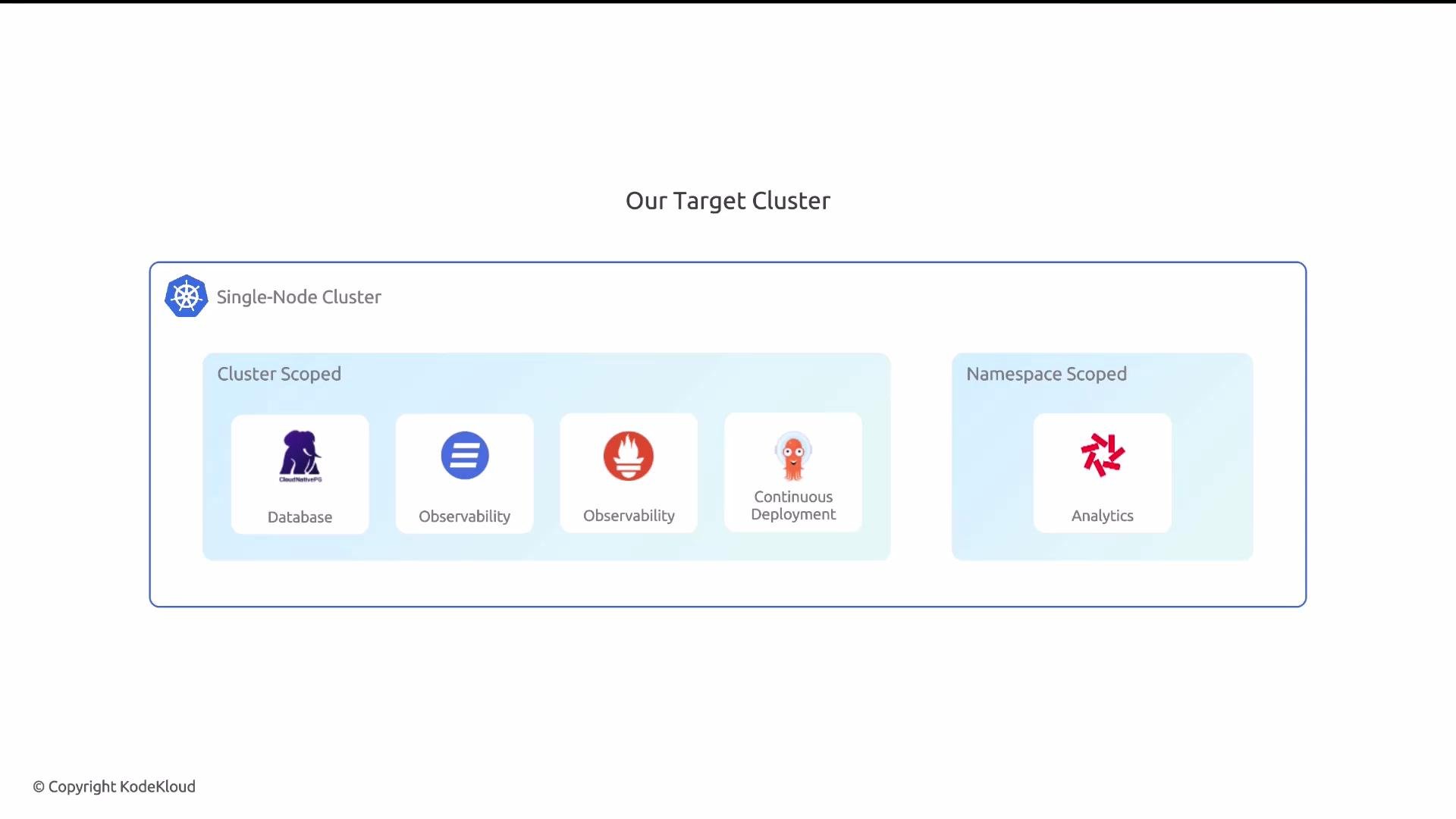 You'll receive credentials to access the single-node cluster for hands-on exercises. During the lesson we'll install each package in turn, verify basic functionality, and point out any scope-specific configuration (cluster vs namespace).
Cluster-scoped installs typically require elevated permissions (cluster-admin or equivalent). Ensure you run cluster-scoped commands with the appropriate context and credentials to avoid permission errors.
What to expect in the lesson sequence
* We will provision and configure the cluster components in the following logical order:
1. Observability (Kube Prometheus Stack) — get metrics and dashboards running early so you can monitor installs.
2. Continuous delivery (Argo CD) — install GitOps tooling to manage subsequent manifests.
3. Database (CloudNativePG) — provision stateful Postgres after operators are available.
4. Observability utility (Kubetail) — use for troubleshooting during other installs.
5. Namespace-scoped analytics (QuickWit) — deploy last into its own namespace to demonstrate scoped installs.
Links and references
* [Kubernetes Documentation](https://kubernetes.io/docs/)
* [CloudNativePG](https://cloudnative-pg.io/)
* [Kube Prometheus Stack (prometheus-operator)](https://github.com/prometheus-operator/kube-prometheus)
* [Argo CD](https://argo-cd.readthedocs.io/)
* [QuickWit](https://quickwit.io/)
* [Kubetail repository](https://github.com/johanhaleby/kubetail)
This target cluster layout and installation order will be used as the reference architecture for the hands-on exercises in the remainder of the lesson.
You'll receive credentials to access the single-node cluster for hands-on exercises. During the lesson we'll install each package in turn, verify basic functionality, and point out any scope-specific configuration (cluster vs namespace).
Cluster-scoped installs typically require elevated permissions (cluster-admin or equivalent). Ensure you run cluster-scoped commands with the appropriate context and credentials to avoid permission errors.
What to expect in the lesson sequence
* We will provision and configure the cluster components in the following logical order:
1. Observability (Kube Prometheus Stack) — get metrics and dashboards running early so you can monitor installs.
2. Continuous delivery (Argo CD) — install GitOps tooling to manage subsequent manifests.
3. Database (CloudNativePG) — provision stateful Postgres after operators are available.
4. Observability utility (Kubetail) — use for troubleshooting during other installs.
5. Namespace-scoped analytics (QuickWit) — deploy last into its own namespace to demonstrate scoped installs.
Links and references
* [Kubernetes Documentation](https://kubernetes.io/docs/)
* [CloudNativePG](https://cloudnative-pg.io/)
* [Kube Prometheus Stack (prometheus-operator)](https://github.com/prometheus-operator/kube-prometheus)
* [Argo CD](https://argo-cd.readthedocs.io/)
* [QuickWit](https://quickwit.io/)
* [Kubetail repository](https://github.com/johanhaleby/kubetail)
This target cluster layout and installation order will be used as the reference architecture for the hands-on exercises in the remainder of the lesson.