> ## Documentation Index
> Fetch the complete documentation index at: https://notes.kodekloud.com/llms.txt
> Use this file to discover all available pages before exploring further.
# Installation Details
> Explains installing KEDA with Helm, what Kubernetes resources the chart creates, verification commands, RBAC considerations, and troubleshooting tips.
Welcome.
This lesson describes the KEDA installation flow you'll run through and what the Helm chart will create in your Kubernetes cluster. KEDA (Kubernetes Event-driven Autoscaling) is commonly installed with Helm — a package manager for Kubernetes that packages resources as charts to make complex installations repeatable. KEDA maintains its official Helm charts on GitHub, so you can pull a supported configuration and install reliably.
 Why use Helm for KEDA
* Helm packages KEDA's CRDs, Deployments, ServiceAccounts, Roles/ClusterRoles, and more in a single chart.
* The chart automates resource ordering (CRDs first), RBAC binding, and lifecycle hooks so KEDA components are installed and configured correctly.
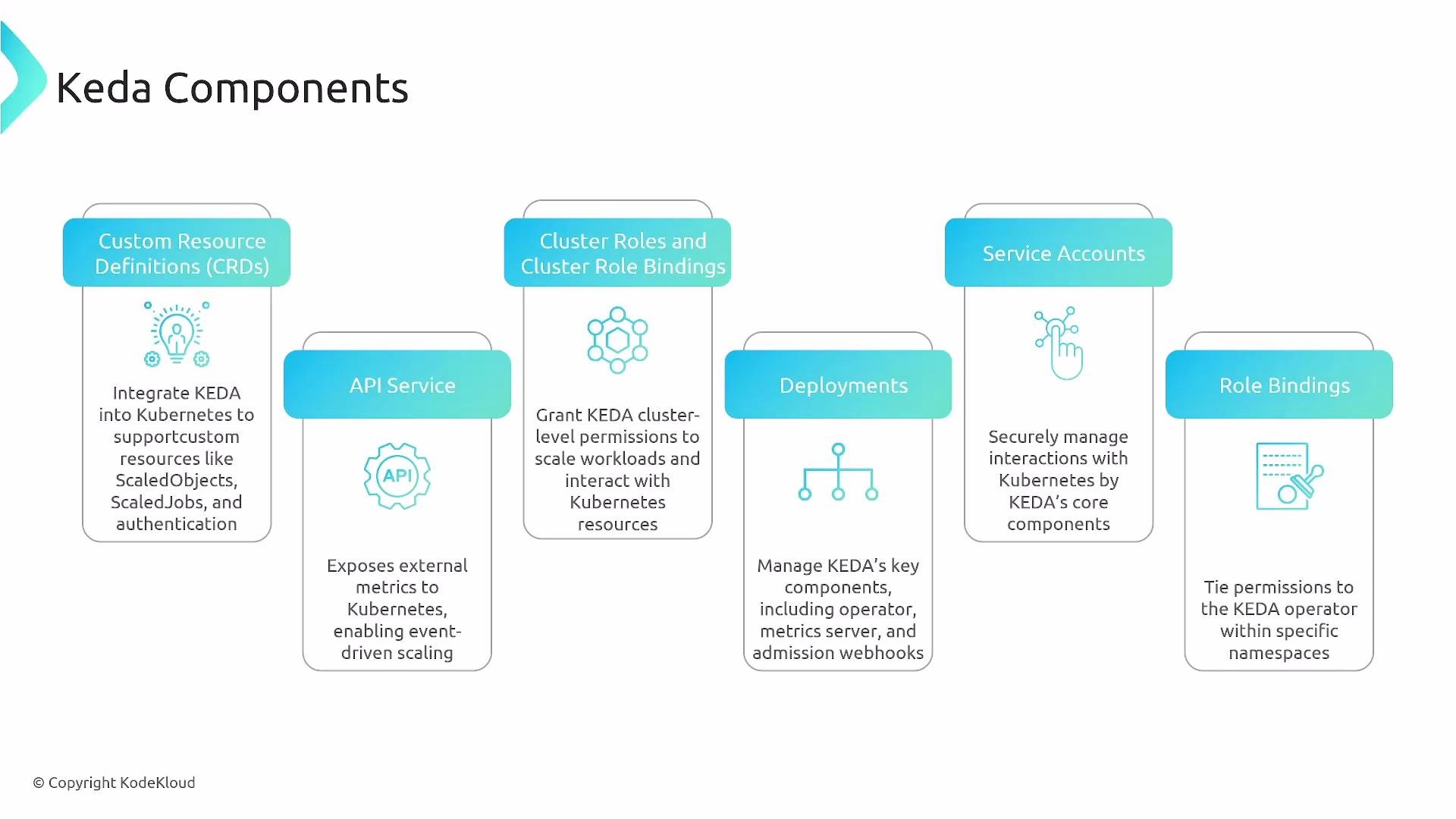
Core components the Helm chart installs and why they matter
* CustomResourceDefinitions (CRDs)\
CRDs extend the Kubernetes API so KEDA can introduce custom objects such as ScaledObjects, ScaledJobs, TriggerAuthentication, and ClusterTriggerAuthentication. These let you declare KEDA scaling behavior alongside standard Kubernetes manifests.
* APIService / Metrics API Server\
The Metrics API Server exposes external metrics under `external.metrics.k8s.io`, enabling HPAs and other consumers to read KEDA-provided metrics.
* Deployments\
KEDA's operator, the Metrics API Server, and the Admission Webhook are deployed as standard Kubernetes Deployments. These controllers implement the logic to observe event sources and act on scaling decisions.
* ServiceAccounts\
ServiceAccounts define the identity KEDA components use when interacting with the Kubernetes API.
* ClusterRoles and ClusterRoleBindings\
Cluster-wide permissions are declared via ClusterRoles and bound to ServiceAccounts with ClusterRoleBindings.
* Roles and RoleBindings\
Roles and RoleBindings grant namespace-scoped permissions and can reference ClusterRoles to restrict cluster-level capabilities to a particular namespace.
Why use Helm for KEDA
* Helm packages KEDA's CRDs, Deployments, ServiceAccounts, Roles/ClusterRoles, and more in a single chart.
* The chart automates resource ordering (CRDs first), RBAC binding, and lifecycle hooks so KEDA components are installed and configured correctly.
Core components the Helm chart installs and why they matter
* CustomResourceDefinitions (CRDs)\
CRDs extend the Kubernetes API so KEDA can introduce custom objects such as ScaledObjects, ScaledJobs, TriggerAuthentication, and ClusterTriggerAuthentication. These let you declare KEDA scaling behavior alongside standard Kubernetes manifests.
* APIService / Metrics API Server\
The Metrics API Server exposes external metrics under `external.metrics.k8s.io`, enabling HPAs and other consumers to read KEDA-provided metrics.
* Deployments\
KEDA's operator, the Metrics API Server, and the Admission Webhook are deployed as standard Kubernetes Deployments. These controllers implement the logic to observe event sources and act on scaling decisions.
* ServiceAccounts\
ServiceAccounts define the identity KEDA components use when interacting with the Kubernetes API.
* ClusterRoles and ClusterRoleBindings\
Cluster-wide permissions are declared via ClusterRoles and bound to ServiceAccounts with ClusterRoleBindings.
* Roles and RoleBindings\
Roles and RoleBindings grant namespace-scoped permissions and can reference ClusterRoles to restrict cluster-level capabilities to a particular namespace.
 Quick reference table — resources installed and how to check them
| Resource | Purpose | Example command to inspect | |
| ---------------------------------: | ---------------------------------------------------------- | --------------------------------------------- | ------------------------------ |
| CRDs | Define KEDA custom objects (ScaledObject, ScaledJob, etc.) | \`kubectl get crds | grep keda\` |
| Deployments | Run KEDA operator, metrics-server, admission webhook | `kubectl get deploy -n ` | |
| ServiceAccounts | Identity for KEDA components | `kubectl get sa -n ` | |
| ClusterRoles / ClusterRoleBindings | Cluster-wide permissions for KEDA | \`kubectl get clusterrole | grep keda\` |
| Roles / RoleBindings | Namespace-scoped permissions | `kubectl get role,rolebinding -n ` | |
| APIService | External metrics surface (`external.metrics.k8s.io`) | \`kubectl get apiservice | grep external.metrics.k8s.io\` |
Important notes on RBAC and RoleBindings
RoleBindings can reference ClusterRoles. This is useful when you want to grant cluster-level permissions but restrict the effect to a specific namespace by creating a RoleBinding in that namespace that references a ClusterRole.
Installing KEDA's CRDs and cluster-level resources requires cluster-wide permissions (for example, `cluster-admin` or equivalent). Ensure you run Helm with an account that has the necessary RBAC privileges.
Typical Helm installation flow (high level)
* Add the KEDA Helm repository and update:
```bash theme={null}
helm repo add kedacore https://kedacore.github.io/charts
helm repo update
```
* Install the KEDA chart. Example (creates namespace if needed):
```bash theme={null}
helm install kedacore/keda --namespace keda --create-namespace
```
* The chart will:
* Create KEDA CRDs (ScaledObjects, ScaledJobs, TriggerAuthentication, ClusterTriggerAuthentication, etc.).
* Deploy the KEDA operator, Metrics API Server, and Admission Webhook.
* Create ServiceAccounts and bind Roles/ClusterRoles and RoleBindings/ClusterRoleBindings.
* Register an APIService to surface metrics under `external.metrics.k8s.io`.
Verification checklist — commands to confirm installation
* Verify CRDs exist:
```bash theme={null}
kubectl get crds | grep keda
```
* Check KEDA deployments in the namespace (example uses `keda`):
```bash theme={null}
kubectl get deploy -n keda
```
* Confirm ServiceAccounts, Roles, and RoleBindings:
```bash theme={null}
kubectl get sa,role,rolebinding,clusterrole,clusterrolebinding -n keda
```
* Verify the external metrics API service is present:
```bash theme={null}
kubectl get apiservice | grep external.metrics.k8s.io
```
* Inspect the operator logs if a pod is not ready:
```bash theme={null}
kubectl logs -n keda deploy/keda-operator
```
Best practices and troubleshooting tips
* Install CRDs before resources that depend on them. The official Helm chart handles this, but manual installs should respect ordering.
* Use a dedicated namespace (for example, `keda`) to scope visibility and RoleBindings.
* If HPAs cannot see external metrics, ensure the `APIService` for `external.metrics.k8s.io` is `Available` and that RBAC rules allow the Metrics API Server to list/ get the resources it needs.
* For upgrades, follow Helm upgrade best practices and watch for CRD changes — some CRD updates require manual steps.
Summary
Installing KEDA with Helm creates a small set of cluster and namespace resources (CRDs, deployments, ServiceAccounts, Roles, RoleBindings, and an APIService) that allow KEDA to observe external event sources, expose metrics via the external metrics API, and drive scaling through HPAs and the KEDA operator. Use the verification commands above to confirm a successful installation and to troubleshoot common issues.
Quick reference table — resources installed and how to check them
| Resource | Purpose | Example command to inspect | |
| ---------------------------------: | ---------------------------------------------------------- | --------------------------------------------- | ------------------------------ |
| CRDs | Define KEDA custom objects (ScaledObject, ScaledJob, etc.) | \`kubectl get crds | grep keda\` |
| Deployments | Run KEDA operator, metrics-server, admission webhook | `kubectl get deploy -n ` | |
| ServiceAccounts | Identity for KEDA components | `kubectl get sa -n ` | |
| ClusterRoles / ClusterRoleBindings | Cluster-wide permissions for KEDA | \`kubectl get clusterrole | grep keda\` |
| Roles / RoleBindings | Namespace-scoped permissions | `kubectl get role,rolebinding -n ` | |
| APIService | External metrics surface (`external.metrics.k8s.io`) | \`kubectl get apiservice | grep external.metrics.k8s.io\` |
Important notes on RBAC and RoleBindings
RoleBindings can reference ClusterRoles. This is useful when you want to grant cluster-level permissions but restrict the effect to a specific namespace by creating a RoleBinding in that namespace that references a ClusterRole.
Installing KEDA's CRDs and cluster-level resources requires cluster-wide permissions (for example, `cluster-admin` or equivalent). Ensure you run Helm with an account that has the necessary RBAC privileges.
Typical Helm installation flow (high level)
* Add the KEDA Helm repository and update:
```bash theme={null}
helm repo add kedacore https://kedacore.github.io/charts
helm repo update
```
* Install the KEDA chart. Example (creates namespace if needed):
```bash theme={null}
helm install kedacore/keda --namespace keda --create-namespace
```
* The chart will:
* Create KEDA CRDs (ScaledObjects, ScaledJobs, TriggerAuthentication, ClusterTriggerAuthentication, etc.).
* Deploy the KEDA operator, Metrics API Server, and Admission Webhook.
* Create ServiceAccounts and bind Roles/ClusterRoles and RoleBindings/ClusterRoleBindings.
* Register an APIService to surface metrics under `external.metrics.k8s.io`.
Verification checklist — commands to confirm installation
* Verify CRDs exist:
```bash theme={null}
kubectl get crds | grep keda
```
* Check KEDA deployments in the namespace (example uses `keda`):
```bash theme={null}
kubectl get deploy -n keda
```
* Confirm ServiceAccounts, Roles, and RoleBindings:
```bash theme={null}
kubectl get sa,role,rolebinding,clusterrole,clusterrolebinding -n keda
```
* Verify the external metrics API service is present:
```bash theme={null}
kubectl get apiservice | grep external.metrics.k8s.io
```
* Inspect the operator logs if a pod is not ready:
```bash theme={null}
kubectl logs -n keda deploy/keda-operator
```
Best practices and troubleshooting tips
* Install CRDs before resources that depend on them. The official Helm chart handles this, but manual installs should respect ordering.
* Use a dedicated namespace (for example, `keda`) to scope visibility and RoleBindings.
* If HPAs cannot see external metrics, ensure the `APIService` for `external.metrics.k8s.io` is `Available` and that RBAC rules allow the Metrics API Server to list/ get the resources it needs.
* For upgrades, follow Helm upgrade best practices and watch for CRD changes — some CRD updates require manual steps.
Summary
Installing KEDA with Helm creates a small set of cluster and namespace resources (CRDs, deployments, ServiceAccounts, Roles, RoleBindings, and an APIService) that allow KEDA to observe external event sources, expose metrics via the external metrics API, and drive scaling through HPAs and the KEDA operator. Use the verification commands above to confirm a successful installation and to troubleshoot common issues.