> ## Documentation Index
> Fetch the complete documentation index at: https://notes.kodekloud.com/llms.txt
> Use this file to discover all available pages before exploring further.
# Course Introduction
> Introductory course teaching how to design, build, test, package, and operate Kubernetes Operators using Kubebuilder and Operator SDK with hands-on labs on CRDs, reconciliation, webhooks, and production readiness
Kubernetes has transformed application deployment and management, but as systems grow, many operational tasks—provisioning resources, performing upgrades, managing backups, and recovering from failures—still require automation. Kubernetes Operators embed application-specific operational knowledge into the cluster, letting you automate complex lifecycle tasks in a cloud-native way.
Welcome to the Kubernetes Operators course.
I am Ahmed Elfakharany, and I will guide you through what operators are, how to build them, and how to take them into production. This lesson/article introduces the course structure and highlights the practical hands-on labs you’ll complete.
## What you'll learn (At a glance)
This course covers fundamentals through production-readiness, including practical scaffolding, reconciliation patterns, testing, and packaging.
| Module | Focus | Outcome |
| -------------------------- | -------------------------------------------------------------------------------------------- | -------------------------------------------------------------------- |
| Operator Fundamentals | What an Operator is, differences between controllers and operators, and the operator pattern | Decide when to use an operator vs alternatives like Helm |
| CRDs & API design | Design Custom Resource Definitions (CRDs) and choose API shapes | Author CRD manifests with validation schemas |
| Scaffolding & Tooling | Generate projects with Kubebuilder and the Operator SDK | Start a Go-based operator project ready for reconcilers and webhooks |
| Reconciliation & Resources | Reconcile Deployments, Services, ConfigMaps, set OwnerReferences | Implement controller logic to manage child resources |
| Admission & Validation | Create validating webhooks and CEL policies | Validate resources at admission time |
| Packaging & Distribution | Package operators for OperatorHub/OpenShift and Helm-based operators | Publish operators and consume popular ones like Cert Manager |
| Production Readiness | Testing, CI/CD, observability, and operational practices | Deliver a production-capable operator with monitoring and alerts |
For more context on Helm-based approaches, see the Helm for Beginners course: [https://learn.kodekloud.com/user/courses/helm-for-beginners](https://learn.kodekloud.com/user/courses/helm-for-beginners). For operator packaging and distribution, see OperatorHub and OpenShift: [https://operatorhub.io](https://operatorhub.io) and [https://learn.kodekloud.com/user/courses/openshift-4](https://learn.kodekloud.com/user/courses/openshift-4).
Operator projects are commonly scaffolded using Kubebuilder or the Operator SDK. Depending on the scenario you may choose:
* A Helm-based operator (if you already have a Helm chart and prefer minimal Go code).
* A Go-based operator with Kubebuilder/Operator SDK (for deep integration, custom controllers, and advanced lifecycle management).
* Packaging for OpenShift/OperatorHub for distribution.
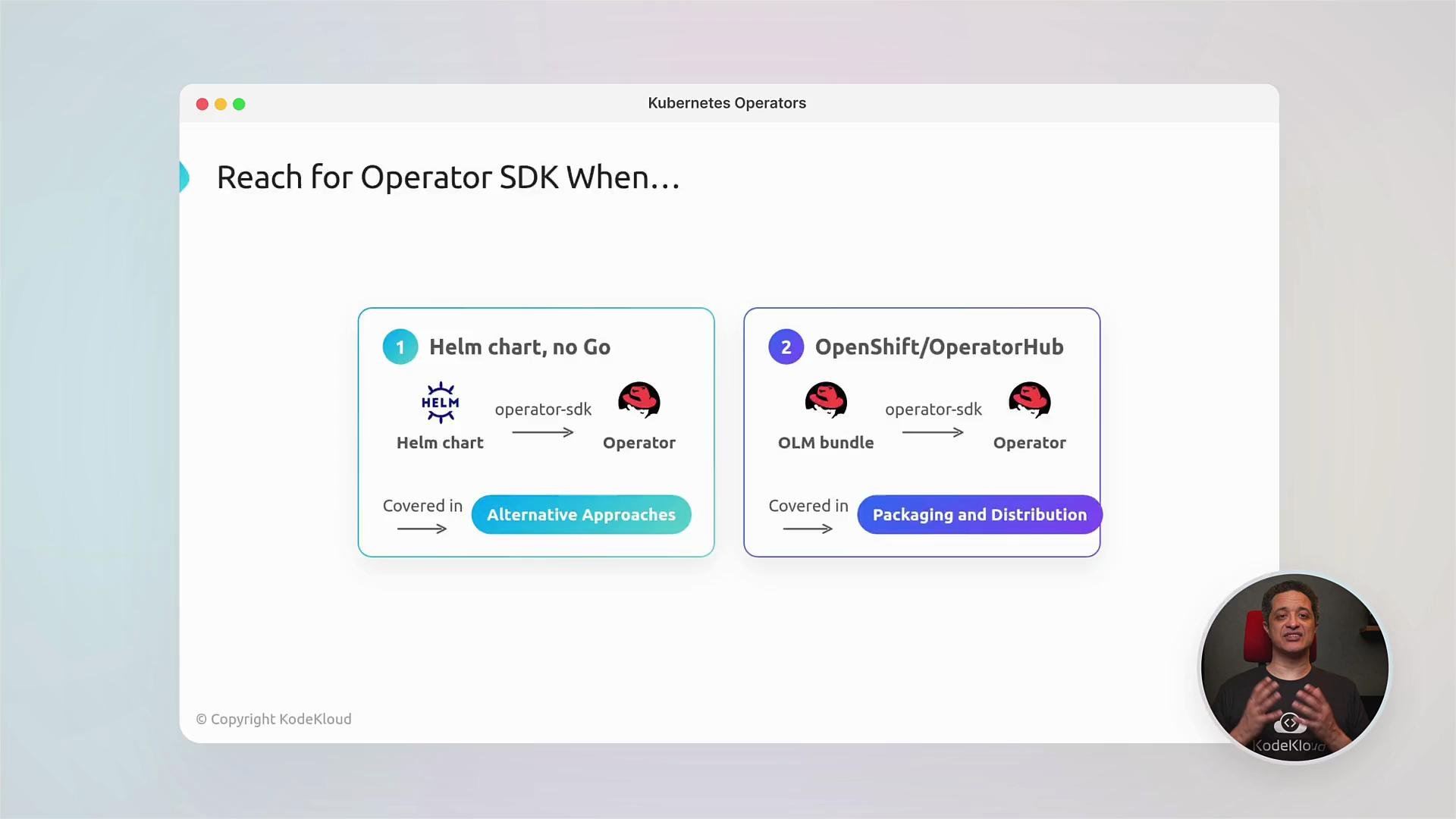 This course emphasizes a Go-based operator built with Kubebuilder and the Operator SDK to teach the reconciliation pattern, CRD design, webhooks, and production packaging. If you already have Helm charts, you can follow a Helm-based operator path instead.
## Reconciliation: core of an Operator
The Reconcile loop compares desired state (from the custom resource) to actual cluster state, and then creates, updates, or deletes Kubernetes objects to converge toward the desired state. A typical reconciler from a Kubebuilder-generated controller looks like this:
```go theme={null}
package controllers
import (
"context"
webappv1 "github.com/kodekloud/webapp-operator/api/v1"
appsv1 "k8s.io/api/apps/v1"
corev1 "k8s.io/api/core/v1"
metav1 "k8s.io/apimachinery/pkg/apis/meta/v1"
"k8s.io/apimachinery/pkg/runtime"
ctrl "sigs.k8s.io/controller-runtime"
"sigs.k8s.io/controller-runtime/pkg/client"
)
// WebAppReconciler reconciles a WebApp object
type WebAppReconciler struct {
client.Client
Scheme *runtime.Scheme
}
// +kubebuilder:rbac:groups=webapp.kodekloud.com,resources=webapps,verbs=get;list;watch;create;update;patch;delete
// +kubebuilder:rbac:groups=webapp.kodekloud.com,resources=webapps/status,verbs=get;update;patch
// +kubebuilder:rbac:groups=webapp.kodekloud.com,resources=webapps/finalizers,verbs=update
// Reconcile is part of the main Kubernetes reconciliation loop which aims to
// move the current state of the cluster closer to the desired state.
func (r *WebAppReconciler) Reconcile(ctx context.Context, req ctrl.Request) (ctrl.Result, error) {
// Reconciliation logic goes here: read the WebApp resource, compute desired
// child objects (Deployment, Service, ConfigMap), create/update them, set
// owner references, and update status conditions.
return ctrl.Result{}, nil
}
```
Key reconciliation steps you'll implement in labs:
* Read the custom resource (CR) and validate fields.
* Compute desired child objects: Deployment, Service, ConfigMap, Secrets, etc.
* Reconcile child objects (create/update/delete) using client operations.
* Set OwnerReferences on children so Kubernetes garbage collects them automatically.
* Update the CR's Status and emit Events for observability.
After implementing reconciliation, you will learn to run, test, and debug operators locally; report and use status conditions; handle finalizers for cleanup; and implement validating admission webhooks and CEL policies to validate resources before they are persisted.
Example: a validating admission binding for a named policy:
```yaml theme={null}
apiVersion: admissionregistration.k8s.io/v1
kind: ValidatingAdmissionPolicyBinding
metadata:
name: webapp-validation-binding
spec:
policyName: webapp-validation
validationActions: ["Deny"]
```
Admission webhooks and validating policies require cluster-level privileges and correct TLS setup. Test webhooks in a controlled environment to avoid disrupting cluster API server operations.
## Packaging, integration, and monitoring
We cover operator packaging with the Operator SDK and Helm-based operators, and how to publish to OperatorHub or OpenShift catalogs. You’ll also learn to consume popular operators like Cert Manager and Prometheus Operator.
When exposing metrics for Prometheus, a typical ServiceMonitor looks like this:
```yaml theme={null}
apiVersion: monitoring.coreos.com/v1
kind: ServiceMonitor
metadata:
name: webapp-servicemonitor
spec:
selector:
matchLabels:
app: api
endpoints:
- port: metrics
path: /metrics
```
This lets Prometheus discover the operator-managed workloads and scrape metrics at the specified endpoint.
## CRD design and lifecycle
Designing CRDs and schemas is a core skill: define names, kinds, validation schemas (OpenAPI v3), and status subresources. A CRD schema excerpt could look like:
```yaml theme={null}
names:
plural: widgets
singular: widget
kind: Widget
shortNames: [wg]
...
size:
type: string
enum: [small, medium, large]
```
After authoring a CRD you apply it and wait for it to be established:
```bash theme={null}
kubectl apply -f /root/code/widget-crd.yaml
kubectl wait --for=condition=Established crd/widgets.training.kodekloud.io
```
## Production readiness
The production-readiness section covers:
* Unit and integration testing for controllers and webhooks
* CI/CD pipelines to build, test, and publish operator bundles
* Observability: exposing metrics, structured logs, traces
* Operational runbooks: upgrades, rollbacks, backup/restore, emergency procedures
You will build a fully functional web app operator from scratch, with hands-on labs and guided demos to reinforce each concept. By the end, you will be able to design, build, test, package, and deploy Kubernetes operators for real-world use.
## Links and references
* Kubernetes Concepts: [https://kubernetes.io/docs/concepts/overview/what-is-kubernetes/](https://kubernetes.io/docs/concepts/overview/what-is-kubernetes/)
* Kubebuilder: [https://book.kubebuilder.io](https://book.kubebuilder.io)
* Operator SDK: [https://sdk.operatorframework.io](https://sdk.operatorframework.io)
* OperatorHub: [https://operatorhub.io](https://operatorhub.io)
* Prometheus Operator / ServiceMonitor docs: [https://github.com/prometheus-operator/prometheus-operator](https://github.com/prometheus-operator/prometheus-operator)
* Helm for Beginners (course): [https://learn.kodekloud.com/user/courses/helm-for-beginners](https://learn.kodekloud.com/user/courses/helm-for-beginners)
* OpenShift 4 (course): [https://learn.kodekloud.com/user/courses/openshift-4](https://learn.kodekloud.com/user/courses/openshift-4)
At KodeKloud, learning continues beyond the course—join the community to ask questions, share knowledge, collaborate, and get support.
If you're ready to take your Kubernetes skills to the next level, let's get started.
This course emphasizes a Go-based operator built with Kubebuilder and the Operator SDK to teach the reconciliation pattern, CRD design, webhooks, and production packaging. If you already have Helm charts, you can follow a Helm-based operator path instead.
## Reconciliation: core of an Operator
The Reconcile loop compares desired state (from the custom resource) to actual cluster state, and then creates, updates, or deletes Kubernetes objects to converge toward the desired state. A typical reconciler from a Kubebuilder-generated controller looks like this:
```go theme={null}
package controllers
import (
"context"
webappv1 "github.com/kodekloud/webapp-operator/api/v1"
appsv1 "k8s.io/api/apps/v1"
corev1 "k8s.io/api/core/v1"
metav1 "k8s.io/apimachinery/pkg/apis/meta/v1"
"k8s.io/apimachinery/pkg/runtime"
ctrl "sigs.k8s.io/controller-runtime"
"sigs.k8s.io/controller-runtime/pkg/client"
)
// WebAppReconciler reconciles a WebApp object
type WebAppReconciler struct {
client.Client
Scheme *runtime.Scheme
}
// +kubebuilder:rbac:groups=webapp.kodekloud.com,resources=webapps,verbs=get;list;watch;create;update;patch;delete
// +kubebuilder:rbac:groups=webapp.kodekloud.com,resources=webapps/status,verbs=get;update;patch
// +kubebuilder:rbac:groups=webapp.kodekloud.com,resources=webapps/finalizers,verbs=update
// Reconcile is part of the main Kubernetes reconciliation loop which aims to
// move the current state of the cluster closer to the desired state.
func (r *WebAppReconciler) Reconcile(ctx context.Context, req ctrl.Request) (ctrl.Result, error) {
// Reconciliation logic goes here: read the WebApp resource, compute desired
// child objects (Deployment, Service, ConfigMap), create/update them, set
// owner references, and update status conditions.
return ctrl.Result{}, nil
}
```
Key reconciliation steps you'll implement in labs:
* Read the custom resource (CR) and validate fields.
* Compute desired child objects: Deployment, Service, ConfigMap, Secrets, etc.
* Reconcile child objects (create/update/delete) using client operations.
* Set OwnerReferences on children so Kubernetes garbage collects them automatically.
* Update the CR's Status and emit Events for observability.
After implementing reconciliation, you will learn to run, test, and debug operators locally; report and use status conditions; handle finalizers for cleanup; and implement validating admission webhooks and CEL policies to validate resources before they are persisted.
Example: a validating admission binding for a named policy:
```yaml theme={null}
apiVersion: admissionregistration.k8s.io/v1
kind: ValidatingAdmissionPolicyBinding
metadata:
name: webapp-validation-binding
spec:
policyName: webapp-validation
validationActions: ["Deny"]
```
Admission webhooks and validating policies require cluster-level privileges and correct TLS setup. Test webhooks in a controlled environment to avoid disrupting cluster API server operations.
## Packaging, integration, and monitoring
We cover operator packaging with the Operator SDK and Helm-based operators, and how to publish to OperatorHub or OpenShift catalogs. You’ll also learn to consume popular operators like Cert Manager and Prometheus Operator.
When exposing metrics for Prometheus, a typical ServiceMonitor looks like this:
```yaml theme={null}
apiVersion: monitoring.coreos.com/v1
kind: ServiceMonitor
metadata:
name: webapp-servicemonitor
spec:
selector:
matchLabels:
app: api
endpoints:
- port: metrics
path: /metrics
```
This lets Prometheus discover the operator-managed workloads and scrape metrics at the specified endpoint.
## CRD design and lifecycle
Designing CRDs and schemas is a core skill: define names, kinds, validation schemas (OpenAPI v3), and status subresources. A CRD schema excerpt could look like:
```yaml theme={null}
names:
plural: widgets
singular: widget
kind: Widget
shortNames: [wg]
...
size:
type: string
enum: [small, medium, large]
```
After authoring a CRD you apply it and wait for it to be established:
```bash theme={null}
kubectl apply -f /root/code/widget-crd.yaml
kubectl wait --for=condition=Established crd/widgets.training.kodekloud.io
```
## Production readiness
The production-readiness section covers:
* Unit and integration testing for controllers and webhooks
* CI/CD pipelines to build, test, and publish operator bundles
* Observability: exposing metrics, structured logs, traces
* Operational runbooks: upgrades, rollbacks, backup/restore, emergency procedures
You will build a fully functional web app operator from scratch, with hands-on labs and guided demos to reinforce each concept. By the end, you will be able to design, build, test, package, and deploy Kubernetes operators for real-world use.
## Links and references
* Kubernetes Concepts: [https://kubernetes.io/docs/concepts/overview/what-is-kubernetes/](https://kubernetes.io/docs/concepts/overview/what-is-kubernetes/)
* Kubebuilder: [https://book.kubebuilder.io](https://book.kubebuilder.io)
* Operator SDK: [https://sdk.operatorframework.io](https://sdk.operatorframework.io)
* OperatorHub: [https://operatorhub.io](https://operatorhub.io)
* Prometheus Operator / ServiceMonitor docs: [https://github.com/prometheus-operator/prometheus-operator](https://github.com/prometheus-operator/prometheus-operator)
* Helm for Beginners (course): [https://learn.kodekloud.com/user/courses/helm-for-beginners](https://learn.kodekloud.com/user/courses/helm-for-beginners)
* OpenShift 4 (course): [https://learn.kodekloud.com/user/courses/openshift-4](https://learn.kodekloud.com/user/courses/openshift-4)
At KodeKloud, learning continues beyond the course—join the community to ask questions, share knowledge, collaborate, and get support.
If you're ready to take your Kubernetes skills to the next level, let's get started.