> ## Documentation Index
> Fetch the complete documentation index at: https://notes.kodekloud.com/llms.txt
> Use this file to discover all available pages before exploring further.
# Create Container Errors
> This guide explores common Kubernetes container creation errors and the container lifecycle stages where these errors occur.
In this guide, we explore common Kubernetes container creation errors—specifically, CreateContainerConfigError and CreateContainerError. We will walk through the Kubernetes container lifecycle, highlighting the stages—from image pulling to container startup—and identify where these errors occur.
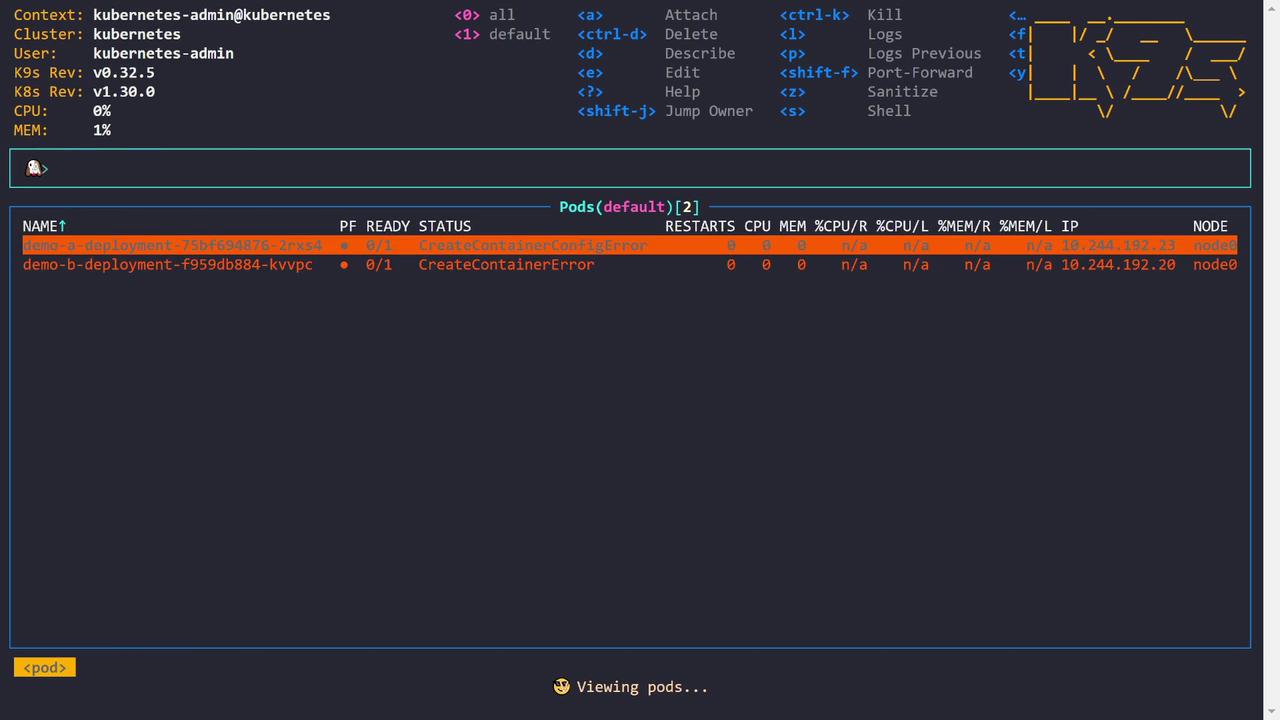
Below is an initial pod status output displaying both errors:
```plaintext theme={null}
NAME READY STATUS RESTARTS CPU MEM IP NODE
demo-a-deployment-75bf694876-2rxs4 0/1 CreateContainerConfigError 0 0 0 10.244.192.23 node0
demo-b-deployment-f959d8b884-kvvpc 0/1 CreateContainerError 0 0 0 n/a 10.244.192.20 node0
```
An extended output with additional flags looks as follows:
```plaintext theme={null}
NAME PF READY STATUS RESTARTS CPU MEM %CPU/R %MEM/R %CPU/L %MEM/L IP NODE
demo-a-deployment-75bf694876-2rxs4 ✔ 0/1 CreateContainerConfigError 0 0 0 n/a n/a n/a 10.244.192.23 node0
demo-b-deployment-f959db884-kvvpc ✖ 0/1 CreateContainerError 0 0 0 n/a n/a n/a 10.244.192.20 node0
```
## Container Creation Lifecycle in Kubernetes
Understanding the container lifecycle is crucial for troubleshooting these issues. The container creation process is divided into four main stages:
1. **Image Pulling**\
Kubernetes pulls the container image (e.g., `nginx:latest`) from the image registry to the node. With correct registry credentials, this step completes successfully.
2. **Container Configuration**\
Kubernetes creates the container configuration by setting environment variables, command arguments, resource limits, volume mounts, network settings, security contexts, and more.
A CreateContainerConfigError is raised if required configurations (such as a referenced Secret or ConfigMap) are missing.
3. **Container Creation**\
The container runtime (e.g., containerd or Docker) creates the container using the pulled image. This involves establishing the filesystem and Linux namespaces.
A CreateContainerError is typically due to issues encountered by the container runtime while setting up the container.
4. **Container Start**\
Finally, the container's process starts by executing the defined command or entry point. Errors occurring at this stage are often referred to as run container errors, signaling problems with the process startup.
The CreateContainerConfigError usually points to misconfigurations such as referencing a Secret or a ConfigMap that doesn't exist, while the CreateContainerError suggests that the container runtime could not complete the container creation.
## Troubleshooting CreateContainerConfigError
Let’s begin with demo A, which encounters a CreateContainerConfigError. The pod description for demo A shows the error in the container state:
```plaintext theme={null}
Describe(default/demo-a-deployment-75bf694876-2rxs4)
Annotations:
pod-template-hash: 75bf694876
Status: Pending
IP: 10.244.192.23
IPs:
IP: 10.244.192.23
Controlled By: ReplicaSet/demo-a-deployment-75bf694876
Containers:
example-container:
Container ID:
Image: nginx:latest
Image ID:
Port:
Host Port:
State: Waiting
Reason: CreateContainerConfigError
Ready: False
Restart Count: 0
Environment:
KEY_A: Optional: false
Mounts:
/var/run/secrets/kubernetes.io/serviceaccount from kube-api-access-trh8x (ro)
Conditions:
Type: PodReadyToStartContainers
Status: True
```
Reviewing the Events section reveals the root cause:
```plaintext theme={null}
Describe(default/demo-a-deployment-75bf694876-2rxs4)
Events:
Type Reason Age From Message
---- ----- ---- ---- ------
Normal Scheduled 7m27s default-scheduler Successfully assigned default/demo-a-deployment-75bf694876-2rxs4 to node0
Normal Pulled 7m21s kubelet Successfully pulled image "nginx:latest" in 2.973s (4.377s including wait)
...
Warning Failed 5m59s kubelet Error: secret "demo-a-secret" not found
...
Normal Pulling 2m17s kubelet Pulling image "nginx:latest"
```
The pod is referencing a Secret named `demo-a-secret` that does not exist in the cluster. The environment variable `KEY_A` is configured to use the value from this Secret (key: `some_key`). Without this Secret, Kubernetes cannot inject the necessary environment variable, leading to the CreateContainerConfigError.
Below is the relevant portion of the pod’s YAML configuration:
```yaml theme={null}
name: demo-a-deployment-75bf694876-2rxs4
namespace: default
ownerReferences:
- apiVersion: apps/v1
blockOwnerDeletion: true
controller: true
kind: ReplicaSet
name: demo-a-deployment-75bf694876
uid: bfb8961f-93a0-46b1-8a0b-30167dd9017
resourceVersion: "1772"
uid: d2547de8-626c-4c91-8a37-5f4106463bf6
spec:
containers:
- env:
- name: KEY_A
valueFrom:
secretKeyRef:
key: some_key
name: demo-a-secret
image: nginx:latest
imagePullPolicy: Always
name: example-container
resources: {}
terminationMessagePath: /dev/termination-log
terminationMessagePolicy: File
```
To resolve this error, create the missing Secret by applying a YAML file similar to the following:
```bash theme={null}
controlplane ~ ➜ k9s
controlplane ~ ➜ k apply -f missing-secret.yaml
secret/demo-a-secret created
controlplane ~ ➜
```
After creating the Secret, the environment variable can be properly injected and the pod transitions from the error state. An updated pod status might look like this:
```plaintext theme={null}
NAME READY STATUS RESTARTS CPU MEM IP NODE AGE
demo-a-deployment-75bf694876-vcftf 1/1 Running 0 0 17 10.244.192.4 node01 118
demo-b-deployment-f959db884-kvvpc 0/1 CreateContainerError 0 0 0 n/a n/a 12m
```
## Troubleshooting CreateContainerError
Next, let’s investigate demo B which shows the CreateContainerError. The pod description for demo B indicates that no command or entry point is specified:
```plaintext theme={null}
Context: kubernetes-admin@kubernetes
Cluster: kubernetes
User: kubernetes-admin
K9s Rev: v0.32.5
K8s Rev: v1.30.0
CPU: 0%
MEM: 1%
NAME PF READY STATUS RESTARTS CPU MEM %CPU/R %CPU/L %MEM/R %MEM/L IP NODE AGE
demo-a-deployment-75bf694876-vcftf 1/1 Running 0 0 0 n/a n/a n/a 10.244.192.4 node01 2m
demo-b-deployment-f959db884-kvvpc 0/2 CreateContainerError 0 0 0 n/a n/a n/a 10.244.192.20 node01 12m
```
The detailed pod description for the failing container points out the issue:
```plaintext theme={null}
Describe(default/demo-b-deployment-f959db884-kvpc)
QoS Class: BestEffort
Node-Selectors:
Tolerations:
node.kubernetes.io/not-ready: NoExecute op=Exists for 300s
node.kubernetes.io/unreachable: NoExecute op=Exists for 300s
Events:
Type Reason Age From Message
---- ------ --- ---- -------
Normal Scheduled 12m default-scheduler Successfully assigned default/demo-b-deployment-f959db884-kvpc to node01
Normal Pulling 12m kubelet Pulling image "ngheith/no-entry-point:v5"
Normal Pulled 12m kubelet Successfully pulled image "ngheith/no-entry-point:v5" in 548ms (1.422s including waiting).
Warning Failed 12m kubelet Error: failed to generate spec: no command specified
```
The image `ngheith/no-entry-point:v5` does not define an entry point, and the pod configuration does not override this by providing a command. To resolve this issue, update the deployment to include a valid command that keeps the container running—for example:
```yaml theme={null}
maxSurge: 25%
maxUnavailable: 25%
type: RollingUpdate
template:
metadata:
creationTimestamp: null
labels:
app: demo-b
spec:
containers:
- image: ngheith/no-entry-point:v5
imagePullPolicy: IfNotPresent
name: example-container
command: ["sleep", "3600"]
resources: {}
terminationMessagePath: /dev/termination-log
terminationMessagePolicy: File
dnsPolicy: ClusterFirst
restartPolicy: Always
schedulerName: default-scheduler
securityContext: {}
terminationGracePeriodSeconds: 30
status:
conditions:
- lastTransitionTime: "2024-08-04T22:09:40Z"
lastUpdateTime: "2024-08-04T22:09:40Z"
message: Deployment does not have minimum availability.
reason: MinimumReplicasUnavailable
status: "False"
type: Available
- lastTransitionTime: "2024-08-04T22:19:41Z"
lastUpdateTime: "2024-08-04T22:19:41Z"
message: ReplicaSet "demo-b-deployment-f959db884" has timed out progressing.
reason: ProgressDeadlineExceeded
status: "False"
```
After updating the deployment, verifying the pod status should show that the container is now running without the creation error:
```plaintext theme={null}
NAME READY STATUS RESTARTS CPU MEM IP NODE AGE
demo-a-deployment-75bf694876-vctf 1/1 Running 0 0 17 10.244.192.4 node01 3m
demo-b-deployment-f959db884-kvvtc 0/2 CreateContainerError 0 0 0 n/a n/a n/a
```
## Demonstrating a Run Container Error
In some cases, the container is created successfully but fails to start its process due to an invalid command. For example, a deployment might define an incorrect command (gibberish), causing the container to crash after creation:
```bash theme={null}
controlplane ~ ⮕ k apply -f demo
```
The resulting pod status shows a CrashLoopBackOff:
```plaintext theme={null}
NAME PF READY STATUS RESTARTS CPU MEM %CPU/R %CPU/L %MEM/R %MEM/L IP NODE AGE
demo-a-deployment-75bf694876-vcttf ● 1/1 Running 0 0 17 n/a n/a n/a 10.244.192.4 node01 6m52s
demo-b-deployment-9cbbbd94f-l2xsc ● 1/1 Running 0 0 1 n/a n/a n/a 10.244.192.23 node01 3m1s
demo-c-deployment-5f47f795c-ghkl4 ● 0/1 CrashLoopBackOff 1 0 0 n/a n/a n/a 10.244.192.20 node01 8s
```
Describing the troubled pod for demo C indicates that the defined command (`jibberish`) is not recognized:
```plaintext theme={null}
Describe(default/demo-c-deployment-5f47f795c-ghkl4)
...
Command: jibberish
State: Waiting
Reason: RunContainerError
Last State: Terminated
Reason: StartError
Message: failed to create contained task: failed to create shim task: OCI runtime create failed: runc create failed: unable to start container process: exec: "jibberish": executable file not found in $PATH: unknown
Exit Code: 128
Started: Thu, 01 Jan 1970 00:00:00 +0000
Finished: Sun, 04 Aug 2024 22:26:55 +0000
Ready: False
Restart Count: 2
...
```
To resolve this RunContainerError, update the deployment with a valid command. For example, to keep the container active, modify the deployment snippet as follows:
```yaml theme={null}
# Updated deployment snippet for demo-c
spec:
containers:
- name: example-container
image: ngheith/no-entry-point:v5
command: ["sleep", "3600"]
imagePullPolicy: IfNotPresent
```
After applying this change, checking the pod statuses should reveal that the container runs without errors:
```plaintext theme={null}
NAME PF READY STATUS RESTARTS CPU MEM %CPU/R %CPU/L %MEM/R %MEM/L IP NODE AGE
demo-a-deployment-75bf694876-vcftr ▢ 1/1 Running 0 0 17 n/a n/a n/a 10.244.192.4 node01 8m25s
demo-b-deployment-9cbbbd944f-l2xsc ▢ 1/1 Running 0 0 0 n/a n/a n/a 10.244.192.23 node01 4m34s
demo-c-deployment-5f47f7f795c-ghkl4 ▢ 0/1 Terminating 4 0 0 n/a n/a n/a n/a node01 10s
demo-c-deployment-86d746c6f9-sbss9 ▢ 1/1 Running 0 0 0 n/a n/a n/a 10.244.192.24 node01 2s
```
## Final Status Summary
Below is a summary of the final pod status after troubleshooting all container creation steps:
```plaintext theme={null}
Context: kubernetes-admin@kubernetes
Cluster: kubernetes
User: kubernetes-admin
K9s Rev: v0.32.5
K8s Rev: v1.30.0
CPU: 0%
MEM: 1%
NAME PF READY STATUS RESTARTS CPU MEM %CPU/R %CPU/L %MEM/R %MEM/L IP NODE AGE
demo-a-deployment-75bf694876-vctf ● 1/1 Running 0 0 17 n/a n/a n/a n/a 10.244.192.4 node01 8m45s
demo-b-deployment-9cbbdb94f-l2xsc ● 1/1 Running 0 0 0 n/a n/a n/a n/a 10.244.192.23 node01 4m54s
demo-c-deployment-86d746c6f9-sbss9 ● 1/1 Running 0 0 0 n/a n/a n/a n/a 10.244.192.24 node01 22s
```
By understanding the container lifecycle and the specific error messages, you can more effectively narrow down troubleshooting efforts in Kubernetes environments.
For more detailed troubleshooting techniques, check out the [Kubernetes Documentation](https://kubernetes.io/docs/) and resources on [Container Runtime Troubleshooting](https://kubernetes.io/docs/tasks/debug/debugging-pod/).