> ## Documentation Index
> Fetch the complete documentation index at: https://notes.kodekloud.com/llms.txt
> Use this file to discover all available pages before exploring further.
# Client Security kubeconfig
> This article explains how to use Kubernetes kubeconfig files to manage cluster endpoints and user credentials for easier interaction with kubectl.
In this lesson, we’ll explore how Kubernetes **kubeconfig** files let you store cluster endpoints and user credentials for `kubectl`, eliminating the need to retype flags every time you interact with your cluster.
## 1. Direct API Access with curl
If your API server is at `my-kube-playground:6443` and you’ve generated:
* CA certificate: `ca.crt`
* Client certificate: `admin.crt`
* Client key: `admin.key`
You can query the API directly:
```bash theme={null}
curl https://my-kube-playground:6443/api/v1/pods \
--key admin.key \
--cert admin.crt \
--cacert ca.crt
```
Response:
```json theme={null}
{
"kind": "PodList",
"apiVersion": "v1",
"metadata": {
"selfLink": "/api/v1/pods"
},
"items": []
}
```
## 2. Equivalent kubectl Commands
With `kubectl`, the same request requires these flags:
```bash theme={null}
kubectl get pods \
--server https://my-kube-playground:6443 \
--client-key admin.key \
--client-certificate admin.crt \
--certificate-authority ca.crt
```
Output:
```text theme={null}
No resources found.
```
Typing long flag lists is tedious. Let’s streamline this with a kubeconfig file.
By default, `kubectl` looks for `~/.kube/config`. You can override with `--kubeconfig=PATH`.
## 3. Creating and Using a kubeconfig File
Save your cluster, user, and context definitions in a YAML file (e.g., `config`), then run:
```bash theme={null}
kubectl get pods --kubeconfig=config
# Or, if you place it at ~/.kube/config:
kubectl get pods
```
Both commands will yield:
```text theme={null}
No resources found.
```
***
## 4. Structure of a kubeconfig File
A kubeconfig has three top-level sections:
| Section | Description |
| -------- | -------------------------------------------------------------- |
| clusters | Definitions of Kubernetes clusters (name, server URL, CA info) |
| users | Credentials (client cert/key or token) for each user |
| contexts | Mappings of user ↔ cluster, with optional namespace setting |
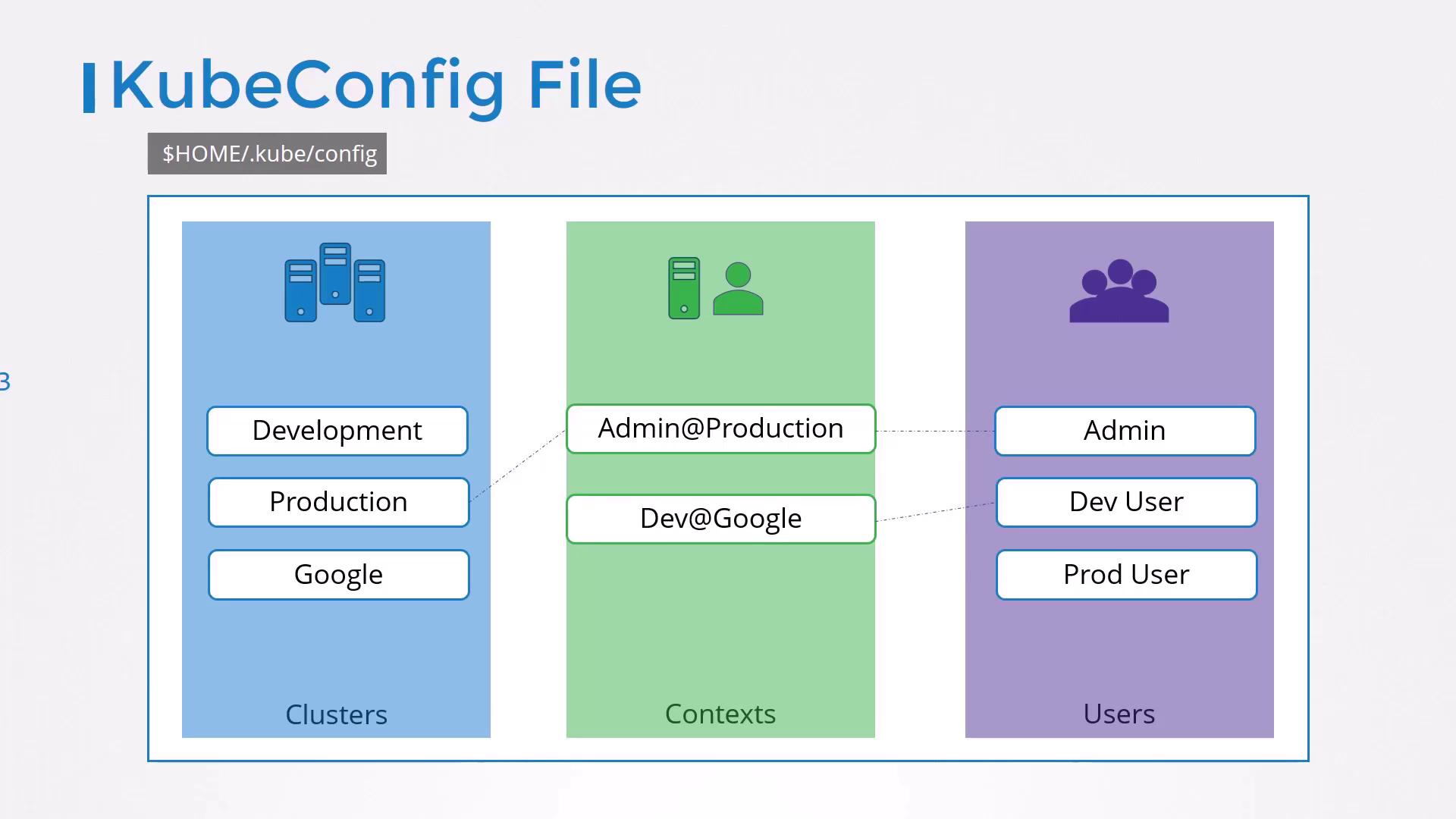
### 4.1 Minimal Example
```yaml theme={null}
apiVersion: v1
kind: Config
clusters:
- name: my-kube-playground
cluster:
server: https://my-kube-playground:6443
certificate-authority: ca.crt
users:
- name: my-kube-admin
user:
client-certificate: admin.crt
client-key: admin.key
contexts:
- name: my-kube-admin@my-kube-playground
context:
cluster: my-kube-playground
user: my-kube-admin
current-context: my-kube-admin@my-kube-playground
```
***
## 5. Managing Multiple Clusters, Users, and Contexts
You can add as many entries as needed:
```yaml theme={null}
apiVersion: v1
kind: Config
clusters:
- name: my-kube-playground
cluster:
server: https://my-kube-playground:6443
certificate-authority: ca.crt
- name: development
cluster:
server: https://dev.example.com:6443
certificate-authority: dev-ca.crt
- name: production
cluster:
server: https://prod.example.com:6443
certificate-authority: prod-ca.crt
users:
- name: my-kube-admin
user:
client-certificate: admin.crt
client-key: admin.key
- name: dev-user
user:
client-certificate: dev.crt
client-key: dev.key
- name: prod-user
user:
client-certificate: prod.crt
client-key: prod.key
contexts:
- name: my-kube-admin@my-kube-playground
context:
cluster: my-kube-playground
user: my-kube-admin
- name: dev-user@development
context:
cluster: development
user: dev-user
- name: prod-user@production
context:
cluster: production
user: prod-user
current-context: my-kube-admin@my-kube-playground
```
### 5.1 Viewing and Switching Contexts
Use built-in commands to inspect or switch contexts:
| Command | Description |
| ------------------------------------------------- | ----------------------------------------- |
| `kubectl config view` | Show merged config (defaults + overrides) |
| `kubectl --kubeconfig=my-config config view` | View a specific file |
| `kubectl config use-context prod-user@production` | Switch current context to production |
***
## 6. Setting a Default Namespace
Embed `namespace` in the context to avoid adding `-n` on every command:
```yaml theme={null}
contexts:
- name: admin@production
context:
cluster: production
user: admin
namespace: finance
```
Now `kubectl get pods` under this context defaults to the `finance` namespace.
***
## 7. Embedding Certificate Data Directly
Inline your certs and keys as base64 to avoid external files:
```yaml theme={null}
clusters:
- name: production
cluster:
server: https://172.17.0.51:6443
certificate-authority-data: |
LS0tLS1CRUdJTiBDRVJUSUZJQ0FURS0tLS0tCk1JSUNXREND...
users:
- name: admin
user:
client-certificate-data: |
LS0tLS1CRUdJTiBDRVJUSUZJQ0FURS0tLS0tCk1JSUJXREND...
client-key-data: |
LS0tLS1CRUdJTiBSU0EgUFJJVkFURSBLRVktLS0tLQo...
```
Generate and inspect base64 fields:
```bash theme={null}
# Encode files
cat ca.crt | base64
cat admin.crt | base64
cat admin.key | base64
# Decode embedded data
echo "LS0tLS1CRUdJTiBDRVJUSUZJQ0FURS0tLS0t" | base64 --decode
```
Embedding secrets directly in your config can increase exposure risk. Always secure your files and consider encryption at rest.
***
## 8. Practice Exercises
1. Create a second context for a staging cluster.
2. Switch between contexts without retyping server flags.
3. Embed certificates and verify connectivity.
4. Troubleshoot an invalid certificate scenario.
***
## Links and References
* [Kubeconfig Overview](https://kubernetes.io/docs/concepts/configuration/organize-cluster-access-kubeconfig/)
* [kubectl Cheat Sheet](https://kubernetes.io/docs/reference/kubectl/cheatsheet/)
* [Kubernetes Authentication](https://kubernetes.io/docs/reference/access-authn-authz/authentication/)