> ## Documentation Index
> Fetch the complete documentation index at: https://notes.kodekloud.com/llms.txt
> Use this file to discover all available pages before exploring further.
# Denial of Service
> This article examines Denial-of-Service attacks in Kubernetes, identifying attack vectors and mitigation strategies to enhance cluster resilience.
In this lesson, we’ll examine how attackers can launch Denial-of-Service (DoS) attacks against a Kubernetes cluster. Using a typical multi-tier web application, we’ll identify primary attack vectors defined by the [Cloud Native Computing Foundation (CNCF)](https://www.cncf.io), demonstrate real-world examples, and outline mitigation strategies to keep your environment resilient.
A DoS attack aims to exhaust system resources—CPU, memory, networking—or disrupt control-plane components so that legitimate workloads cannot be served.
## CNCF-Defined DoS Attack Vectors
| Attack Vector | Description |
| ---------------------------------- | ----------------------------------------------------------------------------------------------------------- |
| Adding processes to a running pod | Spawn new processes inside a compromised container to consume CPU and memory. |
| Privileged container modifications | Use `--privileged` to alter host processes, mount the filesystem, abuse Docker socket, or join host PID ns. |
| Direct `etcd` writes | Inject or inflate workload definitions by writing straight to `etcd` with stolen certificates or tokens. |
| API-server scaling abuse | Create or scale deployments via the API server to force excessive pod creation. |
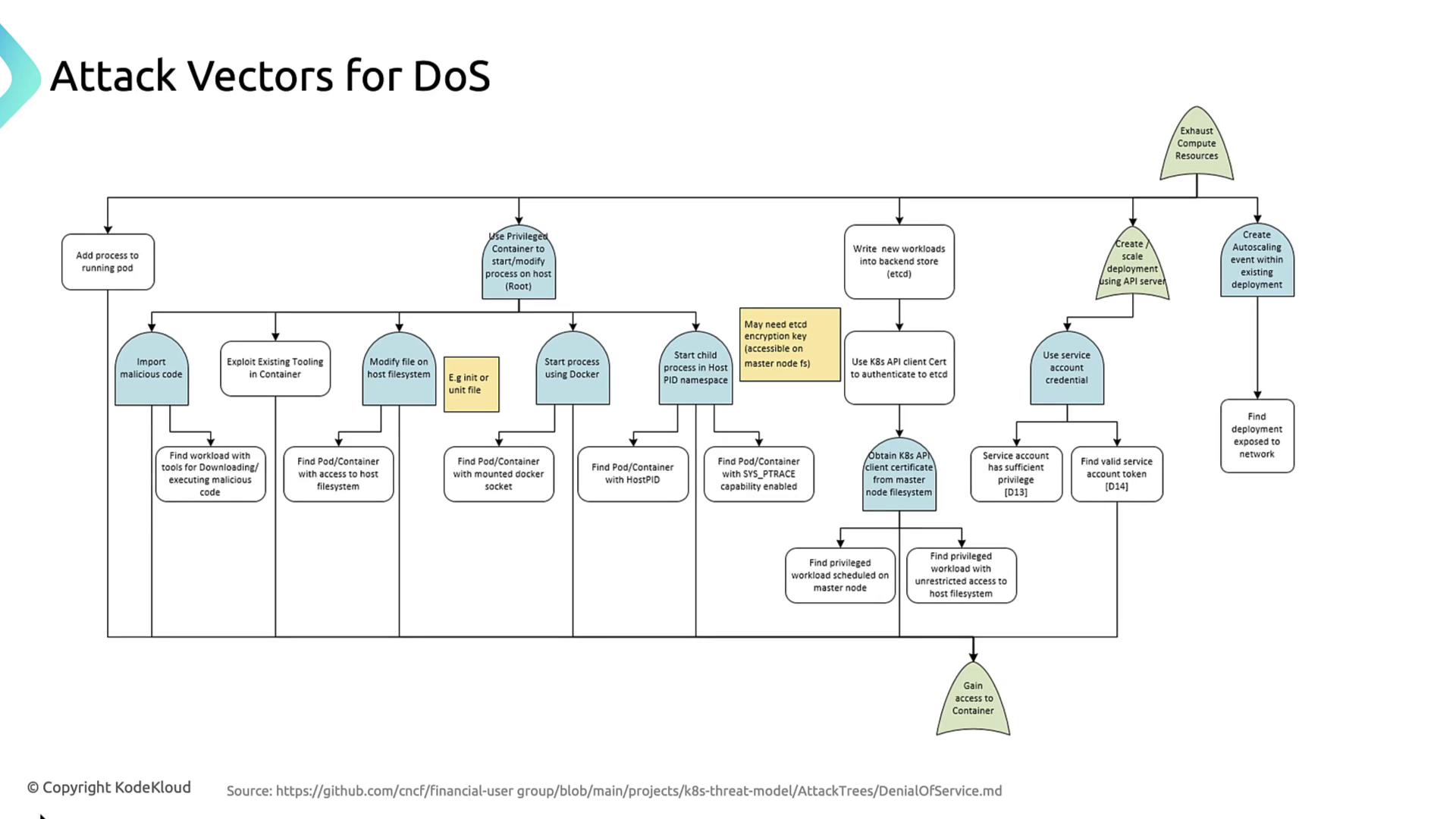
***
## 1. Adding Processes to a Running Pod
If an attacker can exec into a pod, they may launch additional CPU- or memory-intensive processes:
```bash theme={null}
kubectl exec -it compromised-pod -- sh -c "yes > /dev/null &"
```
This simple command can starve the container of resources, leading to service degradation or crash.
***
## 2. Privileged Container Exploits
Running a container in privileged mode grants full host access:
* Mount the host filesystem (`/`) to modify critical files (e.g., systemd units).
* Execute `docker` commands via `/var/run/docker.sock`.
* Enter the host PID namespace to kill or spawn host processes.
* Download and run malicious binaries with tools like `curl` or package managers.
Privileged containers bypass nearly all Kubernetes isolation. Use `securityContext.privileged: true` only when absolutely necessary and audit those pods.
### Deep Dive: Privileged Container Attack Steps
1. Deploy malicious binaries via existing host tools (`curl`, `wget`).
2. Modify host unit or cron files for persistence.
3. Abuse the Docker daemon to spawn new containers on the node.
4. Interact with host processes directly using the host PID namespace.
***
## 3. Direct `etcd` Key-Value Manipulation
With stolen client certificates or service account tokens, an attacker can write new workload specs directly to etcd, bypassing API-server RBAC and admission controls. This forces the scheduler to spin up arbitrarily many pods.
***
## 4. API-Server Abuse for Deployment Scaling
An attacker with API-server credentials can:
* Create fresh deployments or jobs.
* Increase replica counts on existing Deployments.
* Trigger HorizontalPodAutoscalers by simulating load, causing endless pod creation.
***
## Network-Based DoS Tactics
| Tactic | Impact |
| --------------------- | ------------------------------------------------------------------------ |
| Resource Exhaustion | Flood kubelets or kube-proxies to cause node-level failures. |
| Scheduling Disruption | Overwhelm the API server or scheduler with bogus requests. |
| Network Disruption | Poison DNS or tamper with CNI plugins to break pod-to-pod communication. |
***
### Example: Compromised Service Account
An attacker uses a stolen token to mass-create pods:
```bash theme={null}
for i in {1..1000}; do
kubectl --token=$STOLEN_TOKEN run attack-pod-$i \
--image=busybox --restart=Never
done
```
Without resource quotas, this exhausts CPU and memory across the cluster.
***
### API Server Flooding
Lax network rules allow an HTTP flood against the control plane:
```bash theme={null}
while true; do
curl -k https://api.k8s.example.com:6443/version &
done
```
***
## Mitigation Strategies
### 1. Resource Quotas and Limits
Limit per-pod and per-namespace resource consumption:
```yaml theme={null}
apiVersion: v1
kind: ResourceQuota
metadata:
name: namespace-quota
namespace: default
spec:
hard:
pods: "10"
requests.cpu: "2"
requests.memory: "4Gi"
limits.cpu: "4"
limits.memory: "8Gi"
```
```yaml theme={null}
apiVersion: v1
kind: Pod
metadata:
name: frontend
spec:
containers:
- name: nginx
image: nginx:latest
resources:
requests:
memory: "256Mi"
cpu: "250m"
limits:
memory: "512Mi"
cpu: "500m"
```
### 2. Least-Privilege Service Accounts
Define RBAC roles with minimal privileges:
```yaml theme={null}
apiVersion: v1
kind: ServiceAccount
metadata:
name: backend-sa
namespace: default
---
apiVersion: rbac.authorization.k8s.io/v1
kind: Role
metadata:
name: backend-read-only
namespace: default
rules:
- apiGroups: [""]
resources: ["pods", "services", "configmaps"]
verbs: ["get", "list"]
```
### 3. Network Policies & Firewalls
Restrict access to the API server and etcd:
```yaml theme={null}
apiVersion: networking.k8s.io/v1
kind: NetworkPolicy
metadata:
name: restrict-api-access
namespace: kube-system
spec:
podSelector:
matchLabels:
component: kube-apiserver
policyTypes:
- Ingress
ingress:
- from:
- namespaceSelector:
matchLabels:
trusted: "true"
- podSelector:
matchLabels:
access: api-server
ports:
- protocol: TCP
port: 6443
```
### 4. Monitoring and Alerts
Use Prometheus and Grafana to detect unusual resource spikes:
```yaml theme={null}
apiVersion: monitoring.coreos.com/v1
kind: PrometheusRule
metadata:
name: dos-alert-rules
namespace: monitoring
spec:
groups:
- name: dos-alerts
rules:
- alert: HighCPUUsage
expr: sum(rate(container_cpu_usage_seconds_total[5m])) by (namespace) > 0.8
for: 5m
labels:
severity: warning
annotations:
summary: "High CPU usage detected"
description: "Namespace {{ $labels.namespace }} CPU usage >80%. Possible DoS attack."
```
Regularly review alerts and integrate with your incident-response workflow to minimize reaction time.
***
## Summary
To defend against Kubernetes DoS attacks:
* Enforce **resource quotas** and **limits**.
* Apply **least-privilege** RBAC for service accounts.
* Implement **network policies** and **firewall** rules.
* Continuously **monitor** and **alert** on anomalies.
***
## Links and References
* [Kubernetes Documentation](https://kubernetes.io/docs/)
* [Cloud Native Computing Foundation (CNCF)](https://www.cncf.io)
* [etcd Key-Value Store](https://etcd.io)
* [Prometheus Monitoring](https://prometheus.io)
* [Grafana Dashboards](https://grafana.com/)