> ## Documentation Index
> Fetch the complete documentation index at: https://notes.kodekloud.com/llms.txt
> Use this file to discover all available pages before exploring further.

# Kubernetes Trust Boundaries and Data Flow

> This guide explores securing multi-tier web applications on Kubernetes by defining trust boundaries and mapping data flow.

In this guide, we explore how to secure a multi-tier web application on Kubernetes by defining trust boundaries and mapping data flow. We use a typical front-end, back-end, and database setup to demonstrate threat modeling, isolation strategies, and enforcement of security controls.

## Application Architecture Overview

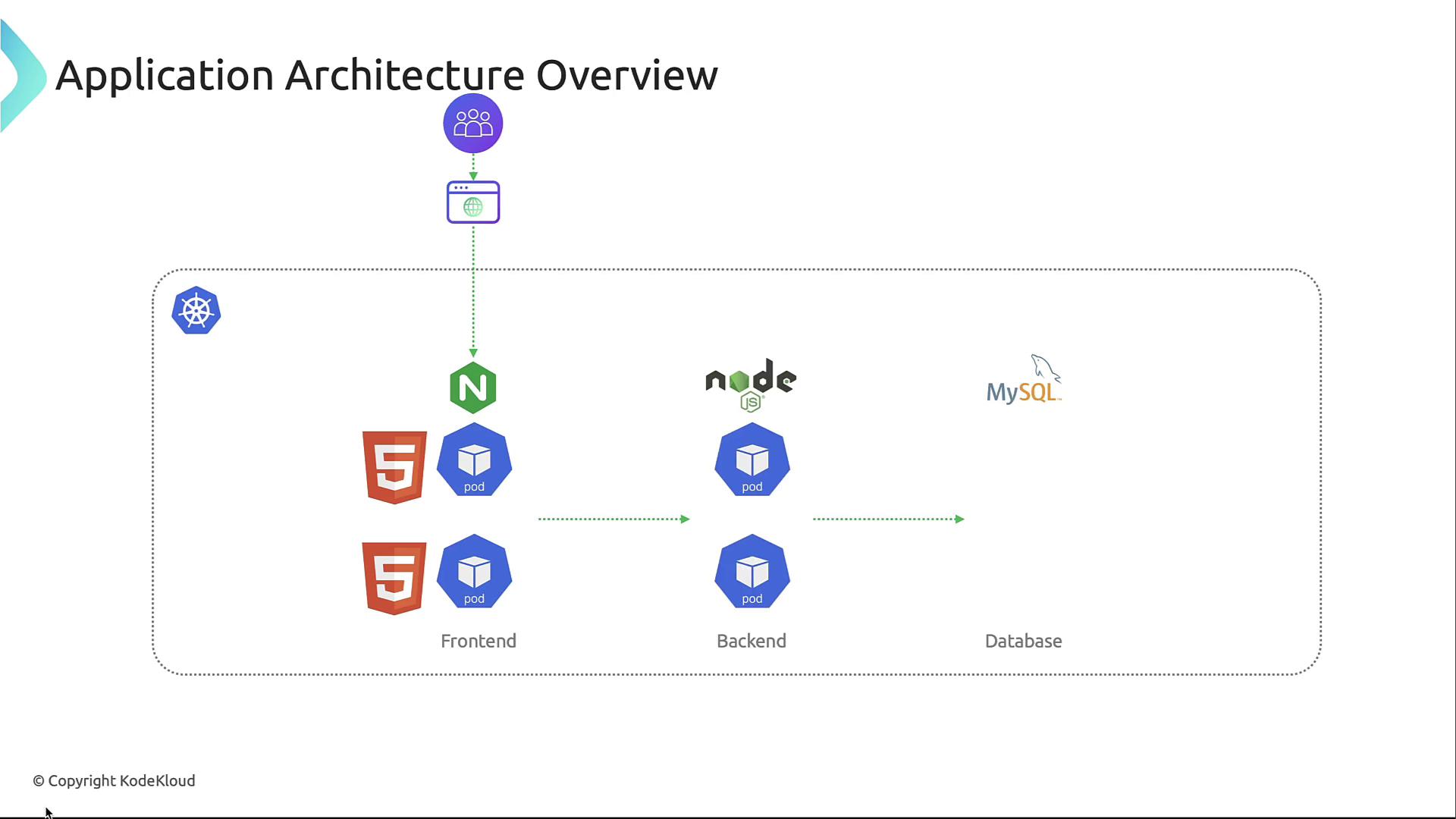
Our sample application consists of three layers running in separate namespaces:

* **Front-end**: An Nginx server serving static assets and proxying requests.
* **Back-end API**: Node.js microservices handling business logic.
* **Database**: A MySQL instance persisting user data.
<Frame>
  ![The image is an application architecture overview diagram showing a system with a frontend using HTML5 and Nginx, a backend with Node.js, and a MySQL database, all running on Kubernetes pods.](https://kodekloud.com/kk-media/image/upload/v1752880809/notes-assets/images/Kubernetes-and-Cloud-Native-Security-Associate-KCSA-Kubernetes-Trust-Boundaries-and-Data-Flow/application-architecture-html5-nginx-nodejs-mysql-kubernetes.jpg)
</Frame>

### Front-end (frontend namespace)

This Nginx pod delivers HTML, CSS, and JavaScript while terminating TLS and enforcing authentication before proxying to backend services.

### Back-end API (backend namespace)

Node.js pods implement RESTful endpoints, perform request validation, and interact with the database using least-privilege credentials.

### Database (database namespace)

A single MySQL pod stores application state. Connections are encrypted and authenticated with narrow permissions.

## Threat Modeling Process

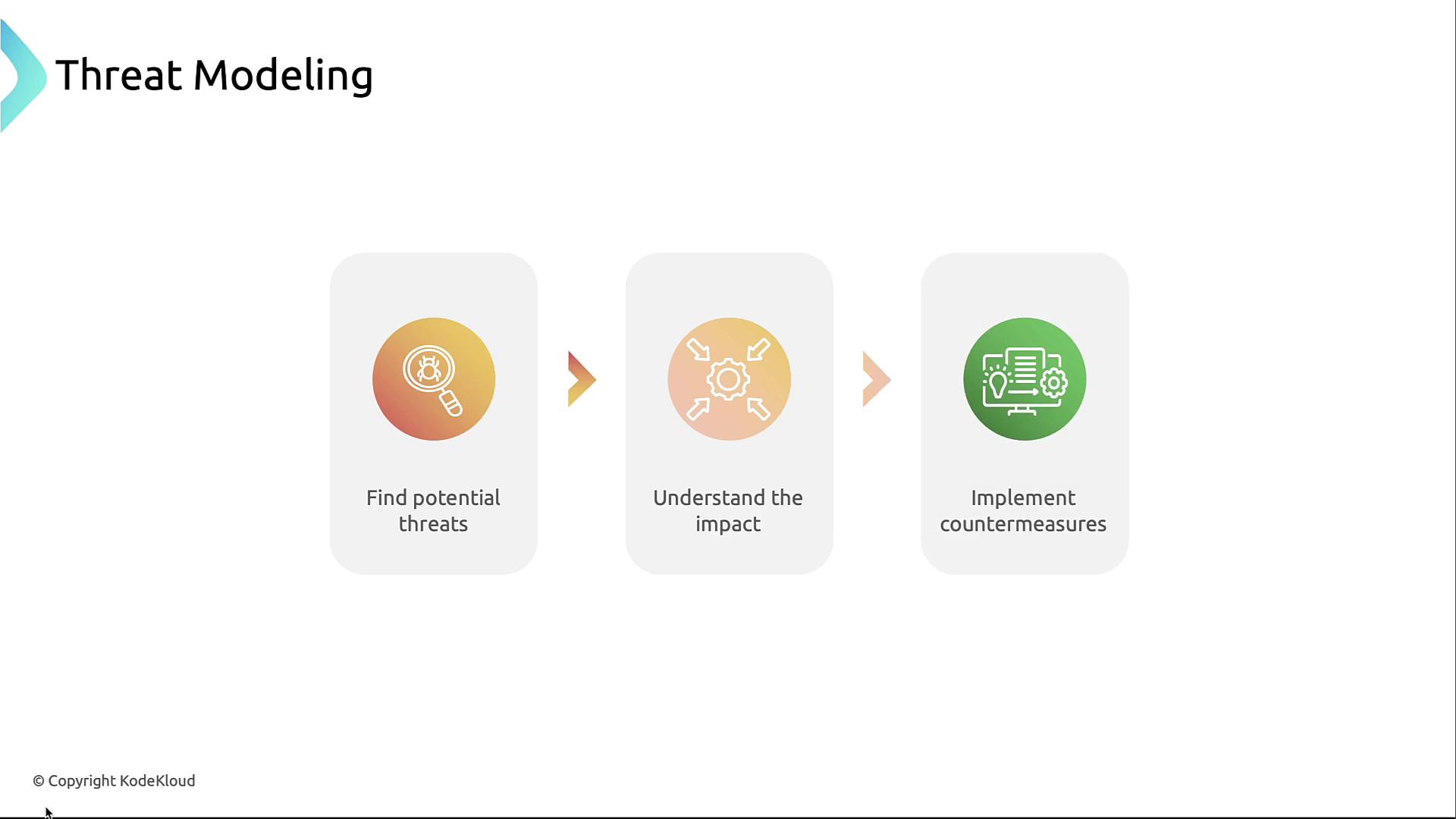
Threat modeling identifies, prioritizes, and mitigates security risks early:

1. **Identify potential threats**—enumerate attack scenarios.
2. **Assess impact**—evaluate risk severity and likelihood.
3. **Implement countermeasures**—design controls to reduce risk.
<Frame>
  ![The image illustrates a three-step process for threat modeling: finding potential threats, understanding the impact, and implementing countermeasures.](https://kodekloud.com/kk-media/image/upload/v1752880810/notes-assets/images/Kubernetes-and-Cloud-Native-Security-Associate-KCSA-Kubernetes-Trust-Boundaries-and-Data-Flow/threat-modeling-three-steps.jpg)
</Frame>

<Callout icon="lightbulb" color="#1CB2FE">
  Threat modeling is iterative. Revisit your diagrams and controls whenever the application architecture changes.
</Callout>

## Defining Trust Boundaries

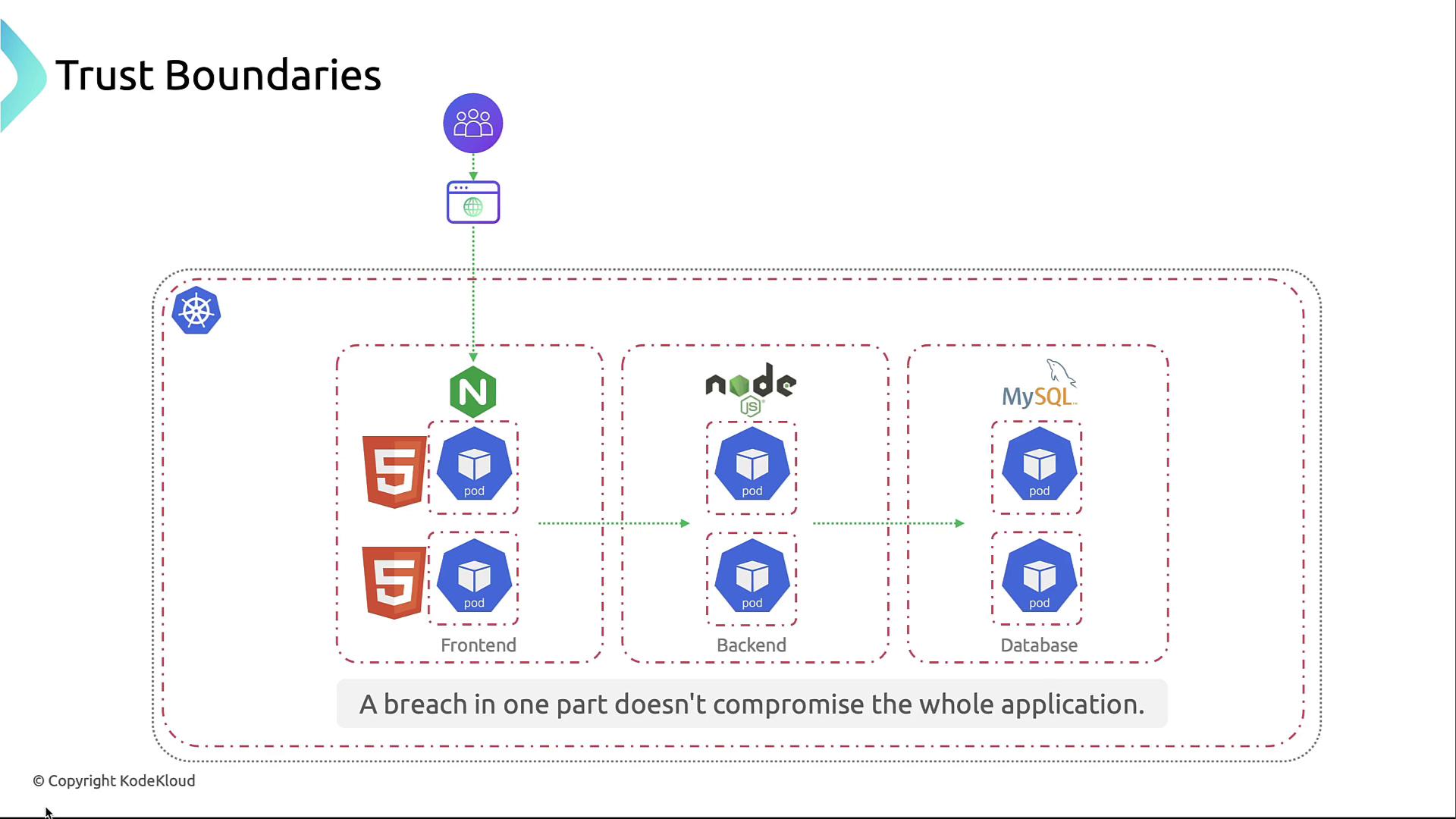
To prevent lateral movement and data exfiltration, segment your cluster into distinct trust zones.
<Frame>
  ![The image illustrates a trust boundary architecture for a web application, showing separate sections for frontend, backend, and database components, each with Kubernetes pods, emphasizing that a breach in one part doesn't compromise the entire application.](https://kodekloud.com/kk-media/image/upload/v1752880811/notes-assets/images/Kubernetes-and-Cloud-Native-Security-Associate-KCSA-Kubernetes-Trust-Boundaries-and-Data-Flow/trust-boundary-architecture-web-app.jpg)
</Frame>

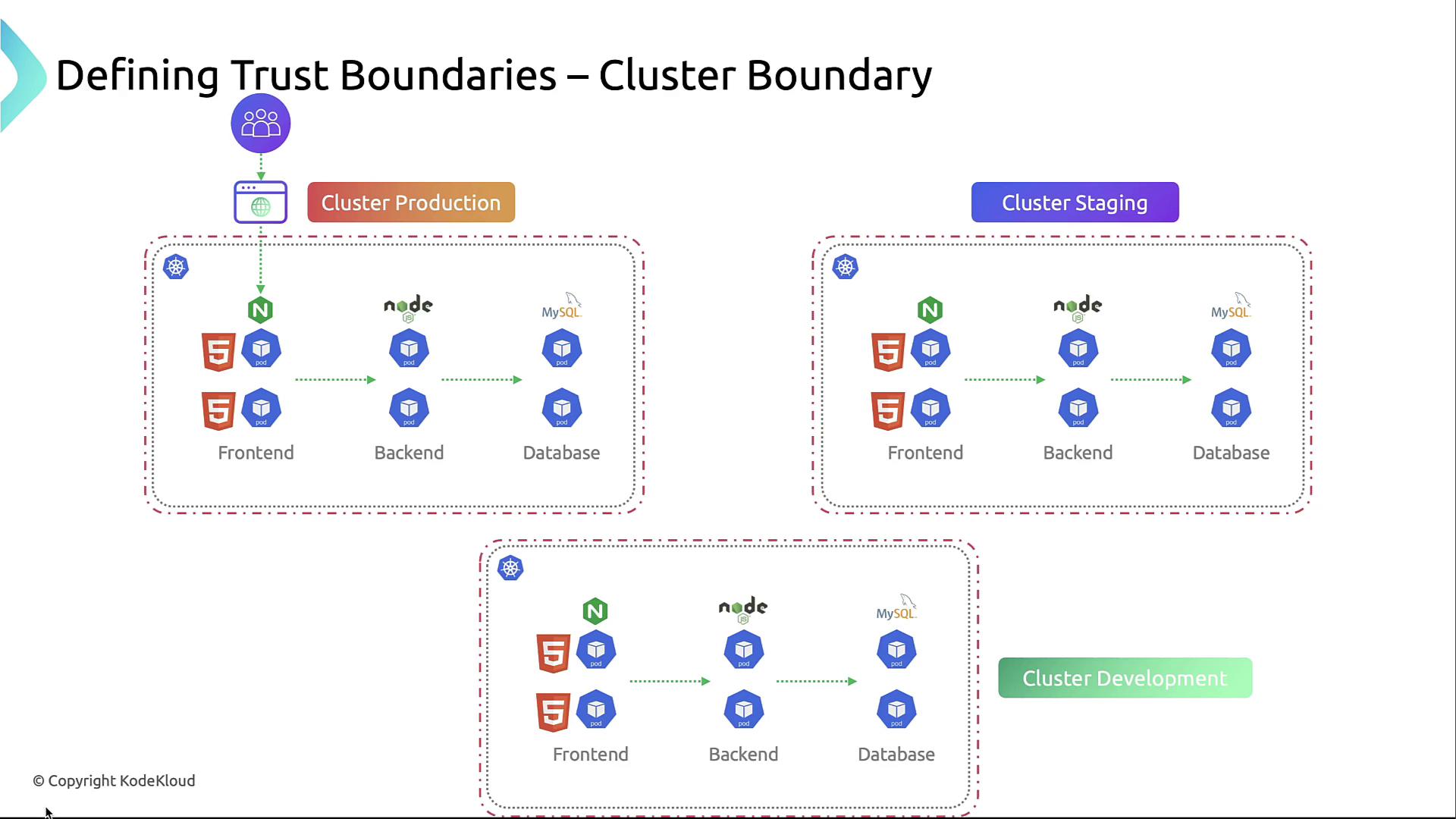
### 1. Cluster Boundary

Using separate clusters for dev, staging, and prod isolates environments at the highest level.
<Frame>
  ![The image illustrates the concept of defining trust boundaries within cluster environments, showing production, staging, and development clusters with frontend, backend, and database components.](https://kodekloud.com/kk-media/image/upload/v1752880812/notes-assets/images/Kubernetes-and-Cloud-Native-Security-Associate-KCSA-Kubernetes-Trust-Boundaries-and-Data-Flow/trust-boundaries-cluster-environments.jpg)
</Frame>

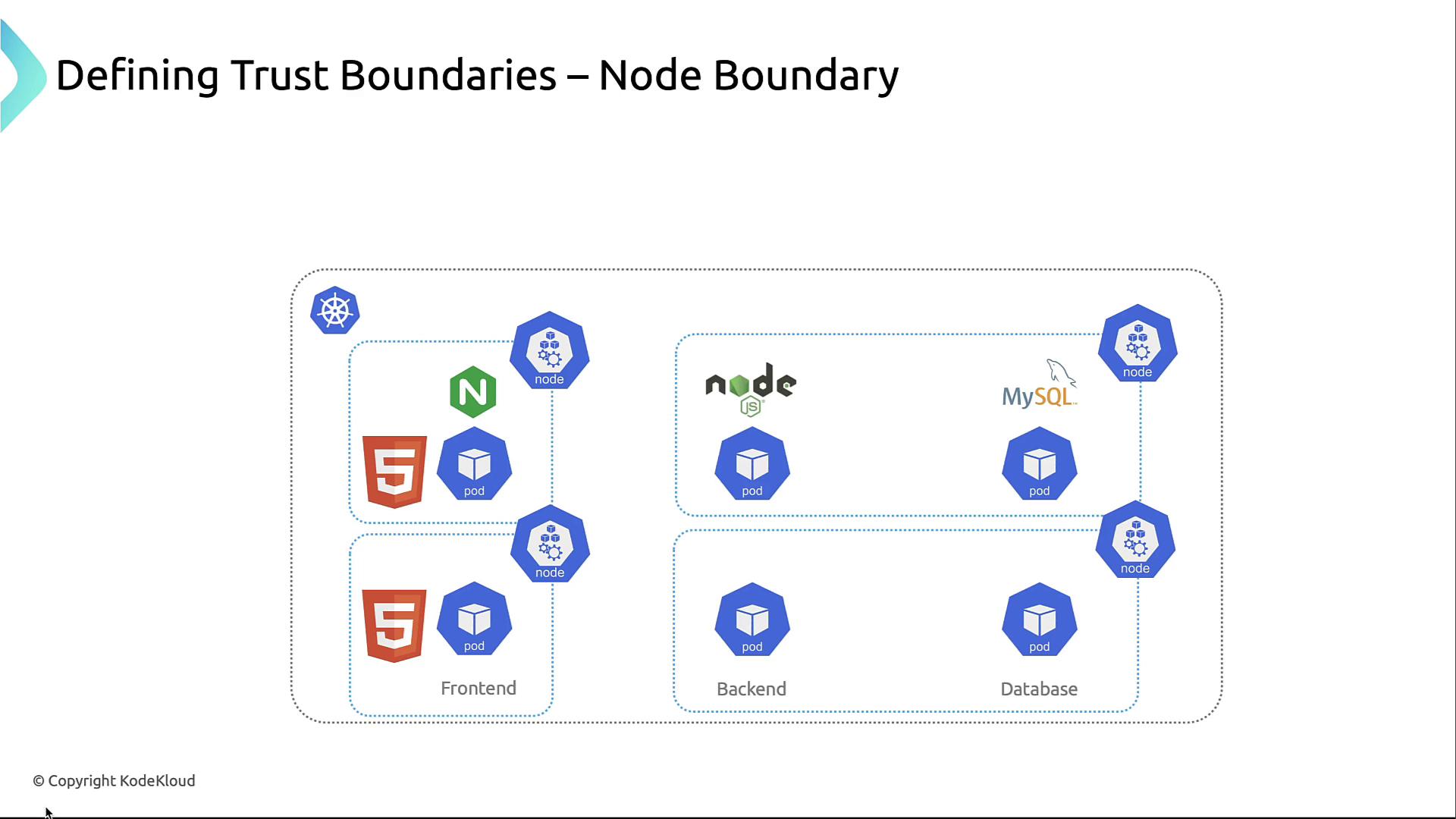
### 2. Node Boundary

Each node is a compute-level boundary. Harden kubelet, restrict SSH, and apply host-based firewalls so a compromised node doesn’t expose others.
<Frame>
  ![The image illustrates a diagram of a Kubernetes architecture, showing trust boundaries with frontend, backend, and database components, including pods and nodes.](https://kodekloud.com/kk-media/image/upload/v1752880813/notes-assets/images/Kubernetes-and-Cloud-Native-Security-Associate-KCSA-Kubernetes-Trust-Boundaries-and-Data-Flow/kubernetes-architecture-trust-boundaries-diagram.jpg)
</Frame>

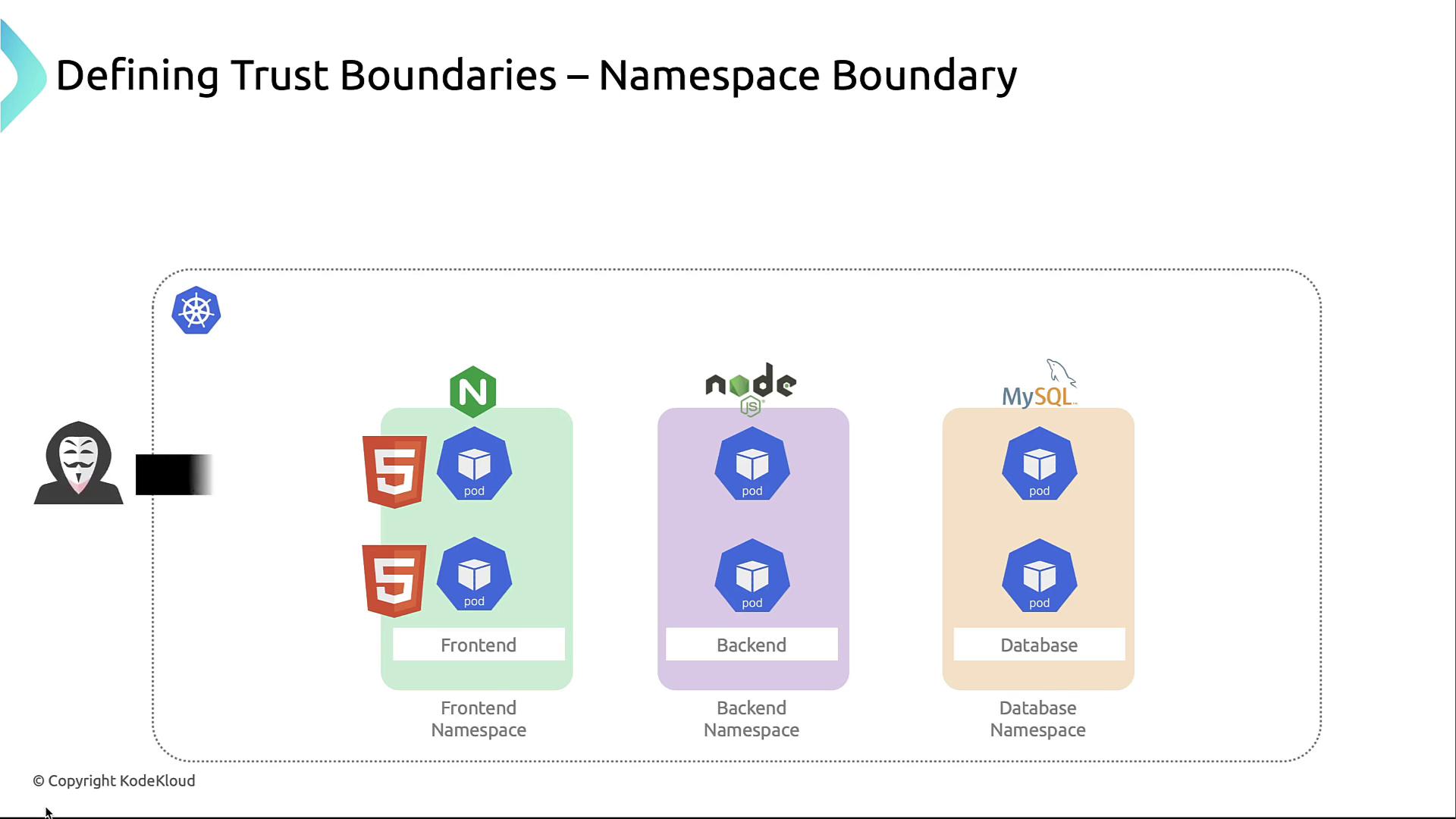
### 3. Namespace Boundary

Namespaces group related workloads and serve as the primary authorization unit. Use RBAC and NetworkPolicies to enforce least privilege.
<Frame>
  ![The image illustrates a Kubernetes namespace boundary setup, showing frontend, backend, and database namespaces with associated technologies like Nginx, Node.js, and MySQL. It also includes a representation of a potential security threat outside the boundary.](https://kodekloud.com/kk-media/image/upload/v1752880814/notes-assets/images/Kubernetes-and-Cloud-Native-Security-Associate-KCSA-Kubernetes-Trust-Boundaries-and-Data-Flow/kubernetes-namespace-boundary-setup.jpg)
</Frame>

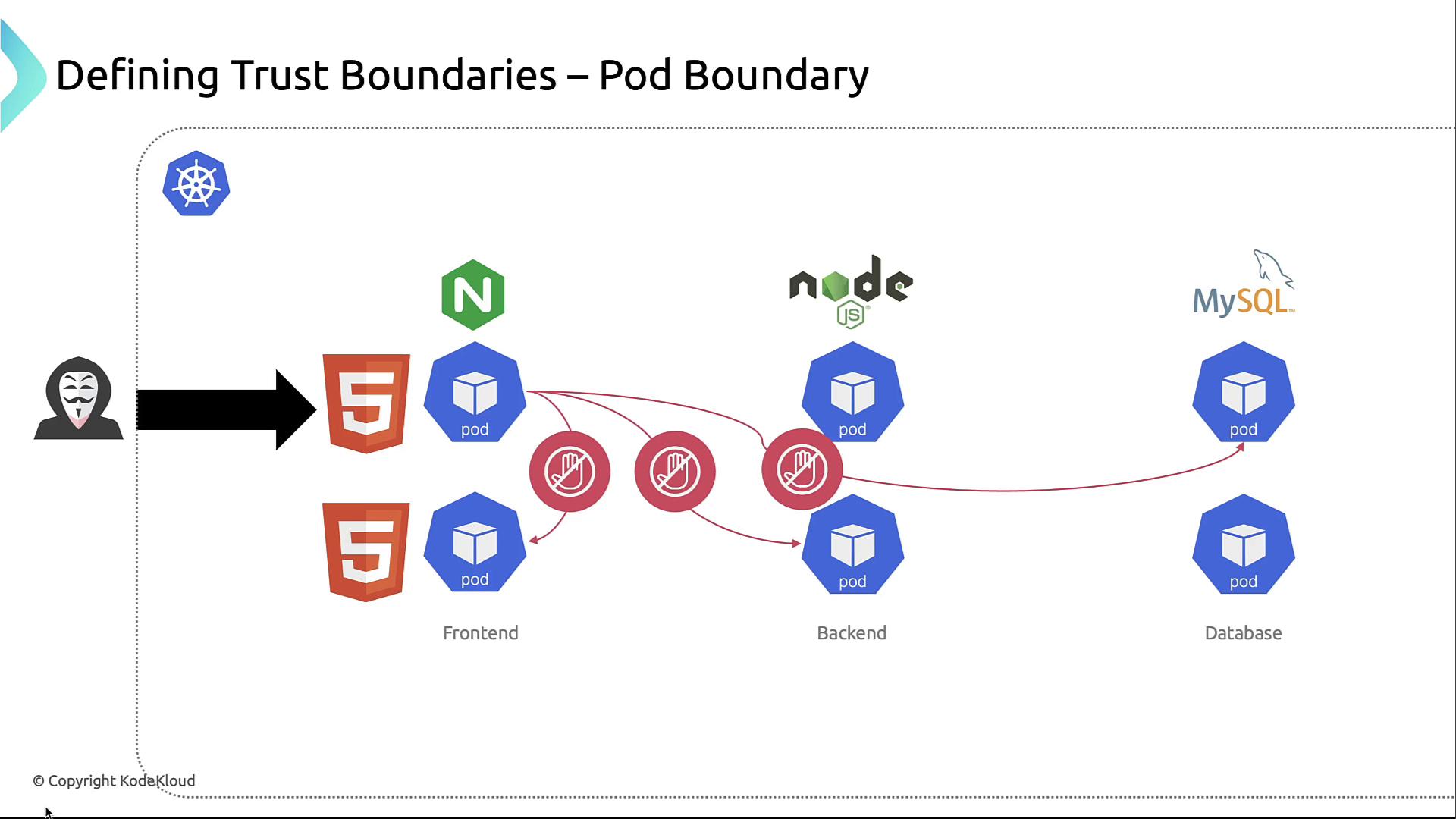
### 4. Pod Boundary

Each pod defines a network and security context. Use NetworkPolicies to prevent unrestricted pod-to-pod traffic.

<Callout icon="triangle-alert" color="#FF6B6B">
  By default, Kubernetes allows all pod-to-pod communication. Without NetworkPolicies, an attacker can move laterally across pods.
</Callout>

<Frame>
  ![The image illustrates a network diagram showing trust boundaries within a Kubernetes environment, featuring frontend, backend, and database pods with security measures. It includes icons for HTML5, Nginx, Node.js, and MySQL, along with a hacker symbol indicating potential threats.](https://kodekloud.com/kk-media/image/upload/v1752880816/notes-assets/images/Kubernetes-and-Cloud-Native-Security-Associate-KCSA-Kubernetes-Trust-Boundaries-and-Data-Flow/kubernetes-network-diagram-trust-boundaries.jpg)
</Frame>

### 5. Container Boundary

Within pods, container runtimes enforce isolation. Sidecar patterns and runtime policies (AppArmor, seccomp) reduce risk of breakout between containers.

## Trust Boundary Summary

| Trust Boundary | Scope                     | Example Controls                              |
| -------------- | ------------------------- | --------------------------------------------- |
| Cluster        | Entire Kubernetes cluster | VPC segregation, dedicated clusters           |
| Node           | Single compute host       | Node hardening, kubelet auth, host OS patches |
| Namespace      | Logical partition         | RBAC roles, NetworkPolicies                   |
| Pod            | Application instance      | PodSecurityPolicies, egress/ingress policies  |
| Container      | Container process         | AppArmor, seccomp, minimal base images        |

## Data Flow in the Application

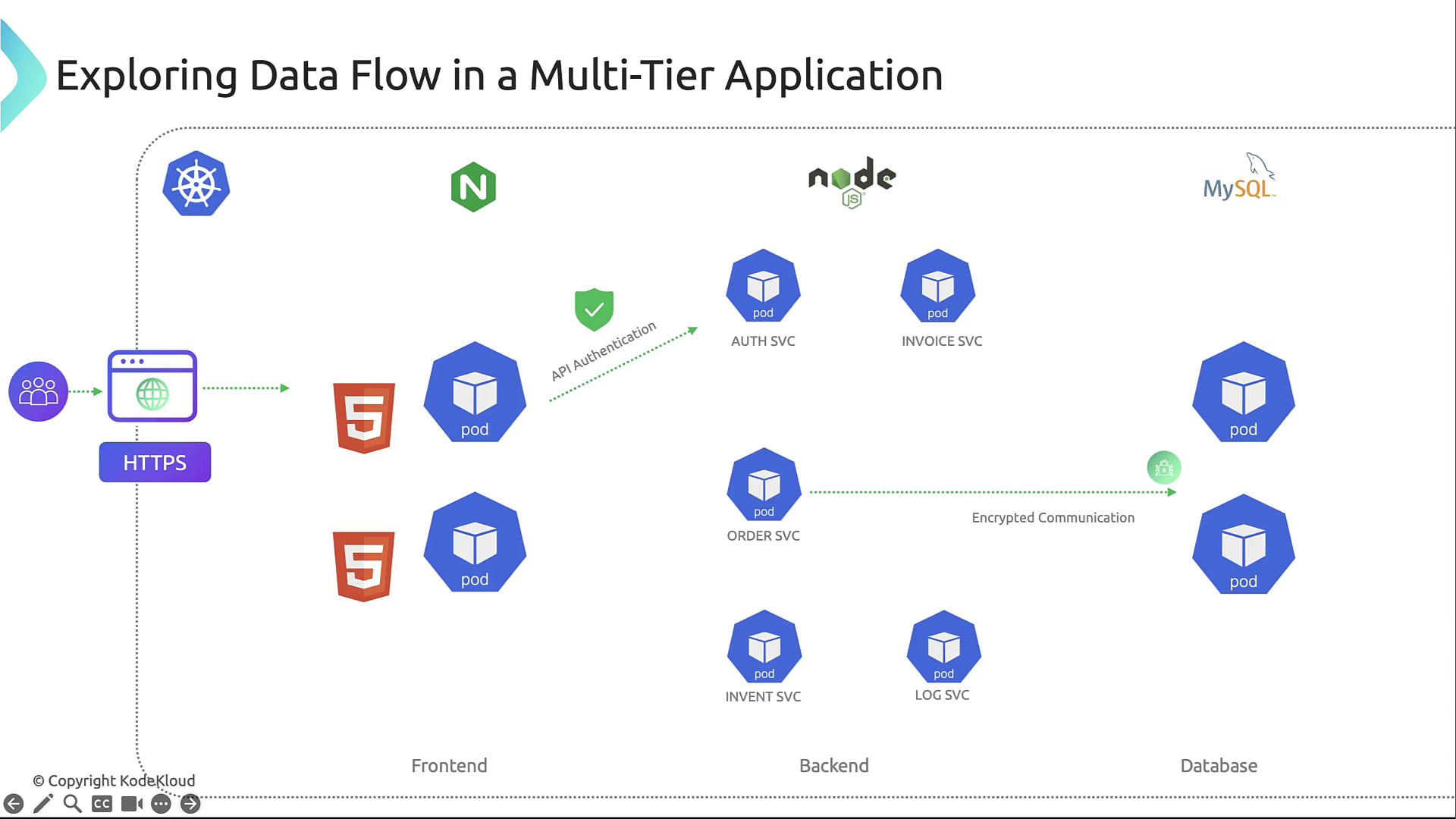
Understanding data flow helps place security controls where they matter most:

* **User → Front-end (Nginx):** HTTPS termination, certificate validation, authentication.
* **Front-end → Back-end APIs:** mTLS or HTTPS with API tokens or OAuth.
* **Back-end APIs → Database:** Encrypted connections, least-privilege SQL accounts.
* **Inter-service:** Microservices communicate over the cluster network; NetworkPolicies restrict to necessary paths.
<Frame>
  ![The image illustrates the data flow in a multi-tier application, showing interactions between frontend, backend, and database components using technologies like Kubernetes, Node.js, and MySQL. It includes elements such as HTTPS, API authentication, and encrypted communication.](https://kodekloud.com/kk-media/image/upload/v1752880817/notes-assets/images/Kubernetes-and-Cloud-Native-Security-Associate-KCSA-Kubernetes-Trust-Boundaries-and-Data-Flow/multi-tier-application-data-flow.jpg)
</Frame>

## Common Threat Actors

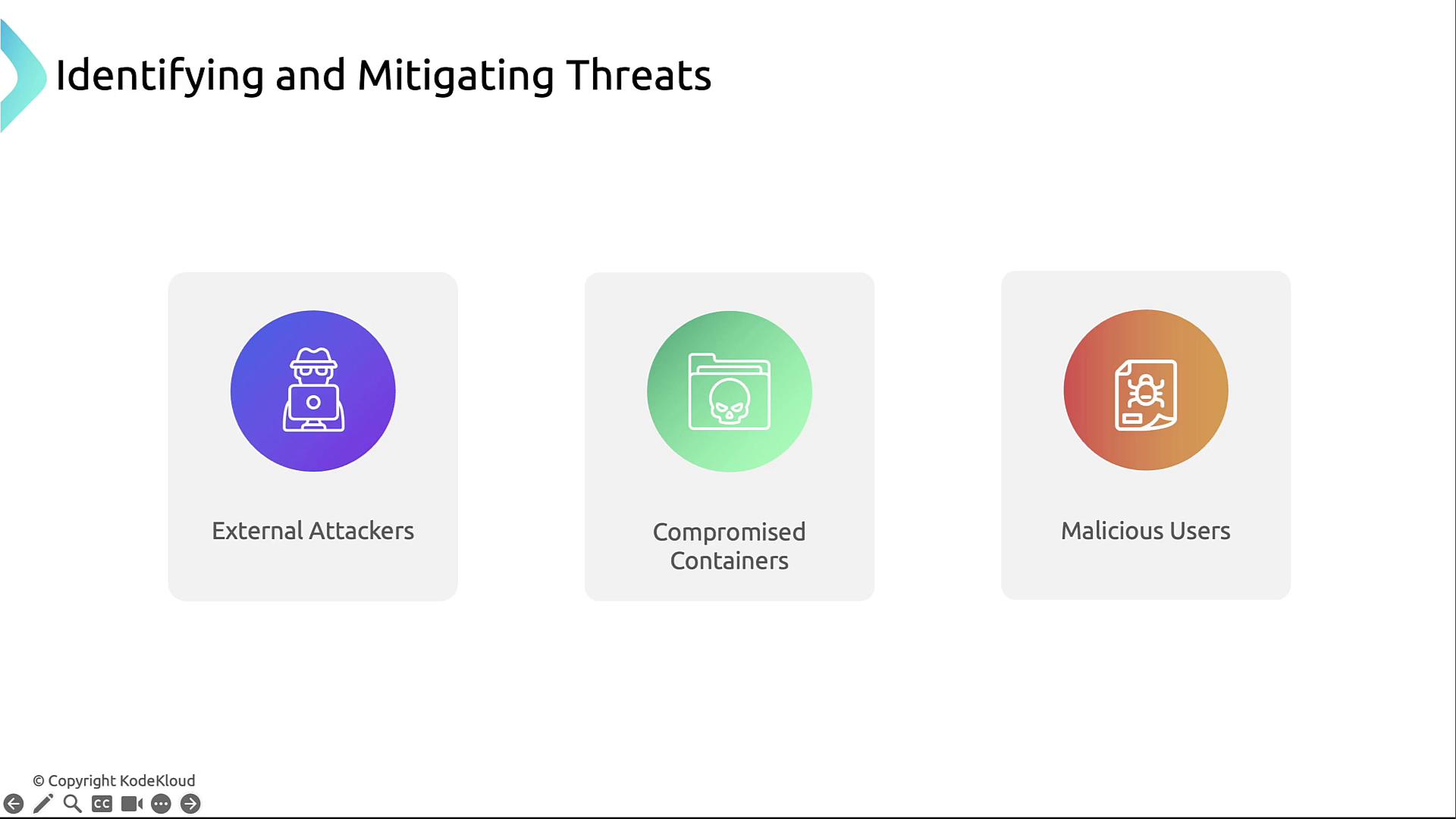
* **External Attackers:** Scanning for exposed endpoints.
* **Compromised Containers:** Exploited via vulnerabilities or misconfigurations.
* **Malicious Users:** Insiders abusing privileges.
<Frame>
  ![The image illustrates three types of threats: external attackers, compromised containers, and malicious users, each represented by an icon.](https://kodekloud.com/kk-media/image/upload/v1752880818/notes-assets/images/Kubernetes-and-Cloud-Native-Security-Associate-KCSA-Kubernetes-Trust-Boundaries-and-Data-Flow/threats-external-attackers-containers-users.jpg)
</Frame>

***

## Links and References

* [Kubernetes Basics](https://kubernetes.io/docs/concepts/overview/what-is-kubernetes/)
* [Kubernetes Documentation](https://kubernetes.io/docs/)
* [Docker Hub](https://hub.docker.com/)
* [Terraform Registry](https://registry.terraform.io/)

<CardGroup>
  <Card title="Watch Video" icon="video" cta="Learn more" href="https://learn.kodekloud.com/user/courses/kubernetes-and-cloud-native-security-associate-kcsa/module/6da25ade-b162-485c-b9b9-f351990e99c2/lesson/9b9d4270-e02d-4a10-a9b1-0fd6e3960c6b" />
</CardGroup>
