> ## Documentation Index
> Fetch the complete documentation index at: https://notes.kodekloud.com/llms.txt
> Use this file to discover all available pages before exploring further.
# Admission Controllers
> Admission Controllers are plugins that enforce policies, mutate objects, or perform actions on requests to the Kubernetes API server before they are stored.
Admission Controllers are plugins that intercept requests to the Kubernetes API server **after** authentication and authorization but **before** they’re persisted in etcd. They enable cluster operators to enforce policies, mutate objects, or perform background actions automatically.
## Kubernetes API Request Flow
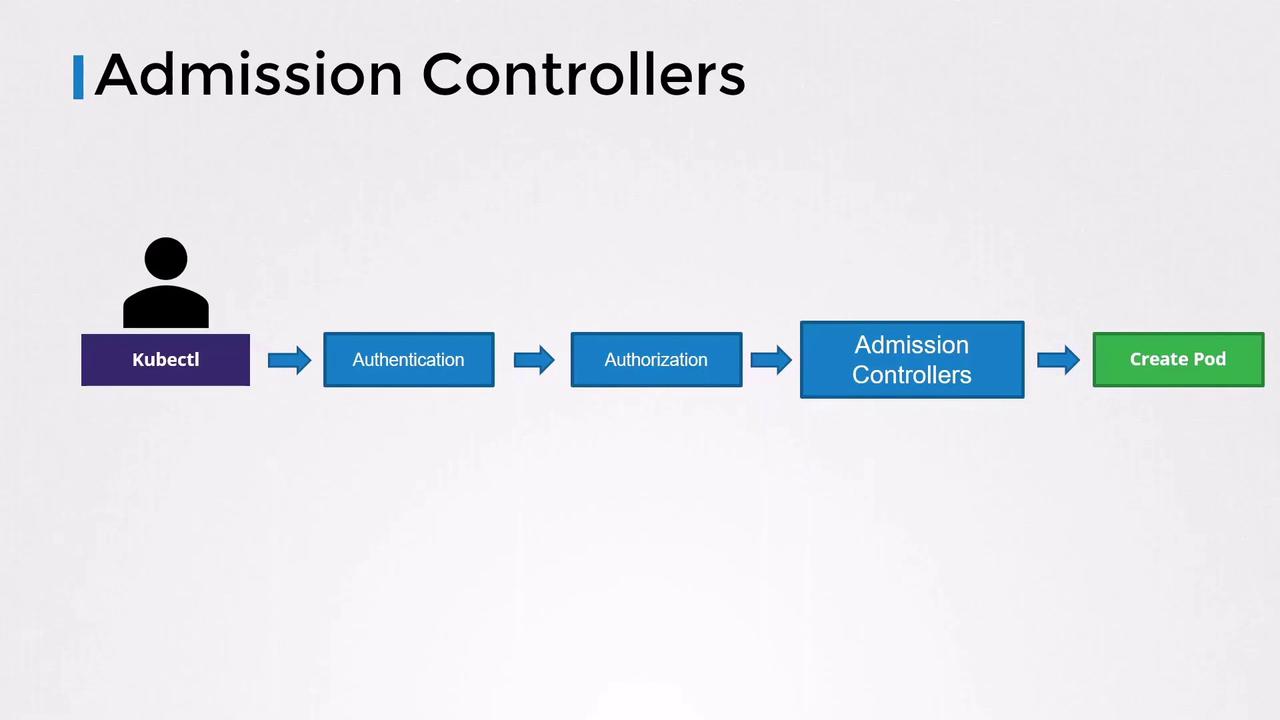
When you run a `kubectl` command (e.g., creating a Pod), the request follows these steps:
1. **Authentication** (AuthN): Verify user identity (usually via certificates in your kubeconfig).
2. **Authorization** (AuthZ): Check if the requester has permission (via RBAC, ABAC, Node, Webhook).
3. **Admission Control** (Admission Controllers): Validate or mutate objects.
4. **Persistence**: Store the final object in etcd.
## Authentication & Authorization Examples
### kubeconfig Snippet
```bash theme={null}
cat ~/.kube/config
apiVersion: v1
clusters:
- cluster:
certificate-authority-data: LS0t...
server: https://your-api-server
contexts:
- context:
cluster: your-cluster
user: your-user
name: your-context
current-context: your-context
users:
- name: your-user
user:
client-certificate-data: LS0t...
client-key-data: LS0t...
```
### RBAC Role for Pod Operations
```yaml theme={null}
apiVersion: rbac.authorization.k8s.io/v1
kind: Role
metadata:
name: developer
rules:
- apiGroups: [""]
resources: ["pods"]
verbs: ["list", "get", "create", "update", "delete"]
```
You can further restrict to specific Pod names:
```yaml theme={null}
apiVersion: rbac.authorization.k8s.io/v1
kind: Role
metadata:
name: limited-developer
rules:
- apiGroups: [""]
resources: ["pods"]
verbs: ["create"]
resourceNames: ["blue", "orange"]
```
## Why Admission Controllers?
RBAC governs **who** can perform **what** at the API surface. It cannot inspect or change the contents of an object. For example, you may want to enforce:
* Only use images from an internal registry
* Disallow `:latest` tags
* Prevent containers from running as root
* Inject security capabilities or sidecars
* Require specific labels or annotations
```yaml theme={null}
apiVersion: v1
kind: Pod
metadata:
name: web-pod
spec:
containers:
- name: ubuntu
image: ubuntu:latest
command: ["sleep", "3600"]
securityContext:
runAsUser: 0
capabilities:
add: ["MAC_ADMIN"]
```
Admission Controllers can **validate** (reject bad requests) or **mutate** (inject defaults, sidecars) before persistence.
## Built-in Admission Controllers
Kubernetes includes many Admission Controllers out of the box. Below is a summary of some common ones:
| Admission Controller | Behavior |
| -------------------- | -------------------------------------------- |
| AlwaysPullImages | Forces image pull for every Pod creation |
| DefaultStorageClass | Labels PVCs with a default StorageClass |
| EventRateLimit | Throttles API events to prevent overload |
| NamespaceExists | Rejects requests for non-existent namespaces |
## Namespace Admission Controllers
### NamespaceExists
By default, creating resources in a namespace that doesn’t exist yields:
```bash theme={null}
kubectl run nginx --image=nginx --namespace=blue
# Error from server (NotFound): namespaces "blue" not found
```
### NamespaceAutoProvision
`NamespaceAutoProvision` (disabled by default) automatically creates a namespace if it doesn’t exist when you submit a request.
#### Viewing Enabled Admission Controllers
```bash theme={null}
kube-apiserver -h | grep enable-admission-plugins
```
On kubeadm-based clusters:
```bash theme={null}
kubectl exec kube-apiserver-control-plane -n kube-system -- kube-apiserver -h | grep enable-admission-plugins
```
#### Enabling an Admission Controller
Update the API server’s startup arguments:
```shell theme={null}
--enable-admission-plugins=NodeRestriction,NamespaceAutoProvision
```
Editing the `kube-apiserver` flags requires careful coordination. After changes, restart the API server or apply the updated control-plane manifest.
**Example (systemd service):**
```shell theme={null}
ExecStart=/usr/local/bin/kube-apiserver \
--authorization-mode=Node,RBAC \
--enable-admission-plugins=NodeRestriction,NamespaceAutoProvision \
…other flags…
```
**Example (kubeadm Pod manifest):**
```yaml theme={null}
apiVersion: v1
kind: Pod
metadata:
name: kube-apiserver
namespace: kube-system
spec:
containers:
- name: kube-apiserver
image: k8s.gcr.io/kube-apiserver:v1.11.3
command:
- kube-apiserver
- --authorization-mode=Node,RBAC
- --enable-admission-plugins=NodeRestriction,NamespaceAutoProvision
…other flags…
```
Now, creating a Pod in a new namespace will auto-create it:
```bash theme={null}
kubectl run nginx --image=nginx --namespace=blue
kubectl get namespaces
# NAME STATUS AGE
# blue Active 3m
# default Active 23m
# kube-public Active 24m
# kube-system Active 24m
```
## NamespaceLifecycle Admission Controller
The **NamespaceLifecycle** plugin supersedes both `NamespaceExists` and `NamespaceAutoProvision`. It:
* Rejects requests to unknown namespaces
* Prevents deletion of critical system namespaces (`default`, `kube-system`, `kube-public`)
## Links and References
* [Kubernetes Admission Controllers](https://kubernetes.io/docs/reference/access-authn-authz/admission-controllers/)
* [Kubernetes RBAC Overview](https://kubernetes.io/docs/reference/access-authn-authz/rbac/)
* [kube-apiserver Command-Line Flags](https://kubernetes.io/docs/reference/command-line-tools-reference/kube-apiserver/)