> ## Documentation Index
> Fetch the complete documentation index at: https://notes.kodekloud.com/llms.txt
> Use this file to discover all available pages before exploring further.
# Connectivity Mutual TLS
> This article explains Mutual TLS (mTLS) for secure two-way authentication between client and server, including its handshake process and implementation in Kubernetes.
## Overview
Mutual TLS (mTLS) enhances standard TLS by providing two-way authentication between client and server. In this lesson, we’ll:
* Review one-way TLS (server-only authentication).
* Introduce mTLS handshake flows.
* Demonstrate how to generate certificates with OpenSSL.
* Explore securing pod-to-pod traffic in Kubernetes.
## Recap: One-Way TLS (Server Authentication)
When you visit an HTTPS website—like your online bank—the browser and server establish an encrypted channel using asymmetric and symmetric cryptography.
1. Client requests the server’s certificate.
2. Server sends its public certificate, signed by a trusted Certificate Authority (CA).
3. Browser verifies the certificate against its trust store (public keys of known CAs).
4. Browser generates a random symmetric key, encrypts it with the server’s public key, and sends it to the server.
5. Server decrypts the symmetric key with its private key.
6. Both parties use the symmetric key to encrypt application data.
One-way TLS ensures confidentiality and server authenticity but relies on application-layer credentials (usernames, passwords) to authenticate the client.
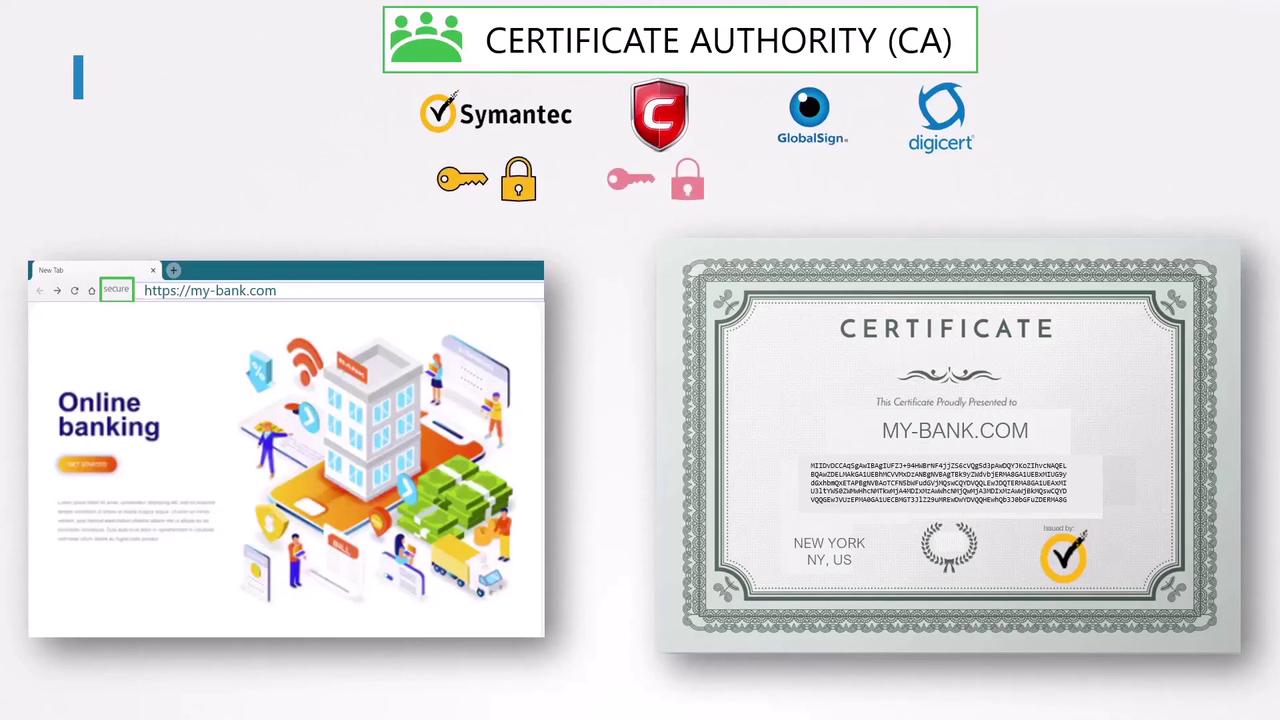
### TLS Handshake Steps
| Step | Description |
| ---- | ------------------------------------------------------------------------------- |
| 1 | Client → Server: “Send me your certificate.” |
| 2 | Server → Client: “[Server Certificate](https://letsencrypt.org/) signed by CA.” |
| 3 | Client: Validate certificate chain using CA public key from trust store. |
| 4 | Client → Server: “Here’s a symmetric key, encrypted with your public key.” |
| 5 | Server: Decrypt symmetric key with its private key. |
| 6 | Both: “All data now encrypted with this symmetric key.” |
## Mutual TLS (mTLS) Handshake
In mTLS, both sides present certificates. This is ideal for machine-to-machine communications—such as two services exchanging confidential data—without human credentials.
### Why Use mTLS?
| Benefit | Description |
| ---------------------------- | ------------------------------------------------------------------------------- |
| Strong Mutual Authentication | Both client and server verify each other’s identities. |
| Automated Trust Management | Certificates can be rotated and validated automatically. |
| Defense in Depth | Prevents unauthorized services from connecting, even if they know the endpoint. |
Ensure your CA certificates are stored securely and rotated regularly to prevent unauthorized access.
### mTLS Handshake Sequence
| Step | Client → Server | Server → Client |
| ---- | ---------------------------------------------------------------------- | ---------------------------------------- |
| 1 | “Send me your certificate.” | |
| 2 | | “Here’s my certificate. Now send yours.” |
| 3 | Validate server certificate via CA. | |
| 4 | “Here’s my certificate + encrypted symmetric key.” | |
| 5 | | Validate client certificate via CA. |
| 6 | **Mutual authentication complete.** | **Mutual authentication complete.** |
| 7 | Both: Encrypt all further communication with the shared symmetric key. | |
## Generating mTLS Certificates with OpenSSL
Below is a sample workflow to create a root CA, a server certificate, and a client certificate.
```bash theme={null}
# 1. Create a Root CA
openssl genrsa -out ca.key 2048
openssl req -x509 -new -nodes -key ca.key -sha256 -days 365 \
-out ca.crt \
-subj "/C=US/ST=CA/O=MyOrg/CN=My Root CA"
# 2. Create Server Key & CSR
openssl genrsa -out server.key 2048
openssl req -new -key server.key -out server.csr \
-subj "/C=US/ST=CA/O=MyOrg/CN=server.mybank.com"
# 3. Sign Server Certificate
openssl x509 -req -in server.csr -CA ca.crt -CAkey ca.key \
-CAcreateserial -out server.crt -days 365 -sha256
# 4. Create Client Key & CSR
openssl genrsa -out client.key 2048
openssl req -new -key client.key -out client.csr \
-subj "/C=US/ST=CA/O=MyOrg/CN=client.mybank.com"
# 5. Sign Client Certificate
openssl x509 -req -in client.csr -CA ca.crt -CAkey ca.key \
-CAcreateserial -out client.crt -days 365 -sha256
```
## Securing Pod-to-Pod Communication in Kubernetes
In a Kubernetes cluster, you can enforce mTLS between services using service meshes like Istio or Linkerd. These platforms automate certificate issuance, rotation, and mutual authentication.
| Service Mesh | mTLS Support | Key Features |
| ------------ | ------------ | --------------------------------------------- |
| Istio | Built-in | Policy-driven security, telemetry, routing. |
| Linkerd | Built-in | Lightweight, auto-mTLS, simple configuration. |
## Links and References
* [Kubernetes Documentation: TLS Setup](https://kubernetes.io/docs/tasks/configure-pod-container/configure-ssl-tls/)
* [Istio Security Concepts](https://istio.io/latest/docs/concepts/security/)
* [Linkerd mTLS Guide](https://linkerd.io/2.11/tasks/automatic-mtls/)
* [RFC 5246: TLS 1.2 Specification](https://tools.ietf.org/html/rfc5246)