> ## Documentation Index
> Fetch the complete documentation index at: https://notes.kodekloud.com/llms.txt
> Use this file to discover all available pages before exploring further.
# Observability Falco Overview and Installation
> This guide explains how to install Falco for threat detection in Kubernetes environments using different deployment methods.
In this guide, you’ll learn how to install Falco to enhance threat detection and analysis in your Kubernetes environment. Falco is an open-source runtime security tool that inspects system calls from user-space applications, applying customizable rules to identify suspicious behavior.
## How Falco Works
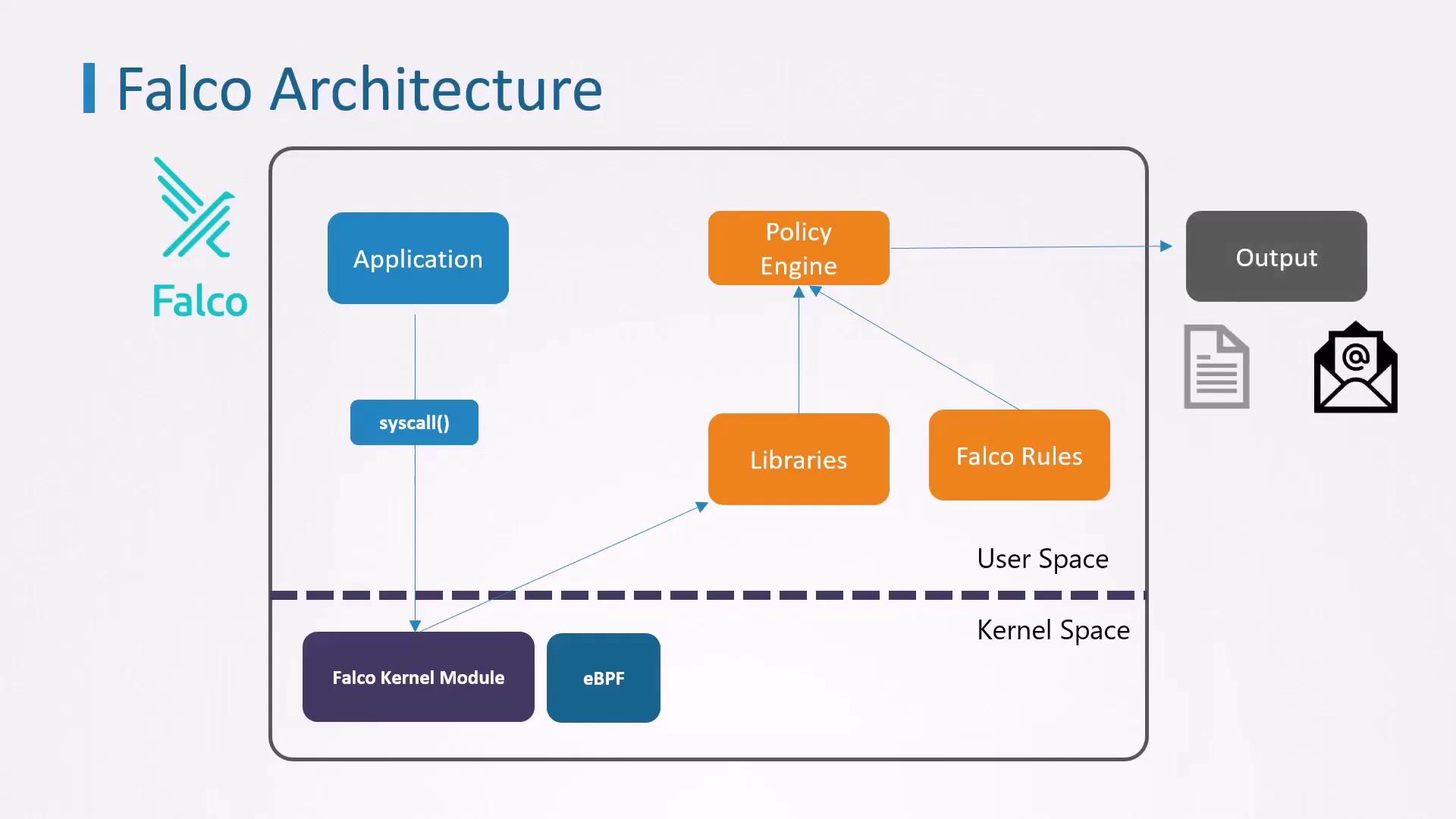
Falco captures kernel events via two primary methods, then filters them through its policy engine:
| Capture Method | Description | Pros & Cons |
| -------------- | -------------------------------------------------------------------------- | ------------------------------------------------------------------------------------------ |
| Kernel Module | Inserts a module into the Linux kernel to intercept syscalls. | **Pros:** High performance
**Cons:** Intrusive; may be restricted on managed clusters |
| eBPF | Uses Extended Berkeley Packet Filter to attach probes to kernel functions. | **Pros:** Safer, non-intrusive
**Cons:** Slightly higher overhead |
Once captured, events flow through Falco’s user-space components—including Sysdig libraries and the Falco policy engine—where they’re evaluated against rules. Alerts can be forwarded to syslog, standard output, Slack, email, and other sinks.
## Installation Methods
You have two common ways to deploy Falco, depending on your access level and platform restrictions:
| Method | Use Case | Advantages |
| ----------------------------- | ------------------------------------------- | ------------------------------------------------- |
| Native Linux Installation | Full root access to a Linux node | Isolated from Kubernetes control plane |
| Kubernetes DaemonSet via Helm | Managed clusters or restricted environments | Easy upgrades and centralized management via Helm |
### Installing Falco on a Linux Node
Use this approach if you can install packages and kernel modules directly on your host. It ensures Falco remains operational even if your Kubernetes control plane is compromised.
Ensure you have the correct `linux-headers-$(uname -r)` package. Mismatched headers can prevent the Falco kernel module from building.
```bash theme={null}
# Add the Falco GPG key and apt repo
curl -s https://falco.org/repo/falcosecurity-3672BA8F.asc | apt-key add -
echo "deb https://download.falco.org/packages/deb stable main" \
| tee /etc/apt/sources.list.d/falcosecurity.list
# Update and install
apt-get update -y
apt-get install -y linux-headers-$(uname -r) falco
# Enable and start the Falco service
systemctl enable --now falco
```
### Deploying Falco in Kubernetes via Helm
If you’re on a managed Kubernetes service or prefer Kubernetes-native deployment, use Helm to install Falco as a DaemonSet:
You can customize Falco’s configuration by passing values files (`-f values.yaml`) to `helm install`.
```bash theme={null}
# Add the Falco Helm repository
helm repo add falcosecurity https://falcosecurity.github.io/charts
helm repo update
# Install Falco
helm install falco falcosecurity/falco
```
After installation, verify that Falco agents are running on each node:
```bash theme={null}
kubectl get pods -l app=falco
# Example output:
# NAME READY STATUS RESTARTS AGE
# falco-7grdt 1/1 Running 0 2m21s
# falco-tmq28 1/1 Running 0 2m21s
```
## Next Steps
* Customize or create [Falco rules](https://falco.org/docs/rules/) to detect specific threats.
* Integrate alerts with your SIEM, Slack, or PagerDuty for real-time notifications.
* Monitor Falco logs and metrics to fine-tune performance and rule accuracy.
## Links and References
* [Falco Documentation](https://falco.org/docs/)
* [Kubernetes Official Docs](https://kubernetes.io/docs/)
* [Aqua Security Tracee (eBPF)](https://github.com/aquasecurity/tracee)