> ## Documentation Index
> Fetch the complete documentation index at: https://notes.kodekloud.com/llms.txt
> Use this file to discover all available pages before exploring further.
# Observability Using Falco to Detect Threats
> This guide explains how to use Falco for detecting threats in a Kubernetes cluster by verifying installation, testing with nginx, and writing custom rules.
Now that Falco is installed on your cluster nodes, you can detect and alert on suspicious behavior. This guide walks you through verifying the installation, testing Falco with an nginx pod, and writing custom rules.
## Prerequisites
* A running Kubernetes cluster
* Falco installed on each node (via systemd or DaemonSet)
* `kubectl` configured to communicate with your cluster
***
## 1. Verifying Falco Installation
First, ensure Falco is active on each node.
If you installed Falco directly on the host:
```bash theme={null}
sudo systemctl status falco
```
You should see output similar to:
```bash theme={null}
● falco.service - Falco: Container Native Runtime Security
Loaded: loaded (/usr/lib/systemd/system/falco.service; enabled; vendor preset: enabled)
Active: active (running) since Tue 2021-04-13 20:42:45 UTC; 1min 2s ago
Docs: https://falco.org/docs/
Main PID: 17994 (falco)
Tasks: 6 (limit: 4678)
CGroup: /system.slice/falco.service
└─17994 /usr/bin/falco --pidfile=/var/run/falco.pid -c /etc/falco/falco.yaml
```
If Falco is deployed as a DaemonSet, use `kubectl get pods -n falco-driver-loader` to verify all Falco pods are running.
***
## 2. Deploying and Testing with nginx
1. **Deploy an nginx pod**
```bash theme={null}
kubectl run nginx --image=nginx
```
Expected response:
```bash theme={null}
pod/nginx created
```
2. **Check pod status and its node**
```bash theme={null}
kubectl get pods -o wide
```
3. **Stream Falco logs**\
In a separate terminal, SSH into the node running the nginx pod:
```bash theme={null}
ssh user@
sudo journalctl -fu falco
```
4. **Trigger an alert**\
Back in your first terminal, open a shell inside the nginx container:
```bash theme={null}
kubectl exec -ti nginx -- bash
```
Inside the container, read a sensitive file:
```bash theme={null}
cat /etc/shadow
```
Falco will immediately log alerts for the shell spawn and file access events.
***
## 3. Falco Architecture
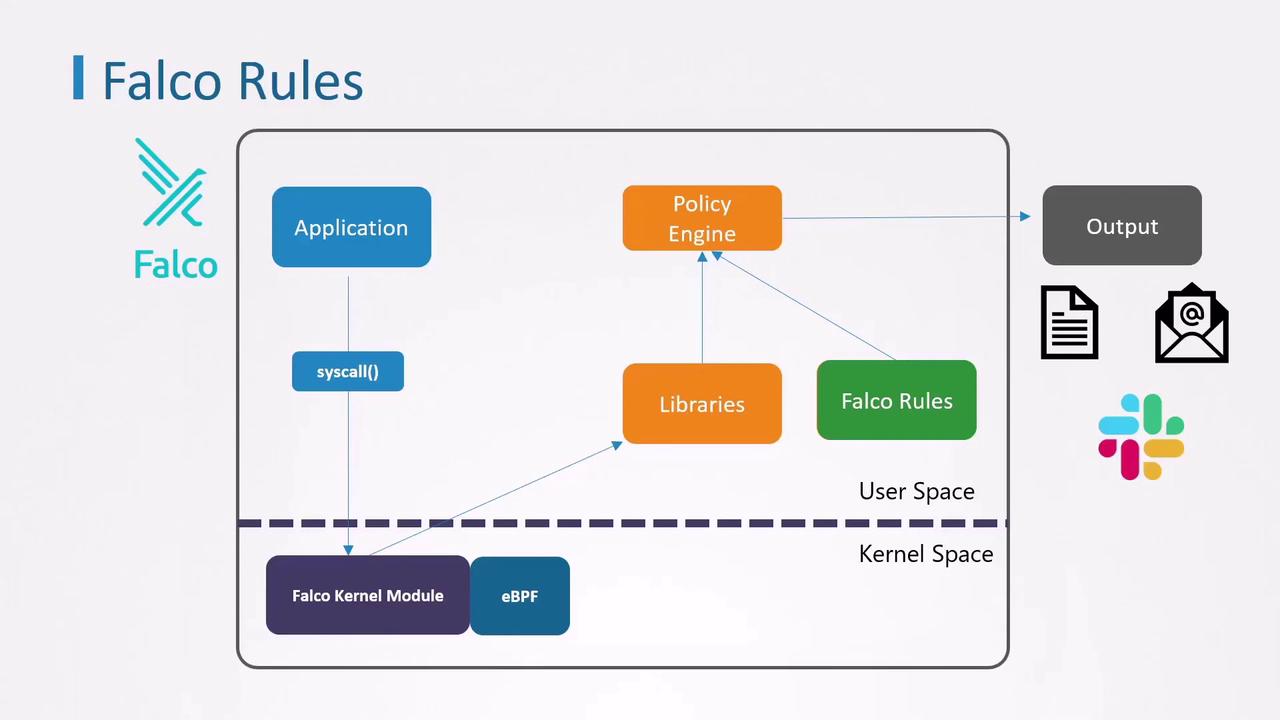
This diagram shows:
* Applications generate system calls
* Falco’s kernel module/eBPF captures events
* Libraries forward events to the policy engine
* Rules define alert conditions
* Outputs include stdout, alerts, notifications
***
## 4. Falco Rules Overview
Falco rules are defined in a YAML file. Each file can include:
* `rules`: Alert definitions
* `lists`: Named collections of values
* `macros`: Reusable filter expressions
### 4.1 Anatomy of a Rule
Every rule requires these five keys:
```yaml theme={null}
- rule: # Unique rule name
desc: # Human-readable description
condition: # Boolean expression against event fields
output: # Alert message template
priority: # Severity (e.g., DEBUG, INFO, WARNING, CRITICAL)
```
**Example**\
Built-in rule that detects a shell inside a container:
```yaml theme={null}
- rule: OpenShellInContainer
desc: Alert when a shell (e.g., bash) is spawned inside a container
condition: container.id != host and proc.name = bash
output: Shell opened in container (user=%user.name container=%container.id)
priority: WARNING
```
***
## 5. Creating a Custom Rule
Let’s write a simple rule to catch any shell launched in a container:
```yaml theme={null}
- rule: DetectShellInsideContainer
desc: Alert if a shell such as bash is opened inside any container
condition: container.id != host and proc.name = bash
output: Bash shell opened (user=%user.name container=%container.id)
priority: WARNING
```
***
## 6. Sysdig Filters Reference
| Filter | Description |
| -------------------------- | ------------------------------------------ |
| container.id | Unique container identifier |
| proc.name | Name of the process |
| user.name | Username that initiated the event |
| container.image.repository | Container image name |
| fd.name | File descriptor path (e.g., `/etc/shadow`) |
| evt.type | System call name (e.g., `execve`, `open`) |
Falco evaluates these filters against each captured system event.
***
## 7. Extending Detection with Lists
To monitor multiple shell types, define a list:
```yaml theme={null}
- list: linux_shells
items: [bash, zsh, ksh, sh, csh]
```
Update the rule to reference the list:
```yaml theme={null}
- rule: DetectShellInsideContainer
desc: Alert if any common shell is opened inside a container
condition: container.id != host and proc.name in (linux_shells)
output: Shell opened (user=%user.name container=%container.id proc=%proc.name)
priority: WARNING
- list: linux_shells
items: [bash, zsh, ksh, sh, csh]
```
***
## 8. Simplifying with Macros
Falco’s built-in macro `container` is shorthand for `container.id != host`. Use it to make rules more concise:
```yaml theme={null}
- rule: DetectShellInsideContainer
desc: Alert if any common shell is opened inside a container
condition: container and proc.name in (linux_shells)
output: Shell opened (user=%user.name container=%container.id proc=%proc.name)
priority: WARNING
- list: linux_shells
items: [bash, zsh, ksh, sh, csh]
```
For a complete list of macros and filters, see the [Falco documentation][falco-docs].
***
## Links and References
* [Falco Documentation][falco-docs]
* [Kubernetes Concepts: What Is Kubernetes?](https://kubernetes.io/docs/concepts/overview/what-is-kubernetes/)
* [Sysdig Filters Reference](https://github.com/falcosecurity/falco/blob/master/rules/falco_rules.yaml)
[falco-docs]: https://falco.org/docs/