> ## Documentation Index
> Fetch the complete documentation index at: https://notes.kodekloud.com/llms.txt
> Use this file to discover all available pages before exploring further.
# Service Mesh Security in Istio
> This article discusses securing microservices in Istio through encryption, access control, and audit logging.
Securing microservices involves three core requirements:
1. **Encryption** of service-to-service traffic to prevent man-in-the-middle (MITM) attacks.
2. **Fine-grained access control** to restrict which services can communicate.
3. **Audit logging** to capture who accessed which service and when.
When one microservice calls another over the network, unencrypted traffic can be intercepted or modified. Istio’s service mesh tackles these challenges by providing mutual TLS (mTLS), policy-driven access control, and comprehensive telemetry for auditing.
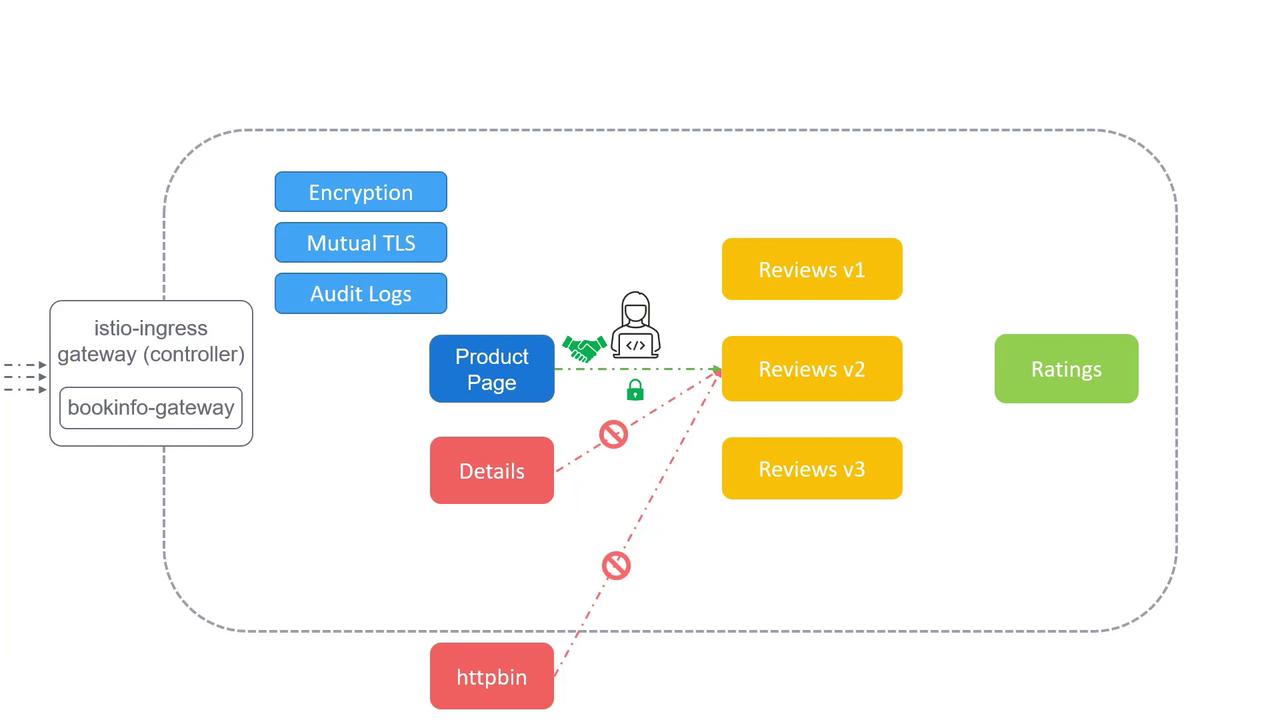
In the sections below, we’ll explore:
* How to enable and configure **mTLS** in Istio
* Defining **access control policies** with `AuthorizationPolicy`
* Collecting and analyzing **audit logs** for compliance and forensics
***
## 1. Mutual TLS (mTLS)
Istio’s mTLS ensures that both client and server authenticate each other and encrypt all data in transit. This prevents eavesdropping and tampering by default.
### Enabling mTLS
1. **Namespace-wide PeerAuthentication**
```yaml theme={null}
apiVersion: security.istio.io/v1beta1
kind: PeerAuthentication
metadata:
name: default
namespace: default
spec:
mtls:
mode: STRICT
```
2. **DestinationRule for TLS settings**
```yaml theme={null}
apiVersion: networking.istio.io/v1beta1
kind: DestinationRule
metadata:
name: default
namespace: default
spec:
host: "*.default.svc.cluster.local"
trafficPolicy:
tls:
mode: ISTIO_MUTUAL
```
Strict mTLS mode requires that all workloads have the Istio sidecar injected. Use `kubectl label namespace default istio-injection=enabled` if sidecars are missing.
***
## 2. Access Control Policies
Istio’s `AuthorizationPolicy` CRD lets you define which services can talk to each other. You can permit or deny traffic based on namespaces, principals, ports, and even request attributes.
### Sample AuthorizationPolicy
```yaml theme={null}
apiVersion: security.istio.io/v1beta1
kind: AuthorizationPolicy
metadata:
name: reviews-access
namespace: default
spec:
selector:
matchLabels:
app: reviews
rules:
- from:
- source:
principals: ["cluster.local/ns/default/sa/productpage"]
```
This policy allows only the `productpage` service account to call `reviews`, blocking all other callers.
### Common Policy Patterns
| Use Case | Resource | Key Field |
| ---------------------------------- | --------------------- | ------------------- |
| Allow only one service as caller | `AuthorizationPolicy` | `source.principals` |
| Block traffic from unknown sources | `AuthorizationPolicy` | no `from` entry |
| Port-based access control | `AuthorizationPolicy` | `to.ports` |
Misconfigured policies can inadvertently block legitimate traffic. Always test changes in a staging environment before promoting to production.
***
## 3. Audit Logging
Istio captures detailed telemetry and access logs, which you can export to backends like Prometheus, Elasticsearch, or Stackdriver.
### Enabling Access Logging
1. **MeshConfig** with accessLogFile:
```yaml theme={null}
apiVersion: install.istio.io/v1alpha1
kind: IstioOperator
spec:
meshConfig:
accessLogFile: /dev/stdout
```
2. **EnvoyFilter** for custom log format:
```yaml theme={null}
apiVersion: networking.istio.io/v1alpha3
kind: EnvoyFilter
metadata:
name: custom-log-format
namespace: istio-system
spec:
configPatches:
- applyTo: NETWORK_FILTER
match:
listener:
filterChain:
filter:
name: "envoy.filters.network.http_connection_manager"
patch:
operation: MERGE
value:
typed_config:
"@type": type.googleapis.com/envoy.extensions.filters.network.http_connection_manager.v3.HttpConnectionManager
access_log:
- name: "envoy.access_loggers.stdout"
typed_config:
"@type": type.googleapis.com/envoy.extensions.access_loggers.stream.v3.StdoutAccessLog
log_format:
text_format_source:
inline_string: "[%START_TIME%] %REQ(:METHOD)% %REQ(X-ENVOY-ORIGINAL-PATH?:PATH)% -> %RESPONSE_CODE%\n"
```
With logs centralized, you gain visibility into who accessed which service and when—crucial for troubleshooting and compliance.
***
## Links and References
* [Istio Security Concepts](https://istio.io/latest/docs/concepts/security/)
* [Mutual TLS Migration](https://istio.io/latest/docs/tasks/security/authentication/mtls-migration/)
* [Authorization Policy Reference](https://istio.io/latest/docs/reference/config/security/authorization-policy/)
* [Envoy Logging Configuration](https://istio.io/latest/docs/reference/config/istio.mesh.v1beta1/#MeshConfig)
* [Kubernetes Documentation](https://kubernetes.io/docs/)