> ## Documentation Index
> Fetch the complete documentation index at: https://notes.kodekloud.com/llms.txt
> Use this file to discover all available pages before exploring further.
# Services ClusterIP
> This article explores the Kubernetes service type ClusterIP and its
Welcome to this article where we explore the Kubernetes service type known as ClusterIP. In typical full-stack web applications, different pods host various components, such as a front-end web server, a back-end server, a key-value store like Redis, and a persistent database such as MySQL. Establishing reliable connectivity among these tiers is critical, particularly because pods are dynamic and their IPs are ephemeral.
Consider the scenario: the front-end server needs to communicate with multiple back-end pods. Each pod receives an IP address, but these addresses can change as pods are terminated and recreated. Thus, it’s impractical to rely on pod IPs for internal communication. Additionally, if a request comes from the front-end (for example, from IP 10.244.0.3), it must be intelligently routed to one of the several available back-end pods.
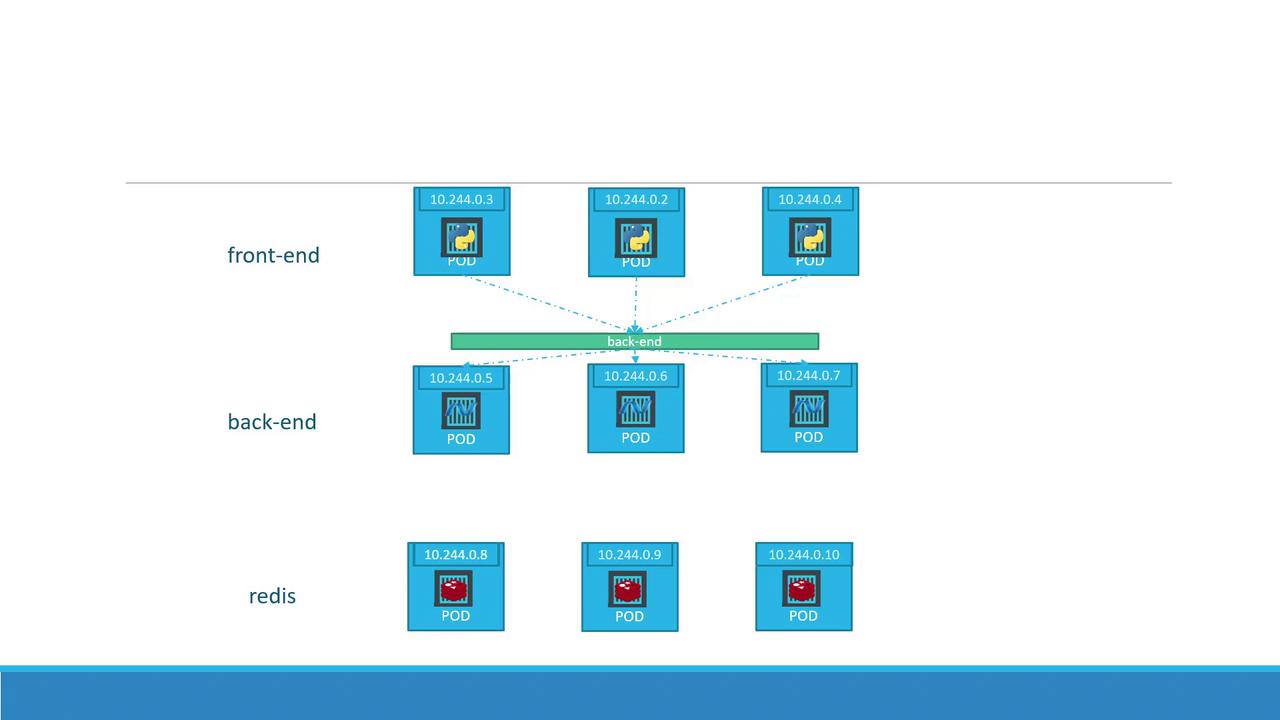
A Kubernetes service overcomes these challenges by grouping related pods and exposing a single, stable interface. When you create a service for the back-end pods, Kubernetes aggregates them and provides a unified endpoint. Incoming requests are automatically load balanced across the available pods, ensuring efficient resource utilization and high availability. Similarly, additional services can be set up for components like Redis, facilitating seamless communication between different parts of your application.
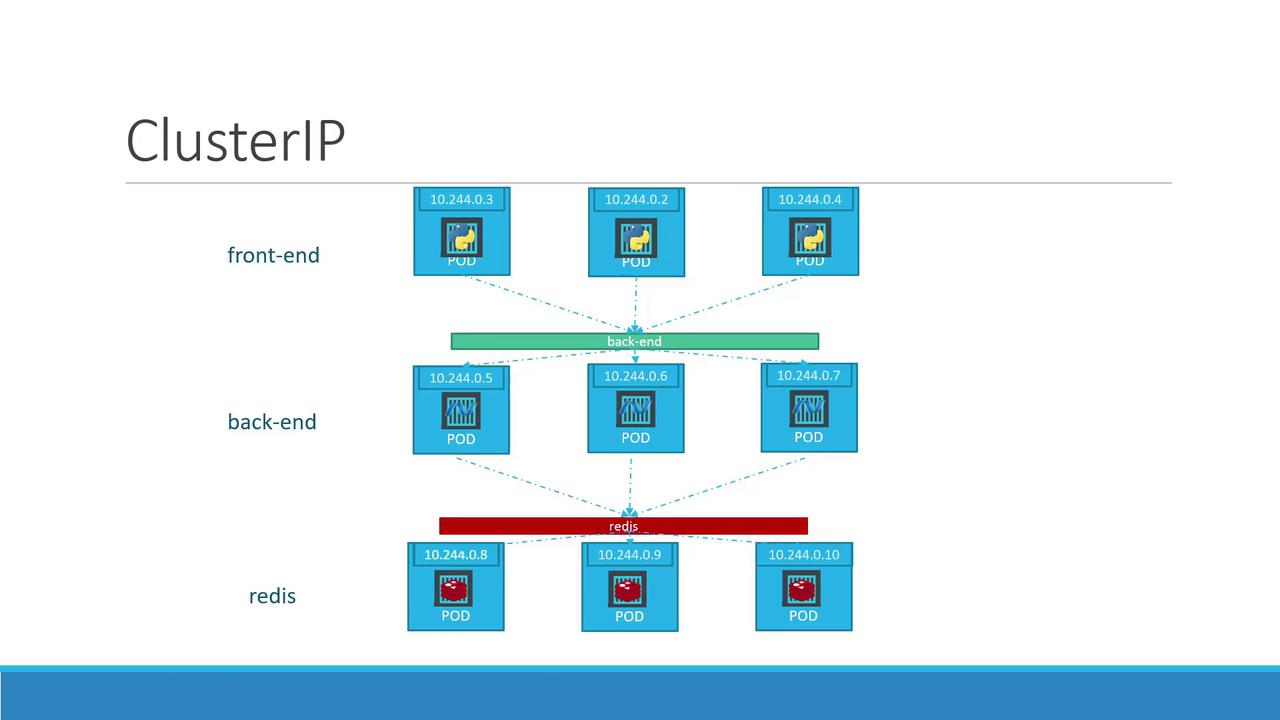
ClusterIP is the default service type in Kubernetes. When you omit the `type` field in your service specification, Kubernetes automatically assumes ClusterIP.
## Creating a ClusterIP Service
To create a ClusterIP service, you define the service using a YAML configuration file. Below is an example service definition for the back-end pods:
```yaml theme={null}
apiVersion: v1
kind: Service
metadata:
name: back-end
spec:
type: ClusterIP
ports:
- port: 80
targetPort: 80
selector:
app: myapp
type: back-end
```
In this definition:
* The API version is v1.
* The kind is Service.
* The service is named "back-end".
* The type is ClusterIP, which exposes the service on a cluster-internal IP.
* Port 80 is exposed and mapped to the target port on the pods.
* The selector targets pods labeled with `app: myapp` and `type: back-end`, linking the service to the appropriate set of pods.
It is essential that you also create corresponding pod definitions that include matching labels. Below is an improved pod definition example:
```yaml theme={null}
apiVersion: v1
kind: Pod
metadata:
name: myapp-pod
labels:
app: myapp
type: back-end
spec:
containers:
- name: nginx-container
image: nginx
```
## Deploying the Service
Once your YAML files are ready, you can deploy the service using the following `kubectl` command:
```bash theme={null}
kubectl create -f service-definition.yml
```
Upon successful creation, your console will display a confirmation similar to:
```bash theme={null}
service "back-end" created
```
Now, other pods in your Kubernetes cluster can communicate with the back-end service using its DNS name (`back-end`) and the assigned ClusterIP. This setup guarantees that even if pods are rescheduled, scaled, or replaced, the internal communication remains consistent and reliable.
For further reading, explore:
* [Kubernetes Documentation](https://kubernetes.io/docs/)
* [Docker Hub](https://hub.docker.com/)
* [Terraform Registry](https://registry.terraform.io/)